
The same flexibility that makes EC2 appealing can also make it complex, confusing, and unnecessarily costly.
Understanding EC2 instance types and their best use cases is essential for optimizing both performance and cost. This guide covers instance families, sizes, and when to use each.
We’ve also covered Amazon EC2 pricing in this article, featuring On-Demand Instances, Savings Plans, Reserved Instances, and Spot Instances.
What Is An Amazon EC2 Instance?
An EC2 instance is a virtual server in the AWS ecosystem that provides processing, memory, storage, and networking capabilities to run applications.
Amazon EC2 instances differ from standard virtual machines (VMs) in several ways:
- Auto Scaling: EC2 instances can automatically scale compute capacity up or down in response to demand, preventing service interruptions from overload.
- Pay-as-you-go pricing: AWS bills EC2 instances based on actual usage with no minimum upfront fees or capacity provisioning requirements.
- Long-term discounts: Savings Plans or Reserved Instances provide up to 72% off On-Demand pricing for committed usage.
- Dedicated resources: Each EC2 instance receives dedicated memory and vCPU allocation, ensuring consistent performance.
- Persistent block storage: EC2 instances integrate with Amazon Elastic Block Store (EBS) for persistent, high-performance block storage that survives instance stops and failures.
- Object storage integration: EC2 can access Amazon Simple Storage Service (S3) for scalable object storage, backups, and data lakes.
2026 State of AI Spend Report
Why Finance Caps What It Can’t See
Learn how finance leaders are managing AI spend, and how they’re approaching FY2027
What Are EC2 Instances Used For?
AWS offers five categories of Amazon EC2 instances for different use cases:
- General Purpose: Balanced CPU, RAM, storage, and networking for diverse workloads
- Compute Optimized: High-performance processing for batch processing and high-traffic web servers
- Memory Optimized: Large dataset processing in memory
- Storage Optimized: Rapid sequential read/write access to large datasets with high IOPS
- Accelerated Computing: Hardware accelerators for graphics processing and specialized tasks
Each of these instance classes divides further into different sizes and families of EC2 instances.
What Are The EC2 Instance Families?
Amazon EC2 organizes instances into five classes, each containing multiple instance families:
|
Amazon EC2 Instance Types | ||||
|
General Purpose |
Compute Optimized |
Memory Optimized |
Storage Optimized |
Accelerated Computing |
|
Mac, T, M, A |
C, Hpc |
R, X, High Memory, Z |
I, D, H |
P, DL, Trn, Inf, G, F, VT |
EC2 offers over 20 instance families across these five classes, each optimized for specific workload types.
Each of these families was designed for a specific use case, which we will explore in the sections that follow.
What EC2 Instance Types Are Available Today?
An EC2 instance type describes the combination of CPU, RAM, storage, and networking capacity for a specific instance family. Below is a handy table that highlights the various types of instances.
|
Amazon EC2 Instance Types | ||||
|
General Purpose |
Compute Optimized |
Memory Optimized |
Storage Optimized |
Accelerated Computing |
|
Mac, T, M, A |
C, Hpc |
R, X, High Memory, Z |
I, D, H |
P, DL, Trn, Inf, G, F, VT |
|
Mac T2 T3a T3 T4g M4 M5zn M5n M5a M5 M6a M6i M6g A1 |
C4 C5n C5a C5 Hpc6a C6a C6i C6gn C6g C7g |
R4 R5n R5b R5a R5 R6i R6g R6a X1 X1e X2iezn X2iedn X2idn X2gd High Memory z1d |
I3en 13 I4i Is4gen Im4gn D2 D3 D3en H1 |
P2 P3 P4 Inf1 Trn1 DL1 G3 G4ad G4dn G5g G5 F1 VT1 |
Amazon EC2 offers multiple instance sizes within each family, allowing you to match capacity to workload requirements.
What Are The EC2 Instance Sizes?
Amazon EC2 instance sizes specify the amount of CPU, memory, storage, and networking capacity allocated to an instance within a given instance family.
Most EC2 families offer sizes that scale predictably, including:
nano · micro · small · medium · large · xlarge · 2xlarge
(Some families extend beyond these sizes.)
The goal is rightsizing, choosing the smallest instance that meets performance requirements to avoid wasted spending. AWS predefines the vCPU, memory, storage, and networking for each size, so scaling up or down is consistent within a family.
We’ve outlined the characteristics, size, and best use cases for each EC2 instance type below.
1. T2 instance type
T2 instances are burstable, general-purpose EC2 instances, and are now considered legacy by AWS. They remain available but are not recommended for new workloads.
T2 instances use CPU credits:
- Credits accumulate when the instance runs below its baseline performance.
- Credits are consumed during short bursts of higher CPU usage.
In Unlimited Mode, a T2 instance can continue bursting after credits are exhausted, but additional charges apply for sustained CPU usage above baseline.
|
T2 Instance Size |
vCPU |
Memory in GiB |
Networking Performance |
Credits Generated per hour of baseline performance |
|
t2.nano |
1 |
0.5 |
Low |
3 |
|
t2.micro |
1 |
1 |
Low to moderate |
6 |
|
t2.small |
1 |
2 |
Low to moderate |
12 |
|
t2.medium |
2 |
4 |
Low to moderate |
24 |
|
t2.large |
2 |
8 |
Low to moderate |
36 |
|
t2.xlarge |
4 |
16 |
moderate |
54 |
|
t2.2xlarge |
8 |
32 |
moderate |
81 |
2. T3 instance type
Amazon EC2 T3 instances are burstable, general-purpose EC2 instances designed for workloads with variable CPU usage.
They provide balanced CPU, memory, and networking, with Unlimited Mode enabled by default to allow short bursts of higher performance.
- T3 instances use Intel Xeon processors
- T3a instances use AMD EPYC processors and are typically lower cost than T3
Both support Amazon EBS, enhanced networking, and CPU credit–based bursting. They are best suited for low- to moderate-traffic applications, development environments, small databases, and workloads with occasional CPU spikes.
|
T3 Instance Size |
vCPU |
Memory in GiB |
Networking Performance |
Credits Generated per hour of baseline performance |
|
t3.nano |
2 |
0.5 |
Up to 5GHz |
6 |
|
t3.micro |
2 |
1 |
Up to 5GHz |
12 |
|
t3.small |
2 |
2 |
Up to 5GHz |
24 |
|
t3.medium |
2 |
4 |
Up to 5GHz |
24 |
|
t3.large |
2 |
8 |
Up to 5GHz |
36 |
|
t3.xlarge |
4 |
16 |
Up to 5GHz |
96 |
|
t3.2xlarge |
8 |
32 |
Up to 5GHz |
192 |
3. T4g instance type
This is a newer generation of the T family instance that features AWS’s own Arm-based Graviton 2 processors (64-bit), which deliver up to 40% better price-performance over T3 instances.
|
T4 Instance Size |
vCPU |
Memory in GiB |
Networking Performance |
Baseline performance to earn credits |
Credits Generated per hour of baseline performance |
|
t4.nano |
2 |
0.5 |
Up to 55GHz |
5% |
6 |
|
t4.micro |
2 |
1 |
Up to 5GHz |
10% |
12 |
|
t4.small |
2 |
2 |
Up to 5GHz |
20% |
24 |
|
t4.medium |
2 |
4 |
Up to 5GHz |
20% |
24 |
|
t4.large |
2 |
8 |
Up to 5GHz |
30% |
36 |
|
t4.xlarge |
4 |
16 |
Up to 5GHz |
40% |
96 |
|
t4.2xlarge |
8 |
32 |
Up to 5GHz |
40% |
192 |
4. Amazon EC2 M instance types
With M family instances, you get balanced CPU, RAM, and network capacity, along with support for EBS and Enhanced Networking. In some instances, such as M4, Intel Xeon processors (scalable and clocked at 2.5 GHz) are used, whereas in others, such as M6g, AWS Arm Graviton 2 processors are used.
Newer M instances offer more size options than M4 instances (which were limited to six sizes). Common use cases for M instances include:
|
M4 Instance Type |
vCPU |
Memory in GiB |
Networking Performance |
|
m4.large |
2 |
8 |
Moderate |
|
m4.xlarge |
4 |
16 |
High |
|
m4.2xlarge |
8 |
32 |
High |
|
m4.4xlarge |
16 |
64 |
High |
|
m4.10xlarge |
40 |
160 |
10 Gbps |
|
m4.16xlarge |
64 |
256 |
25 Gbps |
5. A1 instance type
This instance uses AWS Graviton processors, supports Enhanced Networking and EBS storage, and combines lightweight hypervisors with dedicated hardware. There are six sizes to choose from:
|
A1 Instance Type |
vCPU |
Memory in GiB |
Networking Performance |
|
a1.medium |
1 |
2 |
Up to 10 Gbps |
|
a1.large |
2 |
4 |
Up to 10 Gbps |
|
a1.xlarge |
4 |
8 |
Up to 10 Gbps |
|
a1.2xlarge |
8 |
16 |
Up to 10 Gbps |
|
a1.4xlarge |
16 |
32 |
Up to 10 Gbps |
|
a1.metal |
16 |
32 |
Up to 10 Gbps |
6. Amazon EC2 C instance types
The C family of instances offers high-performance processing power for compute-intensive workloads. You can expect the Intel Xeon (C4), AMD SYNC (C5), and AWS Graviton3 (C7g) processors, enhanced networking, and EBS support.
The baseline C4 instances have the following sizes:
|
C4 Instance Type |
vCPU |
Memory in GiB |
Networking Performance |
|
c4.large |
2 |
3.75 |
Moderate |
|
c4.xlarge |
4 |
7.5 |
High |
|
c4.2xlarge |
8 |
15 |
High |
|
c4.4xlarge |
16 |
30 |
High |
|
c4.8xlarge |
36 |
60 |
10 Gbps |
7. Amazon EC2 R instance types
These memory-optimized instances support DDR4 memory, Enhanced Networking, and high-frequency processors for running memory-intensive applications.
R6a instances, powered by AMD EPYC processors, deliver up to 60% better price-performance than R4 instances, which are clocked at 2.3 GHz.
Between the two, R5 instances offer the following sizes:
|
R5 Instance Type |
vCPU |
Memory in GiB |
Networking Performance |
|
r5.large |
2 |
15.25 |
Up to 10 Gbps |
|
r5.xlarge |
4 |
30.5 |
Up to 10 Gbps |
|
r5.2xlarge |
8 |
61 |
Up to 10 Gbps |
|
r5.4xlarge |
16 |
122 |
Up to 10 Gbps |
|
r5.8xlarge |
32 |
244 |
10 Gbps |
|
r5.16xlarge |
64 |
488 |
25 Gbps |
8. Amazon EC2 X instance types
Like R instances, these memory-optimized instances exhibit varying performance across sizes within the X1, X1e, and X2 series. For example, X2gd instances offer a 55% better price-to-performance ratio, seven additional sizes, and higher network bandwidth than X1 instances.
As a middle ground, X2iezn instances are available in the following sizes:
|
X2iezn Instance Type |
vCPU |
Memory in GiB |
Networking Performance |
|
x2iezn.large |
8 |
256 |
Up to 25 Gbps |
|
x2iezn.xlarge |
16 |
512 |
Up to 25 Gbps |
|
x2iezn.2xlarge |
24 |
768 |
50 Gbps |
|
x2iezn.4xlarge |
32 |
1024 |
75 Gbps |
|
x2iezn.8xlarge |
48 |
1536 |
100 Gbps |
|
x2iezn.16xlarge |
48 |
1536 |
100 Gbps |
9. Amazon EC2 Z1d instances
If you require both high compute and memory performance, Z1d instances deliver the fastest instance types in the AWS cloud (up to 4.0 GHz across all Intel Xeon cores), up to 384 GiB of RAM, and up to 1.8 TB of storage per instance.
The following sizes are available:
|
Z1d Instance Type |
vCPU |
Memory in GiB |
Networking Performance |
|
z1d.large |
2 |
16 |
Up to 10 Gbps |
|
z1d.xlarge |
4 |
32 |
Up to 10 Gbps |
|
z1d.2xlarge |
8 |
64 |
Up to 10 Gbps |
|
z1d.3xlarge |
12 |
96 |
Up to 10 Gbps |
|
z1d.6xlarge |
24 |
192 |
10 Gbps |
|
z1d.12xlarge |
48 |
384 |
10 Gbps |
|
z1d.metal |
48 |
384 |
25 Gbps |
10. Amazon EC2 P instance type
These Accelerated Computing instances provide high-performance graphics processing.
P2 instances are ideal for general-purpose GPU workloads; P3 instances are suitable for high-performance compute; and P3 are the latest-generation instances, supporting the highest performance among GPU-based instances.
Here are the size options for P3 instances, as an example:
|
P3 Instance Type |
GPU |
GPU Memory |
vCPU |
Memory in GiB |
Networking Performance |
|
p3.2xlarge |
1 |
16 |
8 |
61 |
Up to 10 Gbps |
|
p3.8xlarge |
4 |
64 |
32 |
244 |
10 Gbps |
|
p3.16xlarge |
8 |
128 |
64 |
488 |
25 Gbps |
|
p3.24xlarge |
8 |
256 |
96 |
768 |
100 Gbps |
When to use Amazon EC2 P instances: Machine Learning, high-performance computing, and more.
Like P instances, G, F1, VT1, DL1, Trn1, and Inf1 instance types are all optimized for GPU-intensive applications. The best thing to do is to evaluate each instance type individually to see if it suits your needs.
When choosing the right EC2 instance type, you can either do so manually or automate the process.
How To Choose The Best EC2 Instances For Your Needs
More than any other AWS service, Amazon EC2 gives you the most choice in the type of instances you choose to launch, run, and maintain your applications.
Configuring EC2 instance types incorrectly wastes resources and increases costs. Overprovisioning by even one instance size can:
- Drain your cloud budget faster than planned
- Reduce funds available for engineering innovation and feature development
- Force you to pass costs to customers through price increases
- Lead to customer churn, revenue loss, and slower adoption
It’s a downward spiral that no company wants to experience. You can avoid that with intelligent tools, like CloudZero Advisor.
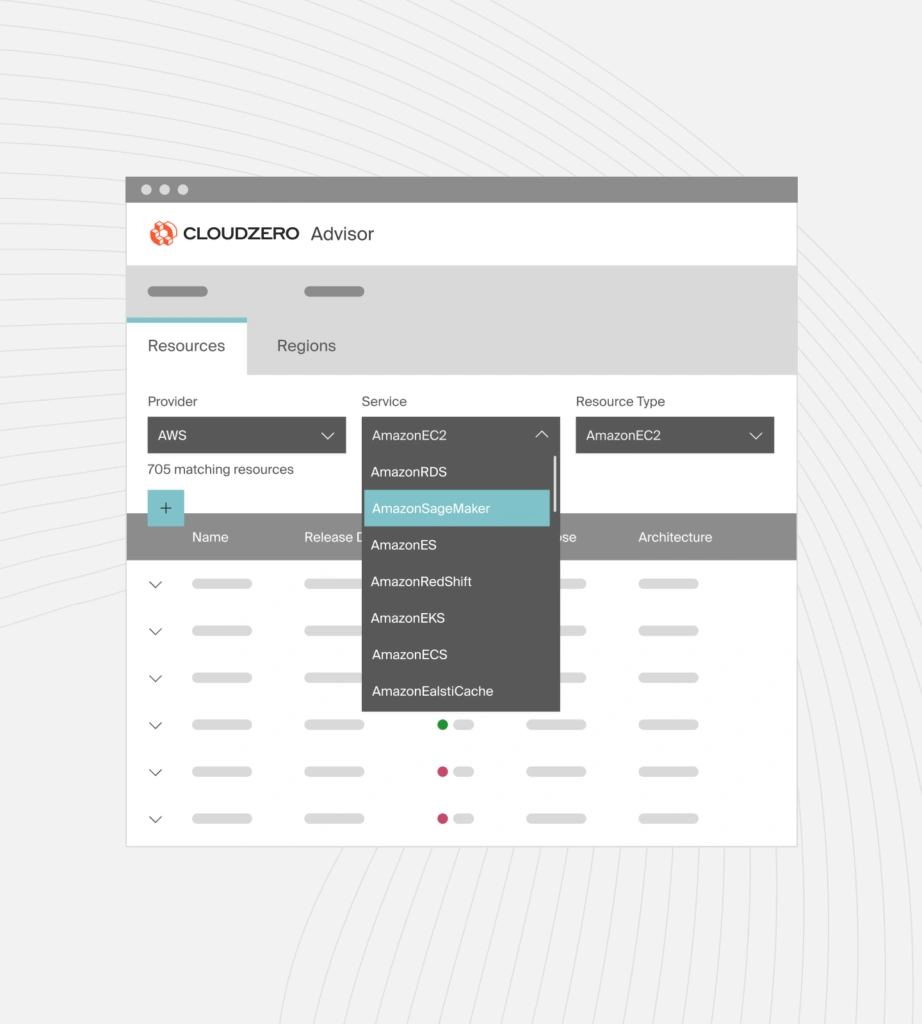
CloudZero Advisor is a free tool that provides recommendations on the best Amazon EC2 instances for a specific workload, based on compute instance type, pricing, name, release date, architecture, region, compute capacity, and additional filters. You can even add a custom filter for even more personalized results.
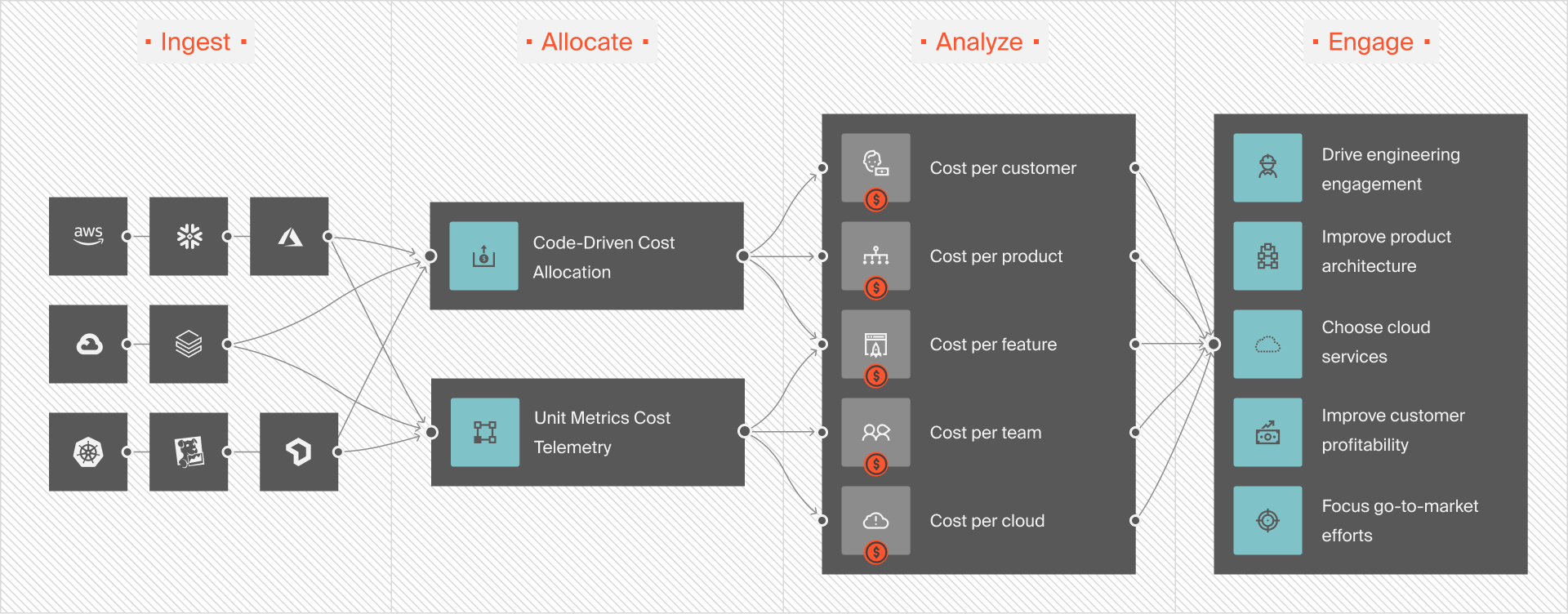
You can also track Amazon EC2 costs by customer, service, feature, team, project, and more with CloudZero — down to the hour to know who, what, and why your Amazon EC2 costs are changing. This empowers you to tell exactly where to cut costs — or increase investment to maximize ROI.
 to see all this in action within days — not months!











