Why this matters
Instead of building a separate role for every team, region, or department, admins can create a single role that automatically personalizes access for each user based on their SSO attributes. Someone moves teams or a new group gets created, and the new access takes effect at their next login with no CloudZero configuration.
As AI spend grows, more companies are looking to give teams visibility into their own AI costs without exposing every individual’s usage across the org. Dynamic Role Filtering makes that possible without creating one role per person.
What we built
Dynamic Role Filtering, which became generally available on Aug. 17.
When you configure a Limited Access role, a new “SSO login attribute” option lets you map any CloudZero dimension to an OIDC claim name, such as team, region, or department. Filter values resolve dynamically for each user at login. If Alice’s SSO says team=engineering, she sees engineering cost data; if Bob’s says team=sales, he sees sales cost data. Same role, different data, no manual work. If a user’s token is missing the expected attribute, they see no data rather than all data.
This gets more powerful when you combine roles. One customer set up two roles that work together: one gives everyone visibility into shared platform costs, and the other uses each user’s SSO identity to automatically scope AI spend down to just their own usage. CloudZero resolves the union of both roles at login, so every user gets the same setup with a personalized view. Zero maintenance as people join or change teams.
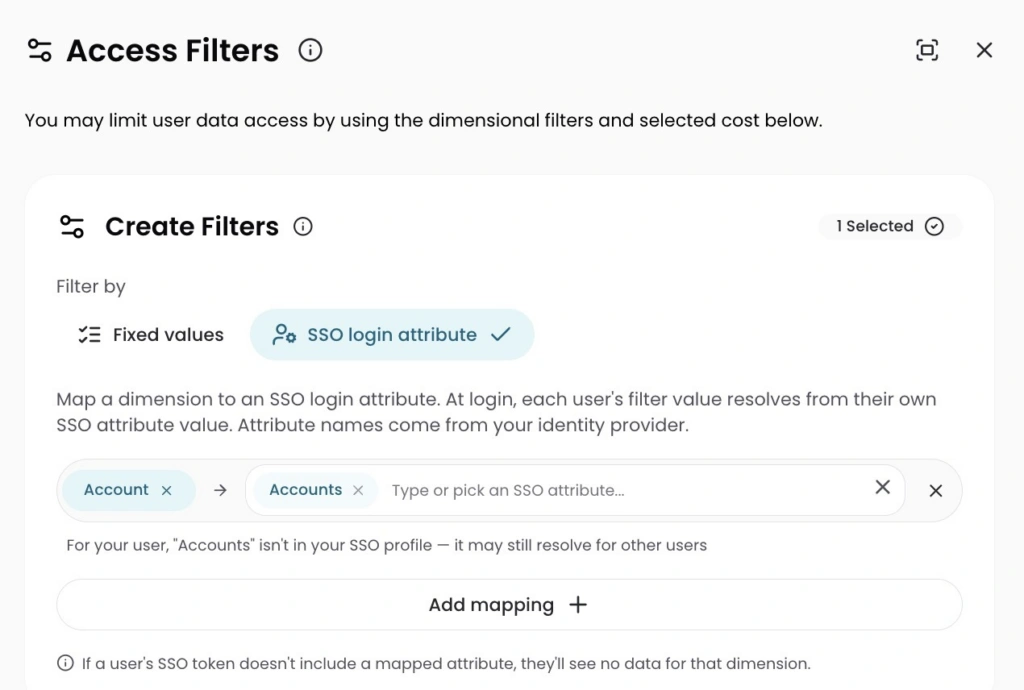
Image: The new “SSO login attribute” option in role configuration. Admins map a CloudZero dimension to a claim from their identity provider, and each user’s access resolves automatically at login.
How it works
Your org needs an active SSO integration. Admins map a CloudZero dimension to an OIDC claim name, and CloudZero reads that claim from each user’s token at login. The claim can be a single value, a comma-delimited list, or a JSON array, so it adapts to however your identity provider structures attributes. When a user has multiple roles, CloudZero resolves the union at login, which is what makes patterns like combining a broad access role with an individually scoped one work seamlessly.











