Labs is an opt-in early-access page in CloudZero where any signed-in user can browse, turn on, and try features still in development and shape what gets built before it ships.
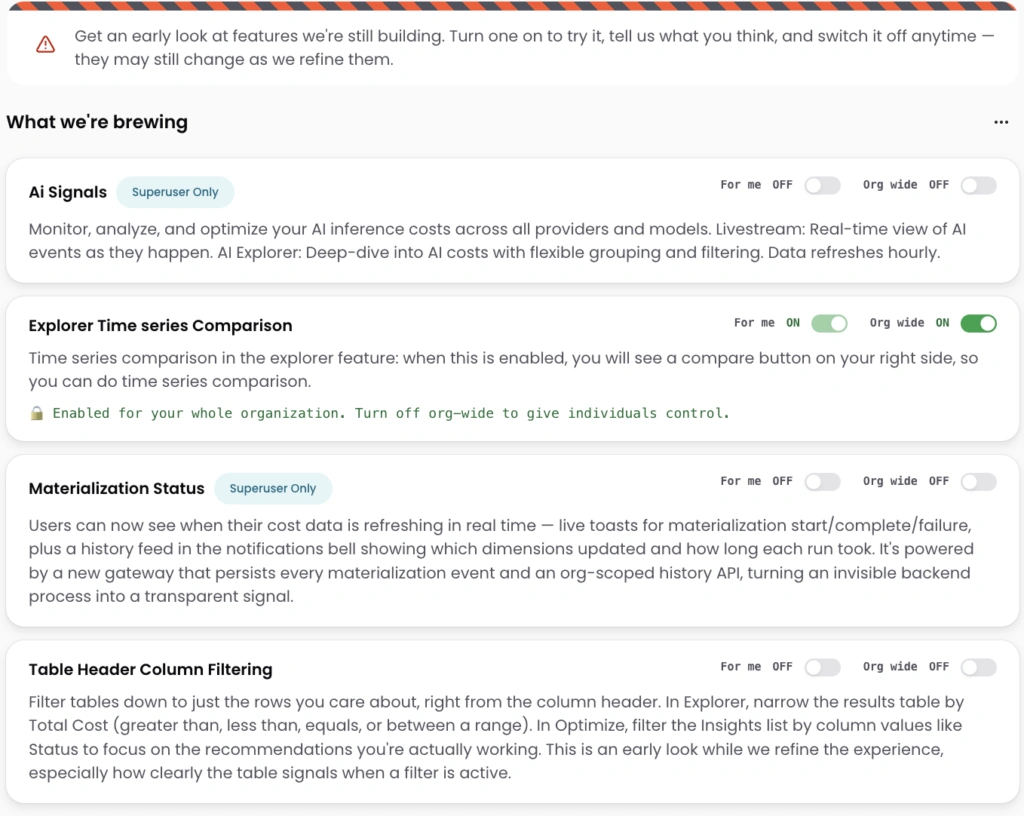
Image: The Labs page lists in-development experiments, each with a short description and toggles to turn it on just for you (“For me”) or org-wide for your whole team.
Why this matters
Some of the most useful features are worth trying before they’re finalized, while your feedback can still shape them. Labs puts early-access features one click away, so you can turn on what looks promising, put it to work in your own environment, and tell us what’s working (or not). Everything is opt-in, and what you tell us directly shapes what graduates to the product.
What we built
Labs is a new page in the avatar menu, open to every signed-in CloudZero user. It’s an early-access shelf for features still in development: browse what’s there and read what each experiment does. Nothing is ever on by default.
How it works
Open Labs to see the current set of experiments. Each has a per-user toggle, so you can enable it just for yourself without affecting anyone else. Admins also get an org-wide toggle to enable an experiment for the whole team in one click. Turn anything off at any time to return to the standard experience.











