Why this matters
You are mid-investigation, chasing a spike or pulling a number for finance, and you hit a term or a workflow you need to look up. You should not have to lose your place to find an answer.
Guide lives in a fixed spot in the left sidebar, always one click away. It opens a panel on the right side that sits beside your page instead of covering it. Your chart, filters, and time range stay exactly where they were. Nothing gets rebuilt and you keep the thread of what you were investigating.
Cost allocation has its own vocabulary. Instead of switching to a separate browser tab to look something up, new users can learn the platform inside the platform.
What we built
A number of usability improvements focused on navigation and tooling for user help.
- A permanent Guide entry in the left sidebar, visible whether the nav is expanded or collapsed
- A flyout with live system status, links to support, documentation, and the CloudZero Academy, as well as quick access to the A-Z Glossary
- A Guide panel that opens on the right side of the page without covering your work
- A redesigned Cmd+K (Ctrl+K on Windows) search overlay with shortcuts for common actions and quick access to your saved views
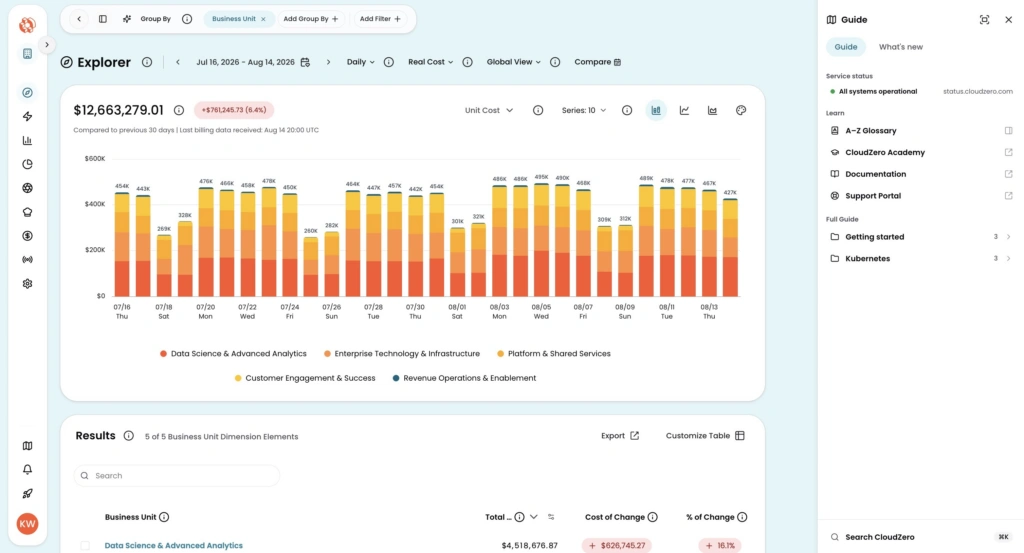
Image: The Guide panel open alongside Explorer. Your chart and data stay on screen while you browse walkthroughs, check system status, or look up a term in the A-Z Glossary.
How it works
Select Guide in the left sidebar to open the flyout. From there, you can check system status, jump to documentation or the support portal, or open the A-Z Glossary. If something looks off with your numbers, you can see whether there is a known issue before opening a ticket.
Press Cmd+K on Mac or Ctrl+K on Windows from any page to open the search overlay. The Shortcuts tab has common actions like connecting providers and creating dimensions. The Views tab lists your saved views. Start typing to filter across everything.
Read more: Navigating CloudZero











