Why this matters
Most people who use CloudZero spend their time in one or two places. For some it’s AI Signals, and for others it’s Optimize or Anomalies. If Explorer isn’t one of those places, every sign-in starts with a click to get where you need to be.
Dates and numbers are another friction. A date like 04/07 means April 7 in the US and July 4 in much of Europe. When the platform shows a format your team doesn’t use, you end up having to convert each value before you can work with it.
Personalization has been a priority since we launched the new CloudZero experience, starting with dark mode, color palettes, and column controls. We keep adding to it because the platform should fit how you work, not the other way around.
What we built
The default landing page setting lets you pick any top-level page as the one CloudZero opens to when you navigate to app.cloudzero.com. Explorer stays the default until you choose something else. Mine is AI Signals, in case you were wondering.
Formats and locale settings cover the rest. Date format offers MM/DD/YYYY, DD/MM/YYYY, and YYYY-MM-DD, and applies to chart axes, table cells, and date pickers. Number format sets the decimal and thousands separators.
Table density lets you set the row spacing for tables across the platform to Compact, Standard, or Spacious, and stays in sync with the Customize Table panel. The detail panel on the right side of Explorer also remembers your preferred view, whether you keep it expanded, collapsed, or in icon mode.
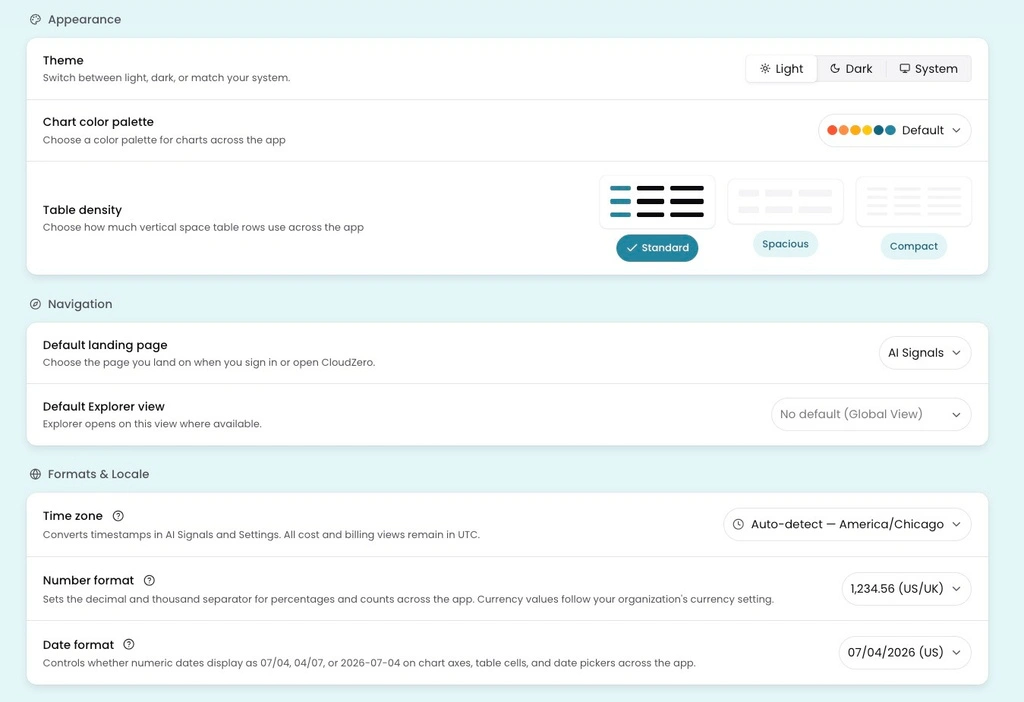
The Personal Settings page in CloudZero. Set your landing page, table density, and date and number formats in one place.
How it works
Open Personal Settings from your profile icon in the bottom left. Your choices are saved to your CloudZero account, so they follow you across browsers and devices. They apply only to you. Two people can look at the same dashboard, one seeing 1,234.56 and the other seeing 1.234,56.
See it in the docs → https://docs.cloudzero.com/docs/personal-settings











