Organization Settings let you set defaults for the whole org, one time for everyone.
Why this matters
Yesterday’s post was about making CloudZero feel like yours. This one is about giving your whole team a consistent experience, not just you.
As an admin, you shouldn’t need a support ticket or an engineering team to change something that affects your whole team. Organization Settings gives you one place to set the defaults your whole team inherits.
What we built
The new Organization Settings page is controlled by RBAC, so only users with the right role can access it, separate from Personal Settings. From here you can update your organization’s display name.
You can turn Trend Display on or off by default across Explorer, so teams working with large datasets or long lookback windows can prioritize either comparison context or faster load times.
And you can send an Organization Message, a toast notification announcement that appears for every user until they dismiss it, a fast way to get platform-related updates in front of your whole team, like a new feature to check out or a change to how they’re viewing cost and usage data.
How it works
Organization Settings runs on the same shared preferences backend as Personal Settings, just scoped to your organization instead of a single user.
Changes save immediately: an updated Organization Message appears for active users without anyone refreshing. Org-level settings define the default experience for everyone in your organization, while Personal Settings remain yours alone to control.
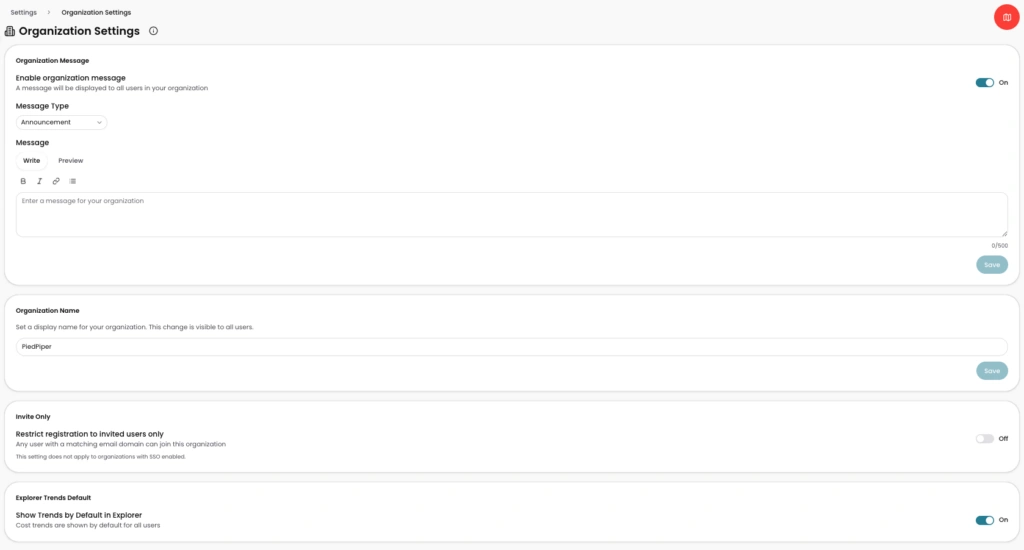
Image: CloudZero’s new Organization Settings page gives admins one place to rename the org, send org-wide announcements, control registration, and set Explorer’s default trend display, all without a support ticket.











