Personal Settings let you make CloudZero look and run the way you do.
Why this matters
Everyone reads a cost dashboard a little differently. Some of us want dark mode on at 11:00 PM, some of us want a different color palette, and all of us want the platform to remember what we like.
What we built
CloudZero’s new Personal Settings page puts control of your own experience in one place. You’ll also find your permissions bundled right here, so no more digging to find them.
Toggle Dark Mode manually, or set it to System Mode so it automatically matches your OS.
Choose from six color palettes for your visualizations, from the everyday default to punchier options like Vibrant, plus an Accessible option built for higher contrast. Pick one, and it applies to every chart across the platform.
Set a time zone preference for your account. Choose auto-detect to match your browser’s local time zone, or pick one manually, and change it anytime. This governs how timestamps display in Settings pages.
How it works
Every preference you set on the Personal Settings page saves to your account through CloudZero’s shared preferences backend, so it follows you across sessions and devices instead of living in a browser cookie that resets on a hard refresh.
See the page in the CloudZero →
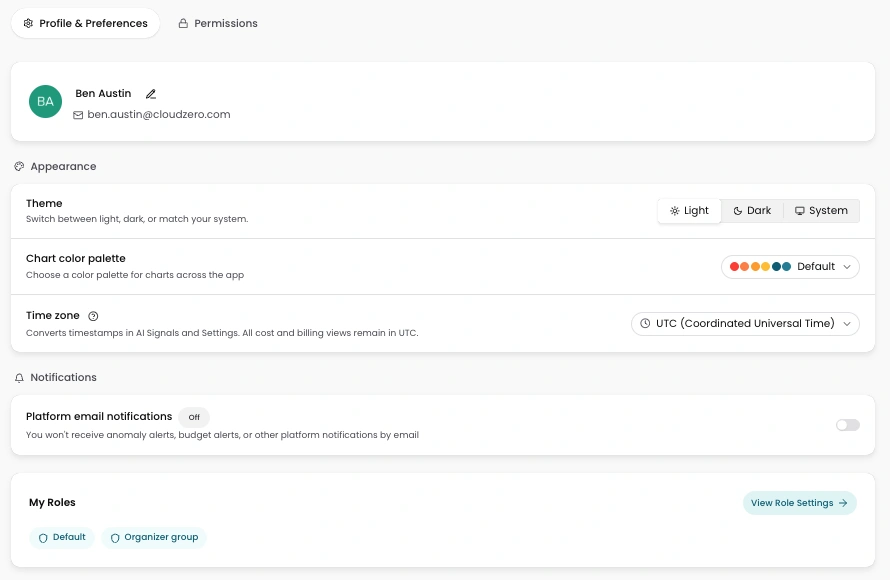
Image: CloudZero’s new Personal Settings page brings dark mode, chart color palettes, time zone display, and notification preferences into one place, so you can shape how the platform looks and behaves, and it remembers.











