
The core of ROI is visibility. If you can clearly see …
1. What it costs to produce the thing you make, and
2. How much money it makes you
… then calculating ROI is easy.
But with AI, as with the cloud before it, getting that visibility is extremely challenging. Why? Because the cost data associated with each is inherently chaotic. Both send bills too vast to analyze manually; neither sends bills in a format that matches the structure of your business; and each AI and cloud provider sends bills in a different format.
Getting to ROI is the reason CloudZero exists. Turning cost obscurity into cost visibility is how we do it. Specifically, we do it through Dimensions, the mechanism within our platform that allocates every penny you spend to the correct customers, products, features, and more. Dimensions answer questions like:
- “How much are we spending on production vs. development environments?”
- “What’s our cost breakdown by product or team?”
- “Which departments are driving our costs?”
And today, Dimension Studio, our revamped approach to creating Dimensions, makes it easier than ever.
What is Dimension Studio?
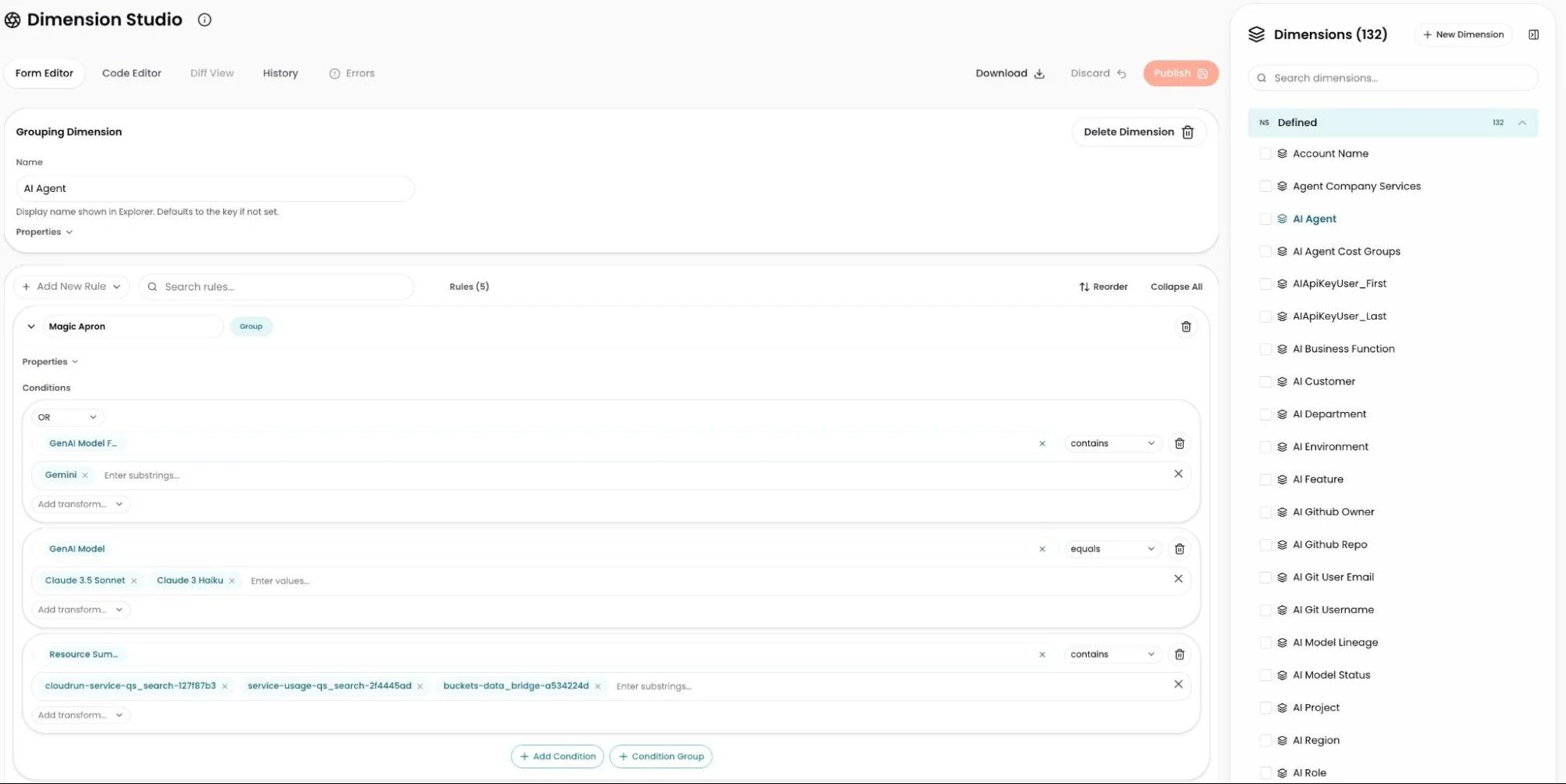
Dimension Studio is a drag-and-drop interface allowing users to create, update, or delete Dimension definitions, directly within CloudZero, without having to write code. Prefer to work in code? You can write CostFormation® YAML right inside Dimension Studio too.
Two types of Dimensions
Before you build, it helps to understand the two types of Dimensions available and when to use each.
Group Dimensions are the most common type. They label costs into categories using logic you define. Think slices like Environment, Team, or Product. Elements can be named explicitly (e.g., “Production,” “Staging”) or generated automatically from existing tag values.
Allocation Dimensions are used when you need to split shared infrastructure costs across teams or products — situations where shared resources can’t be reasonably tagged or grouped on their own. You can split costs evenly, proportionally based on each team’s share of total spend, or based on actual telemetry and usage data.
How do you choose? Most Dimensions are Group Dimensions. Reach for Allocation Dimensions only when shared infrastructure makes it genuinely difficult to determine who’s spending what.
Creating a Dimension in Dimension Studio takes just a few steps:
1. Choose the type: Use the decision guide to decide whether you need a Group Dimension or an Allocation Dimension.
2. Define parameters: Set the dimension name and configure basic options (see parameter configuration).
3. Build rules (if rule-based Dimension): Create the logic that categorizes your spend
- For Group Dimensions: Define which resources belong in which categories (see rule writing guide).
- For Allocation by Rules Dimensions: Define what costs to allocate and how to distribute them (see Allocate By Rules procedure).
4. Publish: Make your dimension live so it begins processing your cost data.
Dimension Studio also makes Dimensions easy to update if and when your cost framework changes. You can create or delete Dimensions; rename Dimensions; and/or add to, reorder, or subtract from their underlying logic all within Dimension Studio. Tip: You can discard unpublished changes at any time, so it’s safe to experiment before going live.
A common starting pattern
Not sure where to begin? Here’s how most teams ramp up:
- Start with Group Dimensions for foundational slices: Environment, Team, Product
- Add Allocation Dimensions where shared infrastructure obscures cost ownership: shared databases, data lakes, platform services
- Use your Dimensions everywhere: Group spend in Explorer, build unit cost dashboards in Analytics, and configure anomaly notifications for teams in Views
The more precisely your Dimensions reflect your business structure, the more clearly CloudZero can answer the question that matters most: what does it actually cost to build and run what you make?
Report
Finance needs to prove AI’s return: CloudZero report
260 senior finance leaders (more than half CFOs) told us why the speed of seeing AI spend, not the size of it, separates who pulls ahead on AI from who gets burned.
CloudZero’s new groove
Concurrent with the release of our revamped Dimension Studio is an all-new UI. From new customizability options (hello, Dark Mode) to enhanced performativity to faster feature delivery, CloudZero’s new UI makes our platform more adaptable and user-friendly to a wider range of users than ever. Enhanced performativity has made Dimension Studio even faster and more performant — especially critical as cost footprints scale.
The best is yet to come
The easier it is to create allocation Dimensions, the easier it is to get the visibility necessary to know your AI ROI. The companies who have the clearest line of sight into their AI ROI will be the ones who can direct capital most effectively to the bets that are paying off — and away from the ones that aren’t.
There’s more in store for Dimension studio. Without giving too much away, let’s just say that we’ve currently got Claude in Dimension boot camp. Stay tuned to CloudZero’s blog for updates; you’ll want to be the first to chat with him once he’s cleared training.
Curious to give Dimension Studio a spin?