
What it is: Last login now visible to org admins
Org admins can now see each user’s last login directly in Settings > Users, making it easy to spot inactive accounts, manage licenses, and run security reviews without opening a support ticket.
Why it matters
Knowing which accounts in your organization are still active shouldn’t require maintaining a spreadsheet outside the platform.
Last login timestamps are now visible directly in Settings > Users, so you can handle routine account hygiene, auditing who’s still logging in, managing licenses, preparing for security reviews, identifying accounts to deactivate. And, you can do this without leaving CloudZero or waiting on anyone else to pull the data for you.
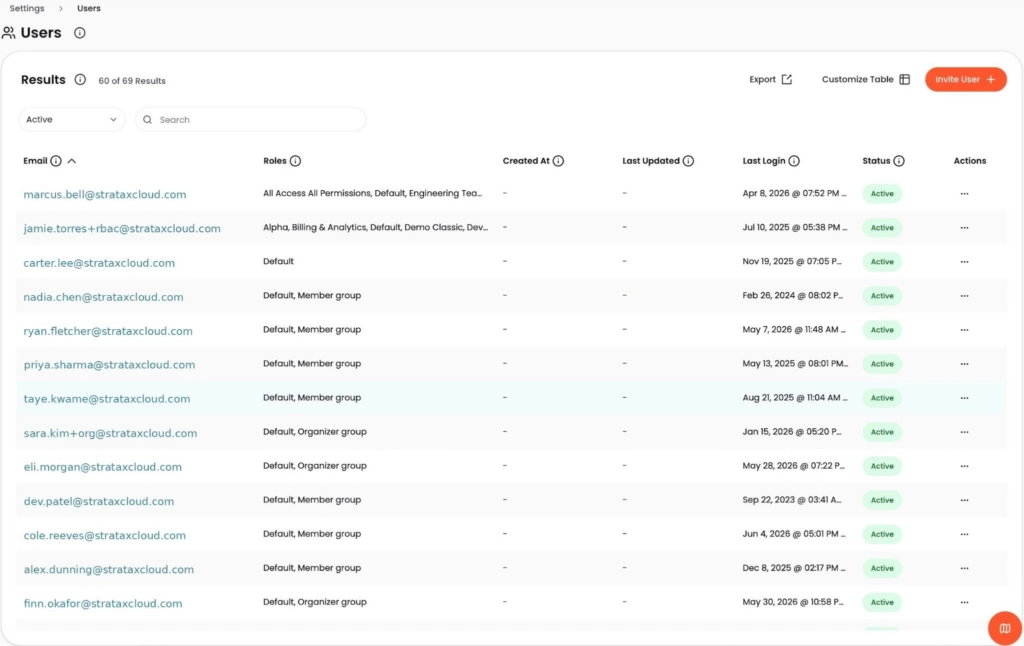
Image: The Last Login column in Settings > Users gives org admins an at-a-glance view of account activity across the organization.
How it works
Organization administrators can now see when each user last logged in, directly from Settings > Users. The timestamp appears alongside each user record, giving admins a clear view of account activity across the organization without external reporting or support requests.
See it in the CloudZero platform.