Why this matters
In Explorer, you build a filter set and group-by to answer a cost question, and often that’s exactly the configuration you’d want to save for later. But saving it as a View meant navigating away from Explorer, opening the Views page, and rebuilding the same configuration from scratch: filter by filter, dimension by dimension. That friction was enough to discourage saving exploratory analysis as a View at all You can now save any Explorer analysis as a View in place. The active filters and group-by carry over automatically – no rebuild required.
For teams that rely on Views for shared cost monitoring, an analyst’s work becomes a reusable View the whole team can use in seconds. For individuals, it means the exploratory analysis you just spent time building doesn’t disappear at the end of the session.
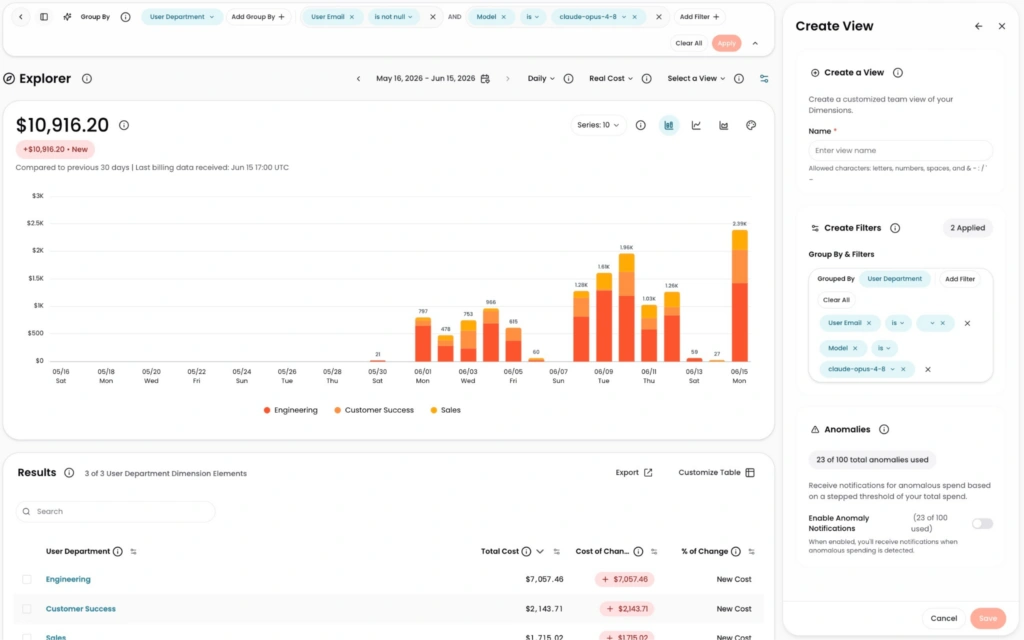
Image: The Create View panel opens right inside Explorer with your active filters (User Email, Model) and the User Department group-by already carried over, so you just name it and save.
What we built
Users can now create a View directly from Explorer. The current filter set and group-by configuration carry over automatically, with no need to rebuild from scratch on the Views page. Users with the “Create/Modify Views” role will see the create action directly in the Explorer interface.
How it works
When you have a filter and group-by configuration in Explorer that you want to save, select the create View feature directly from the Explorer right configuration panel – no leaving the page required. Name it, confirm, and it appears in your Views list with the same filters and group-by you had active. Date range and cost type aren’t saved with the View; you can set those in Explorer. Access to the create action requires the “Create/Modify Views” role.
See it in the CloudZero documentation.