Why this matters
Your company talks about AI spend in its own terms, like projects, teams, and products. Now AI Signals can show AI spend in those terms, too.
Write a CostFormation rule in CloudZero that groups AI spend by categories you care about, and the new breakdown appears in AI Signals the same day you decide to track it. There’s no waiting for a full processing cycle. If you’re evaluating CloudZero with telemetry only, you can author CostFormation rules and see custom breakdowns without a billing account set up first.
What we built
Group AI spend by your own projects, teams, and products in AI Signals, and see the new breakdown within minutes of writing the rule.
Custom AI Dimensions, now generally available for every customer with AI Signals. CostFormation dimensions that resolve from AI telemetry run directly against live data, so custom breakdowns show up in the Overview and AI Explorer tabs within minutes of publishing
You write the rules the same way you write any CostFormation dimension, with no new syntax. The dimension picker in Overview and AI Explorer automatically surfaces which custom dimensions are available based on the AI telemetry you’re sending.
How it works
Once you publish a dimension, it appears in the AI Signals dimension picker automatically. There’s nothing to configure on the AI Signals side.
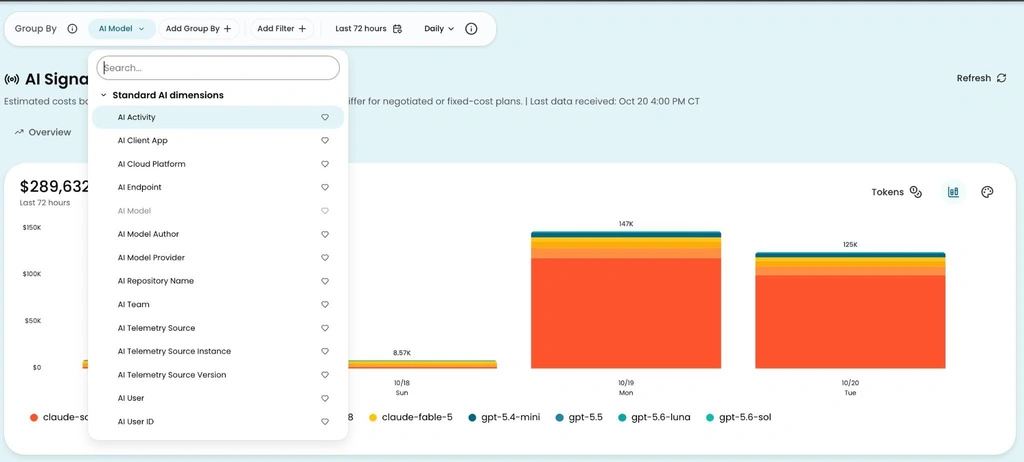
The dimension picker in AI Signals Overview. Every AI dimension here resolves from CostFormation rules against live telemetry.
See it in the docs → https://docs.cloudzero.com/changelog/custom-ai-dimensions











