Why this matters
Many CloudZero users ask the same few questions. What did my team spend this month? How is our AI spend trending over the last 30 days? What does one MCP tool call cost?
Now you can save the exact Explorer setup behind each answer as a View and get back to it instantly. It’s not just filters and grouping anymore, but the full picture. You can share a link with a teammate or finance and they see the same View, filtered to the spend their role allows.
What we built
Views already saved your filters and grouping. Now they also save time range, granularity, chart type, and series count. Date ranges can be relative, so “last 30 days” always counts back from today. You can also add a description so the next person knows what the View is for.
You create and edit Views directly in Explorer right where you build your queries. There’s no need to navigate to a separate settings page. A side panel shows a preview of the chart and table before you save, so you can confirm you’re capturing the right data without reloading the page.
You can also scope a View to only the dimensions that matter. For example, an EC2 cost view doesn’t need Kubernetes labels. When a View defines exactly which dimensions it needs, CloudZero can optimize how it computes and stores cost data behind the scenes. Fewer dimensions means faster loads for users.
Set any View as your default and CloudZero opens there when you start a new session. Each View has a Copy Link button that gives you a clean, readable URL based on the View’s name instead of a long string of query parameters – so it’s easy to paste it in Slack or bookmark it. The link resolves by ID internally, so it still works after you rename the View. Applying a View leaves your personal settings as they are, and clearing it returns you to your default.
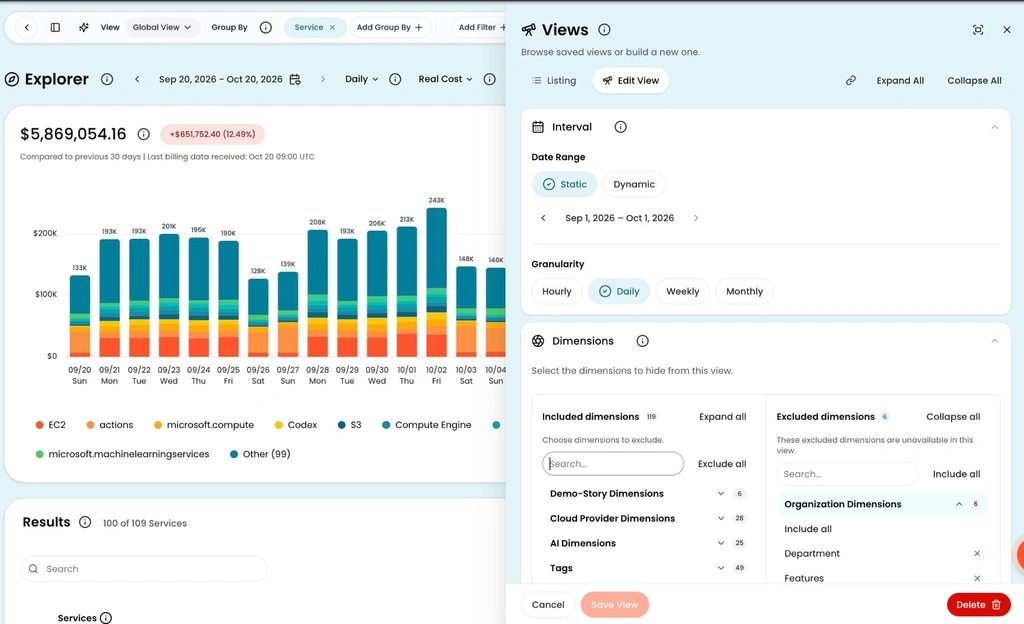
The Views side panel open alongside Explorer. Set the date range, granularity, and which dimensions to include or exclude, all without leaving the page.
How it works
Open Explorer, set it up the way you want, and save it as a View. Need to change something later? Update the View in place or save it as a new one. The View is ready to reopen, set as a default, or share with a shortened link.
Try it now → https://docs.cloudzero.com/docs/views











