Why this matters
Enterprise agent platforms need a client ID and client secret in hand before they will connect to anything. An admin with the Modify MCP Settings permission can now issue that pair directly in Settings, connect the platform, and manage the credential lifecycle on whatever schedule your security policy requires. No support request, no wait.
The client grants no data access on its own. Every person using the agent platform signs in with their own CloudZero account, and their role’s permission sets and data filters apply to every query the agent makes. A finance analyst asking Bedrock about a cost center sees the accounts their role allows. An engineering lead sees theirs. One connection serves the whole platform without flattening everyone to the same level of access.
What we built
MCP OAuth Clients, a page under Settings > Preferences & Extensions. Create a client with a display name, receive a client ID and client secret, and register the redirect URIs your agent platform requires. The list shows every client in your organization with its name, client ID, redirect URIs, creator, last editor, and last secret rotation. The same operations are available through the CloudZero public API.
Credentials stay on your schedule. Rotate a secret when your policy says to or when one is compromised. The client ID and redirect URIs stay the same, so the platform keeps working. If a platform is decommissioned, revoking the client stops new sign-ins and token requests immediately. Any access token already issued expires within about two hours.
Every create, edit, rotate, and revoke writes an audit event naming the CloudZero user who made the change.
The page is only visible to users with the appropriate MCP Settings permissions in their role.
How it works
The workflow matches how enterprise agent platforms expect to connect. Create a client, copy the credentials into your platform’s connector, and add the callback URL the platform gives you. The client name you choose appears on the CloudZero sign-in screen when someone authorizes the connection. Amazon Bedrock AgentCore, Google Gemini Enterprise, and Microsoft Foundry are all supported today.
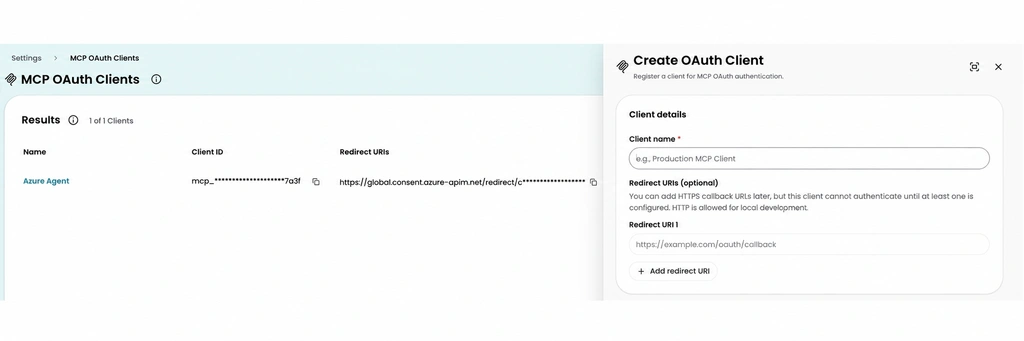
Image: The MCP OAuth Clients page with the Create OAuth Client panel open. Name the client, add your redirect URIs, and the credentials are ready to paste into your agent platform’s connector.











