Why this matters
You’re probably already tracking the metrics that matter most in your Analytics dashboards like unit economics, AI ROI, and spend by team. Now you can put a target on any of them. Pick the metric, set the threshold, and CloudZero emails you when it’s crossed, with no ticket to us, no custom build.
This was one of the most requested capabilities we heard, and now it’s fully self-serve: you decide what matters and where the line is.The dashboard comes to you instead of the other way around.
What we built
Thresholds live directly on the tile, no separate alert-building tool and no request to CloudZero. Set multiple alerts on a single tile, so one metric can warn you at more than one level. Alert emails link straight back to the CloudZero app, not a raw data view, so one click takes you to the number in context.
How it works
Open an Analytics dashboard and click the alert bell on the tile you want to watch. Choose your condition and threshold, add the email address that should hear about it, set how often CloudZero checks the data (from every 15 minutes up to monthly), and save. CloudZero checks your alerts on a regular cadence and emails you when a value crosses the line, so think of them as periodic budget checks rather than real-time streaming.
Want a second warning level? Add another alert to the same tile.
The bell is already live on your tiles, so there’s nothing to turn on to get started.
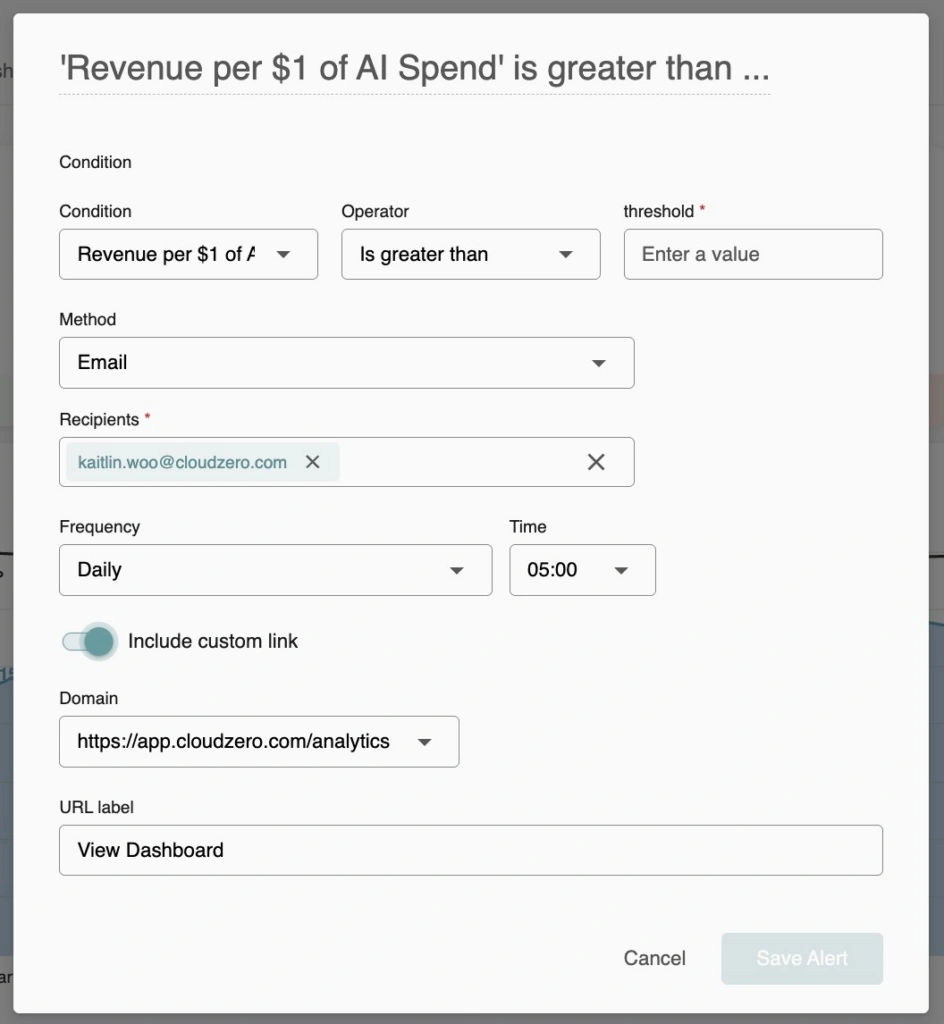
Here’s what setting one up looks like: choose your metric and condition, set a threshold, and CloudZero emails you when it’s crossed, checked on the schedule you pick, with a link straight back to the CloudZero Platform.











