Why this matters
The most common reason to create an API key in CloudZero is to send data, such as AI telemetry or billing exports. Until now, that meant picking individual scopes from a list and hoping you chose the right ones. That works on day one. The problem is day ninety.
Permissions on a key have always been a snapshot of the day you created it. A new AI telemetry endpoint ships in October, and a key created in August has no idea it exists. The data from that one source does not arrive, and you find out later when somebody asks why a chart has a gap, and then you get to work out whether it was the key, the endpoint, or the payload. Managed scopes make that debugging loop avoidable.
What we built
When you create an API key, you can now choose a use case instead of picking individual scopes. Select Send AI Telemetry or Send Billing Data, and CloudZero assigns the permissions your key needs and keeps them current as new endpoints ship. No manual updates, no missed permissions.
AI telemetry is simpler on the scope side too. What used to be a separate scope per telemetry source is now a single AI Telemetry scope that covers all of them.
Each key with managed scopes also gets a permission history showing which scopes were added or removed and when. When someone in security asks what a key can do and how it got there, you have an answer.
How it works
Create or edit an API key under Settings, choose Managed scopes, and select a use case like Send AI Telemetry or Send Billing Data. Open any key to see its permission history. Existing keys keep working exactly as they do today.
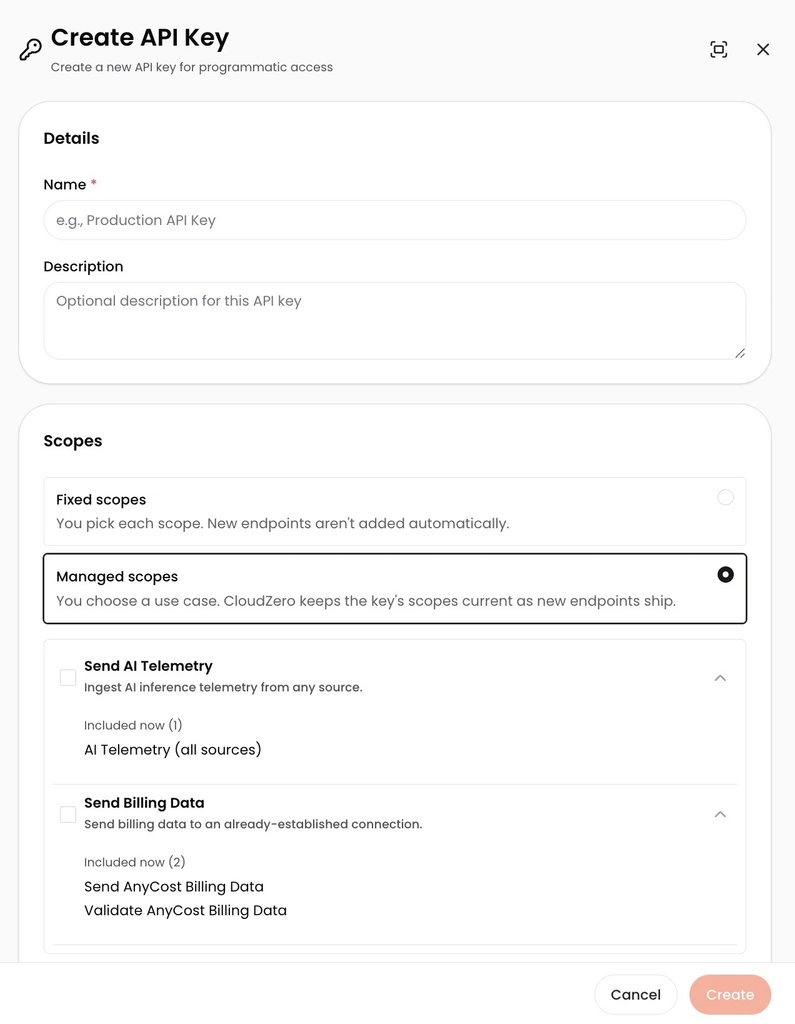
Creating an API key with managed scopes selected. Choose a use case and CloudZero shows you exactly which scopes it includes today.
See it in the docs → https://docs.cloudzero.com/reference/authorization#fixed-and-managed-scopes











