Why this matters
Most people who open CloudZero care about one slice of the spend, like their team, their product, or their region. A View gives them that slice in one click, with the grouping and filters already set, so nobody has to rebuild the same Explorer query every week.
Views now work for everyone in your organization, including people with scoped access. That puts them in the hands of the people who get the most out of a ready-made starting point, like a team lead checking their team’s spend or a finance analyst who’d rather open a saved View than build from a blank Explorer. Each View follows the access rules already set by that person’s role, so everyone sees exactly the data they’re meant to see.
With Views scoped by access, a new finance hire who asks where to find their business unit’s spend can get a View on day one.
What we built
Every user with Explorer access can now open Views, including people in Limited Access roles. An admin can build a View once and share it with everyone. Each person’s roles decide what data they see, so you don’t need to configure a separate copy for every team.
Say you build a View called Platform Costs, grouped by service and filtered to three engineering teams. Priya’s role covers all three teams, so she sees the whole View. Marcus’s role covers only one of them, so he sees that team’s share of the same View, along with a short note that the data is filtered by his access. It’s the same View, but different data; there’s nothing extra for the admin to maintain.
A few details keep this predictable. Views that don’t overlap with any of a user’s access are hidden from their dropdown, so the list only shows Views that’ll return data for them. If a View is set to a cost type the user’s role doesn’t include, CloudZero shows them their default cost type and tells them it made the switch. And if someone follows a direct link to a View they have no access to, it still opens, with no data and a message explaining why, so a shared link never appears broken.
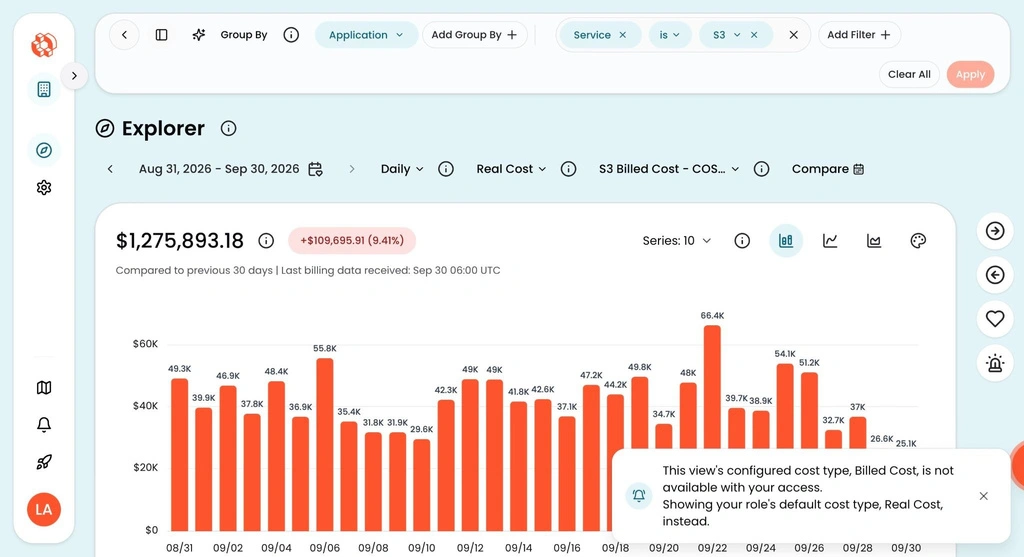
A View open in Explorer for a limited-access user. The notification box at lower right explains that the View’s configured cost type was swapped to one their role allows.
How it works
In Explorer, pick a View from the dropdown. CloudZero handles the rest. If your access is narrower than the View’s full scope, a notice tells you so.
Admins don’t need to change any settings. Your existing Views and roles work together as they are.











