Why this matters
You can already break down cloud spend by team, product, or customer in Explorer. But AI spend has been harder to decompose. Which models is each team running? What activity is driving the cost growth you saw this month? Before AI Explorer, answering those questions meant exporting raw event data and building your own breakdowns, or waiting days for reconciled billing to land in Explorer.
AI Explorer shows estimated AI spend within minutes, grouped by the dimensions your organization uses, with the same controls you use in Explorer.
What we built
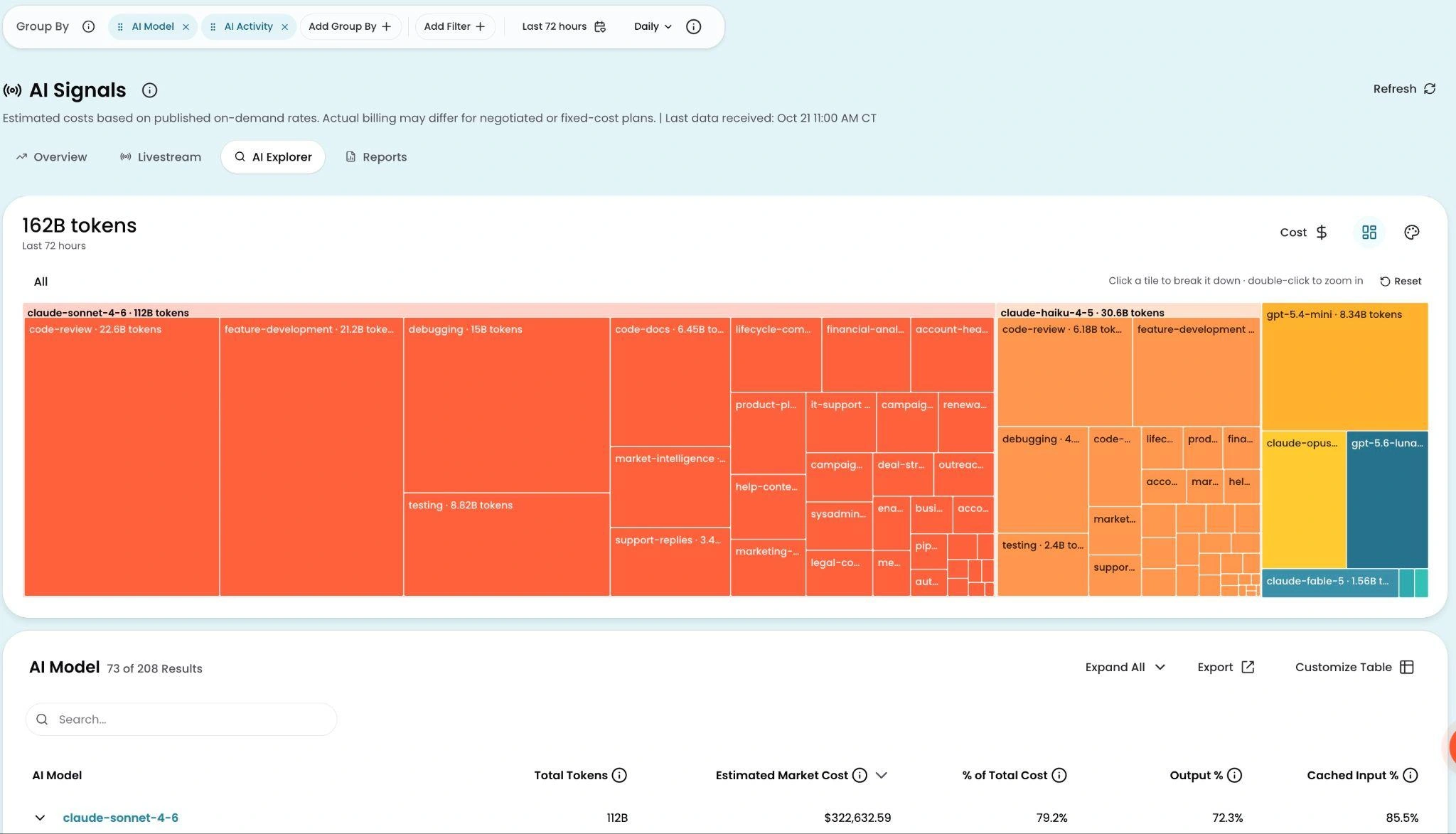
AI Explorer is a tab in AI Signals for analyzing AI spend. You can group by model, department, activity, team, or any combination of up to eight dimensions at once. Filters narrow the results to a specific model, source, or team. When you change the time range, the chart and table update immediately.
The dimension picker includes built-in AI dimensions and any custom dimensions you define with CostFormation rules that resolve from live AI telemetry. If you write and publish a rule that groups AI spend by project or product, that breakdown appears in AI Explorer within minutes. You don’t need to configure anything in AI Signals or wait for a sync.
In the chart, you can switch between a cost view and a token view to see spend or usage volume. In the table, you can add columns for cache and model detail, sort by any column, and export to CSV to share the analysis outside CloudZero.
AI Explorer is linked to the rest of AI Signals. If a department shows unexpected cost on the Overview tab, click its card to open AI Explorer filtered to that department’s spend.
How it works
Open AI Signals and click the AI Explorer tab. It uses the same group, filter, and table controls as Explorer, applied to AI spend and updated within minutes. Costs in AI Explorer are estimates based on token volume at published rates. Reconciled costs for finance reporting appear in Explorer on the billing cycle.
See it in the docs → https://docs.cloudzero.com/docs/real-time-ai-spend-with-ai-signals#ai-explorer











