
What it is: CloudZero Explorer two-dimensional group-by
One dimension gives you a list. Two gives you a story. Now you can slice by two dimensions simultaneously, right in CloudZero Explorer.
Why it matters
Before now, analyzing cost by service meant one view, and analyzing by account meant another view. You had to choose your slice before you could see the data, which meant you often didn’t know what you were missing.
Two-dimensional group-by changes that. Instead of stacking dimensions separately, you see how they interact: what EC2 costs per account in each region, which team’s spend is concentrated in which service, which feature is hitting which environment. The answer to “what’s behind this number” is in the same view where you asked the question, no separate build and no context switch.
It’s also the foundation for chargeback and showback without custom views, and the only way to answer AI cost questions that are inherently two-dimensional: which model is driving cost for which customer, which feature is hitting which vendor.
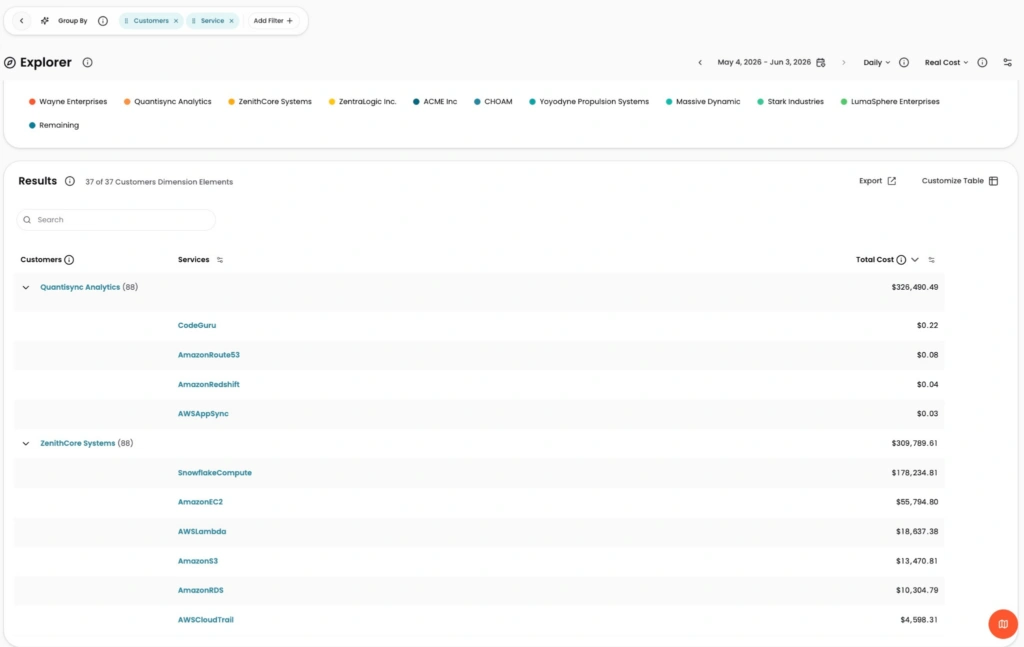
Image: Cost broken down by Customer, then nested by Service — Quantisync Analytics’ $326K total expands to show exactly which services are driving it.
How it works
Explorer in the new CloudZero experience supports grouping by two dimensions at once. Select a primary dimension, add a second, and the table shows nested results with locked columns and row counts per group. Break down cost by service within account, or by region within resource type, directly in Explorer, no custom view required.
See it in CloudZero Documentation.