
Why this matters
When the changelog doesn’t keep pace with the product, two things can happen. One, you keep working around something that was already fixed weeks ago. Or two, a behavior changes, you assume it’s a bug, and you spend an afternoon on triage and a support ticket before learning it was an intentional improvement.
CloudZero now ships around 30 improvements a week, a pace driven by the Next Gen Platform and the AI-first approach we’re building for our customers. The previous changelog was an external page updated periodically, usually covering a handful of features a month. That gap meant useful changes could go unnoticed.
A weekly cadence also gives you something concrete to share. When an engineering lead or finance partner asks what changed and when, a dated entry gives you the answer. You can confirm a fix actually shipped, see which week it landed, reference a specific release when you’re reconciling a number that changed.
What we built
“What’s New” now sits in the left nav of CloudZero and opens the changelog in a side panel without blocking the page you’re working on.
Each weekly update leads with feature highlights that expand to a full description. Below the highlights are collapsible Improved and Fixed lists covering the smaller changes. You can use a date picker to jump to any past release week.
Previously, the changelog was an external page or tucked inside a help modal. Giving it a permanent home in the nav means it’s one click away on any page, not something you have to go looking for.
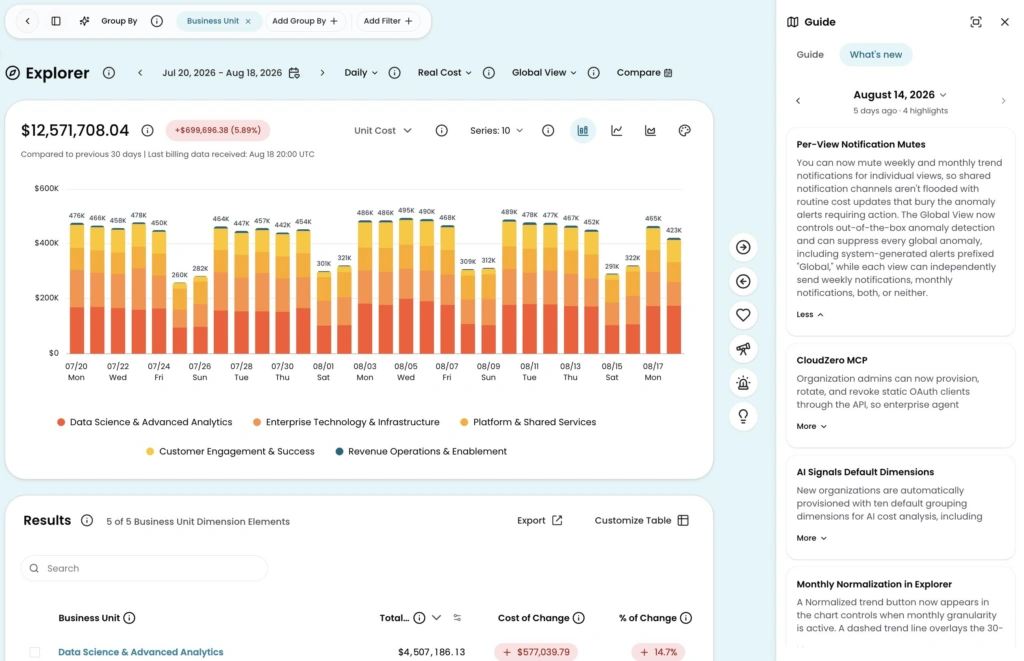
Image: The What’s New panel open alongside Explorer. Browse recent releases and expand highlights without leaving your working view.
How it works
Open the panel from any page, browse the latest release or jump to a past week, and keep working while it’s open. The same content is also available inside the Full Guide panel.
See it in CloudZero or learn more in the docs →











