Why this matters
A design partner told us the AI Explorer table needed a way to get data out so it could be saved and shared elsewhere. Now you export the whole view in one click, cost, tokens, cache, and model count all included. The values come through as clean numbers, not text you have to scrub. It’s the same pattern as Explorer, so there’s nothing new to learn.
What we built
An Export button on the AI Explorer table. It downloads the current view as a CSV of what’s currently on your screen, reflecting your grouping and filter choices..
How it works
Open the AI Explorer cost table, set your grouping and filters, and click Export.
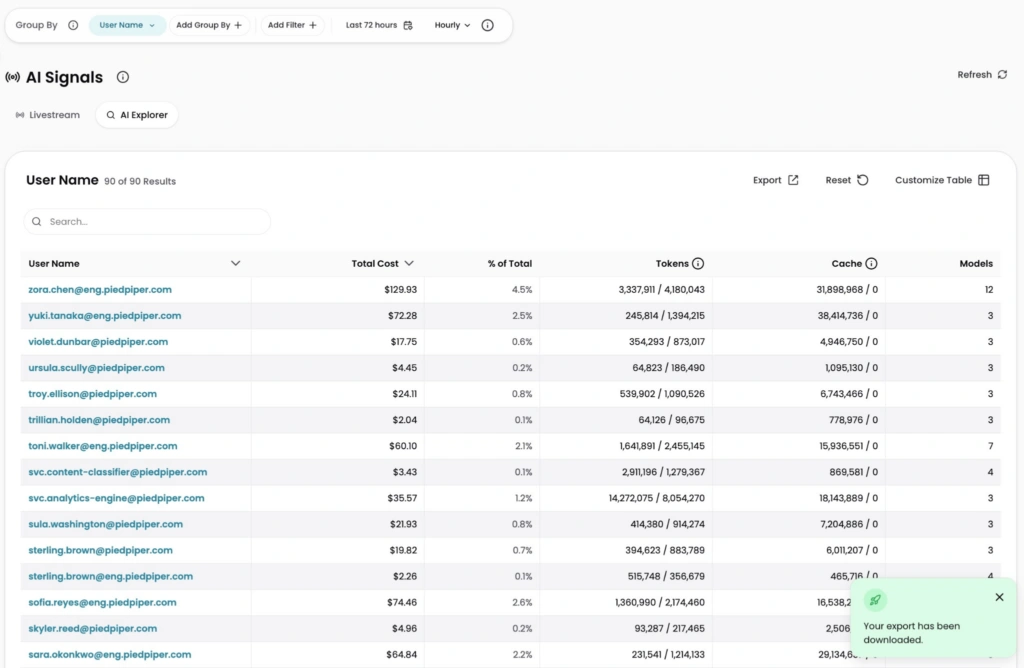
Image: AI Explorer already breaks usage down by cost, tokens, cache, and model count per user, and now Export turns that same breakdown into a clean CSV ready for a report or chargeback model.