
Amazon’s Elastic Compute Cloud (EC2) service provides a variety of virtual machines (instances) for compute workloads. Among those, Amazon EC2 M5 instances are among the most versatile.
M5 instances are available in multiple variants, each optimized for different use cases. This guide covers M5 instance types, sizes, and when to use them.
What Is An M5 Instance In Amazon EC2?
An Amazon EC2 M5 instance is a fifth-generation general-purpose virtual machine designed for workloads that need a balanced mix of compute, memory, and networking resources.
M5 instances typically run on Intel Xeon Scalable processors and use Amazon Elastic Block Storage (EBS) for persistent storage. They support enhanced networking and are built on the AWS Nitro System, which offloads virtualization tasks to dedicated hardware for better performance and security.
Report
Finance needs to prove AI’s return: CloudZero report
260 senior finance leaders (more than half CFOs) told us why the speed of seeing AI spend, not the size of it, separates who pulls ahead on AI from who gets burned.
What Are M5 Instances Used For?
M5 instances are ideal for general-purpose computing, supporting workloads that require consistent, balanced CPU, RAM, and networking capacity.
Such use cases include:
- Small and mid-sized databases
- Backend application servers
- In-memory caching fleets
- Data processing tasks with moderate memory requirements
- Enterprise and internal services that need consistent capacity
Why teams choose M5 instances
M5 instances work well for workloads requiring balanced resources without specialization. They occupy a middle ground between:
- T instances, which rely on burstable CPU credits
- C instances, which prioritize compute over memory
- R instances, which prioritize large memory footprints
For teams comparing across these families, CloudZero’s side-by-side comparisons cover the trade-offs in detail: M5 vs. R5, T3 vs. M5, and C5 vs. M5.
Storage options: EBS vs NVMe on M5
M5 instances support two storage models, depending on the variant.
EBS-backed M5 and M5a instances
- Use network-attached Amazon Elastic Block Storage (EBS)
- Data persists through instance stops and hardware failures
- Volumes can be detached and reattached across instances
- Lower cost than NVMe-backed variants
NVMe-backed M5d and M5ad instances
- Use local NVMe SSDs physically attached to the host
- Deliver lower latency and higher throughput
- Data does not persist through instance stops or failures
- Best suited for temporary, high-performance storage needs
EBS-backed M5 instances do not inherently have “high latency.” They share networked storage infrastructure, which introduces more variability than local NVMe, but performance is predictable and sufficient for most general-purpose workloads.
Additional characteristics
- M5 and M5a support EBS-only storage
- M5d and M5ad include local NVMe SSDs
- All M5 variants run on the AWS Nitro System, which offloads virtualization to dedicated hardware for improved performance and security
M5 instances are available in bare metal variants (m5.metal and m5d.metal) that run directly on physical servers without a hypervisor, providing complete hardware access for specialized workloads or licensing requirements.
Related reads:
When to Use M5 Instances (And When Not To)
M5 instances work well when:
- CPU usage is steady rather than bursty
- Memory needs are moderate
- Network traffic is predictable
They may not be the best fit for:
- Sustained high CPU utilization (consider C instances)
- Massive in-memory datasets (consider R instances)
- Short-lived or highly bursty workloads (consider T instances)
M5 instance pricing varies by size, region, and purchase model. In US East (N. Virginia), On-Demand rates start at roughly $0.096/hour for an m5.large (2 vCPUs, 8 GiB) and scale to approximately $4.608/hour for an m5.24xlarge (96 vCPUs, 384 GiB). M5a variants running AMD processors typically cost about 10% less than their Intel-based M5 equivalents at the same size. Reserved Instances and Savings Plans can reduce these rates by 30–60% depending on commitment length and payment structure.
Pricing alone rarely tells the full story, though. An m5.xlarge running at 20% average CPU utilization is paying for capacity it never uses. Teams that track cost per workload or per service — rather than raw instance spend — tend to catch these mismatches faster and rightsize before waste accumulates.
M5 instance sizes range from m5.large to m5.24xlarge, covering a wide span of CPU and memory configurations. Choosing the right size early helps avoid overprovisioning, performance bottlenecks, and unnecessary cost.
Start with utilization data. If average CPU stays below 30% on an m5.xlarge, a smaller size or a burstable T3 instance may deliver the same performance at lower cost. If memory pressure is the constraint rather than CPU, an R-family instance will usually be more economical than scaling up within M5. CloudZero’s M3 vs. M4 vs. M5 comparison walks through how to evaluate generational trade-offs within the M family itself.
CloudZero Advisor helps teams evaluate instance choices based on workload behavior, region, and pricing, reducing trial-and-error and simplifying rightsizing decisions.
What Are The Different M5 Instance Types?
There are four types of M5 instances available on Amazon EC2:
- M5
- M5a
- M5n
- M5zn
These variants differ in processor type, storage configuration, and networking performance. Each variant is optimized for specific use cases.
1. Amazon EC2 M5 instances
M5 instances run on Intel Xeon Scalable processors (Cascade Lake and Skylake 8000 series) at 3.1 GHz compared to M4’s 2.5 GHz. M5 delivers up to 20% improvement in price/performance compared to M4 instances, according to AWS.
The following table highlights specific features of M5 instances:
|
M5 instance type |
vCPU |
RAM in GiB |
Supported storage |
Network bandwidth |
EBS bandwidth |
|
m5.large |
2 |
8 |
EBS |
Up to 10Gbps |
Up to 4,750Mbps |
|
m5.xlarge |
4 |
16 |
EBS |
Up to 10Gbps |
Up to 4,750Mbps |
|
m5.2xlarge |
8 |
32 |
EBS |
Up to 10Gbps |
Up to 4,750Mbps |
|
m5.4xlarge |
16 |
64 |
EBS |
Up to 10Gbps |
4,750Mbps |
|
m5.8xlarge |
32 |
128 |
EBS |
10Gbps |
6800Mbps |
|
m5.12xlarge |
48 |
192 |
EBS |
12Gbps |
9500Mbps |
|
m5.16xlarge |
64 |
256 |
EBS |
20Gbps |
13,600Mbps |
|
m5.24xlarge |
96 |
384 |
EBS |
25Gbps |
19,000Mbps |
|
m5.metal |
96 |
384 |
EBS |
25Gbps |
19,000Mbps |
|
m5d.large |
2 |
8 |
75 NVMe SSD (1X) |
Up to 10Gbps |
Up to 4,750Mbps |
|
m5d.xlarge |
4 |
16 |
150 NVMe SSD (1X) |
Up to 10Gbps |
Up to 4,750Mbps |
|
m5d.2xlarge |
8 |
32 |
300 NVMe SSD (1X) |
Up to 10Gbps |
Up to 4,750Mbps |
|
m5d.4xlarge |
16 |
64 |
300 NVMe SSD (2X) |
Up to 10Gbps |
4,750Mbps |
|
m5d.8xlarge |
32 |
128 |
600 NVMe SSD (2X) |
10Gbps |
6,800Mbps |
|
m5d.12xlarge |
48 |
192 |
900 NVMe SSD (2X) |
12Gbps |
9,500Mbps |
|
m5d.16xlarge |
64 |
256 |
600 NVMe SSD (4X) |
20Gbps |
13,600Mbps |
|
m5d.24xlarge |
96 |
384 |
900 NVMe SSD (4X) |
25Gbps |
19,000Mbps |
|
m5d.metal |
96 |
384 |
900 NVMe SSD (4X) |
25Gbps |
19,000Mbps |
2. Amazon EC2 M5a instances
AMD EPYC 7571 processors clocked at 2.5 GHz (all-core turbo) power M5a instances. AWS designed them to deliver 10% cost savings compared with similar M5 instances.
M5ad instances include local NVMe SSD storage physically attached to the host, providing block-level storage throughout the instance lifecycle.
Other M5a instance features include:
|
M5a instance type |
vCPU |
RAM in GiB |
Supported storage |
Network bandwidth |
EBS bandwidth |
|
m5a.large |
2 |
8 |
EBS |
Up to 10Gbps |
Up to 2,880Mbps |
|
m5a.xlarge |
4 |
16 |
EBS |
Up to 10Gbps |
Up to 2,880Mbps |
|
m5a.2xlarge |
8 |
32 |
EBS |
Up to 10Gbps |
Up to 2,880Mbps |
|
m5a.4xlarge |
16 |
64 |
EBS |
Up to 10Gbps |
2,880Mbps |
|
m5a.8xlarge |
32 |
128 |
EBS |
Up to 10Gbps |
4,750Mbps |
|
m5a.12xlarge |
48 |
192 |
EBS |
10Gbps |
6,780Mbps |
|
m5a.16xlarge |
64 |
256 |
EBS |
12Gbps |
9,500Mbps |
|
m5a.24xlarge |
96 |
384 |
EBS |
20Gbps |
13,570Mbps |
|
m5ad.large |
2 |
8 |
75 NVMe SSD (1X) |
Up to 10Gbps |
Up to 2,880Mbps |
|
m5ad.xlarge |
4 |
16 |
150 NVMe SSD (1X) |
Up to 10Gbps |
Up to 2,880Mbps |
|
m5ad.2xlarge |
8 |
32 |
300 NVMe SSD (1X) |
Up to 10Gbps |
Up to 2,880Mbps |
|
m5ad.4xlarge |
16 |
64 |
300 NVMe SSD (2X) |
Up to 10Gbps |
2,880Mbps |
|
m5ad.8xlarge |
32 |
128 |
600 NVMe SSD (2X) |
Up to 10Gbps |
4,750Mbps |
|
m5ad.12xlarge |
48 |
192 |
900 NVMe SSD (2X) |
10Gbps |
6,870Mbps |
|
m5ad.16xlarge |
64 |
256 | 4 x 600 NVMe SSD |
12Gbps |
9,500Mbps |
|
m5ad.24xlarge |
96 |
384 |
900 NVMe SSD (4X) |
20Gbps |
13,570Mbps |
3. Amazon EC2 M5n instances
M5n instances deliver high network speeds and packet rate performance, with network bandwidth up to 100 Gbps. While they use second-generation Cascade Lake 8000 series Intel Xeon Scalable processors, they clock between 3.1GHz and 3.5GHz all-core turbo speeds.’
Here are more M5n instance features:
|
M5n instance |
vCPU |
RAM in GiB |
Supported storage |
Network bandwidth |
EBS bandwidth |
|
m5n.large |
2 |
8 |
EBS |
Up to 25Gbps |
Up to 4,750Mbps |
|
m5n.xlarge |
4 |
16 |
EBS |
Up to 25Gbps |
Up to 4,750Mbps |
|
m5n.2xlarge |
8 |
32 |
EBS |
Up to 25Gbps |
Up to 4,750Mbps |
|
m5n.4xlarge |
16 |
64 |
EBS |
Up to 25Gbps |
4,750Mbps |
|
m5n.8xlarge |
32 |
128 |
EBS |
25Gbps |
6,800Mbps |
|
m5n.12xlarge |
48 |
192 |
EBS |
50Gbps |
9,500Mbps |
|
m5n.16xlarge |
64 |
256 |
EBS |
75Gbps |
13,600Mbps |
|
m5n.24xlarge |
96 |
384 |
EBS |
100Gbps |
19,000Mbps |
|
m5n.metal |
96 |
384 |
EBS |
100Gbps |
19,000Mbps |
m5dn.large |
2 |
8 |
75 NVMe SSD (1X) |
Up to 25Gbps |
Up to 4,750Mbps |
m5dn.xlarge |
4 |
16 |
150 NVMe SSD (1X) |
Up to 25Gbps |
Up to 4,750Mbps |
m5dn.2xlarge |
8 |
32 |
300 NVMe SSD (1X) |
Up to 25Gbps |
Up to 4,750Mbps |
m5dn.4xlarge |
16 |
64 |
300 NVMe SSD (2X) |
Up to 25Gbps |
4,750Mbps |
m5dn.8xlarge |
32 |
128 |
600 NVMe SSD (2X) |
25Gbps |
6,800Mbps |
m5dn.12xlarge |
48 |
192 |
900 NVMe SSD (2X) |
50Gbps |
9,500Mbps |
m5dn.16xlarge |
64 |
256 |
600 NVMe SSD (4X) |
75Gbps |
13,600Mbps |
m5dn.24xlarge |
96 |
384 |
900 NVMe SSD (4X) |
100Gbps |
19,000Mbps |
m5dn.metal |
96 |
384 |
900 NVMe SSD (4X) |
100Gbps |
19,000Mbps |
4. Amazon EC2 M5zn instances
With 4.5 GHz Intel Xeon Scalable processors (Cascade Lake 8252CL) and up to 100 Gbps of network throughput, M5zn instances deliver higher performance for higher-throughput workloads.
Here are some more details:
|
M5zn instance |
vCPU |
RAM in GiB |
Supported storage |
Network bandwidth |
EBS bandwidth |
|
m5zn.large |
2 |
8 |
EBS |
Up to 25Gbps |
Up to 3,170Mbps |
|
m5zn.xlarge |
4 |
16 |
EBS |
Up to 25Gbps |
Up to 3,170Mbps |
|
m5zn.2xlarge |
8 |
32 |
EBS |
Up to 25Gbps |
3,170Mbps |
|
m5zn.3xlarge |
12 |
48 |
EBS |
Up to 25Gbps |
4,750Mbps |
|
m5zn.6xlarge |
24 |
96 |
EBS |
50Gbps |
9,500Mbps |
|
m5zn.12xlarge |
48 |
192 |
EBS |
100Gbps |
19,000Mbps |
|
m5zn.metal |
48 |
192 |
EBS |
100Gbps |
19,000Mbps |
How To Choose The Right Amazon EC2 Instance Types With CloudZero Advisor
Manually selecting and configuring EC2 instance types can be time-consuming and error-prone. CloudZero Advisor simplifies this process:
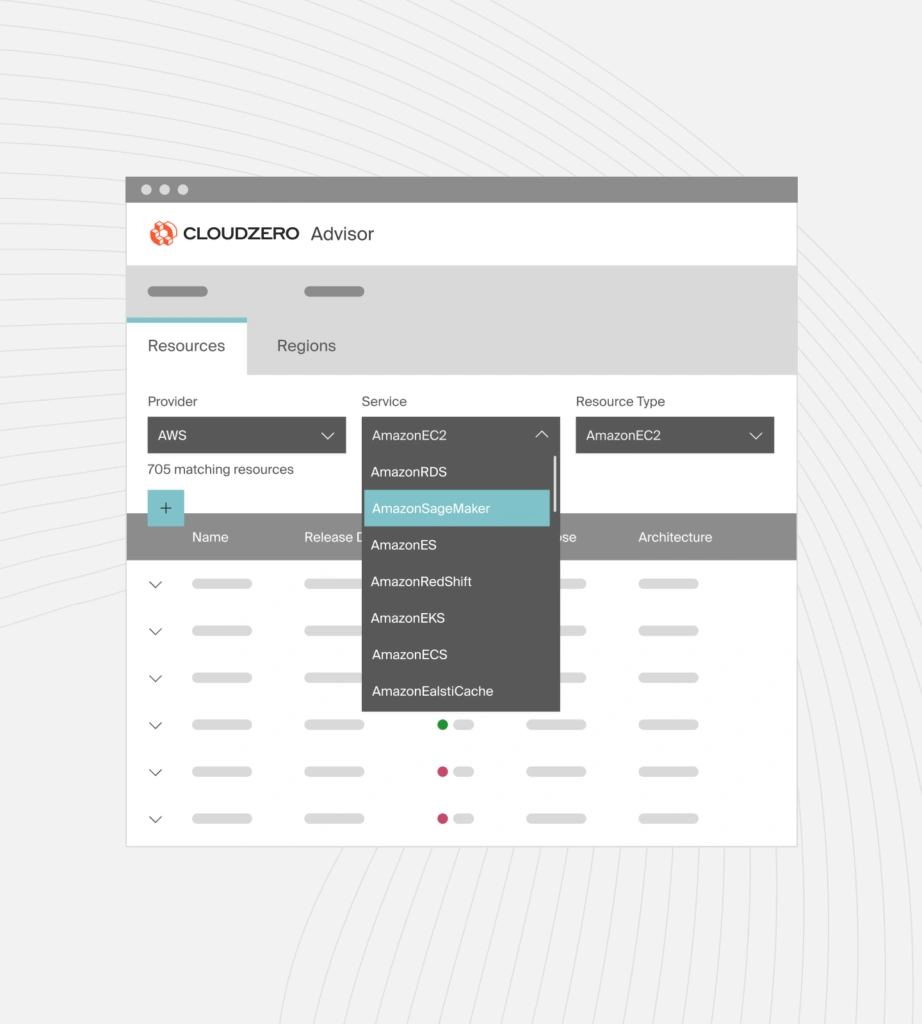
This is CloudZero Advisor. CloudZero Advisor helps you choose the right instance type and size for your workload based on factors such as AWS service, region, pricing, resource type, and more.
This eliminates the trial-and-error phase of rightsizing instances. You can commit to Service Level Agreements (SLAs) with confidence, avoiding downtime from overloading, underperformance, or instance type changes.
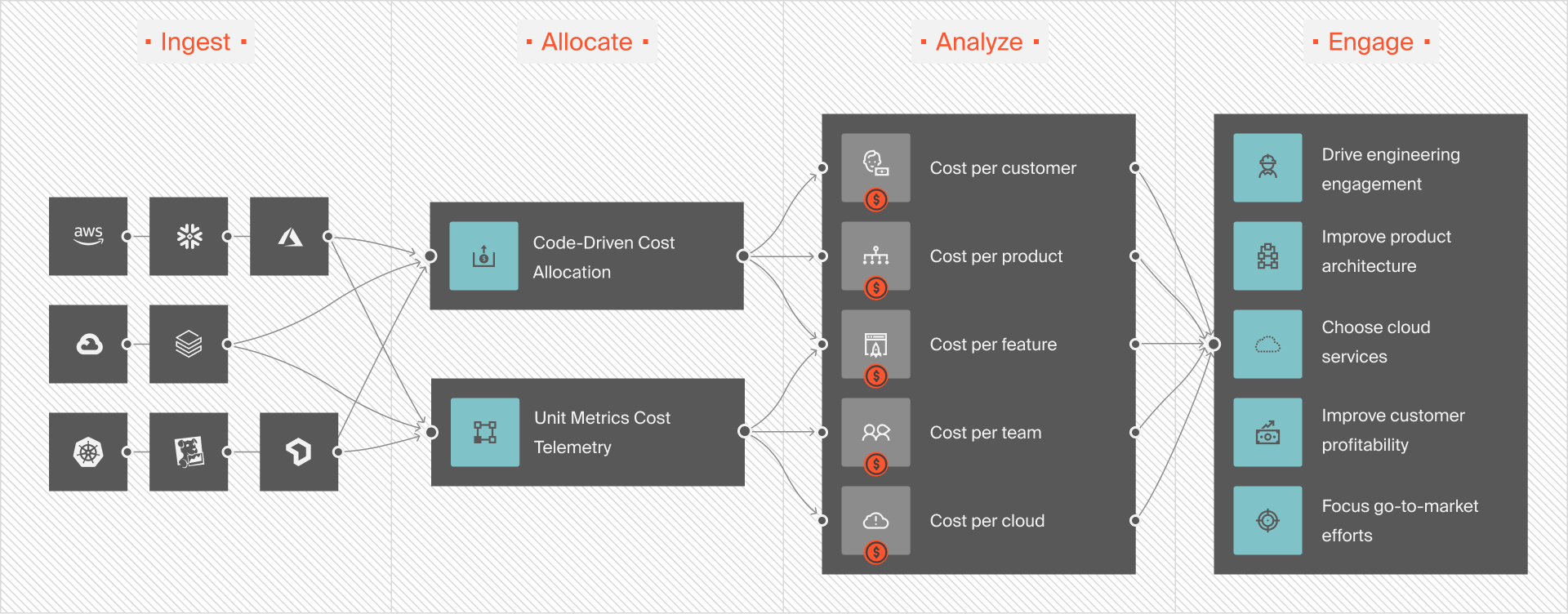
Once you pick the best Amazon EC2 instances, CloudZero’s cloud cost intelligence platform can help you continuously collect, understand, and optimize your cloud spend across all your cloud platforms, including AWS, Azure, GCP, Kubernetes, Snowflake, and more.
Unlike conventional cost tools, CloudZero delivers detailed, actionable cost intelligence, including cost per customer, per product feature, per team, and per project.
 to see how CloudZero works in your environment.
Amazon EC2 M5 Instances FAQS
How many M5 instance types are available?
There are four M5 instance variants: M5, M5a, M5n, and M5zn. Each variant is optimized for a different balance of processor type, networking performance, or clock speed.
Is Amazon EC2 M5 still worth using in 2026?
Yes, though the answer depends on your workload and migration timeline. M5 instances remain widely deployed due to stable pricing, predictable performance, and broad regional availability. For existing workloads already tuned to M5, the cost and risk of migrating may outweigh the incremental performance gain from a newer generation.
That said, AWS has since released M6i (3rd Gen Intel Xeon, up to 15% better price-performance than M5), M7i (4th Gen Intel Xeon, another 15% improvement over M6i), and M8i (Intel Xeon 6, roughly 15% better than M7i). For new deployments or workloads approaching a refresh cycle, starting on M6i or M7i is typically the better move — you get more performance per dollar with no architectural changes, since the M-family maintains the same 4:1 memory-to-vCPU ratio across generations. Graviton-based options like M6g and M7g can deliver even better price-performance for workloads compatible with Arm-based processors.
What is the difference between M4 and M5 instances?
M5 instances replaced M4 as the general-purpose default by offering newer processor architectures, improved networking, and support for NVMe-based variants. M4 instances are largely phased out in favor of M5 and newer generations.
What’s the difference between M5 and T3 instances?
The key difference is CPU behavior. T3 instances use burstable CPU credits, making them suitable for intermittent workloads. M5 instances provide consistent CPU performance, making them better for services that run continuously under steady load.
When should I use M5 instead of C or R instances?
Choose M5 when your workload needs balanced CPU and memory. If your application is CPU-bound, C instances are usually a better fit. If it is memory-heavy, R instances are typically more cost-effective.
Why do M5 costs sometimes increase unexpectedly?
Cost changes are usually driven by instance size selection, storage configuration (EBS vs NVMe), and network throughput, not the instance family itself. Monitoring cost by workload or service helps identify these drivers early.