
Why this matters
Creating an API key used to mean sorting through categories organized around our internal structure, not how you’d use them, so finding everything you needed for a specific job meant guessing, or having someone on our team walk you through it. Now you can tell what each permission actually does at a glance.
What we built
The scope picker for creating or editing an API key now groups permissions by use case, such as Cost Allocation, Cost & Usage Data, Views, Budgets, and more, instead of by our internal service structure. Every category has a short description so you know what you are selecting, and a search bar lets you find a category or an individual scope across all 80 of them.
Under the hood, the categories are driven by a new, Product-owned mapping, so as we add new scopes going forward, they’ll automatically land in the right category without needing a UI update. Your existing scopes and API keys are unaffected, this is a change to how permissions are presented, not to what they do.
How it works
Categories appear collapsed by default, so instead of scanning all 80 scopes at once, you see a short list of customer-friendly groupings. Expand any category to view and select the individual scopes inside it, or skip that step and select the whole category, or all scopes, in one click if that’s what the key needs.
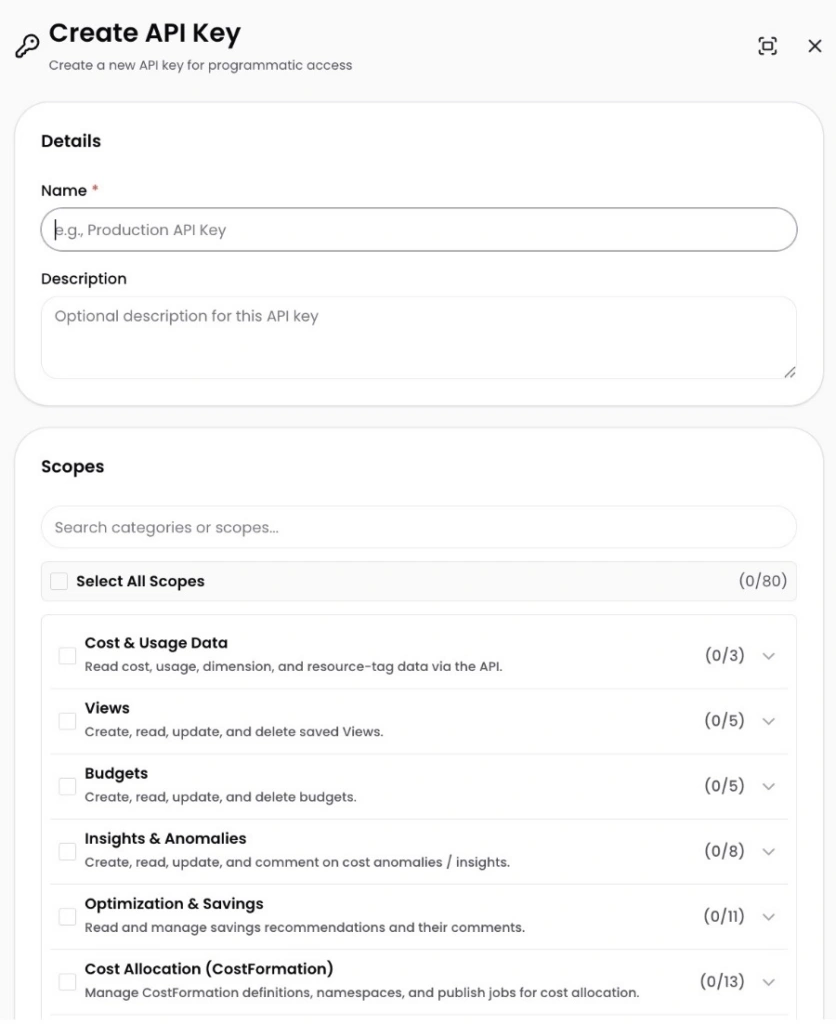
Image: The new scope picker organizes API key permissions into labeled categories with descriptions and counts, instead of one long undifferentiated list.











