Kubernetes efficiency metrics now work with infrastructure filters.
Why this matters
When you dig into Kubernetes spend, you filter by the dimensions you already think in: Cloud Provider, Account, Region. Now those filters and your Kubernetes efficiency data work together. Exports get the same treatment: CPU and memory efficiency are included in downloaded Explorer data, so the file you hand off matches what you saw on the screen.
What we built
Kubernetes CPU and memory efficiency metrics now render in Explorer alongside Cloud Provider, Region, and Cloud Account ID filters, so you can scope your view by infrastructure and keep full efficiency context while you work. Efficiency columns are also now included when you export the dataset from Explorer.
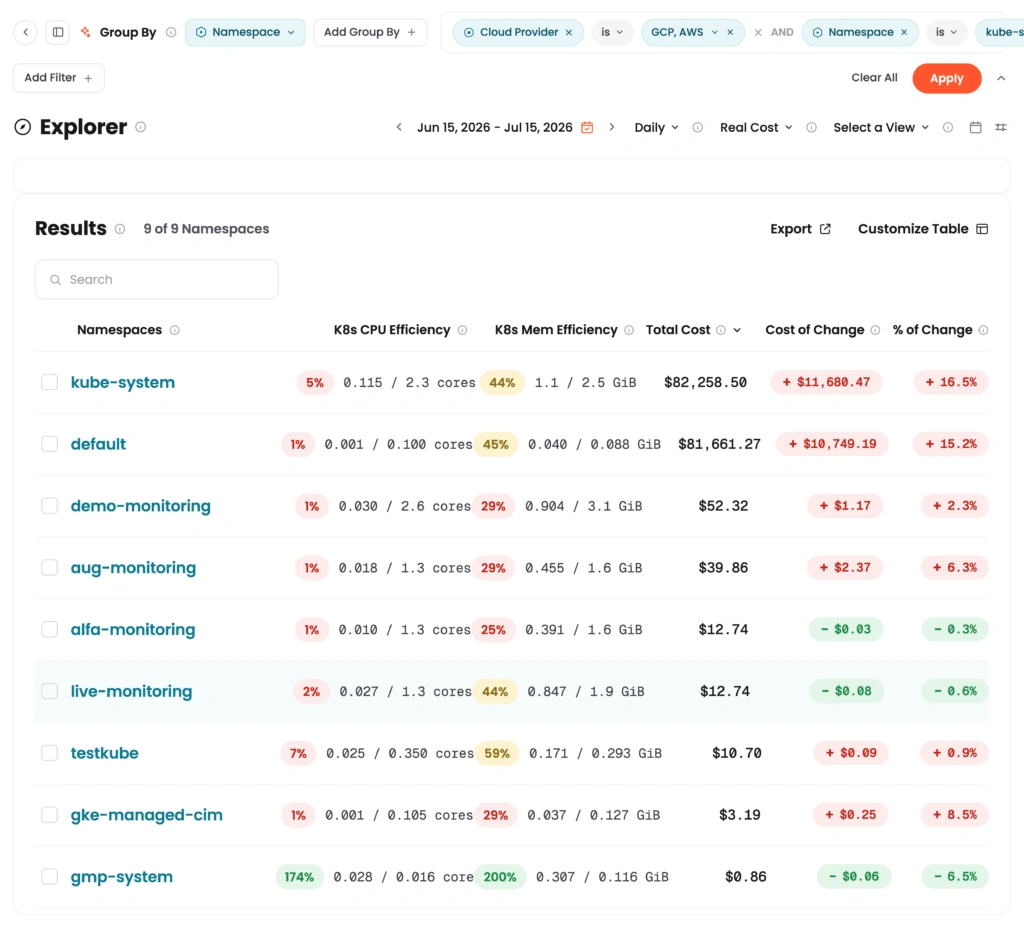
Grouped by Namespace and filtered to Cloud Provider (GCP, AWS), K8s CPU and Mem Efficiency stay populated for every row instead of dropping out.
How it works
Group by a Kubernetes dimension (Cluster, Namespace, or Workload) in Explorer, then apply a Cloud Provider, Region, or Cloud Account ID filter. CPU and memory efficiency stay visible and update to match the filtered scope. Export the table and the efficiency scores are included.
Note: Kubernetes usage metrics require the CloudZero Agent for Kubernetes.