
Back in May of 2021, containers had already won. Kubernetes adoption was surging. ECS and EKS were powerful. But for many teams, deploying a simple containerized web service still meant stitching together clusters, networking rules, scaling policies, load balancers, IAM roles, and CI/CD pipelines.
It felt heavier than it should. Developers no longer wanted more orchestration power. They wanted less operational drag. If they could ship containerized apps without managing clusters at all, that’s even better.
So AWS introduced App Runner to bring serverless simplicity to containers, web apps, and APIs. And in many ways, it delivers. It streamlines deployments and fades infrastructure management into the background.
But convenience doesn’t eliminate cost behavior. It abstracts it.
App Runner simplifies deployment, but doesn’t automatically optimize your costs.
In this guide, we’ll break down how AWS App Runner works, how its pricing model behaves in practice, and whether it truly solves the problem it set out to fix, especially for SaaS teams trying to balance engineering velocity with protecting profitable growth.
What Is AWS App Runner And How Does It Work?
AWS App Runner is a fully managed container application service designed to deploy and run containerized web applications and APIs without requiring you to manage infrastructure.
Instead, you provide one of two things:
- A source code repository (such as GitHub or Bitbucket), or
- A container image stored in Amazon ECR
From there, App Runner handles the rest.
It handles building (if needed), provisioning compute, configuring HTTPS endpoints, load balancing traffic, performing health checks, and scaling your service based on incoming requests. No need to provision ECS clusters, EC2 instances, or Auto Scaling policies.
At the abstraction layer, AWS handles infrastructure provisioning, scaling events, TLS termination, and service availability. You define vCPU and memory allocation, Autoscaling configuration, and environment variables.
How scaling works in AWS App Runner
App Runner automatically scales container instances based on concurrent HTTP requests.
As your traffic increases, App Runner provisions additional instances and distributes requests automatically, increasing compute usage accordingly.
As your traffic decreases, the instances scale down and active compute drops.
However, unlike AWS Lambda, which can scale to zero, App Runner services maintain baseline availability. That means even low-traffic services may accumulate idle compute costs over time.
For SaaS teams running multiple microservices, especially dev, staging, feature experiments, and internal tools, those idle hours can stack up in dollars spent.
Report
Finance needs to prove AI’s return: CloudZero report
260 senior finance leaders (more than half CFOs) told us why the speed of seeing AI spend, not the size of it, separates who pulls ahead on AI from who gets burned.
Where AWS App Runner Fits In The AWS Compute Spectrum
Think of AWS compute services as a spectrum:
- AWS Lambda: Event-driven, request-based billing, highly granular scaling
- AWS ECS/Fargate: Managed container orchestration with greater flexibility
- AWS EKS (AWS-managed Kubernetes): Full orchestration control
App Runner sits in the middle, and here’s why.
AWS App Runner vs. Fargate
The comparison between AWS App Runner and AWS Fargate is often framed as simplicity versus control.
App Runner is opinionated. You deploy a container, define CPU and memory, and AWS handles the rest. It’s built for teams that want serverless-style deployment for long-running HTTP services without thinking about clusters.
Fargate, on the other hand, is a serverless compute engine for ECS and EKS. It removes EC2 management, but you still manage task definitions, networking, scaling policies, and orchestration layers. It offers more flexibility with more responsibility.
Cost-wise, Fargate can offer tighter control over task sizing and scaling behavior, which can help you reduce idle overhead if configured carefully. App Runner, while simpler, maintains baseline compute and may introduce predictable but persistent idle costs.
Helpful resource: How Much Does AWS Fargate Cost Really?
If your priority is operational speed, App Runner often wins. But if your priority is granular infrastructure control and fine-tuned cost behavior, Fargate offers more levers for that.
AWS App Runner vs. Elastic Beanstalk
Elastic Beanstalk predates containers as the dominant deployment model. It abstracts EC2 provisioning and handles scaling and load balancing for traditional web applications.
On the flip side, App Runner was built for the container-native era.
While Beanstalk still relies on EC2 instances under the hood, App Runner runs containerized services without requiring you to manage underlying instances at all. The operational experience is generally lighter with App Runner, particularly for teams standardizing around Docker.
Cost behavior differs as well. Beanstalk environments can incur persistent EC2 and load balancer costs regardless of traffic. App Runner charges are based on active and idle compute, which may better align with variable workloads, though idle services still accumulate charges.
For container-first SaaS teams, App Runner is usually the cleaner path. Beanstalk remains viable for legacy or non-containerized applications.
AWS App Runner vs. ECS
Amazon ECS is a container orchestration service. App Runner is a managed application service.
With ECS, you define clusters, services, tasks, networking modes, scaling policies, and deployment strategies. You control more, which means you can optimize more, but you also get to manage more.
App Runner removes that orchestration layer. You deploy a service, and AWS handles infrastructure and scaling behind the scenes.
For growing SaaS platforms, ECS can offer deeper control over scaling patterns, networking configurations, and resource utilization. That control can translate into cost efficiency at scale, but it requires higher engineering maturity.
The right choice here often depends on whether your bottleneck is deployment velocity or infrastructure optimization. App Runner favors speed and reduces operational burden. ECS favors flexibility and architectural precision.
AWS App Runner vs. Lambda
AWS Lambda is event-driven and billed per request duration and memory usage. It scales to zero, meaning no traffic typically means no compute cost. It’s ideal for short-lived, stateless workloads and asynchronous processing.
App Runner is designed for long-running HTTP services. It maintains availability and scales based on concurrent requests, but it doesn’t fully scale to zero in the same way Lambda does.
From a financial standpoint, Lambda offers extremely granular billing that aligns tightly with your usage. App Runner, on the other hand, provides predictable service availability but may incur idle compute charges during low-traffic periods.
If your workload fits into short, event-based execution, Lambda often provides tighter cost elasticity. But, if you need persistent HTTP services with container flexibility, App Runner may be the more natural fit here.
Related resource: Your Bookmarkable Guide to How AWS Lambda Pricing Really Works
Takeaway: App Runner offers more structure and simplicity than ECS or Fargate. It supports long-running HTTP services, unlike Lambda. And it removes cluster management without requiring Kubernetes expertise.
AWS App Runner Use Cases (And When It Makes Sense)
Here are the most common, high-fit use cases for App Runner.
1. Containerized web applications and public APIs
App Runner is purpose-built for long-running HTTP services. That makes it a natural fit for:
- REST APIs
- GraphQL endpoints
- Backend-for-frontend services
- Customer-facing SaaS dashboards
- Lightweight web apps
For early-stage or fast-moving product teams, App Runner dramatically reduces time to production. There’s no cluster configuration and no infrastructure to tune upfront, after all.
Economically, this works well when traffic is steady or moderately variable. But if workloads are highly spiky or unpredictable, you may want to model idle compute behavior carefully, especially at scale.
2. Feature-specific microservices
Many SaaS platforms break functionality into feature-level microservices. App Runner makes it easy to spin up isolated services for:
- Search APIs
- Notification engines
- Admin tools
- Billing processors
- AI inference endpoints
The appeal here is speed. Teams can ship independently without platform bottlenecks. But the risk is service sprawl. As your number of microservices grows, idle baseline compute across environments (dev, staging, production) can accumulate quite a bit.
Without solid cost allocation at the feature or service level, it can become difficult to determine which microservices are margin-positive and which are simply burning through your resources.
3. Startup MVPs and rapid prototyping
For startups building containerized MVPs, App Runner offers a low-friction path to launch. The platform ensures there’s no need to:
- Architect ECS clusters
- Manage EC2 instances
- Learn Kubernetes
- Configure complex networking
This simplicity accelerates iteration and makes App Runner efficient at small scale.
But as usage grows, you’ll want to periodically reassess whether more granular control (via ECS or Fargate) could reduce your baseline compute overhead.
Remember: Speed is an advantage early on. Precision often becomes more important later.
4. Internal tools and low-traffic services
App Runner is also common for internal dashboards, admin portals, QA tools, and low-traffic services that don’t justify full orchestration.
The abstraction is convenient. However, this is where idle compute can become disproportionately expensive relative to business value.
A case in point here is an internal tool that receives minimal traffic but runs continuously. Its cost per user or cost per feature may rise higher than expected, particularly across multiple environments.
5. AI-backed HTTP services
As more SaaS platforms integrate AI, App Runner is sometimes used to host containerized inference services or AI middleware APIs.
It works well for prompt processing services, model routing layers, vector search APIs, and AI-driven backend features.
But AI workloads often have variable concurrency and unpredictable usage patterns. When paired with App Runner’s scaling model, this can create cost volatility.
For AI-enabled SaaS, understanding your cost per API, per feature, or per customer becomes critical, especially as token or inference costs layer on top of compute.
Where App Runner makes the most sense
App Runner is strongest when:
- You need fast deployment without infrastructure overhead
- Your service is containerized and HTTP-based
- Traffic patterns are moderately predictable
- You value operational simplicity more than deep infrastructure control
It’s less ideal when:
- Your workloads are extremely spiky, and they need scale-to-zero behavior
- You require highly customized networking
- You need fine-grained orchestration control
- You require idle compute to be minimized aggressively
Ultimately, App Runner optimizes for deployment simplicity, not automatically for cost efficiency.
And that brings us to what every cross-functional team ultimately needs to understand. How AWS App Runner pricing actually behaves.
How AWS App Runner Pricing Works (Your Quick, No-BS Guide)
AWS App Runner pricing works across four primary dimensions:
- Compute (active and idle)
- Build time
- Data transfer
- Supporting services (like logs and VPC connectors)
Here’s a quick view of how AWS App Runner pricing works.
|
Pricing Component |
Rate (US East / EU Ireland) |
Notes |
|
vCPU (active) |
$0.064 per vCPU-hour |
Charged when requests are being processed or instances are active |
|
Memory (active/idle) |
$0.007 per GB-hour |
Charged continuously (even when idle) for provisioned memory |
|
Build minutes |
$0.005 per build-minute (common estimate) |
For source-to-image builds (varies by region) |
|
Data transfer & logging |
Standard AWS egress & CloudWatch rates |
These are not App Runner specific, but add to the bill |
Rates shown for US East (N. Virginia) as of 2026. Always confirm current regional pricing on the official AWS App Runner pricing page.
Now, let’s break down how each App Runner pricing component behaves.
1. Compute pricing (active vs. idle)
When configuring an App Runner service, you select vCPU and memory allocation. App Runner then charges for:
- Active compute (when your service is actively processing requests), and
- Idle compute, which is when the service is running but not serving traffic.
Here’s why that distinction matters.
Active compute scales with concurrency. As your traffic increases, App Runner provisions additional instances and bills them accordingly.
Idle compute accumulates whenever your service remains provisioned but underutilized. Even low-traffic services may incur steady baseline costs.
Unlike AWS Lambda, App Runner does not behave as pure scale-to-zero in most production scenarios. That means your costs do not always fall proportionally with traffic.
For SaaS platforms running dozens of microservices, dev/staging environments, or feature-level services, idle vCPU and memory charges can become recurring spend.
This is where conventional raw billing reports often fall short. They show compute totals, not which specific product feature, environment, or customer drove a particular scaling event (so you can target it specifically for optimization).
2. Build pricing
If you deploy from source code rather than a prebuilt container image, App Runner charges for build minutes.
This is typically minor compared to runtime compute, but frequent CI/CD deployments, especially across multiple environments, can increase your build-related spend.
If you are a fast-moving product team deploying multiple times per day, you’ll want to monitor your build costs alongside runtime compute.
3. Data transfer pricing
App Runner follows standard AWS data transfer pricing. That includes:
- Outbound internet data transfer
- Cross-region traffic
- Inter-service communication
For public-facing APIs or data-heavy services, egress can meaningfully impact the total cost, especially in high-traffic SaaS environments.
As always, the unit economics matter more than the total bill here. For example, calculating your cost per API call, per feature, or per customer can be more informative than looking at average or total egress charges.
4. Supporting costs (logs, networking, and VPC connectors)
App Runner integrates with Amazon CloudWatch (logs and metrics) and VPC connectors (if accessing private resources).
That means CloudWatch ingestion and retention scale with traffic volume. VPC connectors introduce additional networking considerations, including elastic network interfaces and potential cross-Availability Zone traffic charges.
Related: How CloudWatch Pricing Really Works
While those costs are not unique to App Runner, they become part of the service’s real footprint when connecting to RDS, ElastiCache, internal APIs, or other private resources.
These are rarely highlighted in surface-level pricing guides, but in production environments, both materially affect total cost.
5. Regional pricing
Pricing also varies by region. While US East (N. Virginia) and EU (Ireland) are often used as reference points, Asia Pacific regions typically carry higher vCPU and memory rates.
For multi-region SaaS platforms, regional deployment decisions directly influence baseline and scaling costs, so model them accordingly.
6. AWS App Runner Free Tier
Yes, AWS provides a limited free tier allocation for App Runner. The trial run includes monthly compute and build usage.
For experimentation and MVPs, this can reduce your early-stage costs. However, the free tier is consumption-based and capped.
Once your workloads move into steady production usage, free tier coverage becomes negligible relative to active and idle compute.
App Runner pricing isn’t complicated
Yet, Its pricing behavior can be, especially when you need answers to questions like:
- Which microservice is driving scaling events?
- Which feature increased concurrency last week?
- Are our idle services structurally overprovisioned?
- How much does this service cost us per customer or per API call?
AWS billing reports show what you spent. But they don’t show you why. And for SaaS teams balancing growth with profitability, that difference matters. Here’s what to do.
Hidden Cost Drivers to Watch In AWS App Runner (And Best Practices for App Runner Cost Optimization)
Here are the patterns you’ll want to watch, and how to respond like the pros do.
Idle compute across environments
App Runner charges for provisioned memory even when traffic is minimal. Multiply that across dev, staging, QA, and internal services, and your idle baseline costs become meaningful recurring spend.
What to do:
Regularly audit your environments. Consolidate low-traffic services and decommission unused ones. Idle memory charges are small individually, but they accumulate over time and usage.
Overprovisioned vCPU and memory
Teams often size CPU and memory thinking “just in case we need more.” But because App Runner scales instances based on concurrency, every scaling event multiplies that resource choice. Slight overprovisioning at the instance level compounds at scale.
What to do:
Start small and adjust based on your real usage metrics. Right-sizing can be your margin lever here.
Autoscaling that doesn’t reflect revenue
App Runner scales on concurrent requests, not customer value. Traffic spikes from free users, bots, or inefficient workflows can increase your vCPU-hours just the same.
What to do:
Tune concurrency limits and scaling thresholds carefully. More importantly, you’ll want to connect scaling events to customer segments and product features to understand whether the growth is profitable.
Microservice proliferation
App Runner makes spinning up services easy, and retiring them less urgent. Over time, feature-level and experimental services accumulate your baseline compute costs.
What to do:
Implement periodic service reviews. Tie each service to a clear product owner and measurable business purpose to understand your stack.
Logging and observability growth
Higher traffic increases CloudWatch ingestion and retention costs. These charges scale alongside compute costs but are tracked separately in billing.
What to do:
Set retention policies and evaluate log verbosity. Note that observability is essential, but unbounded ingestion is not.
Inter-service and egress costs
App Runner services frequently connect to databases, caches, external APIs, and AI endpoints. Data transfer and supporting service costs layer on top of compute. And these are rarely attributed back to the product feature driving them, leading to surprise costs.
What to do:
Model total service cost, not just vCPU and memory. Compute is rarely the only line item driving margin impact.
Now, here’s the thing.
Nothing is broken when these costs rise. The service is simply behaving exactly as it was designed. Elastic. Available. Responsive.
What’s often missing is business context: the visibility to understand who, what, and why your App Runner costs are increasing.
Turn App Runner Costs into Your Next Competitive Edge
AWS App Runner was built to remove operational friction from containerized applications. And it delivers. It accelerates deployment, reduces infrastructure management, and lowers the barrier to shipping HTTP services at scale.
But abstraction always reshapes cost behavior. And that’s a natural byproduct of elastic, always-available systems.
However, the difference between efficient growth and weak margins isn’t the service itself.
It’s cost visibility.
But when you can clearly see:
- Which services are driving scaling
- Which features increase concurrency
- Which customer segments influence compute
- And how every API maps to real infrastructure cost,
App Runner becomes a growth accelerator in your arsenal, not another cost driver that’s quietly eroding your margins.
If your team is using AWS App Runner or evaluating it alongside ECS, Fargate, or Lambda, you shouldn’t just focus on faster deployment. You’ll also want to be profitable at scale.
With CloudZero, your engineering, FinOps, and finance teams gain real-time cost intelligence grounded in business context. This means you can pinpoint exactly which products, features, customers, and workflows are driving your App Runner spend, like this:
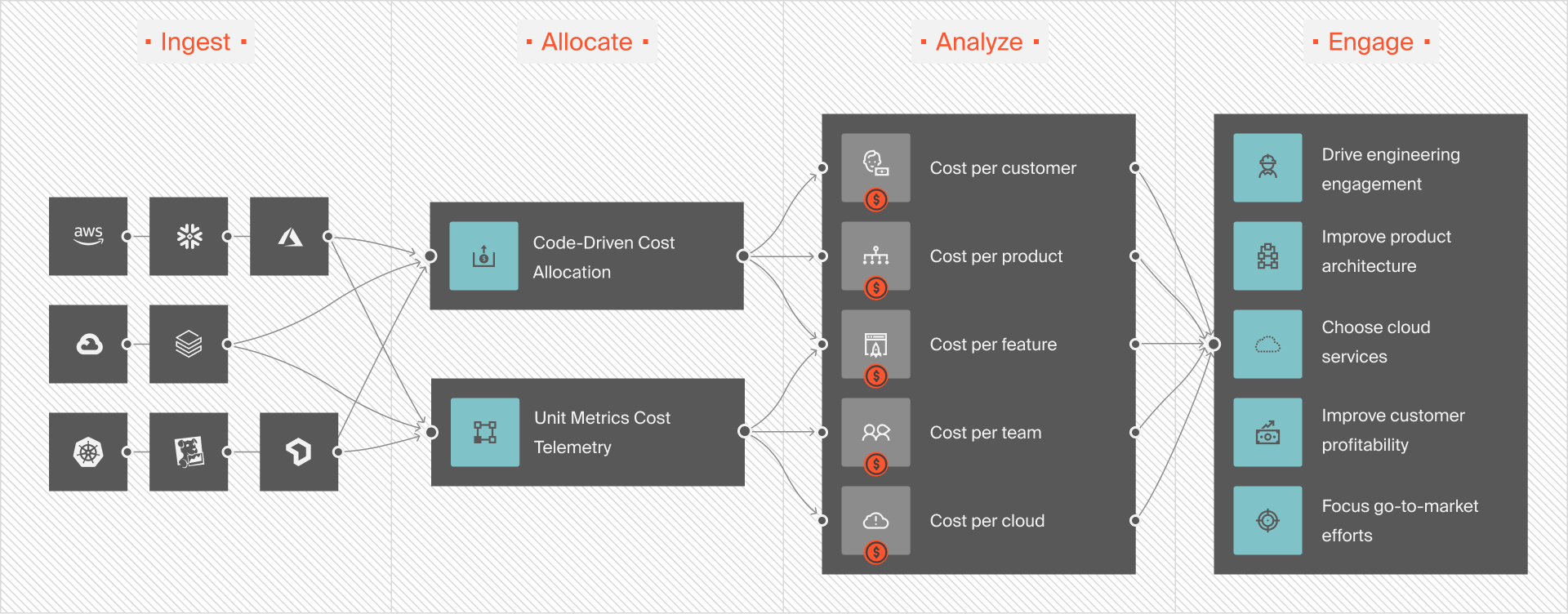
Then you can decide where to move levers to protect your bottom line.
That’s how teams like Toyota, Duolingo, Skyscanner, and Drift (all happy CloudZero customers) stay fast without sacrificing profitability. You don’t need to guess where your App Runner costs are coming from.  and see it for yourself.
Frequently Asked Questions about AWS App Runner











