It’s a fast-paced business world out there. This means artificial intelligence (AI) models that help modern businesses win are more than welcome. The right model can drive innovation, streamline workflows, and save you money.
But OpenAI’s powerful models can have a catch: High-frequency API usage, complex queries, and data processing can lead to unexpectedly high costs. Surprise costs eat up budgets and threaten other critical investments. Not good.
In this guide, we dive into the nitty-gritty of OpenAI pricing and show you how to juggle innovation and costs like a pro. You can then unlock OpenAI’s full potential without breaking the bank.
What Is OpenAI?
OpenAI is a leading Artificial Intelligence (AI) research lab and technology provider. Besides Elon Musk being a co-founder and leaving in 2023, OpenAI is best known for its advanced AI models; GPT (Generative Pre-trained Transformer), DALL-E, Codex, and Sora.
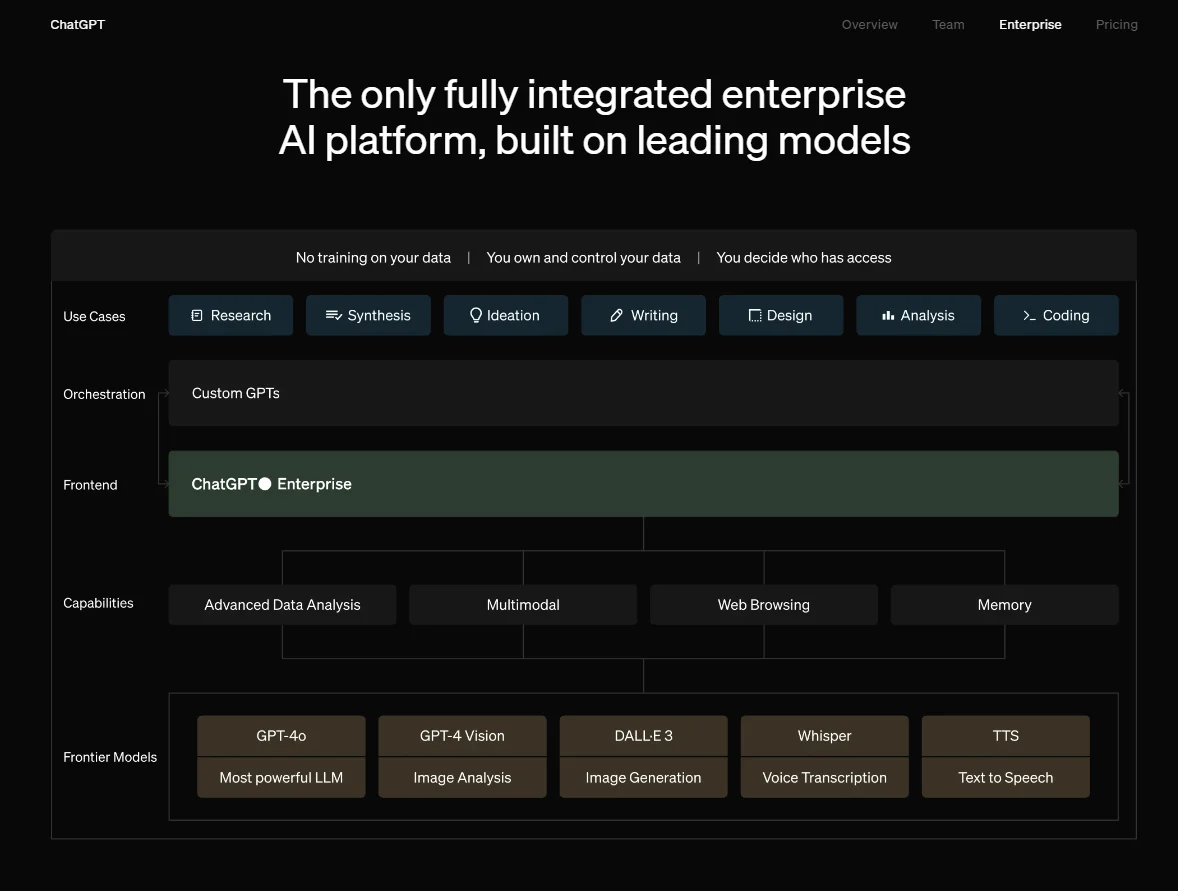
Image: OpenAI features and models
OpenAI services matter because they enable automation, improve productivity, and encourage innovation across diverse use cases.
The platform’s models offer powerful capabilities in natural language processing, code generation, image creation, and data analytics, to mention a few. Here’s a quick visual:
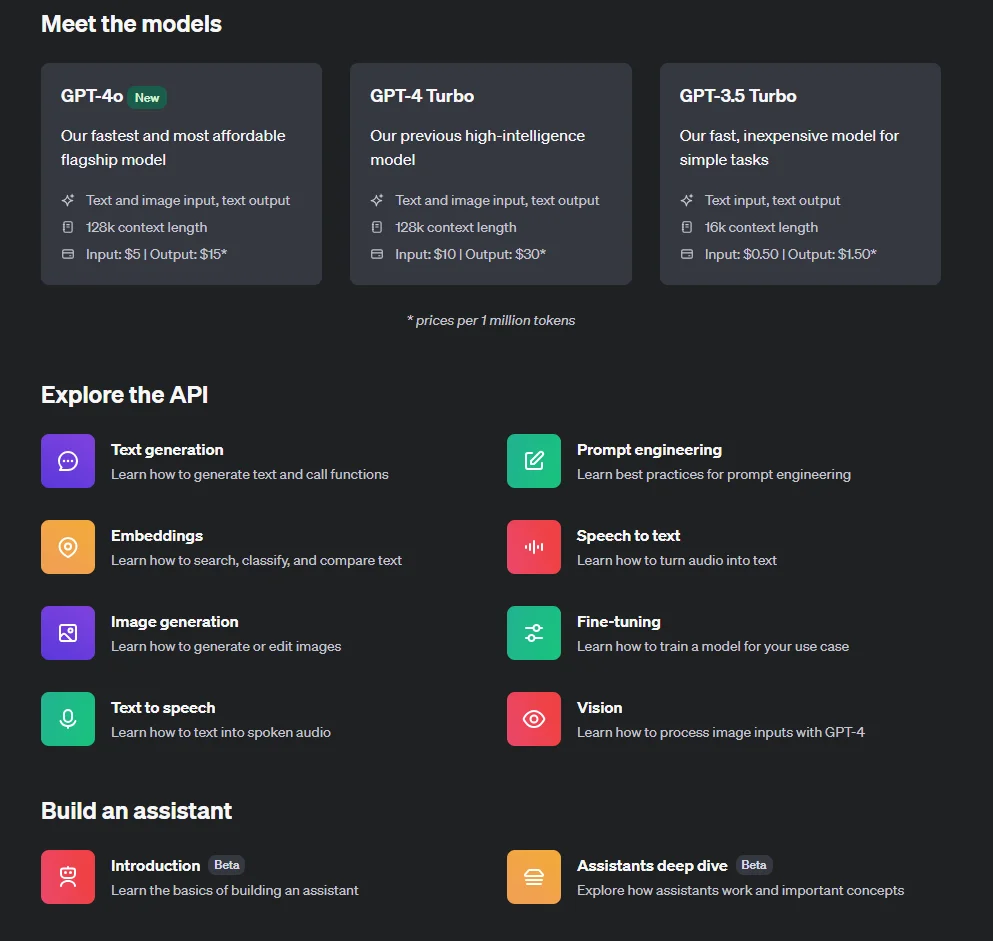
Let’s take a closer look at these tools, concepts, prices, and more.
What do OpenAI services do and why does it matter to businesses?
For context, here are the most relevant OpenAI products for businesses right now.
- GPT is an AI chatbot that generates text and answers to user prompts and questions
Best known as ChatGPT, and now in its GPT4 iteration (ChatGPT-4o), it is an advanced generative AI (Gen AI) that simulates human judgment. For example, it can research, respond, and provide personalized support based on a customer’s support history, purchase history, etc. GPT4 is trained on large data sets to simulate the experience of speaking with and listening to a person.
- DALL-E 2 is an image generation solution that creates custom visuals based on user prompts.
These prompts are descriptive and in text (natural language). Dall-E analyzes them and generates the images as described. For example, “paint a tropical beach at sunset with a dreamy feel to it.” Dall-E is now in its third major release (Dall-E 3).
- Codex is similar to ChatGPT but for code
Billions of lines of code in various programming languages have been trained into it. This enables it to generate accurate, clean code in record time, a boon for developers who want to boost their engineering velocity.
- Whisper is an enterprise-grade, automatic speech recognition and voice transcription tool.
Like the other models here, OpenAI uses tons of audio data to train it to accurately transcribe and translate speech in dozens of languages.
- TTS is built for audio conversions
You can use the model to convert text into realistic sounding audio within seconds. TTS can generate a wide range of voice types, from child to adult, male and female. A few examples of applications can include creating podcasts, training audio, voiceovers, audiobooks, and other audio content.
- OpenAI Gym provides a basis for reinforcement learning
Gym serves as a platform for developing and testing reinforcement learning algorithms. It provides a wide range of pre-built environments and tools that enable developers to build and train AI models that interact with their surroundings, learn from the outcomes of their actions, and improve their decision-making abilities over time.
- Sora provides deep data insights for strategic decision-making across different use cases and industries
For instance, healthcare professionals can use Sora to analyze patient data and identify trends and patterns. This can improve treatment plans and patient outcomes. With Sora, financial professionals can analyze market data and customer behavior to make sound investment calls. Likewise, Sora can provide retailers with valuable insights into consumer buying patterns and preferences, helping them optimize their marketing and sales strategies.
- OpenAI API is the developer platform
The API supports a suite of services for building and deploying AI applications. For example, your developers can use the API to integrate GPT4, DALL-E, Codex, Whisper, and other OpenAI models into your software.
This would help you use natural language processing, image generation, code generation, speech recognition, translation, and reinforcement learning capabilities.
The result: a world of possibilities for creating innovative and intelligent tools across different domains.
Of course, OpenAI is now a for-profit company, which means all these great tools are not free. And, as on other cloud platforms, OpenAI costs can whirl out of control at scale — when not carefully managed.

How OpenAI API Pricing Works
OpenAI’s pricing structure varies across its different services. The pricing model is typically usage-based, meaning costs are directly tied to how much you consume a service.
Here are key cost factors you’ll want to watch out for:
- Usage: Each request to an OpenAI model incurs a fee, so frequent use can quickly add up.
- API calls: The complexity and nature of API calls also affect pricing. More complex queries that require extensive computational resources will be costlier than simpler requests.
- Model type: An advanced model, such as GPT-4o, is more expensive due to its higher computational requirements and capabilities.
- Data processing and storage: Handling large volumes of data, whether for training, fine-tuning, or real-time processing, incurs additional costs. Storage and processing fees can add up as well, especially for businesses dealing with massive datasets.
You pay for OpenAI usage in tokens. The tokens are chunks of text- or image-processing units calculated per 1 million or 1,000 batches. A token is about four characters, while 1,000 tokens amount to about 750 words.
In general, GPT-4o, Codex, and DALL-E 3 have pricing tiers based on the number of API calls made and the complexity of those calls. The more advanced and resource-intensive the model, the higher the cost tends to be per call.
Take GPT-4o pricing, for example.
OpenAI charges $5 per 1 million input requests and $15 per 1 million output tokens for the multimodal GPT. This release is both faster and cheaper than GPT-4 Turbo. It also offers up to an October 2023 knowledge cutoff and more advanced vision capabilities. Vision pricing varies with image dimensions. For example, expect to pay $0.0001275 for a 150 by 150 pixels image.
Check this out:
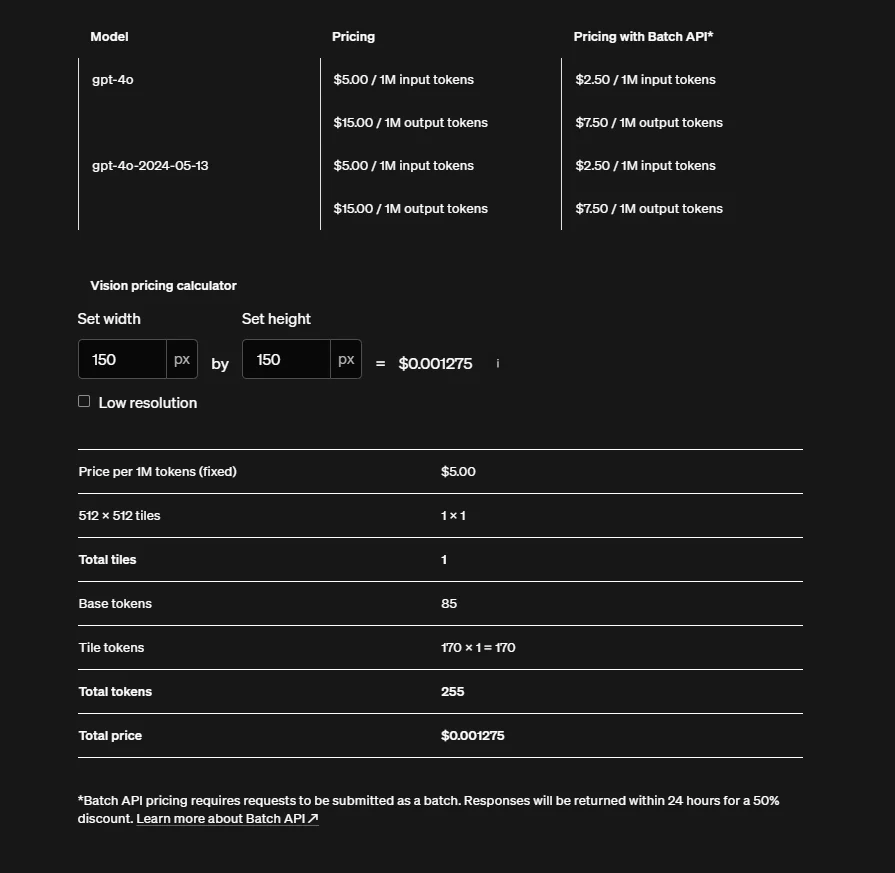
If your needs do not require the latest and greatest GPT model, the GPT-3.5 Turbo will be significantly cheaper. Here’s the comparison:
|
API Name |
Model Release |
Context Window |
Price per 1,000 Tokens |
|
gpt-4o |
GPT-4o |
128,000 |
$0.0050/1,000 input tokens $0.0150/1,000 output tokens |
|
gpt-4-turbo |
GPT-4 Turbo |
128,000 |
$0.0100 input tokens $0.0300 output tokens |
|
gpt-3.5-turbo-0125 |
GPT-3.5 Turbo |
16,000 |
$0.00050 input tokens $0.00150 output tokens |
|
gpt-3.5-turbo-instruct |
GPT-3.5 Instruct |
4,000 |
$0.00150 input tokens $0.00200 output tokens |
|
gpt-3.5-turbo |
Fine-tuning model |
$0.0030 input tokens $0.0060 output tokens $0.0080 training tokens | |
|
davinci-002 |
Fine-tuning model |
$0.0120 input tokens $0.0120 output tokens $0.0060 training tokens | |
|
babbage-002 |
Fine-tuning model |
$0.0120 input tokens $0.0120 input tokens $0.0120 input tokens | |
|
text-embedding-3-small |
Embedding model |
$0.0016 input tokens | |
|
text-embedding-3-large |
Embedding model |
$0.0016 output tokens | |
|
ada v2 |
Embedding model |
$0.0004 training tokens |
Table: OpenAI API pricing for different models, including GPT, fine-tuning, and embedding models.
Pricing for DALL-E 3, the images model, depends on the dimensions and quality of the images. A Standard quality (480p) image with a 1024 x 1024 resolution, for example, costs $0.040.
If you want the same image in HD (720p), you will have to pay twice as much; $0.080 per image.
Meanwhile, a similar-sized low resolution image produced by the older DALL-E 2 costs half as much at $0.020.
Pricing for audio models, such as Whisper and TTS, is based on usage in minutes or characters. Using Whisper costs $0.006 per minute (rounded off to the nearest second). Text To Speech (TTS) costs $0.015 per 1,000 characters (or $15 per 1 million characters) while TTD HD costs $0.015 per 1,000 tokens (or $30 per 1 million characters).
14 OpenAI Cost Optimization Tactics To Lower Costs Without Sacrificing Quality
You can reduce unnecessary OpenAI costs using a variety of cost optimization tactics. Examples here include optimizing the model architecture, reducing training time, and reducing memory usage.
Besides, OpenAI provides free tools that can help identify and address costly errors. Absolutely use them. That said, here are more ways to practically optimize OpenAI API costs without compromising quality output.
1. Take advantage of OpenAI Playground to fine-tune your needs
The OpenAI Playground is a web-based interface that lets users interact with OpenAI’s language models, such as GPT-4o, without writing code. Playground’s customization options include adjusting temperature and frequency to fine-tune responses.
The tool is designed to provide developers, researchers, and AI enthusiasts with the opportunity to explore the capabilities of these models as well as develop new applications.
Playground is free to use, but it does consume API credits. These credits are billed at the same rate as the OpenAI API. It enables you to test different prompts and gauge the model’s responses.
The downside is Playground does not provide a way to estimate the cost of a test before submitting it. But you can use external calculators, such as BotPenguin. It is primarily intended for exploration and experimentation. However, it is not a free or unlimited resource. You’ll need to pay for the tokens consumed during the tests.
The upside is you can test how many tokens you need for particular prompts or tasks, fine-tune them for cost savings, and create a selection of optimized prompts for the future.
2. Use older OpenAI models for simpler tasks
By testing each model’s capabilities against your needs, you’ll know which tasks require the most power and which ones will do fine with an older model. As you can see below, you can save quite a bit of money.
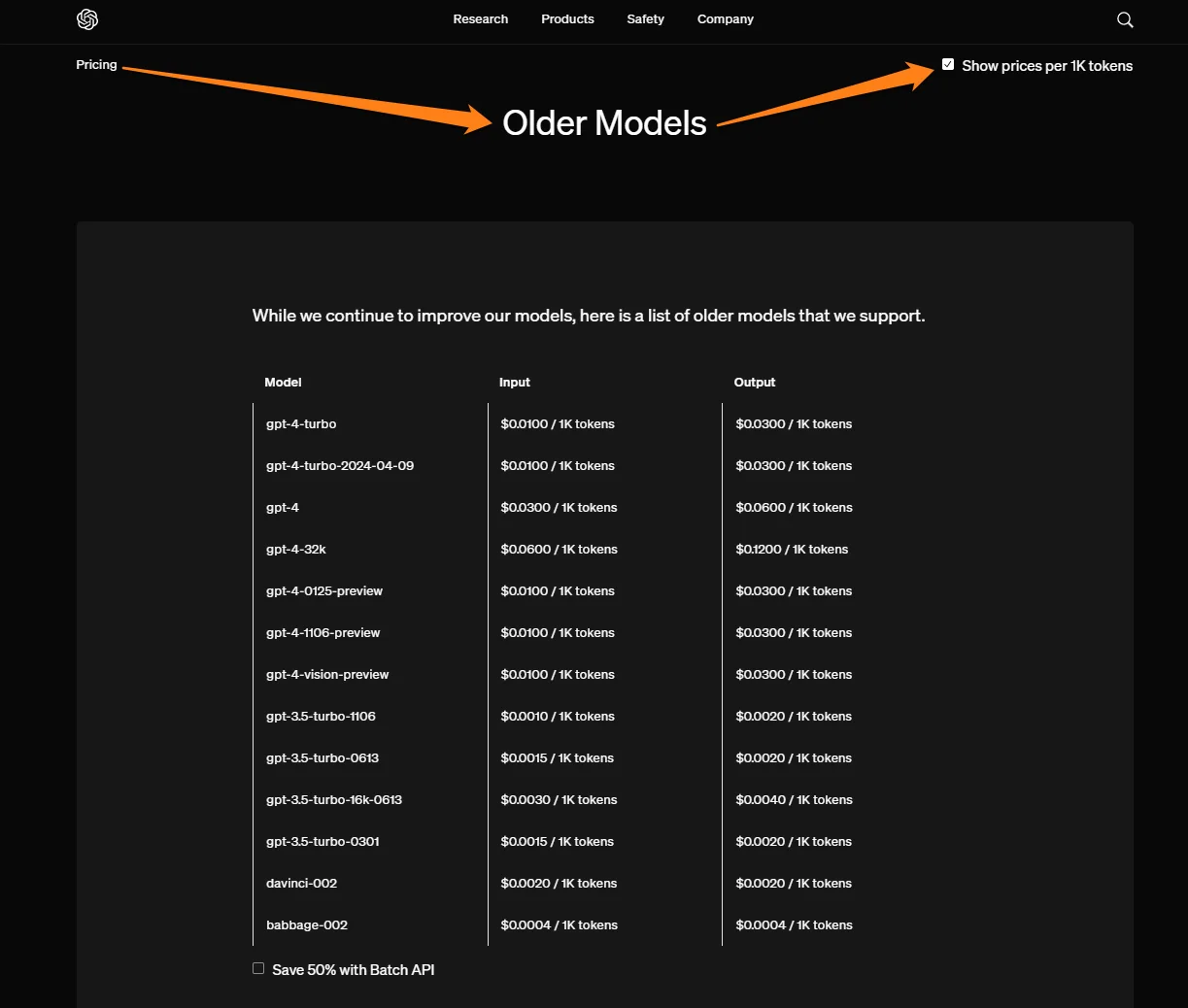
GPT-4 Turbo, for example, is still more expensive than GPT-4o, the latest model. So, do take your time to consider your best options.
In addition, OpenAI recommends exploring alternative options, such as using a cheaper TTS or TTD HD service for image generation. You can also consider alternative pricing models, such as a monthly or annual subscription.
3. Use batch tokens to save up to 50%
The OpenAI Batch API lets you send asynchronous groups of requests. Call it request grouping. The batch API is ideal for use cases where requests do not need quick responses.
It is also suitable where rate limits stop you from executing many queries as quickly as you want. The API offers an additional pool of significantly higher rate limits and a clearly defined 24-hour turnaround time.
Ultimately, it costs half the standard costs. For example, while standard GPT-4o costs $0.0150 per 1,000 output tokens, using the batch API will cost $0.0075 per 1,000 output tokens.
4. Keep an eye out for high-frequency API usage
Frequent API calls, especially in high-demand applications like customer support or real-time data analysis, can quickly increase costs. Ensure you are monitoring and managing the API usage to avoid surprise expenses.
5. Create more precise prompts with Prompt Engineering
Prompt engineering is about honing the skill of using the least amount of tokens to complete the job at high quality.
Remember that OpenAI pricing is based on usage, such as the number of characters and minutes per request. You get a lower prompt price (input) the fewer characters you use, and the same applies to generation prices (output).
Here are several ways to do that:
- Keep queries simple. Examples include removing words like “please”.
- Remove punctuation where possible. It counts as a character, depleting your token bank.
- Add phrases such as “be concise” to your prompt for more brevity.
- Use rephrasing and sentence-shortening tools such as Wordtune or Grammarly to minimize content without losing intent or meaning.
- Adjust queries or models based on performance and costs.
- Use the CSV format over JSON. CSV has fewer repetitive characters, reducing token usage.
As you’ve noticed by now, experimenting and adjusting based on results is a key part of prompt engineering.
6. Set the temperature parameter to 0
This is ideal when you expect structured responses like JSON to prevent unpredictable outputs. Rather than exploring more creative or unexpected options, the model sticks to the most likely completions.
This approach reduces output randomness and diversity. Responses come out more focused and conservative.
Temperature 0 works great where consistent and reliable responses are required, such as translating languages or summarizing text. It is not as suitable for more open-ended tasks that require imaginative responses, such as chatbots and creative writing.
7. Optimize code to improve performance and reduce latency
Trim unnecessary data to reduce JSON size. Cut out any redundant information. Format your JSON for conciseness and clarity. As a result, you’ll transmit less data and streamline API processing at the endpoints.
For example, where possible, you can remove extraneous whitespace, combine JSON objects, and use JSON arrays instead of lists. Instead of sending an array of 3 elements, you can combine them into a single JSON object, such as {“keys”: [“1”, “2”, “3”]}.
8. Minimize data processing and storage requirement
Storing and processing large datasets can be expensive. Consider strategies to minimize unnecessary data storage and optimize data processing workflows to keep your OpenAI costs under control. Again, experimentation is your friend here.
9. Implement rate limits and usage caps
This means defining the maximum number of API calls allowed within a specific period. Rate limiting ensures your usage stays within budgeted limits and prevents unexpected cost spikes due to high-frequency requests. You can configure usage caps to stop or throttle API use once a predefined threshold is reached.
10. Use caching to reduce redundant API calls
Caching in OpenAI involves storing the results of previous API calls and reusing them when the same query is made again. This works well when you have frequent or repeated requests. By minimizing subsequent API calls, you can reduce computational costs, improving overall performance and cost balance.
11. Use model optimization and pruning techniques
Model optimization and pruning involve reducing the size and complexity of models while maintaining their effectiveness. Techniques such as quantization, where model precision is reduced, or pruning, where unnecessary neurons or parameters are removed, can reduce precious resource usage. Of course, you’ll want to do this only where possible.
12. Optimize vector store for file management
Check out the new “vector_store” object by the Assistants API. It simplifies file management and billing by letting you add files to a vector store and automatically parse, chunk, and embed them for file search. This object enables you to easily manage hundreds of thousands of files with a fraction of the effort. It also simplifies the billing process, making it easier to keep track of how much you have used.
13. Take full advantage of OpenAI’s cost management tools
The following cost optimization tools for OpenAI provide insights, automation, and control mechanisms to keep your expenses in check.
Start by exploring and using OpenAI’s built-in cost management features.
- Usage dashboards: These display real-time data for your token usage, including usage patterns per day and the past month’s billing details. Also included are details such as credit grants and usage costs by team and project. Consider this:
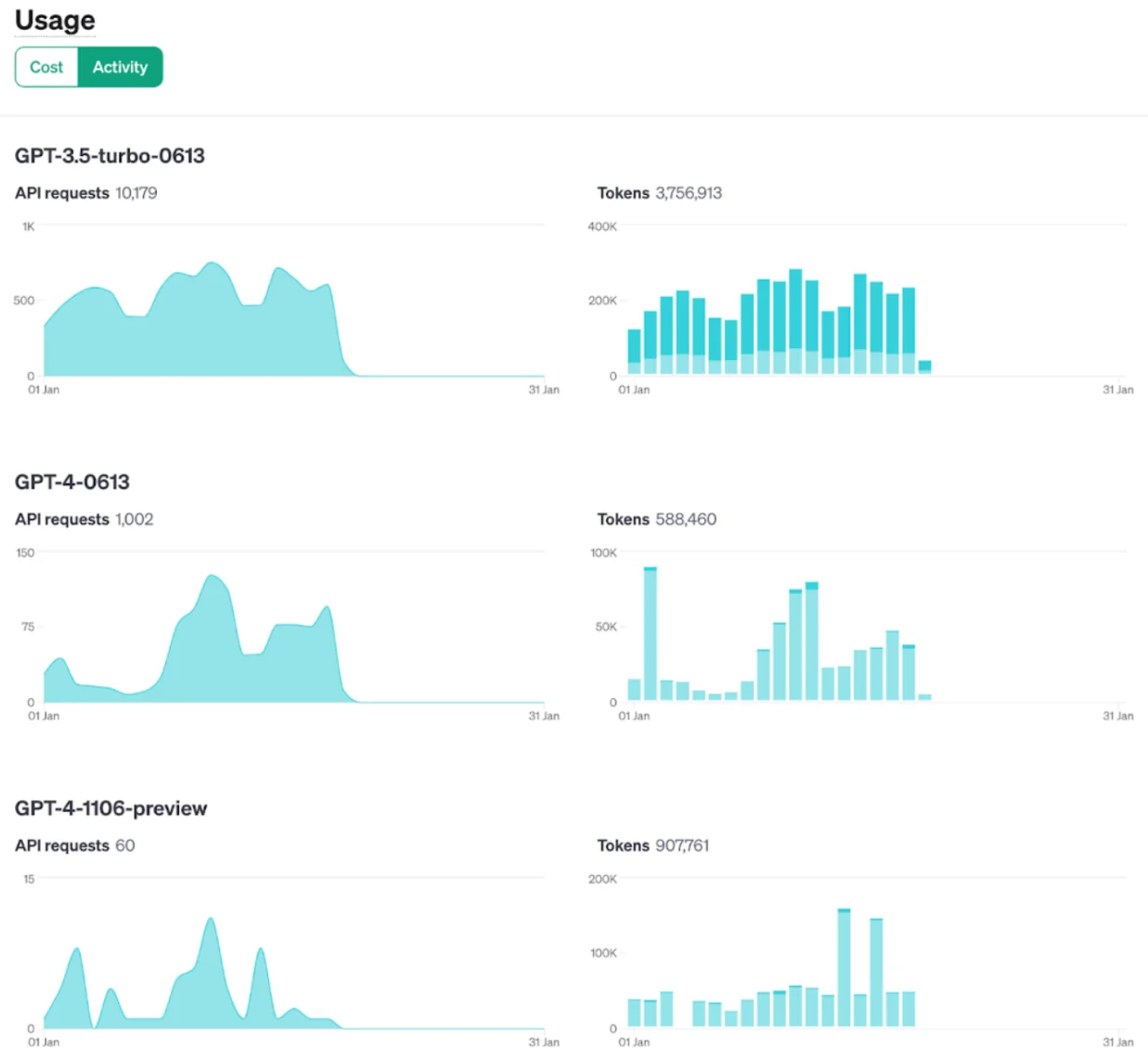
- Usage limits and quotas: Define your maximum usage thresholds to prevent cost overruns.
- Cost estimates and forecasts: You can also estimate and forecast costs based on current usage patterns.
- The Assistants API now includes a “tool_choice” parameter that will let you pick a specific tool (e.g., “file_search”, “code_interpreter”, or “function”) for a particular run. This provides more flexibility in controlling resource use and related costs.
14. Monitor, analyze, and optimize OpenAI costs with the best cost optimization tools
As with most native tools, OpenAI’s cost tools have some limitations. This is especially apparent to users who want more granular details beyond the usual suspects, such as totals, average, daily, and monthly costs.
A better approach would be to get cost insights that are more readily actionable, such as Cost per Customer, Cost per Daily User, Cost per Feature, and Cost per Request. Consider this:
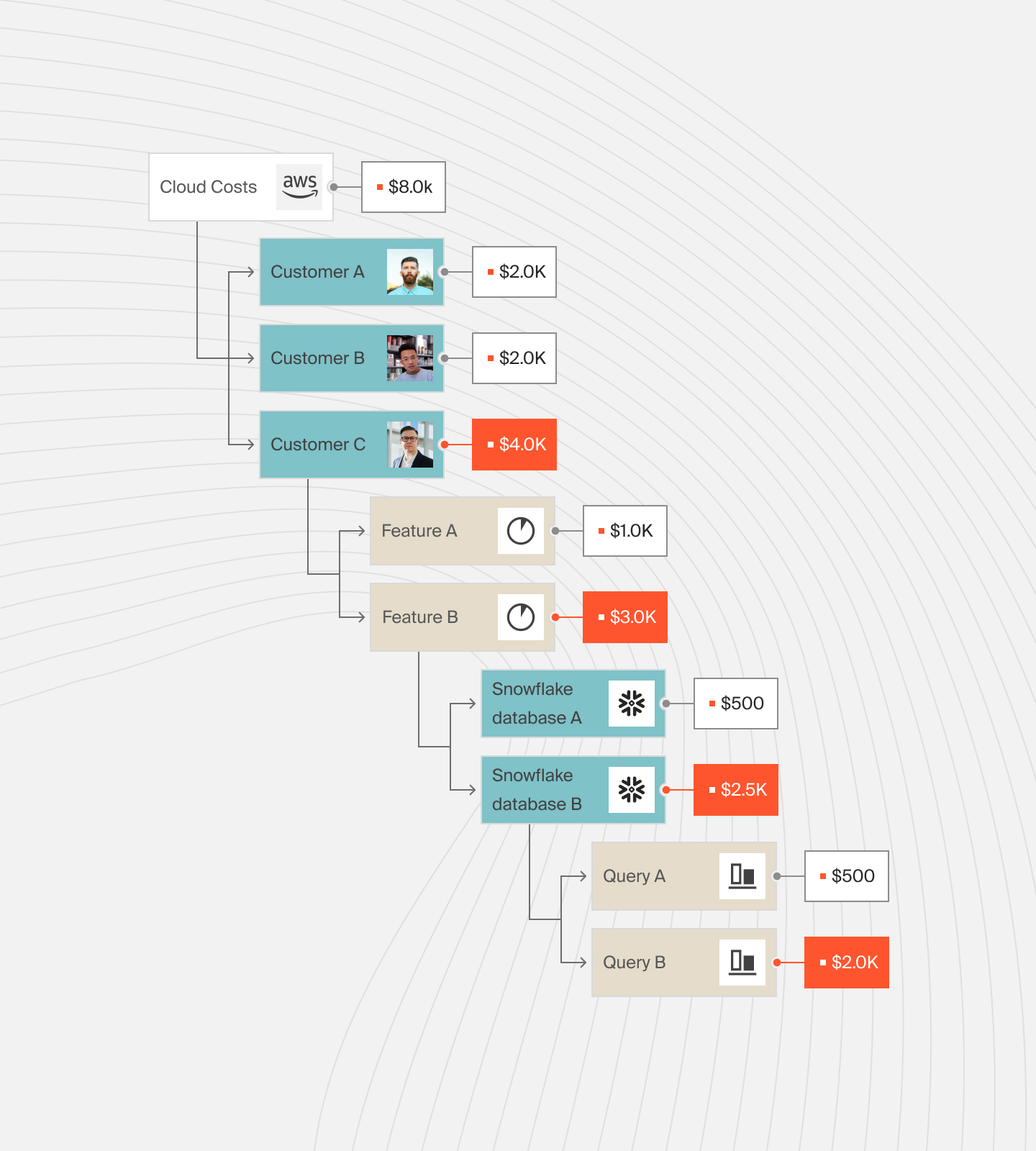
It is also critical to find a cost optimization platform that maps these costs to the specifics of your business, such as the people, products, and processes driving the AI usage.
Yet, the majority of cloud cost tools don’t provide this level of insight. So, where do you go from here?
How To Manage, Control, And Optimize Cloud Costs The Smarter Way
The more specific your OpenAI spend is, the easier it is to understand where your money is going. You can determine exactly who, what, and why your OpenAI costs are changing.
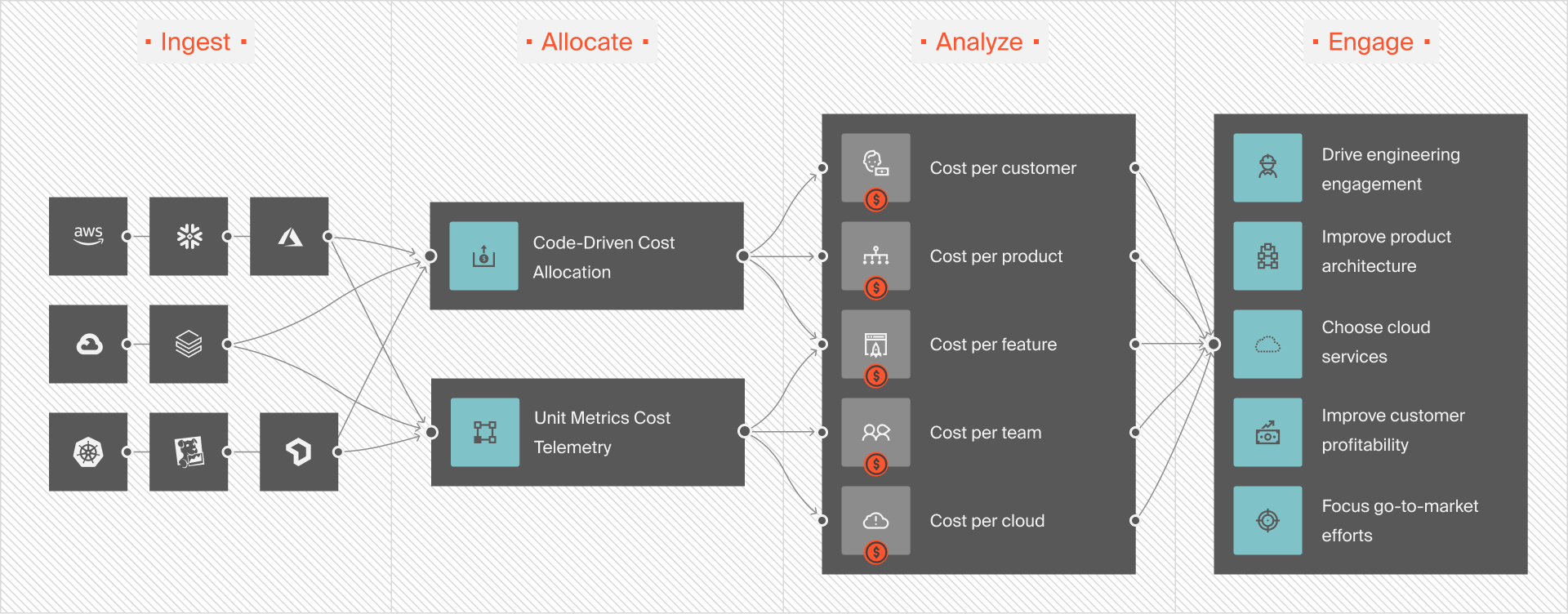
This hourly granularity makes it easier to figure out where to cut usage without sacrificing quality or performance.
With CloudZero, you get all that and more. Additionally, CloudZero detects abnormal cost trends in real-time. And by sending context-rich, noise-free alerts, CloudZero enables you to pinpoint and fix issues to prevent overspending.
This Cloud Cost Intelligence approach works. With CloudZero, Upstart saved $20 million in recent months. Shutterstock, Drift, and Remitly also use CloudZero to understand and optimize their tech costs — without hurting performance, engineering velocity, or user experience. And yes, trying CloudZero is risk-free (and, we’ve been told, fun).  (and see why CloudZero pays for itself within 3 months and saves 22% on average in the first year).


The Cloud Cost Playbook
The step-by-step guide to cost maturity