
01 Introduction
AI isn’t just changing the game; it’s reshaping the playing field. But behind the breakthroughs, there’s a growing reality unfolding: spiraling IT costs, murky ROI, and engineering teams left guessing which workloads are worth the spend.
At first, it was fine. AI was an R&D experiment. A handful of GPU-powered proof-of-concepts. But now, it’s critical infrastructure behind customer-facing features, recommendation engines, fraud detection models, and entire product roadmaps. With that shift comes a hard question every CTO, CFO, and engineering leader has to answer:
How do we scale AI without blowing our budget?
That’s where FinOps comes in.
FinOps, the operating model for cloud financial management, helps you align engineering, finance, and business teams around a common goal: maximizing the value of every AI dollar spent.
Yet, AI isn’t just another workload in the system. It’s bursty. It’s experimental. It’s compute-intensive. And it’s notoriously hard to track.
This playbook will guide you through applying FinOps principles in an AI-first world.
You’ll learn how to:
- Expose hidden costs in your AI pipeline
- Forecast and model AI spend like a business unit
- Apply real-time cost intelligence across training, inference, and deployment
- Track ROI at the feature and team level
- Build a culture of responsible, scalable AI innovation
Your AI tools don’t have to be a cost black hole. With the right strategy, visibility, and culture, they can be your most powerful (and profitable) competitive advantage.
02 The High Cost Of Low AI Cost Visibility
AI is expensive, but the bigger problem is uncertainty. Consider what we found in our State of Cloud Cost Report:
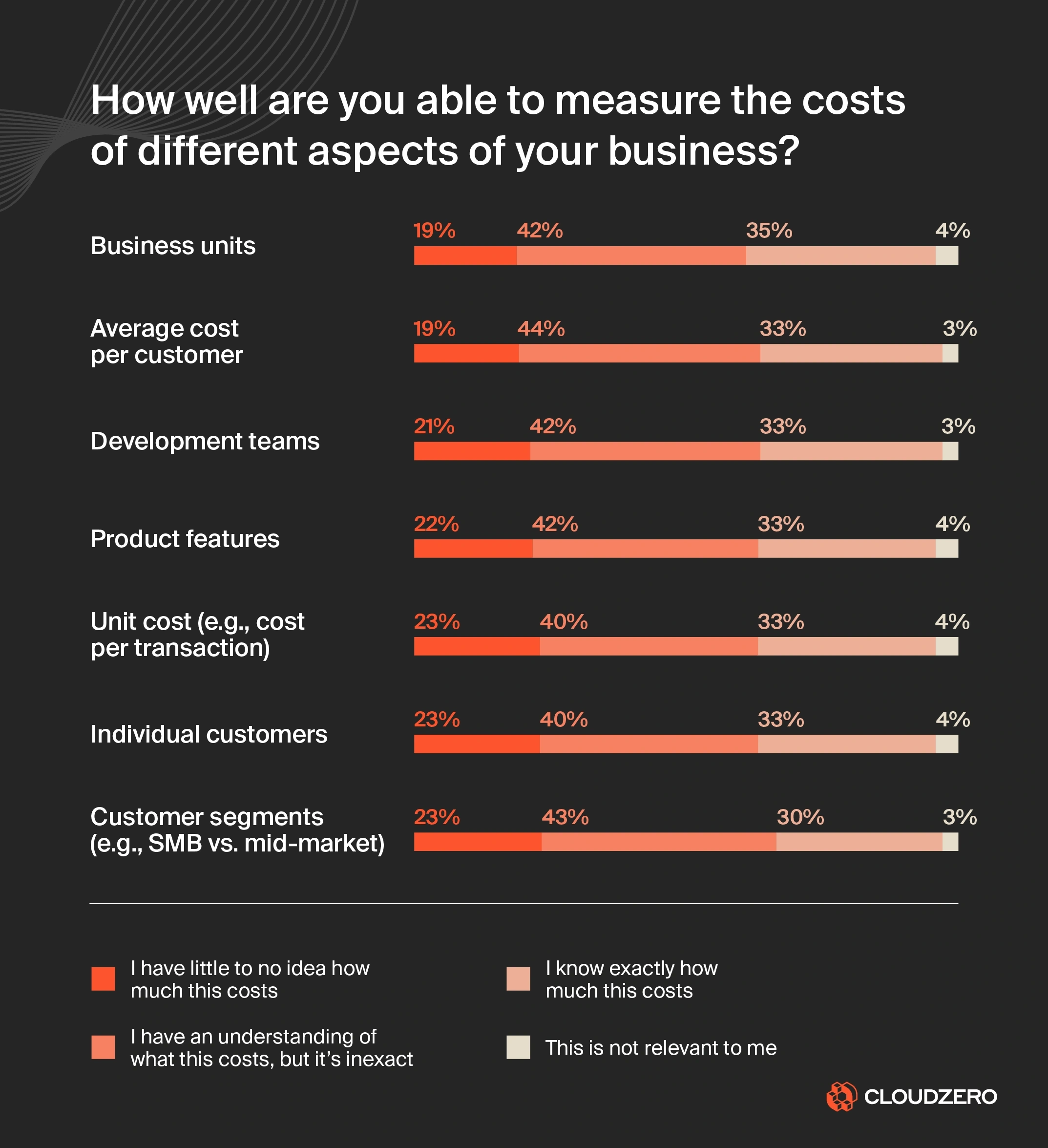
When engineering teams can’t see what’s driving their AI costs, waste becomes the default:
- GPU clusters run idle for days.
- Inference models stay “always on,” even when usage drops.
- Training workloads hog compute across multiple regions.
- Shadow projects rack up thousands before they are ever reviewed.
You end up paying for speed and scale, but get runaway costs and little visibility into value.
Why AI workloads amplify cost complexity
Traditional cloud applications have a fairly predictable cost profile. AI doesn’t.
Here’s why:
AI Cost Driver
What Makes It Risky
GPUs for training and inference
Expensive by default; easily left idle between model runs or over-provisioned for peak loads
Inference endpoints
Often run “always on,” even when requests are sporadic
Burst training jobs
Can spike costs by 10x+ in minutes if autoscaling kicks in without guardrails
Multi-region model training
Duplicated costs when syncing model weights and datasets across regions for redundancy or compliance
Data pipelines for AI workloads
Hidden costs from high-volume ETL, feature engineering, and streaming data for real-time inference
Auto-scaling misconfigurations
Over-aggressive scaling of inference pods or training clusters can burn thousands in hours
AI isn’t just expensive — it’s also scaling fast, and most organizations are flying blind when it comes to understanding the return.
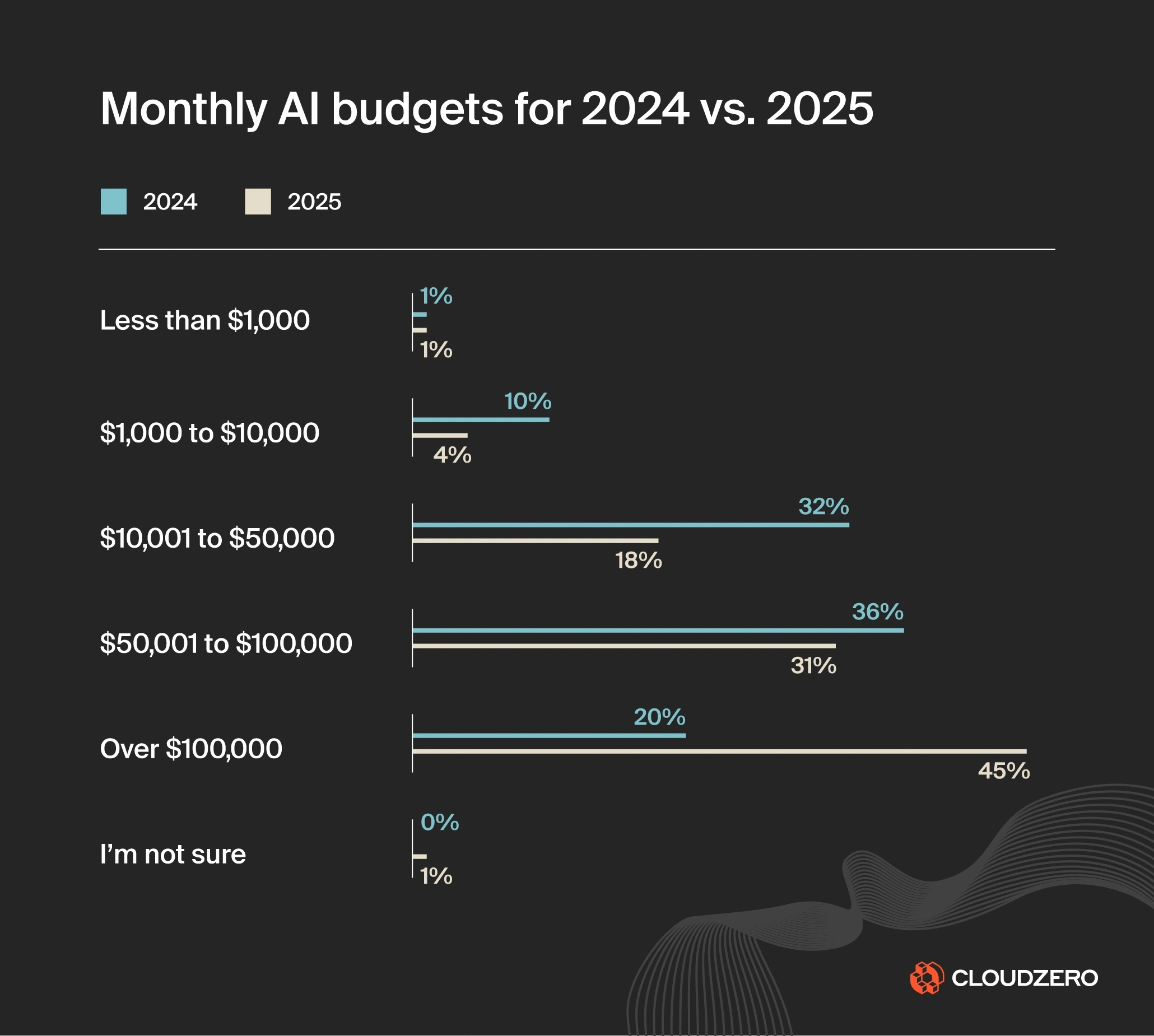
According to CloudZero’s latest State of AI Cost report:
- Average monthly AI budgets are expected to rise 36% in 2025, reaching $85,521 per month. This reflects a shift toward larger, more complex, mission-critical AI initiatives. You can see that shift clearly in the chart above. The share of companies spending over $100,000 per month jumps from 20% to 45%, while all smaller budget brackets shrink year over year.
- 45% of companies plan to spend $100,000 or more per month on AI workloads. The pressure is on to make those investments count, not disappear into GPU waste, idle agents, or experimentation with no impact.
- ROI measurement is still a mystery. Just 51% of organizations say they can confidently evaluate the ROI of their AI costs. It’s still difficult to isolate AI’s business impact from other cloud investments, making cost-to-value analysis harder than it should be.
In short, AI cost sprawl is here, and visibility hasn’t caught up.
But the financial impact of AI blind spots goes far beyond your cloud bill. It also affects:
- Velocity: Engineers slow down innovation when unsure of infrastructure consequences.
- Finance alignment: Forecasting becomes impossible without usage context.
- Unit economics: It becomes tougher to improve what you can’t measure.
- Profitability: Monetizing AI becomes more challenging when cost-to-value ratios are unknown.
However, it’s not all doom and gloom. Using a thorough, proven AI cost optimization platform can help you answer foundational questions such as:
- Which models are burning the most compute?
- Who is responsible for this GPU usage spike?
- What’s the cost per AI feature, team, or customer?
Because when you can see what’s going on and pinpoint who and what’s causing it, you can better protect your bottom line.
03 Planning Strategically For AI Costs
In the early days of adopting AI, costs are often treated like an R&D wildcard: unpredictable, experimental, and hard to justify. Engineers spin up GPU clusters, run training jobs around the clock, and explore new models without knowing which ones will stick.
And that works, until it doesn’t.
As organizations scale AI initiatives, that ad hoc approach becomes a financial risk. What began as “let’s try this” quickly turns into “why are we spending $85,000 a month and can’t explain half of it?”
It’s time to shift the mindset and treat AI costs as a strategic priority.
To build sustainable AI systems, you’ll want to move from reactive cost-cutting to strategic cost planning. How?
Treat AI as a business unit
That means managing AI not as a science project, but as a business function with measurable costs, timelines, and outcomes, just as you would for a product team or revenue center.
It means:
- Allocating budgets to AI projects based on business potential.
- Forecasting AI infrastructure needs across lifecycle phases (training, inference, fine-tuning, deployment).
- Defining success metrics beyond “it runs.” Think of speed to market, customer engagement, or revenue contribution.
You want AI success that goes beyond just “innovation” and is more about responsible, sustainable growth.
This shift in mindset requires:
- Clear ownership: Who is accountable for the financial performance of an AI workload or model?
- Defined success criteria: How will you know if an AI feature is worth what it costs to build and run?
- Timely review: Are you reevaluating infrastructure needs after models move to production?
When you treat AI as a core product capability (not an open-ended experiment), your teams can begin to tie spend to value.
Here are practical tips to apply right away.
Break AI costs into lifecycle phases
Planning for AI cost starts with understanding that its lifecycle differs from traditional applications. You don’t want to treat it like a web app that just runs continuously.
Most AI projects move through three main cost stages:
Phase
Cost Behavior
Strategic Planning Tip
Training
Spiky, GPU-heavy, and often runs in parallel jobs
Timebox experiments; use reserved/spot capacity where possible
Inference
Ongoing but bursty; tied to user or system interactions
Use auto-scaling and right-size for traffic patterns
Monitoring
Continuous logging, drift detection, and retraining
Budget for observability and compliance as long-term cost elements
When you budget without distinguishing between these phases, you risk over-allocating to what’s already complete or under-provisioning what’s actively scaling.
The cost of under-planning: Consider this common scenario
Let’s say your team builds a generative AI model to summarize customer support tickets. After training and testing, you deploy it. But no one forecasts the expected request volume.
Within a week, the model starts handling 1,500 support summaries per day, spiking inference costs by 10X. Engineers scramble to optimize. Finance flags the overages. And the feature’s value becomes questionable just as it goes live.
This is what happens when AI isn’t planned like a product.
Make AI forecastable with simple models
You don’t need to build a machine learning model to predict your AI costs. You just need a few simple inputs:
- Infrastructure variables: Type of GPU/instance, number of training epochs, dataset size
- Usage projections: Expected inference calls per user, per day
- Deployment scale: Will this run in one region or five?
Then, use historical data to forecast:
- Training cost per model
- Inference cost per 1,000 users
- Expected burn rate during early experimentation
The key is to model AI spend before workloads hit production, not after.
Go from chaos to control: Use tagging as a strategic asset
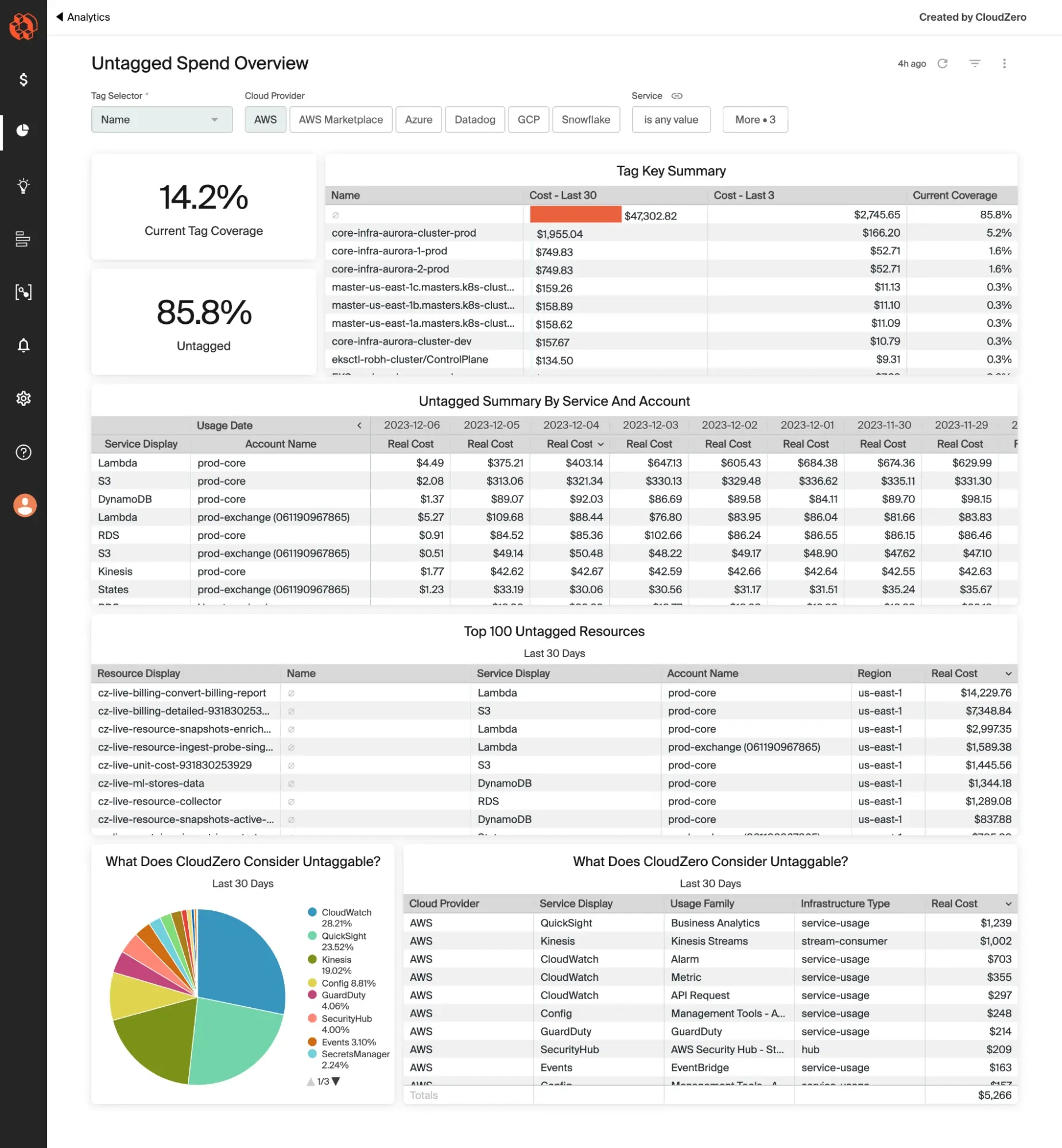
To build these forecasts, you’ll need visibility in droves. That starts with tagging — good tagging.
Tagging resources by model, team, environment, and feature is how you do that. The sooner you implement consistent tags across your AI workloads, the sooner you can:
- Track spend by initiative
- Compare costs across teams or features
- Forecast future needs based on accurate historical patterns
Here’s the thing. As we’ve said many times on our blog, you don’t need perfect tags. But you do need a way to prevent imperfect tagging from derailing your cloud cost visibility.
That’s where platforms like CloudZero come in, helping you transform tags into dimensions you can filter, analyze, and forecast against. Better still, you can capture and allocate tagged, untagged, and untaggable costs to prevent blind spots.
Allocate based on strategic priority
Not every AI initiative deserves unlimited runway. One of the most powerful planning levers you have is to ask, “What’s the cost-to-value ratio for this?”
You can do this using a simple prioritization framework:
Infra Cost
Business Value
Action
High
High
Monitor closely, fund with defined guardrails
High
Low
Sandbox only or postpone
Low
High
Prioritize for full deployment
Low
Low
Kill or consolidate
This framework ensures your AI investments deliver measurable impact — not just absorb resources.
04 Taking A FinOps Approach To AI Workloads
As AI scales, infrastructure costs and financial unknowns grow with it. AI doesn’t behave like traditional cloud workloads, so traditional cloud cost management often falls short.
Here’s what we mean.
Why traditional FinOps isn’t enough for AI
Classic FinOps focuses on areas like reserved instance planning, tagging hygiene, and usage-based allocation. These still matter.
But AI introduces three additional challenges:
- Training costs are nonlinear. You can’t always predict when a model will converge or how many experiments it’ll take. Model training can be resource-intensive, often requiring powerful GPUs over extended periods. Costs can escalate rapidly without proper oversight.
- Inference is unpredictable. Usage may spike without warning, driven by app behavior or user growth. These sudden spikes in demand necessitate rapid scaling of resources, which can lead to unexpected spending.
- AI spans teams and clouds. beyond “it runs.” Think of speed to market, customer engagement, or revenue contribution.
You need to adapt FinOps to AI’s unpredictable and high-intensity cost patterns.
How to adapt FinOps principles to AI workloads
FinOps is built on three core phases: Inform, Optimize, and Operate. These were originally designed for general cloud workloads. They’re now more relevant than ever in the context of AI.
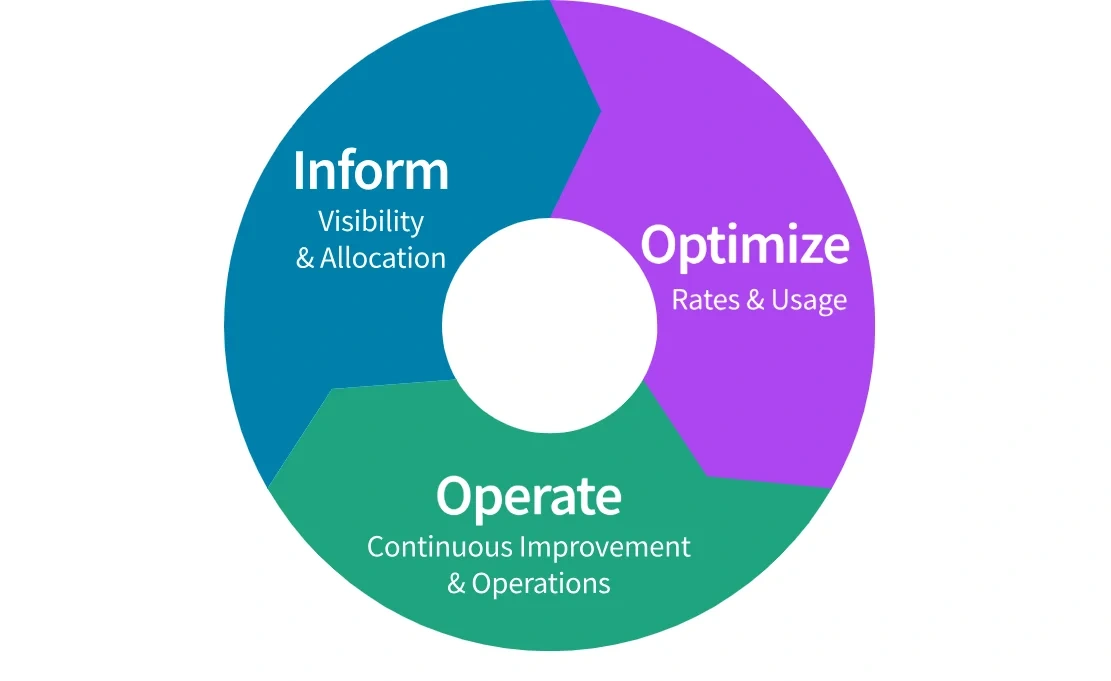
Here’s how to use the FinOps approach to govern your AI usage and costs:
Inform: Know what you’re spending on and why
In the AI context, the “Inform” phase means gaining real-time visibility into every dimension of your workload costs. That includes knowing how much you’re spending on training vs. inference, which teams are consuming the most GPU hours, and which AI features are driving persistent compute usage.
You need granular visibility — not just into total spend, but the cost per model, experiment, and environment. Only then can engineering and finance speak the same language to prevent runaway costs.
Optimize: Make smart, continuous improvements
Once you have visibility, you can optimize. That doesn’t mean cutting corners. It means reducing waste and fine-tuning performance.
That could include right-sizing training jobs, using spot or reserved instances for non-urgent workloads, or auto-scaling inference services to meet demand without overcommitting. It might also mean shutting down low-impact models that no longer justify their infrastructure footprint.
Operate: Manage AI like a financial product
The “Operate” phase is where FinOps becomes cultural. AI cost control can’t be a one-time effort. You want it to become part of how you run AI workloads at scale.
That means setting cost goals tied to model ROI, automating anomaly alerts, and reviewing AI spend regularly as part of sprint cycles or product roadmaps.
When engineering, finance, and product teams align on what success looks like from both a performance and cost perspective, AI becomes a sustainable business capability, not a runaway line item.
To manage these complexities, consider the following five adaptations:
1. Better cost visibility
Implement granular tagging and labeling of AI resources to track costs accurately. Start by project, model, team, and environment.
This level of visibility allows teams to allocate costs precisely and spot the drivers behind spend. And when you can identify what’s driving your bill, it’s easier to answer the big three questions: Who’s spending, on what, and why?
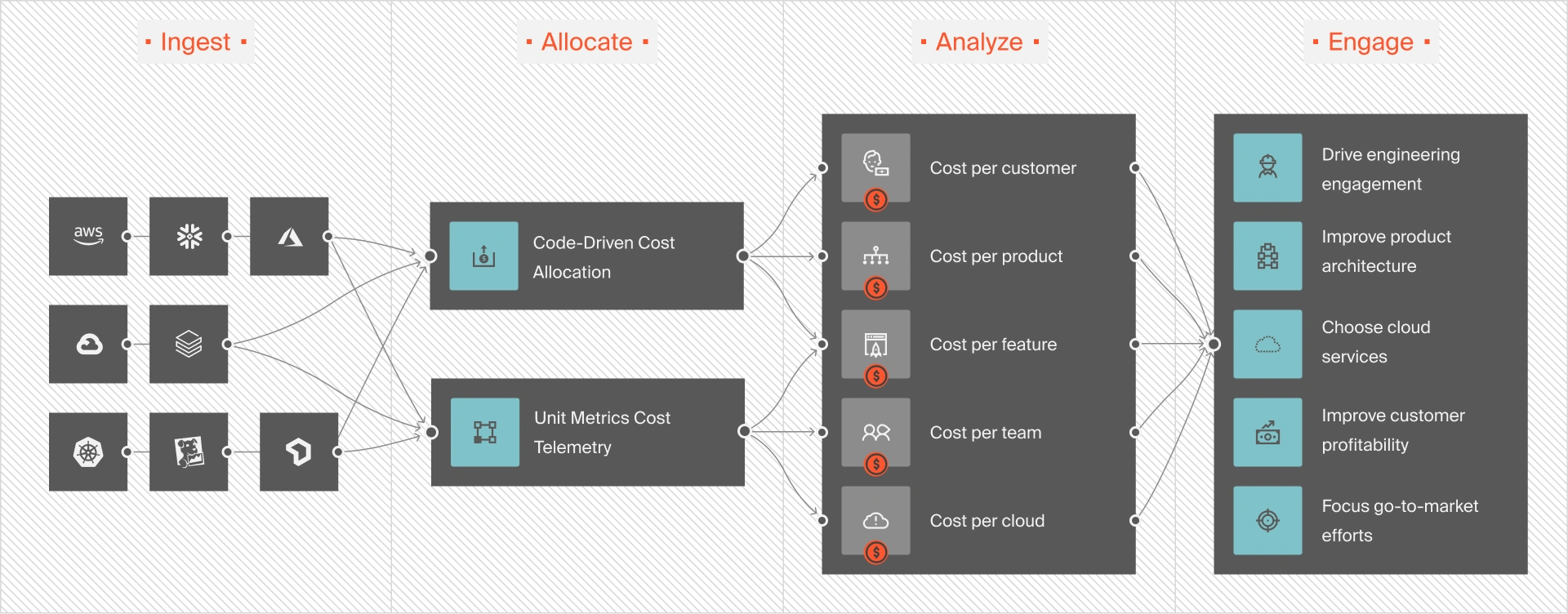
More importantly, you can zero in on unnecessary drivers and eliminate them to prevent waste. It also means cutting costs without compromising performance, innovation, or engineering velocity.
2. Real-time monitoring and alerts
This is about detecting cost spikes and usage drift as they start to happen, so you can respond before they spiral.
Here’s how to do it:
Monitor key AI-specific metrics
You need visibility into metrics that reflect AI workload behavior, such as:
- GPU utilization by model or team
- Inference request rate and response latency
- Training job duration and cost per run
- Idle time on GPU-enabled nodes
- Storage or data egress related to model training datasets
These metrics tell the real story behind cost, especially when layered with business context like feature usage or customer tier.
Set up threshold-based and anomaly alerts
Set both:
- Threshold-based alerts, such as “GPU spend exceeds $2,000 in 24 hours,” and
- Anomaly-based alerts that use historical baselines. An example here is “Model X’s training cost jumped 300% from its typical run.”
This dual approach can help you catch predictable overages and subtle anomalies caused by bugs, configuration drift, or shadow experimentation.
Tie alerts to ownership
AI cost alerts are only useful if they reach the right people in time to act. Tie these alerts to specific model owners or teams, not just a shared inbox. Better yet, integrate them into your engineering workflow. Think of Slack channels, Jira tickets, or CI/CD pipelines to ensure quick resolution.
Use alerting to guide iteration
Alerts are signals, not just for registering a disaster, but also for informing better design decisions. If an alert shows that inference costs double at certain traffic levels, that’s an opportunity to revisit model architecture, quantization strategies, or edge offloading.
3. Collaborative budgeting and forecasting
Bring engineering, finance, and operations together around shared, data-informed models.
Use real workload data, clear business context, and agreed-upon planning frameworks. This ensures forecasting becomes your strategic asset.
Here’s how:
Use historical data to anchor forecasts.
Start with what you know:
- How much did the last training cycle cost?
- What was the GPU-hour burn per experiment?
- What’s the average cost per 1,000 inference requests?
This historical baseline enables your teams to model future workloads more realistically.
For example, if fine-tuning a foundation model takes 72 hours on an A100 instance, and your pipeline includes five fine-tuning stages per quarter, you can forecast those infrastructure needs with precision.
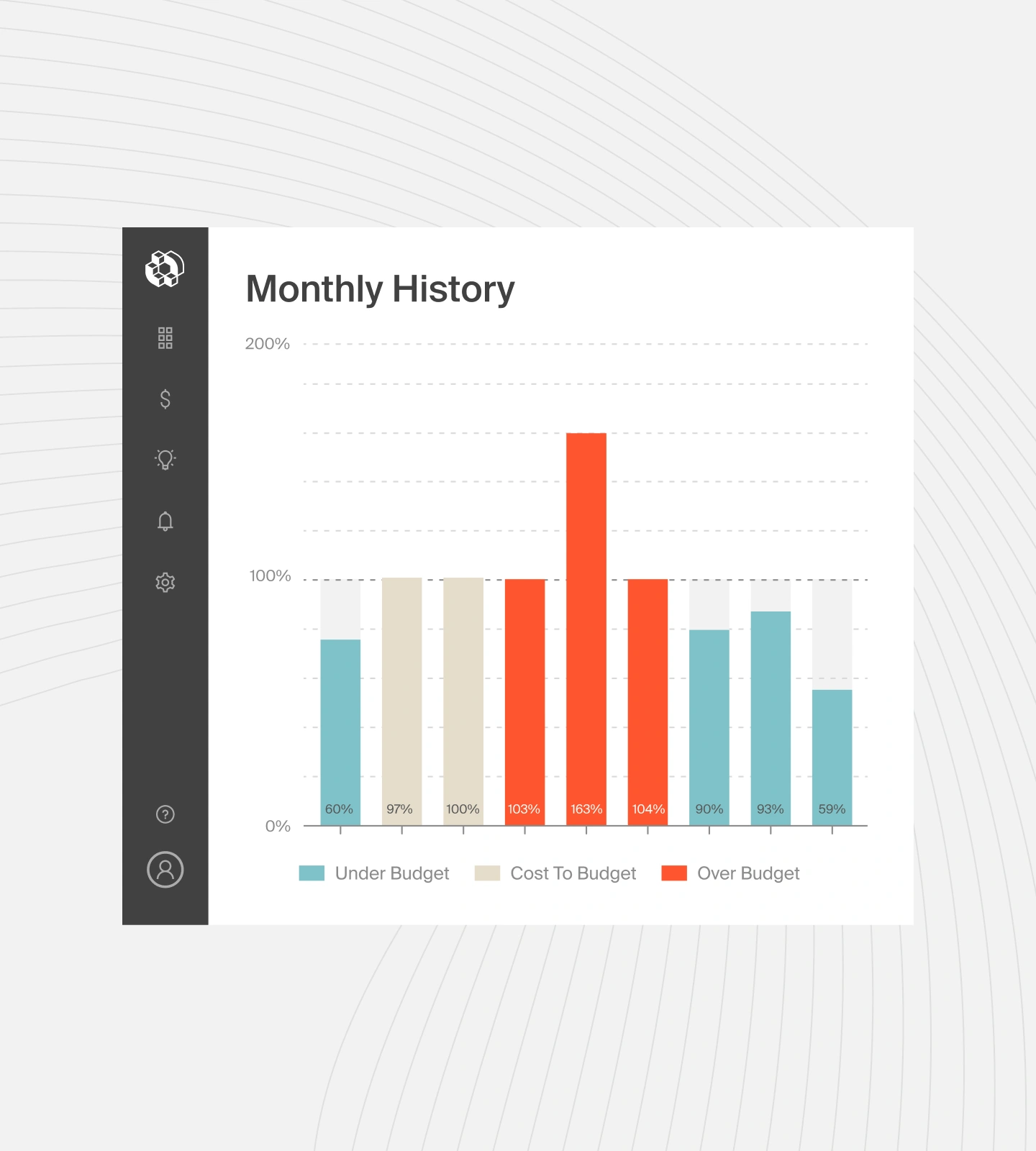
Quick FinOps Tip: CloudZero empowers teams to visualize historical cost by workload phase (training vs. inference) and filter by service, tag, or team. This is perfect for building forecasts tied to usage trends.
Align forecasts with the AI lifecycle and business goals
This is about aligning budgets with product and go-to-market timelines:
- Will a new AI feature launch in Q3? Budget for rising inference costs.
- Is the company expanding to a new region? Plan for cross-region training and data egress.
- Will your enterprise tier offer custom models? That’s personalized training (and extra cost).
When finance knows what’s coming, and engineering knows the cost implications of roadmap choices, everyone can plan proactively.
Make cost part of the design conversation
Too often, budgeting happens in a silo after engineering is done estimating effort. Flip the script. Instill a FinOps mindset into sprint planning, architecture reviews, and model deployment meetings.
Ask questions like this:
- What’s the expected cost per customer interaction?
- Could we achieve similar performance on a less expensive architecture?
- How does this new feature compare to existing ones in terms of infra intensity?
This creates a feedback loop that encourages engineers to design with efficiency in mind — of course, without sacrificing performance or quality.
Forecast based on use-case, not just infrastructure
Forecasting by instance type or region is useful, but incomplete. Instead, you’ll want to forecast by use case:
- “Our fraud detection model handles 50M transactions/month at $0.002 per check = $100K”
- “GenAI summarization costs scale linearly with usage; expect $X/month growth with each 10K users”
This approach connects infrastructure planning to product and revenue models. It is exactly what CFOs and CTOs need to align investments.
4. Optimize resource utilization
At CloudZero, we believe that optimizing resources doesn’t always mean throttling innovation or performance. It’s about ensuring every compute dollar drives meaningful output for you.
Here’s how leading teams get it right:
Right-size instances based on actual workload behavior
AI workloads often default to “just in case” provisioning. This means spinning up the largest instance type to avoid performance issues. But without regular reviews, this leads to massive waste.
Instead, monitor CPU/GPU utilization across training runs and inference workloads. If you’re consistently below 40% GPU usage on A100s, you may be able to downgrade to a less expensive configuration without hurting performance.
Consider this example: One engineering team found that 80% of their training jobs ran comfortably on T4 GPUs instead of V100s. They switched and saved $0.62/hour per instance.
Quick FinOps Tip: Use instance recommendations from cloud-native tools like AWS Compute Optimizer or platforms like CloudZero Advisor to identify rightsizing opportunities at scale.
Leverage Spot and Preemptible Instances where possible
For non-critical workloads like batch training, experiment pipelines, or model evaluation jobs, spot instances (AWS, Azure) or preemptible VMs (GCP) can cut your compute costs by up to 90%.
The key is to:
- Architect jobs for interruption (checkpoint frequently, decouple tasks)
- Use managed spot orchestration (like AWS SageMaker Spot Training)
- Schedule spot-eligible jobs during lower-priority windows
This approach can dramatically reduce training costs without compromising output, especially at the early R&D stages.
Schedule jobs during off-peak hours
Training jobs scheduled overnight or on weekends may:
- Complete faster due to lower resource competition
- Avoid peak pricing in some usage models
- Reduce noise and resource throttling in shared environments
By combining scheduled training windows with reserved or spot capacity, you can reduce unpredictability and improve throughput, all while keeping costs down.
Quick FinOps Tip: Time-based scheduling isn’t just for DevOps. AI training cycles can benefit significantly from temporal optimization, especially at scale.
Review resource allocations after each lifecycle phase
AI workloads don’t stay static. Once a model moves from training to production inference, its infrastructure needs change dramatically.
For example:
- A distributed training cluster may need 32 GPUs, but the final inference endpoint might only require 2 CPUs and a single GPU.
- An active research experiment might justify costly GPUs. Once deprecated, those resources should be shut down or reallocated immediately.
Schedule routine cleanup and re-provisioning checkpoints tied to the AI lifecycle, such as model handoff, feature freeze, or usage plateau.
Automate where you can, review where you must
Try the following:
- Use tools like Kubernetes HPA (Horizontal Pod Autoscaler) for inference
- Employ lifecycle hooks to shut down unused resources post-training
- Set TTL (time-to-live) policies for ephemeral environments
Yet not everything should be automated indiscriminately. Complex AI workloads (like fine-tuning large models) may require human-in-the-loop reviews to balance cost, speed, and performance goals.
5. Governance across multi-cloud environments
Many AI teams run workloads across multiple cloud providers, often by necessity.
One model trains in AWS using SageMaker. Another runs inference in GCP via Vertex AI. Data pipelines might live in Azure, while storage and experimentation are scattered across accounts, regions, and tools.
This flexibility can accelerate innovation. But without strong governance, it can also obliterate cost visibility and consistency.
That’s why you’ll want multi-cloud cost governance to be a first-class discipline in your AI FinOps strategy. Not to restrict engineers, but to ensure everyone plays by the same rules, regardless of platform.
Here’s how to make it work:
Enforce a unified tagging and labeling strategy
Different clouds use different conventions. AWS has tags, GCP has labels, and Azure has resource groups and tags. But the goal is the same: consistent metadata for cost attribution.
To do that, create a shared tagging schema for AI workloads across all clouds that includes:
- project, model, or feature name
- team or owner
- environment (dev, train, staging, prod)
- phase (training, inference, monitoring)
- cloud and region for cross-platform normalization
Then, enforce this schema through infrastructure-as-code, CI/CD pipelines, and policy-as-code tools (like Open Policy Agent).
Centralize cost monitoring across providers
Consolidate all cost and usage data into a single pane of glass. This will help your engineers and finance track all AI spend by provider, project, or phase.
You can use:
- Native tools, such as AWS Cost Explorer and GCP Cost Management
- Third-party aggregators like CloudZero, Apptio, or CloudHealth
- Custom dashboards. These include BigQuery exports + Looker, Power BI, Grafana, and others
The key here is to normalize your units of measurement, so you’re comparing spend apples-to-apples across clouds, workloads, and business functions.
Use consolidated billing and shared cost allocation models
Where possible, consolidate accounts and billing to create unified invoicing and cost sharing. This simplifies chargebacks and lets you allocate shared services (such as shared GPU clusters or orchestration layers) more accurately.
Then, define cost allocation rules:
- Who pays for shared training jobs?
- How are data egress and storage costs split across teams?
- What’s the policy for experimentation vs production infrastructure?
Answering these proactively ensures you avoid inter-team disputes and keeps AI growth financially accountable.
Establish policy guardrails (not roadblocks)
Multi-cloud governance shouldn’t kill velocity. Instead, use guardrails, which reduce risk without blocking progress.
Consider these examples:
- Require cost forecasts for any model running over 48 hours on premium GPUs
- Enforce shutdown of idle instances after X hours
- Require tagging for all deployed inference endpoints
Back these up with automation:
- Tag compliance enforcement via IaC tools (e.g., Terraform, Pulumi)
- Budget threshold alerts at the cloud account or project level
- Scheduled cost audits tied to model lifecycle checkpoints
- Build a cross-cloud FinOps working group
Remember, AI is cross-functional, and so is FinOps. So, create a standing group made up of engineering leads, finance partners, and platform/cloud ops stakeholders to:
- Review AI cost data monthly or quarterly
- Discuss upcoming AI roadmap items and their projected spend
- Standardize multi-cloud FinOps practices as workloads evolve
This ensures governance doesn’t lag behind innovation or become an afterthought.
Overall, by unifying tagging, consolidating monitoring, enforcing cost policies, and keeping humans in the loop, your organization can scale AI across clouds without losing control.
05 How To Monetize AI Without Losing Money
So you’ve built a powerful AI. Now, how do you make it pay off?
Too many teams treat AI like an add-on, something to sprinkle into products and impress users. But as usage grows, so do costs. And without a monetization strategy that aligns pricing to infrastructure impact, AI features can quietly erode your margins.
To make AI profitable, you need to understand the cost-to-value relationship of the models you deploy and price them accordingly.
Still, there’s no single best way to monetize AI. The right AI pricing model depends on your product, your users, and the feature’s real value.
Let’s look at some common models:
AI Pricing Model
How It Works
Best For
Usage-based
Charge per request, token, or inference
Generative AI, APIs, LLM-powered features
Seat-based
Add AI functionality to premium user tiers
B2B SaaS, productivity platforms
Tiered bundles
Package AI with other capabilities in higher plans
PLG SaaS, vertical SaaS
Pay-as-you-grow
Metered pricing that scales with customer size
AI infrastructure platforms, dev tools
Freemium to paid AI
Offer free AI baseline; monetize advanced features
Consumer apps, experimentation-driven products
There’s also internal monetization, where AI is used to drive efficiency (such as automating fraud detection or customer support). These savings don’t show up as revenue, but they can have a measurable bottom-line impact. The key is pricing that reflects both infrastructure cost and perceived customer value.
Here are some common AI pricing models that align cost with value:
Think in terms of unit economics, not just model accuracy
You need to know: Is this feature financially viable at scale?
- What does it cost per 1,000 users?
- How much infra is consumed per feature interaction?
- How does usage scale with customer growth?
- Is this cost passed to the customer, or absorbed?
You don’t need to model this down to the penny. But rough cost models are better than guesswork:
“This GenAI summarization feature costs $0.004 per call. The average user triggers it 20 times per day = $0.08/day. Are we charging enough to cover this?”
When you know your cost-to-serve for your AI features, you can confidently scale them.
Go beyond traditional cloud metrics to define AI ROI
It’s tempting to measure AI success by infrastructure cost alone: “We trained the model for $10K.” But that says nothing about its true value.
Instead, consider these AI-aligned ROI metrics:
AI Pricing Model
What It Measures
Cost per successful feature
How much infra spend results in a stable, shipped feature
Time-to-impact
How quickly AI delivers measurable value post-deployment
Cost-to-value ratio
Infra spend vs. ARR, retention, or operational savings
Model ROI by tier
Revenue or impact segmented by customer or pricing tier
These metrics connect infrastructure to business value. They give product and finance teams the data to back up scaling decisions.
Track experiments, not just outcomes
AI innovation is iterative. You may try 10 models before shipping one. But without visibility into experiment-level costs, teams can’t course-correct or prioritize efficiently.
With that in mind, track:
- Total cost per experiment or training run
- Number of runs before success
- Infrastructure burn vs. user adoption or test results
How do we know this works? When CloudZero customers track cost per experiment, they build a “return-on-learning” model. This approach justifies experimentation while keeping waste in check.
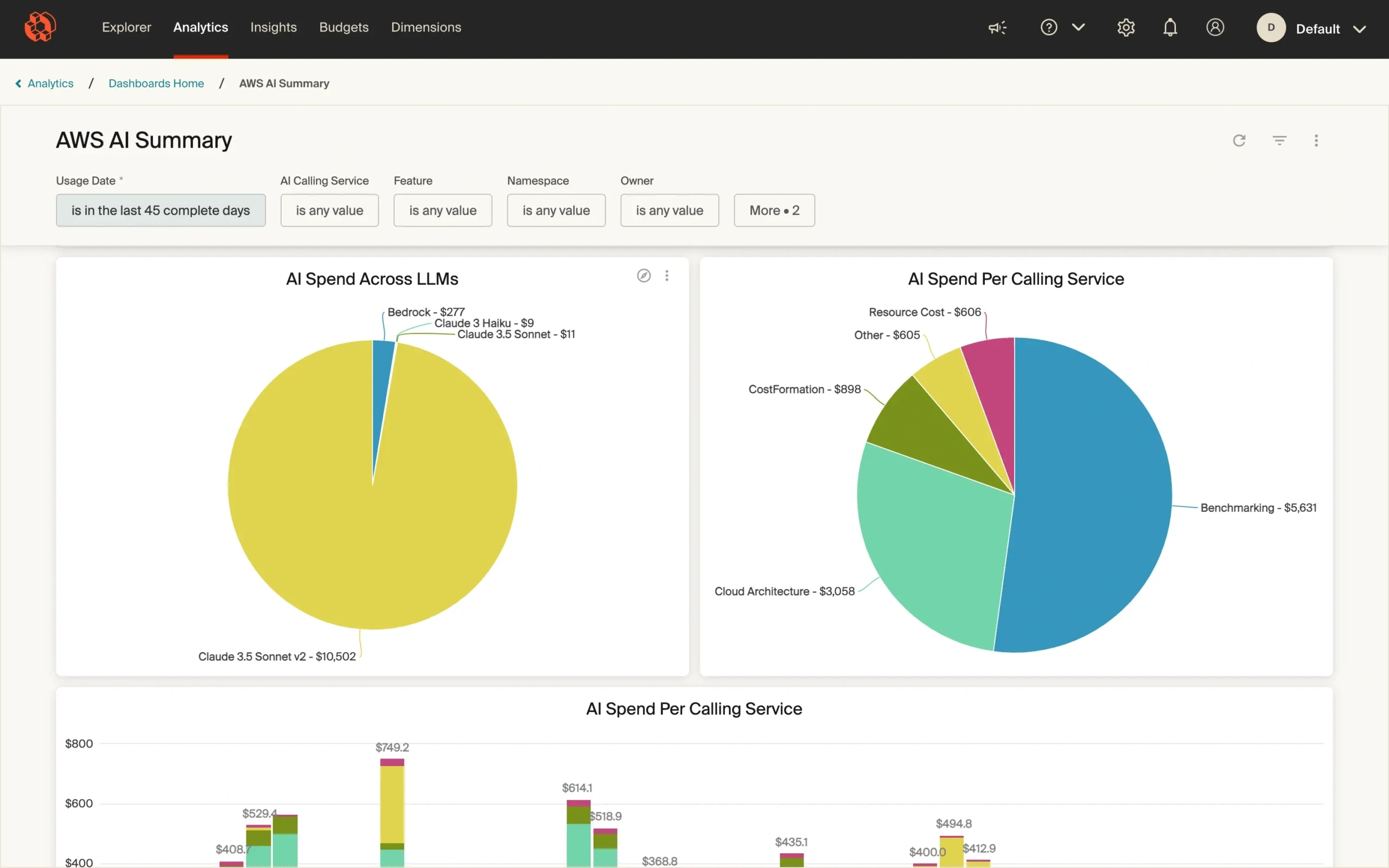
With CloudZero, teams can:
- Map spend to individual AI features or models
- See cost per customer, product tier, or interaction
- Compare infra burn across experiments or product lines
That means instead of guessing, you can say: “This feature costs $0.08 per user per day, and users in Tier 2 generate $0.04 in MRR. Let’s either optimize it or move it to Tier 3.”
That’s AI cost intelligence. It’s how you scale profitably, not just powerfully. It is also how you know which features make you money — and which don’t. Speaking of…
What should you do when a feature costs too much?
Sometimes you ship an AI feature and realize it costs more to run than it delivers. Instead of panicking, use this framework:
- Measure: What’s the cost per user interaction?
- Evaluate: Can you optimize infra (such as quantization, batching, edge deployment)?
- Experiment: Can you redesign the UX to reduce model calls or latency?
- Decide: Should the feature be deprecated, tiered behind a paywall, or offloaded to a cheaper model?
This decision-making loop helps engineers and finance stay aligned without killing innovation.
06 Building An AI Cost-Conscious Culture
A strong AI cost culture means engineering, finance, and product teams are aligned on how resources are used, why they’re used, and what outcomes they drive.
This transforms FinOps from a reactive cleanup job into a proactive way of working, where teams understand the cost impact of what they build and adjust course to protect engineering and business outcomes.
The situation today is different, as we uncovered in our latest State of AI Costs Report. Picture this:
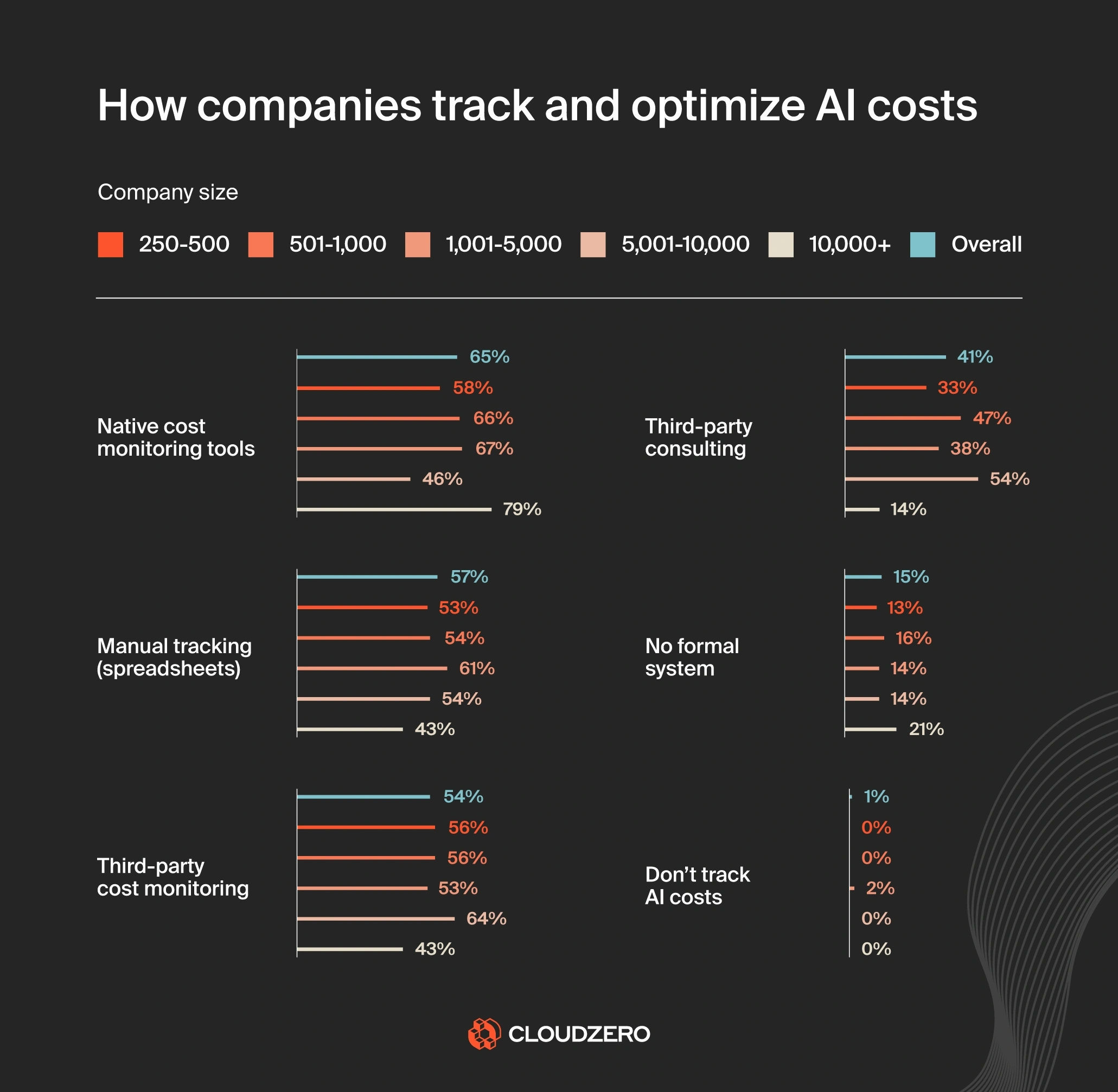
- 21% of large companies don’t have any formal cost-tracking systems in place, leaving them at risk of overspending on AI without knowing where the money is going.
- 57% still rely on spreadsheets for AI cost tracking, a manual process prone to errors and blind spots.
- And 15% have no AI cost tracking at all.
AI development thrives on experimentation, speed, and iteration. Cost control thrives on structure and restraint.
These instincts aren’t mutually exclusive, but they’re often at odds.
To bridge the gap, bring cost awareness into engineering workflows without slowing them down.
What an AI cost-conscious culture looks like
Here are signs your organization is getting it right:
Healthy Practice
What It Measures
Cost surfaced early
Engineers estimate cost-to-serve during design, not after deployment
Shared visibility
Finance and engineering view the same dashboards and dimensions
Continuous review
AI spend is reviewed during sprint retros and roadmap check-ins
Blameless cost exploration
Teams investigate overruns without shame — and improve systems
This cultural shift is gradual, but powerful. It empowers teams to innovate without leaving finance in the dark — or vice versa.
AI cost-saving tactics that reinforce culture
While culture is the foundation, here are specific tactics you’ll want to practice to reinforce a cost-aware environment:
Automate idle resource cleanup
Idle GPU nodes, orphaned storage, and zombie inference jobs can quietly drain budgets. Set TTL (time-to-live) policies, automate cleanup scripts, and alert teams when infrastructure exceeds expected duration.
Use cost as a model evaluation metric
Accuracy is important. But if a 98% model costs 4X more to run than a 96% version with similar user outcomes, that tradeoff needs discussion. Include “cost per prediction” or “infra-per-outcome” in evaluation criteria.
Share cost dashboards with teams
Put spend metrics where engineers already work: Slack, sprint boards, CI/CD tools. Contextualize spend by feature, project, or model — not just billing account. This encourages curiosity and accountability.
Run cost reviews like postmortems
After major training runs or feature launches, do a cost retrospective:
- Did we spend more or less than expected?
- What cost-saving opportunities did we miss?
- What should we change next time?
Practiced regularly, these habits make financial awareness second nature.
Championing culture starts at the top
- CTOs frame FinOps as an engineering practice, not a finance burden
- CFOs provide the tools and visibility that engineering needs to self-correct
- FinOps leads or cloud platform teams act as enablers, not gatekeepers
When leadership sets the tone, teams follow, especially if visibility is framed as a tool for empowerment, not control.
Take The Next Step: Cut AI Costs, Not Performance, Innovation, Or Engineering Velocity
You know this already. AI is reshaping industries, powering product breakthroughs, and driving competitive advantage.
It also brings unprecedented cost complexity, high-performance compute, unpredictable usage patterns, and rapidly evolving infrastructure needs.
To thrive in this new era, treat AI like a business function, not a black box.
That means:
- Exposing hidden costs across training, inference, and experimentation
- Forecasting AI infrastructure spend with cost confidence
- Monetizing AI features in ways that scale with value, not just usage
- Embedding cost-awareness into how engineers, product leaders, and finance teams work together
- Building guardrails that accelerate innovation without letting your budgets spiral
FinOps gives you the framework to do this. But without dependable AI cost visibility, even the best intentions will fall short.
This is where CloudZero comes in
CloudZero is the first cloud cost intelligence platform designed for modern, dynamic cloud workloads, including AI.
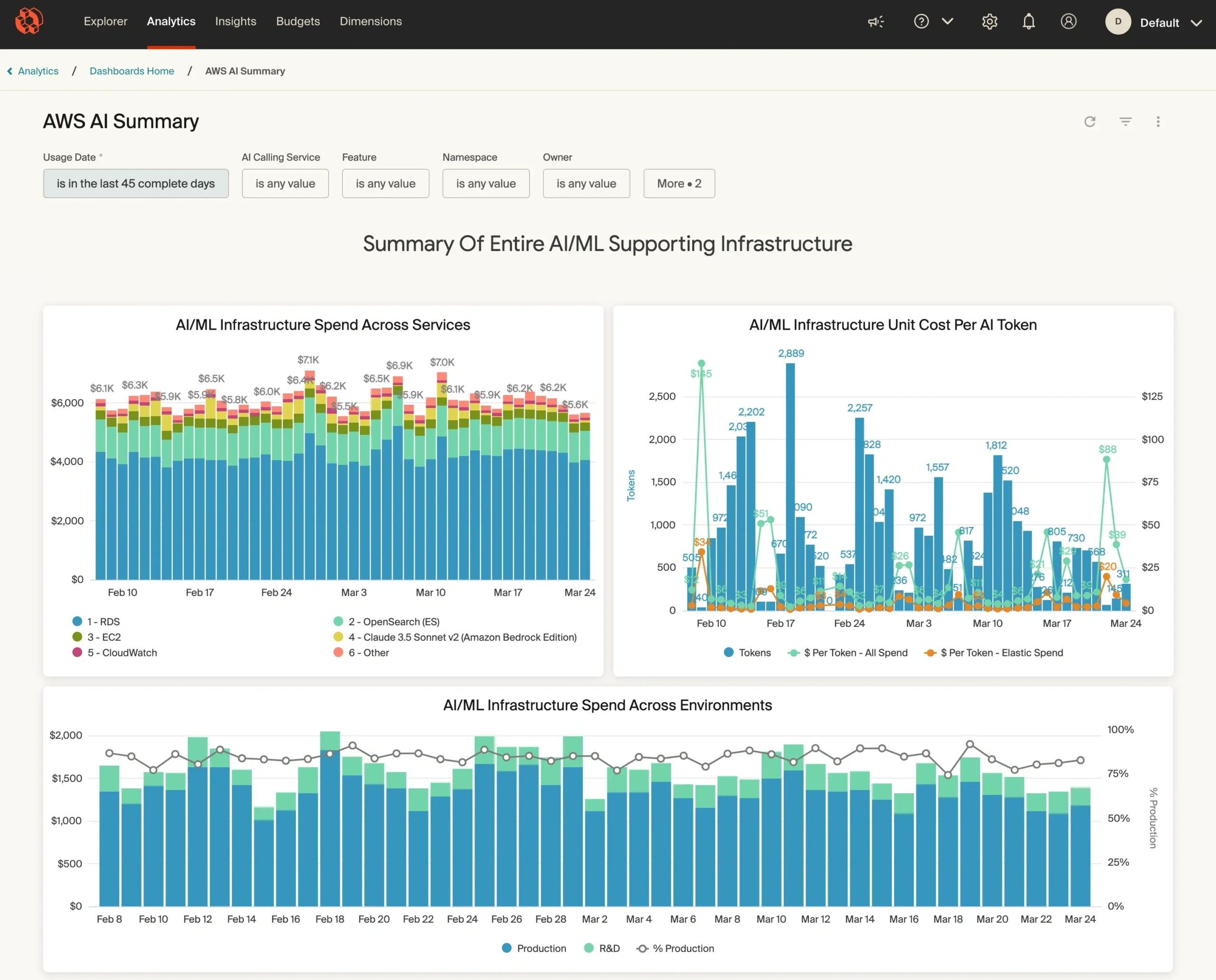
With CloudZero, your team can:
Track AI costs in real time — by model, feature, environment, customer, and more dimensions.
This gives your engineers and CTOs the granular visibility they need to pinpoint what’s driving spend. Then, you can fix cost issues before they’re baked into production or scaled across environments.
Tie cloud spend directly to business outcomes
For CFOs and FinOps teams, this means finally understanding which AI workloads are delivering ROI, and which are burning the budget without creating customer or revenue impact.
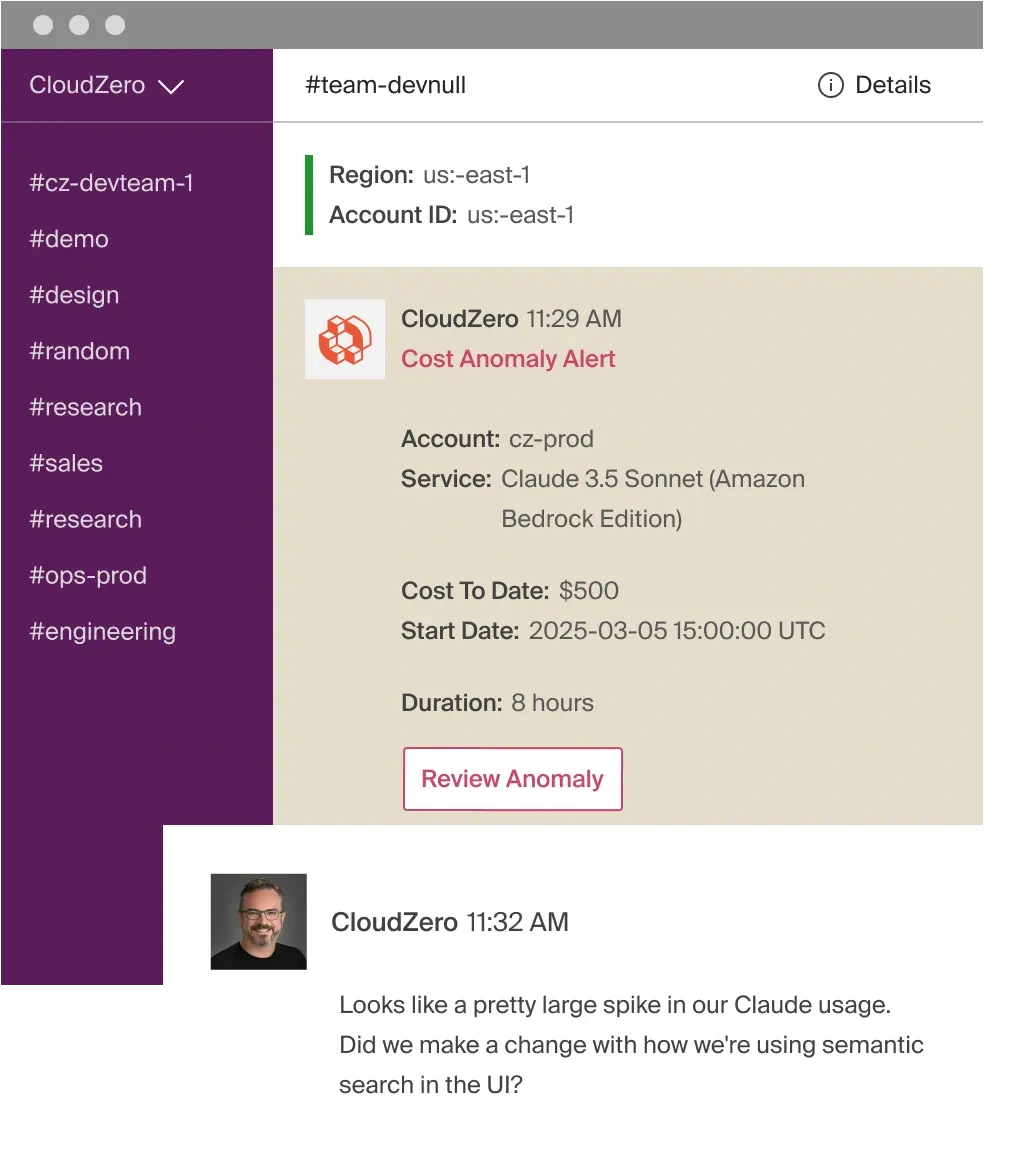
Detect anomalies before they snowball into budget overruns
We’ll alert your engineers to fussy anomalies in seconds to minutes (not weeks), right in their inbox (from email to Slack). This prevents nasty surprises on the monthly bill and enables rapid course correction.
Share a single source of truth across engineering, finance, FinOps, and C-Suite
No more back-and-forth about who used what and why. Everyone sees the same data, but tailored to their role. And this means better collaboration, swifter decision-making, and fewer emergency meetings with the board (a.k.a. finger-pointing budget reviews).
Want to know if your latest AI feature makes sense, might sink you, or exactly where to fine-tune for long-term sustainability? CloudZero can tell you — by the hour, by the user, by model, by training run, and beyond.
Teams at Duolingo, Toyota, Grammarly, and Helm.ai already trust our Cloud Cost Intelligence approach. And we just helped Upstart save $20 million. This could be you, too.
and turn AI into your competitive advantage — not your margin killer.
