
Quick Answer
Databricks cost optimization is the practice of reducing wasted compute, storage, and licensing costs across your Databricks workloads without sacrificing performance. The highest-impact moves are switching production workloads from All-Purpose Compute ($0.55/DBU) to Jobs Compute ($0.15/DBU), terminating idle clusters automatically, and using spot instances for fault-tolerant jobs. Combined, these three changes alone can cut total Databricks cost by 40–60%.
Most teams don’t have a Databricks spending problem. They have a Databricks visibility problem. The bill arrives, someone winces, and the conversation stalls at “can we spend less?” instead of “are we spending in the right places?” That second question is harder to answer, and far more valuable.
This guide covers the practical strategies that get you there, starting with how Databricks pricing actually works and ending with the organizational shift that makes optimization stick.
What Drives Databricks Costs?
Two bills. Two inboxes. One confused finance team.
Databricks cost splits into platform fees and cloud infrastructure charges, and the split trips up nearly every organization the first time around. Here’s how each one works:
The Databricks platform fee is measured in Databricks Units (DBUs), a normalized unit of processing power, billed per second. Your Databricks DBU cost depends on what type of work the cluster is doing, which subscription tier you’re on, and which cloud provider runs the underlying infrastructure.
Here’s what Databricks DBU pricing looks like on the Premium tier, which is now the default for most deployments:
|
Compute type |
AWS rate |
Azure rate |
Best for |
|
Jobs Compute |
~$0.15/DBU+ |
~$0.15–$0.20/DBU |
Scheduled production workloads |
|
All-Purpose Compute |
~$0.55/DBU+ |
~$0.55–$0.65/DBU |
Interactive notebooks, dev |
|
SQL Serverless |
~$0.70/DBU+ |
~$0.70/DBU+ |
Serverless SQL analytics |
|
DLT Core |
~$0.15/DBU |
~$0.15/DBU |
Basic pipelines |
|
DLT Pro |
~$0.25/DBU |
~$0.25/DBU |
CDC + data quality |
|
DLT Advanced |
~$0.36/DBU |
~$0.36/DBU |
Complex pipelines |
Note: DBU pricing varies by region, cloud provider, workload type (e.g., Photon, ML), and configuration. Listed values represent standard starting rates for the Databricks Premium tier as of 2026.
Notice the 3–4x gap between Jobs Compute and All-Purpose Compute. That gap is doing a lot of heavy lifting in this article. We’ll come back to it.
Your Databricks compute cost doesn’t stop at DBUs. Every cluster runs on VMs, storage, and networking from your cloud provider and that infrastructure bill arrives separately. For most teams, infrastructure charges equal or exceed the DBU fees. Budget $2–3 for every $1 you see on the Databricks invoice if you want a number that won’t surprise anyone.
On top of those two bills, storage and egress (Delta Lake on S3, ADLS, or GCS), Photon acceleration ($0.20/DBU for Jobs Compute on AWS, roughly 33% more than standard, but with 3–8x query performance for compatible workloads), and AI/ML model serving are all growing cost categories.
Databricks model serving cost optimization is becoming its own discipline as teams scale inference endpoints and GPU-backed training clusters. We’ll dig into the AI angle in the CloudZero section below.
Research Report
FinOps In The AI Era: A Critical Recalibration
What 475 executives told us about AI and cloud efficiency.
How Much Does Databricks Cost Per Month?
With the pricing structure covered, here’s what it translates to. How much does Databricks cost in real terms? The range is wide, but the pattern is consistent: most teams underestimate.
|
Team profile |
Average monthly spend |
What that includes |
|
Small (2–3 analysts, light ETL) |
~$500–$1,500 |
Small clusters, limited daily runtime |
|
Mid-size (data engineering + analytics) |
~$5,000–$15,000 |
Multiple workloads, SQL warehouses, shared clusters |
|
Enterprise (production ML + heavy ETL) |
$50,000+ |
GPU clusters, model serving, multi-team usage |
Is Databricks expensive? Databricks claims its lakehouse architecture is up to 12x cheaper than traditional data warehouse alternatives. That may be true in aggregate, but the dual-billing model catches teams off guard when the cloud infrastructure portion shows up as a second line item nobody planned for.
Is Databricks worth it? That’s the better question, and the one most organizations can’t answer yet. Knowing what you spent is table stakes. Knowing if that spend produced proportional business value — per customer, per pipeline, per feature — is where real optimization starts. (More on that framing later.)
One note on timing: Databricks is phasing out its Standard tier. AWS and GCP already stopped offering it to new customers in 2025. Azure will retire it by October 2026. If you’re still on Standard, factor the Premium rate increase into your next budget cycle.
Read more: Databricks Pricing Explained: A 2026 Guide
10 Databricks Cost Optimization Strategies
Now that you know what you’re paying for, here’s how to pay less of it. These Databricks cost optimization best practices are drawn from Databricks’ own practitioner patterns shared across engineering communities, and real-world optimization results.
1. Move production workloads to Jobs Compute
The single highest-ROI move. All-Purpose Compute exists for interactive development — notebooks, ad-hoc exploration, the kind of work where a human is actively watching the output.
Jobs Compute handles scheduled, automated workloads at a 73% lower DBU rate for the same computation.
The classic scenario: an engineer builds a pipeline interactively, gets it working, schedules it for production, and never changes the cluster config. That pipeline runs on the expensive compute tier indefinitely, and nobody notices because nobody’s looking. If you audit one thing this week, audit that.
2. Kill idle clusters before they kill your budget
Once you’ve moved workloads to the right compute tier, the next leak to plug is clusters that bill while doing nothing. A developer spins one up at 9 AM, runs a query, gets pulled into back-to-back meetings, and the cluster hums along until end of day, faithfully burning DBUs like a taxi with the meter running while you’re inside a restaurant.
Set auto-termination to 15–30 minutes of inactivity for all interactive clusters. For development workspaces, 10 minutes is aggressive but defensible. The “but cold starts are slow” objection increasingly loses ground to Databricks’ serverless options, which eliminate startup delays entirely.
3. Right-size clusters with autoscaling
With wasteful compute types and idle clusters handled, the next lever is cluster sizing itself.
Oversized clusters waste money. Undersized clusters waste time, and the patience of every engineer waiting on a job that should have finished an hour ago.
Autoscaling resolves this by adjusting worker nodes based on actual demand. Set a minimum that handles baseline load and a maximum that accommodates peaks. Then verify your assumptions: query Databricks system tables — specifically system.billing.usage — to check if your clusters consistently run at 20% utilization with eight nodes. That’s not a cluster. That’s a monument to overprovisioning.
For memory-intensive workloads, choose memory-optimized instances (r-series on AWS, E-series on Azure) instead of adding more general-purpose nodes. Fewer nodes running efficiently almost always beats more nodes running idle.
4. Use spot instances for fault-tolerant workloads
The first three strategies address Databricks platform costs. This one targets the other half of the bill: cloud infrastructure. Spot instances (AWS), Spot VMs (Azure), and Preemptible VMs (GCP) discount VM pricing by 60–90%. Since infrastructure often matches DBU charges, this can shave 30–45% off your total monthly Databricks spend.
But the trade-off is reclamation risk. The cloud provider can pull the instance back with minimal notice. That’s fine for batch ETL, ML training runs, and any workload that can retry gracefully. Keep the driver node on-demand, let the workers ride spot, and save guaranteed uptime pricing for the things that actually need it.
5. Choose the right Delta Live Tables tier
Spot instances cut your infrastructure costs. But there’s another pricing lever hiding inside the Databricks platform itself, one most teams set once and never revisit.
Databricks offers three DLT tiers at three price points, each designed for a different level of pipeline complexity. The pattern we see constantly: teams default to Advanced because it sounds like the safest option — the compute equivalent of buying the extended warranty on a toaster.
If the pipeline doesn’t need Advanced capabilities (complex event processing, advanced monitoring), you’re paying 2.4x the Core rate for features you never touch.
CloudZero documented this exact scenario with a B2B data provider that reclassified pipelines from Advanced to Core and Pro and saved an estimated $40,000 annually, with zero impact on performance. Tier selection should be a data-driven decision, not a default.
6. Optimize queries and use Photon selectively
If the previous strategies address how your clusters are configured, this one addresses what they’re actually doing. Poorly optimized queries are the silent budget killers, the kind nobody notices until someone runs an EXPLAIN plan and discovers a full table scan where a partition prune would have done the job.
Databricks optimization techniques worth adopting:
- Partition pruning. Structure Delta tables with partition columns that match your common filter predicates. A query on date against a table partitioned by date skips irrelevant files entirely.
- Z-ordering. Co-locate related data within files to minimize I/O for range and filter queries.
- Caching. Use .cache() on frequently accessed DataFrames or enable Delta caching for repeated reads.
- Photon — selectively. Photon delivers 3–8x performance for compatible SQL and DataFrame workloads, and the net cost effect is often a 50–70% reduction despite the higher per-DBU rate. But Python UDFs and some non-SQL operations see minimal benefit. Test first, commit second.
7. Use serverless for bursty, unpredictable workloads
Some workloads don’t fit the cluster model. Ad-hoc analytics teams, SQL dashboards with inconsistent query volume, development environments where a provisioned cluster would spend more time idling than computing, these are all cases where Databricks serverless cost (infrastructure included in the DBU rate) makes more sense than paying for capacity you’re not using.
The deciding factor is utilization consistency: if a cluster runs eight hours a day at 80%+ capacity, keep it. If it runs sporadically, go serverless.
8. Commit to discounts, but only with the data to back it
Strategies 1–7 reduce what you consume. This one reduces what you pay per unit of consumption. Databricks committed-use agreements deliver 20–40% savings on one- to three-year terms. Azure’s three-year DBCU commitment saves up to 37%. These are meaningful discounts, but only if your forecast is reliable.
The trap: committing based on three months of usage data that included a migration spike, an anomaly, or a workload that’s since been retired. You’ll either overpay for unused capacity or blow past your commitment at on-demand rates. Wait until you have at least six months of stable, representative data before locking in. And even then, use workload-level cost data, not workspace-level averages — to anchor the forecast.
9. Monitor at the job level, not the workspace level
Committing to discounts requires data. So does every other strategy above. The question is where that data comes from, and for most teams, the default answer isn’t good enough.
Workspace-level usage reports are the Databricks equivalent of checking your bank balance without looking at individual transactions. You know how much left your account, but you have no idea where it went.
Databricks system tables accessible via Unity Catalog, system.billing.usage and system.billing.list_prices, break consumption down to the job level. This is where Databricks cost analysis starts: identifying which jobs consume the most DBUs, which clusters run around the clock but only process data for two hours, and which teams are using compute tiers that cost more than their workloads justify.
But system tables answer “what was consumed.” They don’t answer “why” or “by whom in business terms.” For that, you need the next strategy.
10. Allocate costs to the people and products that drive them
Every previous strategy treats Databricks cost as an infrastructure problem. This one treats it as a business problem, and it’s the one that makes all the others sustainable.
Without allocation, optimization is a quarterly fire drill. Someone runs a report, files tickets, and the savings erode within months because nobody owns the spend day-to-day. With allocation — by team, product, feature, or customer — every engineer sees what their workloads cost and has the context to make trade-offs continuously.
Databricks cost management at its best: instead of “our Databricks bill is $47,000,” you see that Team Alpha’s ML training costs $12,000, Team Beta’s ETL costs $8,000, and $27,000 is ad-hoc analytics spread across six teams with no owner. The first number is a problem. The second is a set of decisions waiting to be made.
This is where FinOps earns its keep, not as a role, but as a practice embedded in engineering workflows. But practices need numbers to anchor them, so let’s make the math concrete.
How To Calculate Your Databricks Costs
Every strategy above becomes easier to prioritize when you can estimate the dollar impact. The Databricks cost calculator (available here) models hypothetical workloads. The core formula:
Total monthly cost = (DBU rate × DBUs per node-hour × node count × hours) + cloud infrastructure cost
Here’s a concrete example:
A four-node cluster on m5.xlarge instances (0.69 DBU/node-hour) running Jobs Compute for eight hours a day across 22 business days (176 hours/month):
- Platform: $0.15/DBU × 0.69 DBU × 4 nodes × 176 hours = $72.86/month
- AWS infrastructure (varies by region): ~$0.19/hr × 4 nodes × 176 hours = $133.76/month
- Total: ~$207/month
Infrastructure costs are approximate — EBS volumes, networking, and region all affect the final number.
Now switch that same cluster to All-Purpose Compute: the platform cost alone jumps to $267/month — 3.7x more — before touching a single infrastructure setting. Scale to 20 nodes and the total bill easily exceeds $2,000/month. Compute type and cluster size are the two variables that swing the number hardest, which is why strategies #1 and #3 deliver the biggest returns.
The math, though, only tells you what you spent. It doesn’t tell you if the spend was justified, and that’s a fundamentally different problem.
How CloudZero Turns Databricks Spend Into Business Intelligence
Here’s the uncomfortable truth about everything above: even if you execute all 10 strategies flawlessly, you still won’t know if your Databricks investment was worth it.
You’ll know what you spent. You’ll know you spent less than before. But when your VP of Engineering asks, “Is our Databricks spend generating proportional business value?” — you’re stuck. Native tools tells you what happened inside Databricks. It doesn’t tell you what that work meant to the business.
This is the question CloudZero was built to answer: not “what did we spend?” but “was it worth it?”
CloudZero is the first and only validated cloud cost optimization partner in the Databricks partner ecosystem. The partnership matters less than what it makes possible: tracing every dollar of Databricks spend to the team, product, feature, or customer that drove it, then measuring if the output justified the input.
That’s unit economics for Databricks. Cost per customer. Cost per pipeline run. Cost per ML training iteration. Not averages, not estimates — precise attribution powered by CloudZero’s CostFormation engine, which allocates 100% of spend regardless of tagging quality. Most cloud cost tools fall apart without clean tags. CloudZero doesn’t need them.
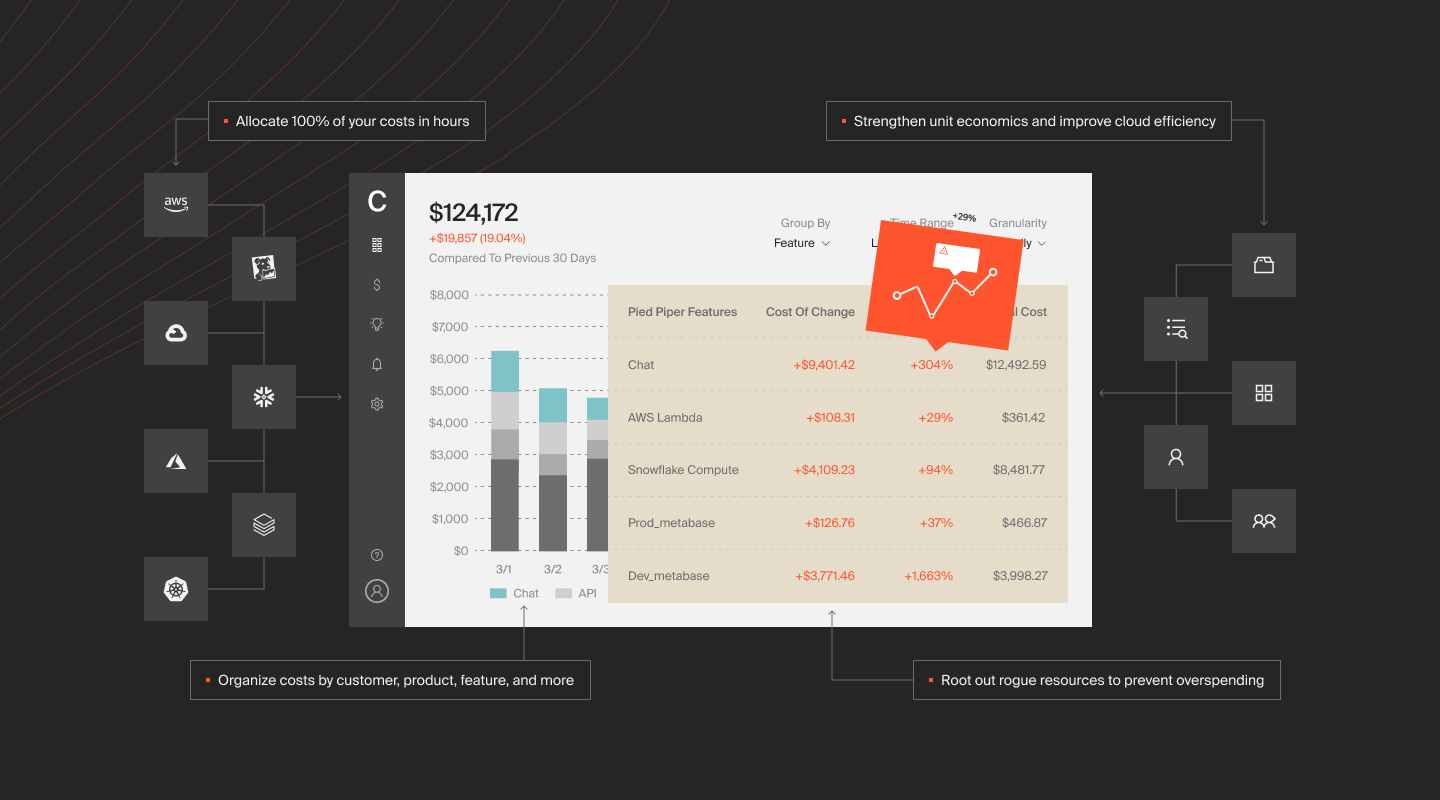
The shift from “how do we cut Databricks costs?” to “how do we invest Databricks dollars where they create the most value?” is the same shift happening across all of cloud, and it’s accelerating fastest in AI.
That acceleration is why the Databricks + AI story matters now. Organizations are deploying ML models through Databricks Model Serving, running GPU-backed training workloads, and integrating LLM APIs from Anthropic and OpenAI alongside their data pipelines. These AI costs are spiky, unpredictable, and buried inside compute line items that look identical to traditional batch processing until you dig in.
CloudZero is the first cloud cost platform to integrate directly with Anthropic’s Cost and Usage API, bringing LLM inference costs into the same framework as Databricks, AWS, Azure, Kubernetes, and Snowflake spend.
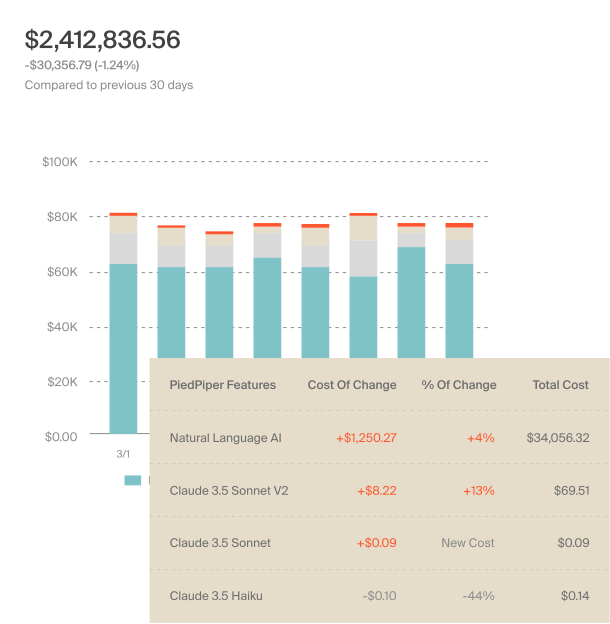
CloudZero research found that average monthly AI spend rose 36% year-over-year to $85,500 in 2025, yet only 51% of organizations could evaluate the ROI confidently. For teams running AI workloads on Databricks alongside external LLM APIs, that visibility gap is the next frontier of FinOps.
The organizations getting this right aren’t treating optimization as a cost-cutting exercise. They’re treating it as a business intelligence problem: every workload has a cost, every cost should trace to value, and the distance between those two numbers is where the real work happens.
CloudZero manages more than $15 billion in cloud and AI spend for organizations including Toyota, Duolingo, Skyscanner, and PicPay.  to see how CloudZero delivers Databricks cost intelligence. Want to see where you currently stand? Take our free cloud cost assessment to gauge the health of your cost management practice. You can also take a product tour to see CloudZero in action on your own time.
Databricks Cost Optimization FAQs


FinOps In The AI Era: A Critical Recalibration
What 475 executives told us about AI and cloud efficiency.