“Perfect tagging” is like tuning a piano. It requires constant manual effort, never achieves perfection, and drifts out of tune with every change. Cloud tagging demands ongoing maintenance from engineering teams yet still leaves gaps in cost visibility from untagged and untaggable resources.
The closer an organization wants to get to perfect tagging, the more engineering resources it must invest — often at the expense of innovation and product-oriented projects. The tradeoff: comprehensive cloud cost visibility requires engineering capacity that could otherwise build features and serve customers.
We developed CloudZero Dimensions to take the tagging burden off of engineering teams.
In the initial stages of adoption, we use your existing tags to create Dimensions for each of your most relevant business units. That could be cost per customer, per engineering team, per product, or even per product feature. (You can even layer Dimensions on top of one another to get advanced metrics like cost per product feature, per customer, per region…etc.)
The best part: Dimensions are decoupled from tagging, so you don’t have to demand the kind of legwork from your engineering team that “perfect tagging” demands.
How does it work? Dimensions are built using CostFormation, a domain-specific language (DSL) created by CloudZero and defined in YAML files. This infrastructure-as-code approach enables version control and peer review while remaining decoupled from application development workflows, allowing finance and FinOps teams to modify cost allocations without engineering sprints.
To give you a sense of their full potential, here are five key capabilities of Dimensions that you can’t get from tagging.
What Are 5 Things CloudZero’s Dimensions Can Do That Tagging Can’t?
1. Capture your resources’ complete historical usage
A core limitation of tags is that they only track cost from the day a resource is tagged. For example, if you tag a resource on July 31st, your July cost report shows only one day of usage (1/31st of the month) even though the resource ran all month. This creates incomplete historical data that makes month-over-month comparisons unreliable.
This creates two problems.
- First, you lose visibility into the full historical cost and usage of tagged resources.
- Second, the missing data forces teams to rely on approximate or improvised cost calculations.
If most of the July spend is untagged, teams often divide the total spend by the number of resources to estimate the cost per resource. This approach is flawed. Resources rarely cost the same, and differences can be significant.
Dimensions address this gap.
When a resource is assigned to a Dimension, its entire cost history — before and after tagging — rolls up to that Dimension. This produces more accurate, complete cost data and supports better long-term decision-making.
Combined with telemetry, Dimensions also allow flexible cost analysis across time and context.
With Dimensions, you can:
- View complete historical costs for any resource from its creation date, even if tagged months or years later
- Reallocate costs to different business units retroactively across any time period — for example, attributing Q1 infrastructure costs to a team that didn’t exist until Q2 (unique to CloudZero)
2. Map the cost of untagged and untaggable cloud resources
Cloud resources fall into three tagging categories:
- Tagged resources: Resources with tags currently applied
- Untagged but taggable: Resources that support tags but don’t have them yet, typically legacy resources created before tagging enforcement
- Untaggable resources: AWS services that don’t support tags at all, such as data transfer costs, CloudFront distributions, and certain CloudWatch metrics
Even perfect tagging strategies leave cost visibility gaps due to untaggable resources.
Dimensions group resources using cloud metadata (resource names, ARNs, service types, regions) rather than requiring tags. Once defined, Dimensions automatically apply pattern-matching rules like “starts with,” “contains,” or “matches pattern” to categorize new resources without manual tagging.
For example, a Dimension can automatically group all S3 buckets starting with “prod-” or all Lambda functions containing “analytics-pipeline” into cost categories, regardless of whether they’re tagged.
Read more on untagged and untaggable resources here.
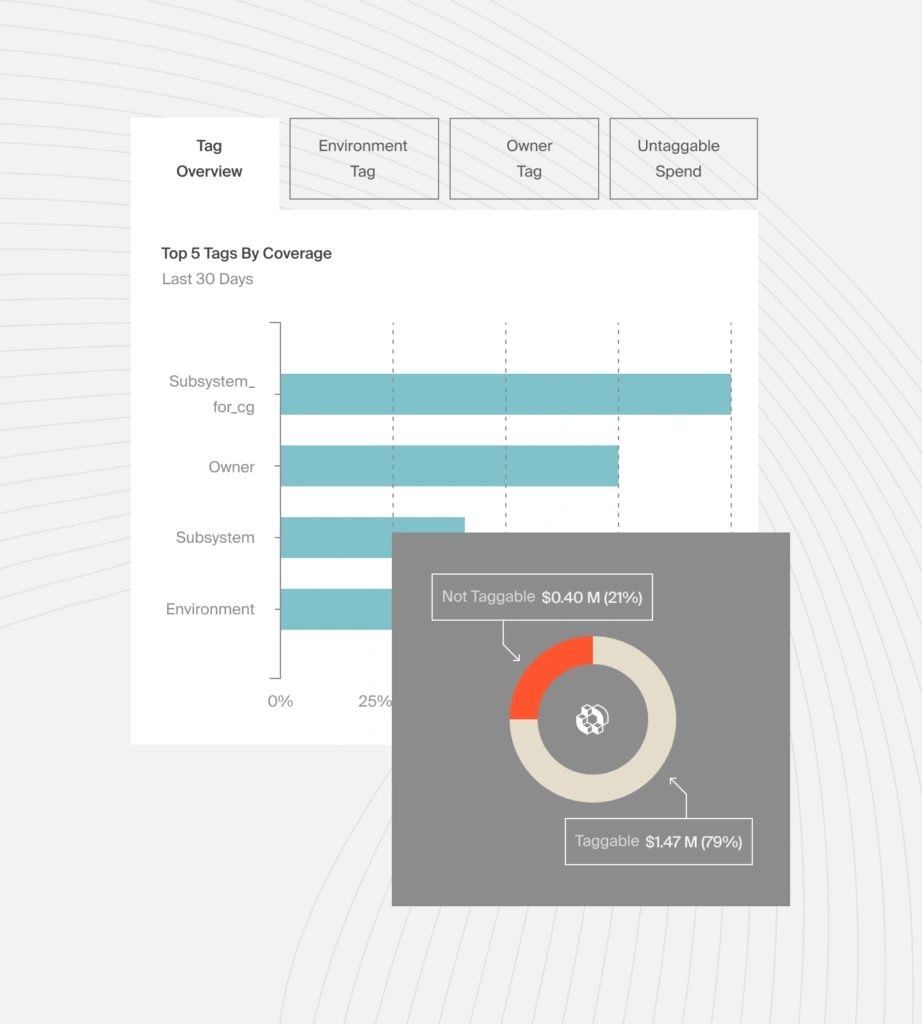
By grouping by metadata rather than tags alone, teams can account for both untagged and untaggable resources while maintaining a reliable cost model.
3. Easily clean up misspelled/misformatted tag values
Tag errors are easy to create and hard to detect.
Tags are case-sensitive and spelling-sensitive, treating “Team,” “team,” “Team-1,” and “Teem-1” as four distinct values. In large organizations, these inconsistencies fragment costs across dozens of variations of what should be a single category, making accurate cost attribution difficult.
Dimensions normalize this automatically.
Dimensions normalize tag variations automatically. During setup, CloudZero analyzes resource names and metadata to identify equivalent values like “engineering,” “Engineering,” “eng,” and “eng-team,” then groups them into a single Dimension.
This normalization is particularly valuable for:
- Organizations with multiple business units using different tagging conventions
- Companies that have completed acquisitions and inherited inconsistent tag schemas
- Multi-cloud environments (AWS, Azure, GCP) where tag standards vary
- Hybrid deployments combining Kubernetes labels and cloud provider tags
4. Rename spend categories on the fly
Teams tag resources by owner, team, or product name, all of which change over time. Leaders leave, teams merge, products get renamed. Each organizational change creates tag inconsistencies that fragment cost data and require resource retagging to fix.
Dimensions allow spend categories to be renamed without retagging resources.
If ownership shifts from one person or team to another, the Dimension name can be updated instantly. Existing and future resources continue to roll up correctly.
The same applies to product or team name changes, or when different organizations use different naming conventions. Dimensions absorb these changes without weeks of engineering effort.
Tag changes require full engineering cycles including planning, implementation, and validation. Dimension updates take effect within minutes and apply retroactively to historical data without resource retagging.
5. Combine Dimensions to visualize spend at a meta-level
Together, the first four capabilities make it easier to group spend accurately and keep it consistent over time.
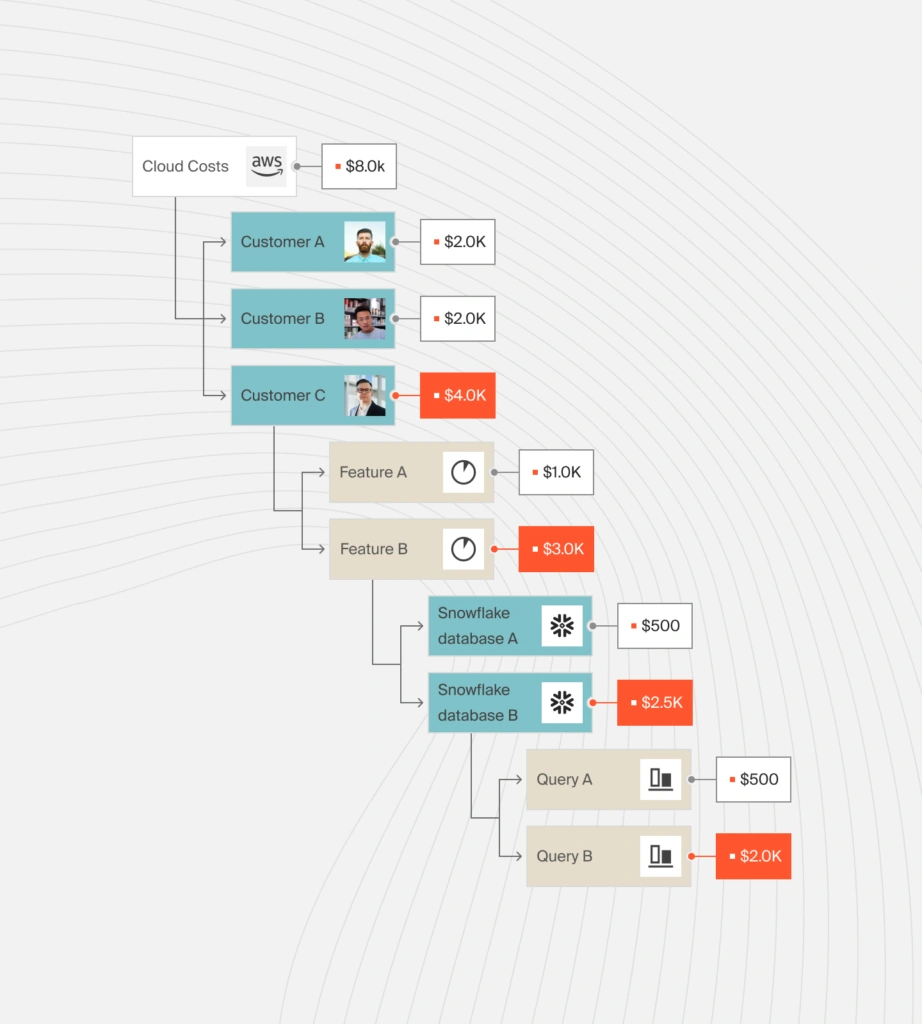
Dimensions can also be combined to create higher-level views of cloud spend.
For example, individual product Dimensions (Product A, Product B, Product C) can be grouped into a product-family Dimension (Consumer Products) without retagging. Achieving this same hierarchy with tags would require manually retagging thousands of resources across compute, storage, networking, and data transfer services.
There is no fixed limit to how Dimensions can be combined. Teams can create views by region, customer type, feature, product group, or other business context — and switch between them without rework.
Report
Finance needs to prove AI’s return: CloudZero report
260 senior finance leaders (more than half CFOs) told us why the speed of seeing AI spend, not the size of it, separates who pulls ahead on AI from who gets burned.
Overcoming The Limitations Of Tags
Even when using Dimensions, tagging remains valuable; the better your tags, the easier it is to develop Dimensions that accurately reflect your spend categories. Dimensions make it easier to overcome the challenges of tagging, which add complexity and time barriers to achieving accurate cost visibility.
Customers with zero tagging and ultra-thorough tagging have come to us; we’ve helped both achieve their visibility objectives.
The longer our customers use Dimensions, the more sophisticated they become, enabling precise views of spend in near-real time. The inherent variability of cloud cost demands cost visibility tools that move at the speed of your business. That’s what CloudZero Dimensions provides.
Want to explore cost visibility beyond tagging? See how CloudZero Dimensions help ambitious organizations to understand cloud spend without relying on perfect tags. See the product tour or  .
.
Frequently Asked Questions about Dimensions vs. Tagging