Google Cloud Platform (GCP) might not always be the loudest name in the cloud room. But it’s gradually become a powerhouse for organizations running data-intensive, AI/ML, and global-scale applications.
We also can’t ignore that GCP offers a backbone powered by Google’s own infrastructure (the same one that runs YouTube, Gmail, and Search).
In this guide, we’ll walk you through GCP machine types (Compute Engine machine families), compare them to help you match the right ones to your workloads, and highlight key considerations that will keep both your engineering and finance teams happy.
We’ll also share how a cost optimization platform like CloudZero can help you manage instance-related spending. This can give you the performance you need without blowing your budget.
Why Choosing The Right Machine Type Matters
For engineers, picking the right VM instances impacts performance and uptime. For CTOs, it shapes scalability and resource efficiency. And for CFOs, well, every misstep shows up on the cloud bill.
Whether you’re running web applications, data analytics pipelines, or AI/ML workloads, the GCP instance type you choose directly impacts:
- Performance: The right instance ensures your applications run smoothly, scale efficiently, and deliver the experience your users expect.
- GCP costs: Overprovisioned resources lead to waste, while underpowered instances can cause downtime or performance bottlenecks — both of which hit your bottom line.
- Scalability: Matching instance types to workload demands ensures you can scale up or down without costly overhauls.
Yet, with all the options available, it’s easy to over-provision, underutilize, or simply pick the wrong fit. And in a world where cloud waste costs organizations tens of billions of dollars annually — Harness estimated $44.5 billion in underutilized infrastructure alone for 2025, while broader industry estimates put total actionable waste well above $100 billion — that’s not a mistake anyone can afford.
The FinOps Foundation has consistently found that waste reduction is the top priority for FinOps practitioners, a position it has held since 2024 across all spending tiers.
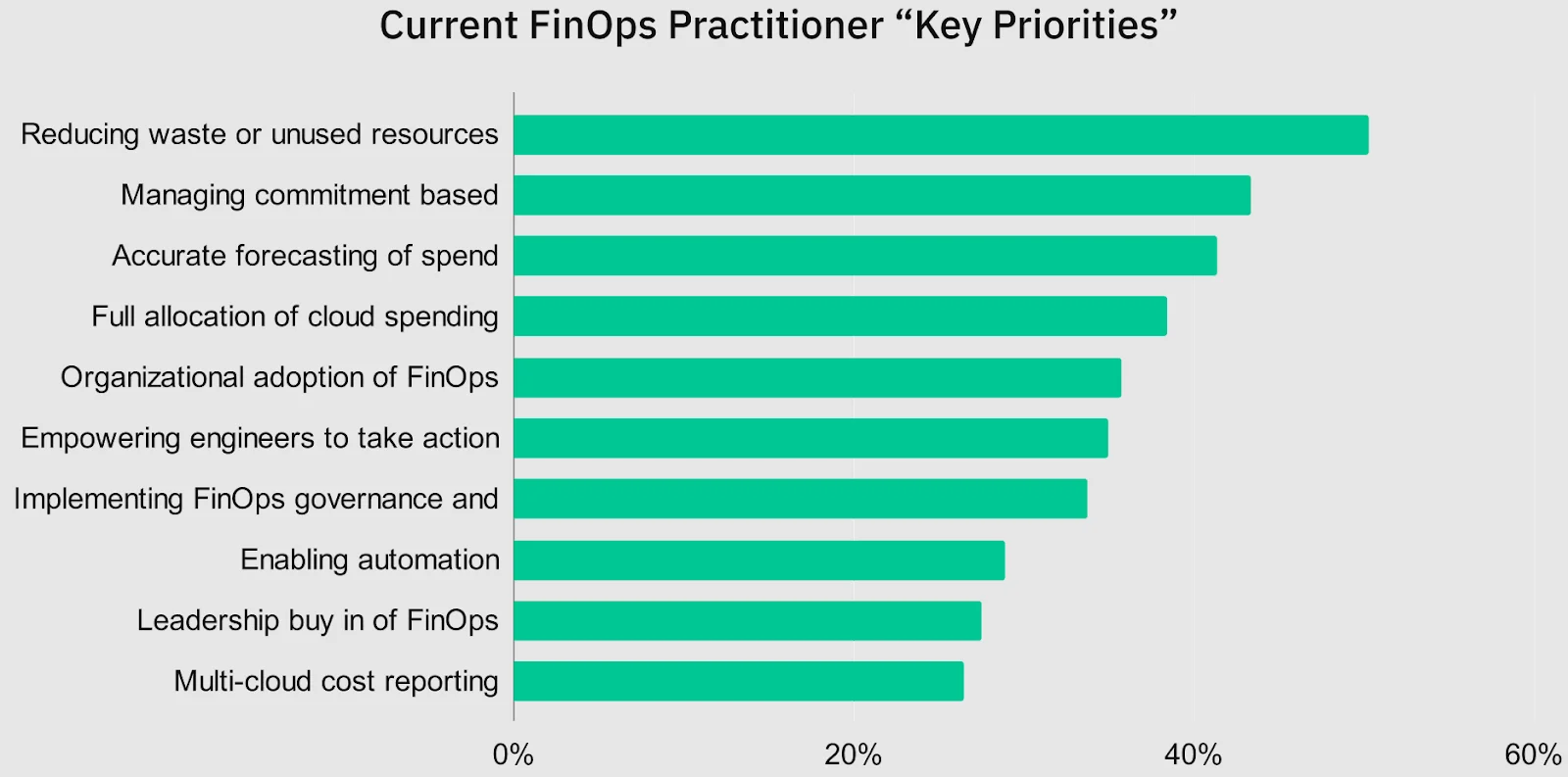
Credit: FinOps Foundation Key Priorities Shift Survey
The challenge isn’t unique to GCP.
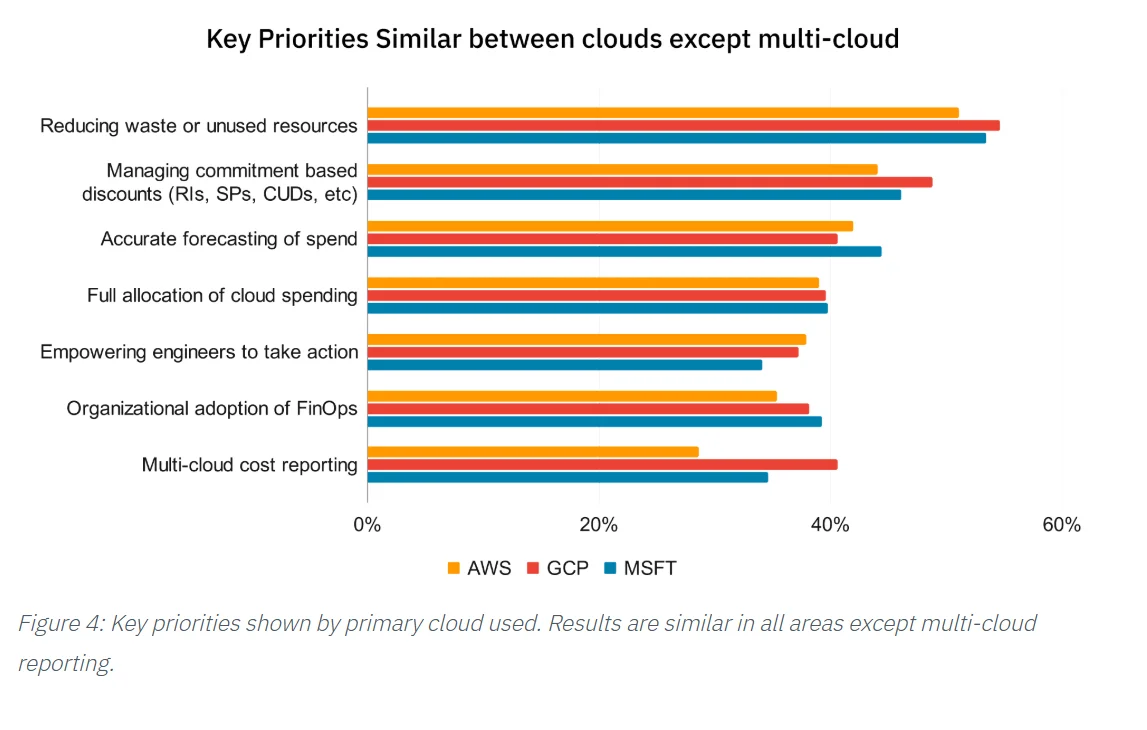
Image: AWS, Microsoft Azure, and GCP users want to reduce cloud costs, at least the unnecessary type.
2026 State of AI Spend Report
Why Finance Caps What It Can’t See
Learn how finance leaders are managing AI spend, and how they’re approaching FY2027
A Quick Overview Of GCP Instance Types
If you’re familiar with Amazon EC2 instances (AWS) or Azure Virtual Machines, you’ll find GCP Compute Engine machine options strikingly similar.
All three top cloud providers offer a sprawling menu of instance types. They offer similar VM categories (general-purpose, compute-optimized, memory-optimized, storage-optimized, etc.), flexible pricing (on-demand, reserved, spot/preemptible), and global infrastructure.
Related read: AWS Instance Types Compared: How to Choose The Right Option
Where GCP edges ahead for many is its focus on:
- Custom machine types: Fine-tune CPU and memory to your specific needs,
- Sustained Use Discounts: Automatically save more the longer your instances run,
- Live migration: Minimize downtime during infrastructure maintenance, and
- Per-second billing: Pay only for what you use, with compute charges calculated to the second (after a 60-second minimum). GCP also includes other cloud tools in one place.
These are all features that can make a real difference in both performance flexibility and cost efficiency.
That’s not all.
Key concepts to know about GCP machine types
- Machine family: A curated group of processor and hardware configurations optimized for specific workloads (such as general-purpose, compute-optimized, memory-optimized).
- Machine series: Within each family, machine types are further classified by series, generation, and processor type. Each series focuses on different performance aspects. For example, the E series offers cost-efficient VMs, while the C series focuses on high-performance compute.
- Generation: Generations are marked by ascending numbers. A higher series or generation number typically reflects newer CPU platforms or technologies.
- For example, the N2 series (older) has been succeeded by the N4 series (newest) within the general-purpose family, bringing DDR5 memory and Intel Emerald Rapids processors.
- Similarly, the M3 series (based on Intel Xeon Scalable 3rd Gen “Ice Lake”) is newer than the M2 series (based on Intel Xeon Scalable 2nd Gen “Cascade Lake”).
- Machine type: Each series offers various machine types, specifying resources like vCPUs, memory, disks, and GPUs. If predefined options don’t fit your needs, many series also support custom machine types. GCP machine type categories include:
- Predefined machine types
- Custom machine types
- Local SSD machine types
- Bare metal machine types
- Shared-core machine types
With that clarified, here’s a quick overview of the VMs.
What are the different categories of GCP machines available today?
Consider these GCP instance categories (a.k.a. Compute Engine machine families, series, and examples):
|
Compute Engine machine family |
GCP Machine series (Examples) |
Best for |
Key highlights |
General purpose | E series (E2) C series (C3, C3D, C4, C4A) T series (T2A, T2D) N series (N1, N2, N2D, N4, N4D) |
Web servers, app servers, development environments |
Balanced vCPU/memory, customizable, cost-efficient |
Compute-optimized |
H3 series (H3) C2 series |
High-performance computing, gaming servers, latency-sensitive apps |
High vCPU-to-memory ratio, faster CPUs |
Memory-optimized |
X4 series M4 series M3 series M2 series M1 series |
Large databases (SAP HANA), in-memory analytics |
High memory-to-vCPU ratio, designed for memory-heavy workloads |
Storage-optimized |
D series (D2, D3, D3 Standard) Z3 series (Z2 highmem) |
Workloads that are low in core usage but high in storage density |
High local storage throughput and IOPS, local SSDs |
Accelerator-optimized |
A2 (GPU) series A3 series A4 series G2 series TPU VMs |
Designed for massively parallelized workloads that require GPUs or TPUs |
GPUs (NVIDIA) or TPUs attached, optimized for Artificial Intelligence and Machine Learning |
Table: GCP Cloud Engine machine families and series
Next, we’ll look closer at each category, without making things too complicated.
GCP Instance Types Explained: Comparing Instances For Your Workload Needs
GCP Compute Engine offers various machine types to meet virtually any compute need.
General purpose Compute Engine machine types
General purpose instances are the workhorses of GCP. They offer a balanced ratio of vCPUs to memory, supporting everyday workloads such as web servers, microservices, small-to-medium databases, and development environments.
But even within this category, GCP offers several options, each with its own nuances for cost, performance, and flexibility.
| Machine series | Processor | Best use case | Key features |
|---|---|---|---|
| E2 | Intel or AMD | dev/test, cost-sensitive workloads | Lowest cost, no sustained use discounts needed, flexible CPU platforms |
| N2 | Intel Xeon Cascade Lake | General workloads that need better performance | Higher performance than E2, supports custom machine types |
| N2D | AMD EPYC Rome | Cost-effective compute with more memory bandwidth | Up to 13% lower cost than N2, ideal for workloads needing high memory bandwidth |
| N4 | Intel Emerald Rapids | Next-gen general-purpose workloads needing flexibility and cost efficiency | DDR5 memory, Titanium offloads, up to 80 vCPUs, custom and predefined shapes |
| N4D | AMD EPYC Turin | Cost-optimized workloads with AMD price-performance advantage | DDR5 memory, Titanium offloads, up to 96 vCPUs, efficient architecture |
| C3 (General-purpose flavor) | Intel Sapphire Rapids | Cutting-edge workloads that need higher performance and efficiency | Latest CPUs, improved networking, better performance per dollar |
| C4 | Intel Granite Rapids | Performance-intensive general-purpose and compute workloads | Up to 288 vCPUs, DDR5, Titanium, up to 200 Gbps networking, Hyperdisk support |
| C4A | Google Axion (Arm) | Cost-efficient, scale-out workloads (web serving, containerized apps, media encoding) | Arm-based (Neoverse V2), Titanium offloads, strong price-performance for compatible workloads |
Table: GCP General purpose machines
Some additional notes to take here:
- E2 pricing already includes automatic discounts, making it simpler for predictable workloads.
- N2, N2D, N4, N4D, C3, C4, and C4A benefit from Sustained Use Discounts. The longer you run them in a month, the bigger your savings.
- All except E2 support custom machine types, letting you fine-tune vCPU and memory independently.
- When choosing between series: E2 is the go-to for dev/test and cost-sensitive workloads where raw performance isn’t critical. N4 and N4D replace N2/N2D as the current-generation balanced option with DDR5 and better price-performance. C4 is the right pick when you need maximum single-thread performance or the highest vCPU counts. C4A offers compelling price-performance for Arm-compatible workloads like containerized microservices and web servers. If you’re running GKE node pools, C4A and N4 are strong candidates for scale-out workloads where per-vCPU cost matters most.
Compute-optimized Compute Engine machine types
These Compute Engine instances prioritize high vCPU-to-memory ratios, faster processors, and advanced networking performance to run compute-heavy workloads efficiently.
Choose GCP’s compute-optimized machines when raw compute power is your top priority. Think high-performance computing (HPC), gaming servers, media transcoding, or latency-sensitive applications.
|
Machine series |
Processor |
Best use case |
Key features |
|
C2 |
Intel Xeon Scalable (Cascade Lake) |
HPC workloads, gaming servers, latency-sensitive apps |
High clock speed CPUs, excellent single-threaded performance |
|
C2D | AMD EPYC Milan (3rd Gen) | Memory-bandwidth-intensive HPC, large-scale compute | High core counts, large L3 cache, DDR4 memory, PCIe Gen4 |
|
H3 |
AMD EPYC Genoa |
Advanced HPC workloads (CFD, seismic, weather modeling) |
High memory bandwidth, ultra-fast networking, high-core count |
Additional notes:
- H3 machines are specifically designed for HPC workloads. These require high-bandwidth memory and fast interconnects, like computational fluid dynamics, weather simulations, and seismic processing.
- C2 machines use older Intel Cascade Lake CPUs, ideal for applications requiring high clock speeds. C2D provides high core counts with AMD EPYC Milan, offering large L3 caches and strong memory bandwidth for compute-heavy parallel workloads.
- For storage, C3 supports Hyperdisk for next-gen block storage. H3 types focus more on high-throughput local SSD storage for HPC workloads.
Memory-optimized Compute Engine machine types
These instances offer the highest memory-to-vCPU ratios available on Compute Engine. This makes them ideal for memory-intensive applications. And that includes large-scale databases, in-memory analytics, and high-performance computing (HPC).
|
Machine series |
Processor |
Memory |
Best for |
Key features |
|
M1 |
Intel Xeon (Skylake, Broadwell E7) |
Up to 4 TB |
Medium in-memory databases (e.g., SAP HANA), in-memory analytics, business warehousing workloads |
Predefined machine types; supports Persistent Disk and Hyperdisk; available in select regions |
|
M2 |
Intel Xeon Scalable (Cascade Lake) |
Up to 12 TB |
Large in-memory databases, in-memory analytics, business warehousing, genomics analysis |
Predefined machine types; supports Persistent Disk and Hyperdisk; available in select regions |
|
M3 |
Intel Xeon Scalable (Ice Lake) |
1 to 4 TB |
OLAP and OLTP SAP workloads, memory-intensive applications (e.g., genomic modeling, EDA), HPC |
Predefined machine types; supports Hyperdisk Balanced storage; gVNIC networking; available in select regions |
|
M4 |
Intel Xeon Scalable (Sapphire Rapids) |
Up to 3 TB |
OLAP and OLTP SAP workloads, memory-intensive applications (e.g., genomic modeling, EDA), HPC |
Predefined machine types; supports Hyperdisk Balanced and Extreme; gVNIC networking; available in select regions |
|
X4 |
Intel Xeon Scalable (Sapphire Rapids) |
16 to 32 TB |
Extra-large SAP HANA systems, enterprise-grade ultra memory-equipped IaaS, high-performance computing |
Bare metal instances; supports only Hyperdisk storage; ultra-fast networking; available in select regions |
Note the following:
- All series are available in select regions and zones.
- M1 and M2 machines do not support GPUs. They are limited to predefined machine types. M3 and M4 are similar here except that they are available in select regions.
- X4 are bare metal instances and do not support GPUs, Shielded VMs, or live migration. They also include longer boot times due to hardware initialization.
Storage-optimized Compute Engine machine types
Storage-optimized machines are tailored for applications that demand high local storage capacity and throughput.
|
Machine series |
Processor |
Local storage |
Best use case |
Key features |
|
D2 |
Intel Xeon E5 (Haswell) |
Up to 3 TB HDD |
Big data (Hadoop), sequential I/O processing |
High local HDD storage, lower cost, good for batch workloads |
|
D3 |
Intel Xeon Scalable (Cascade Lake) |
Up to 3 TB SSD |
Data warehousing, analytics workloads |
High-performance local SSD storage, higher IOPS |
|
D3 Standard |
Intel Xeon Scalable (Cascade Lake) |
Up to 3 TB SSD |
Cost-effective storage-heavy workloads |
Balanced storage and compute, SSD storage, more affordable than D3 |
|
Z3-highmem–88 |
Intel Xeon Scalable (Sapphire Rapids) |
36 TiB Titanium SSDs |
SQL/NoSQL/vector databases, data analytics, media streaming |
High memory (704 GB), Titanium SSDs, up to 100 Gbps networking |
|
Z3-highmem-176 |
Intel Xeon Scalable (Sapphire Rapids) |
36 TiB Titanium SSDs |
Large-scale database and analytics workloads |
Maximum memory (1,408 GB), Titanium SSDs, up to 200 Gbps networking |
D3/D3-Standard machines offer solid performance for most analytics workloads. Meanwhile, Z3 provides up to 200 Gbps networking (and up to 1.4 TB memory) and is ideal for data-intensive and distributed workloads.
Accelerator-optimized Compute Engine machine types
Accelerator-optimized machines come equipped with GPUs or TPUs (Tensor Processing Units). This ensures they provide the specialized hardware needed for compute-intensive tasks like model training, inference, scientific simulations, and rendering at scale.
|
Machine series |
GPU model |
vCPUs |
Memory |
Best use case |
Key features |
|
A2 |
NVIDIA A100 (40GB or 80GB) |
12 to 96 |
85 to 1360 GB |
ML training and inference, HPC workloads |
High GPU memory bandwidth, NVLink support, up to 100 Gbps networking |
|
A3 |
NVIDIA H100 (80GB) or H200 (141GB) |
26 to 224 |
234 to 2952 GB |
Large-scale ML training, foundation model serving |
High GPU memory, NVLink, up to 3,600 Gbps networking |
|
A4 |
NVIDIA B200 (180GB) |
224 |
3968 |
Massive-scale ML training, large language models | Up to 3x performance over A3, NVLink 5th gen, up to 14.4 TBps aggregate GPU bandwidth |
|
G2 |
NVIDIA L4 (24GB) |
4 to 94 |
16 to 384 |
Graphics-intensive applications, video transcoding, inference workloads |
Supports virtual workstations, customizable vCPU and memory, up to 100 Gbps networking |
And there you have them.
Criteria To Consider When Choosing Compute Engine Instance Types
Choosing the right GCP instance type is about balancing performance, scalability, and cost-efficiency to avoid under- or overprovisioning.
Here are key factors to consider:
1. Understand your workload requirements
For example, compute-bound workloads (like HPC simulations or gaming servers) perform best on compute-optimized instances (such as C3 or H3 series) with high vCPU-to-memory ratios.
Benchmarking is best practice here. CTOs and engineers will want to test workloads across different instance types before committing. Google Cloud often provides trial credits so you can experiment with configurations.
2. Plan for Scalability and Flexibility
Consider whether your app needs to scale vertically (adding more CPU/memory to a single instance) or horizontally (adding more instances). Custom Machine types allow you to fine-tune vCPU and memory independently to avoid overprovisioning.
For example, a memory-heavy app with low CPU demands can be right-sized for better cost-performance. For CFOs, this flexibility often translates to better cost-to-performance ratios.
3. Consider pricing models
Consider these:
- On-demand instances offer flexibility but at a premium.
- Committed Use Discounts (CUDs) save up to 57% on predictable, long-running workloads with 1- or 3-year commitments.
- Spot VMs (up to 91% cheaper) are ideal for non-critical or interruptible workloads like batch jobs or CI/CD pipelines. Google has transitioned from the older “Preemptible VM” model to Spot VMs, which offer the same deep discounts with improved flexibility.
You can blend the pricing models, too. For example, use CUDs for steady workloads and Spot VMs for flexible, short-lived tasks.
4. Factor in regional availability and latency
Not all Compute Engine machine types, GPUs, or storage options are available in every GCP region. Consider deploying closer to your end users to minimize latency and reduce data transfer costs. Also, use GCP’s network performance tools to measure latency across regions before deploying latency-sensitive workloads.
Related read: A Guide To GCP Regions (And How They Affect Your Costs)
5. Evaluate networking and storage performance
Some instances, such as C3, Z3, and A4, offer ultra-fast networking (up to 3,600 Gbps in A4), ideal for distributed systems or ML workloads. You can pair high-performance compute with storage options like Hyperdisk or Titanium SSDs to avoid bottlenecks.
6. Watch for “hidden costs”
Data transfer fees, licensing, and discount eligibility can significantly affect your total cost of ownership (TCO). For example, data egress fees between regions or outside GCP can add up quickly.
Sustained Use Discounts (automatically applied) offer savings as instances run longer throughout the month. Some specialized instances (e.g., SAP-certified VMs) may include additional licensing fees, so remember to factor these into your forecasts.
In short, choosing the right GCP instance type is a multi-dimensional decision, where you’ll want to optimize for both performance and budget efficiency.
Take The Next Step: Optimize Your GCP Costs Across Machine Types With Confidence
From benchmarking your workloads to blending pricing models and avoiding hidden costs, making smart choices upfront can pay off in better performance and long-term savings.
But here’s the thing: even with the right Compute Engine machine types, cloud costs can still creep up unnoticed, especially across distributed teams and environments.
That’s where CloudZero comes in to help you choose smart and spend smarter.
CloudZero gives you real-time, granular visibility into your GCP costs. You’ll get the immediately actionable insights most cost tools miss.
Think of cost per customer, product, and deployment. So, you’ll know exactly where your spend is going and how to optimize it without sacrificing performance or innovation.
With CloudZero, you’re never in the dark about rising costs or inefficient usage. You get the clarity to make smart decisions that protect engineering performance and financial profitability.
It’s why ambitious teams at Drift, Duolingo, Skyscanner, MalwareBytes, among others, trust CloudZero to help them spend smarter. (Drift saved over $3 million, and Upstart saved $20 million with CloudZero!)
Don’t just take our word for it. See for yourself — risk-free.  to start optimizing your GCP environment without sacrificing speed or innovation.
Software and pricing information last verified May 2026. Features, pricing, and availability may have changed. Please verify current details with Google Cloud before making decisions.











