
On paper, Gemini pricing looks straightforward. You pay per token. Input tokens cost one amount, output tokens cost another, and different models come with different rates. But once Gemini is wired into a production SaaS product, that simplicity disappears. Fast. That’s because token usage compounds across context, retrieval, and output — not across requests.
The same “API call” can cost pennies in one feature and dollars in another.
Two customers can trigger identical-looking requests that land very differently on the invoice.
How? Why?
In this guide, we’ll break down how Gemini API calls actually translate into cost and why cost per API call is the metric that finally aligns your engineers and finance. Cost per API call acts as a behavioral metric, revealing how implementation choices affect spend at the unit level.
Then we’ll share how that visibility is helping innovative teams scale AI innovation while keeping their margins intact (and how you can apply the same playbook in your own environment).
How Gemini API Pricing Works In 2026
Pricing for the Gemini API is usage-based. You’re billed for what the model processes and generates, not for how many times you’re calling it.
This distinction is why two identical-looking API calls can produce dramatically different costs on your invoice.
See our in-depth guide to Gemini pricing here.
What you won’t see in the pricing docs is how uneven this becomes once Gemini is embedded into a real SaaS product.
Let’s ground how a Gemini API call actually works to see exactly what you actually pay for.
(Important distinction: the cost of each call is driven by how much text the model must read, retain, and generate — not by the act of calling the API itself.)
Report
Finance needs to prove AI’s return: CloudZero report
260 senior finance leaders (more than half CFOs) told us why the speed of seeing AI spend, not the size of it, separates who pulls ahead on AI from who gets burned.
How Gemini API Calls Work
A Gemini API call can seem like a single request and response. But when your application calls Gemini, it usually sends:
- System instructions that define how the model should behave
- The user’s current prompt or action
- Any retained conversation history or context
- Retrieved data, tool outputs, or structured inputs
- Instructions for how long or detailed the response should be
Gemini processes all of that together, then generates an output based on your selected model.
From the outside, this still looks like “one API call.” But internally, Gemini is reading and writing varying amounts of text every time. From a cost perspective, however, each call behaves like a variable-sized workload.
With that in mind, we can now talk about what the Gemini cost per API call actually means.
What Is the Gemini Cost Per API Call, Really?
At a glance:
- Gemini does not charge per request — it charges per token processed
- Context length and output verbosity drive most cost variation
- Cost per API call varies by feature, customer, and workflow
- Averages hide the few calls that generate most of the spend
- Cost per API call behaves like a unit cost, not an infrastructure total
If you’ve been following our guides on unit economics, you know by now that the Gemini cost per API isn’t calculated by dividing total Gemini spend by the number of requests made.
Doing that flattens all the variability that actually matters, including model choice, context length, output size, and usage patterns across unique customers and features.
Instead, the true cost per API call reflects the actual cost of delivering one unit of AI-driven value. This makes cost per API call a true GenAI unit economics metric, not just a billing calculation.
Gemini pricing tells you what you’re charged. Cost per API call tells you why (and whether it’s worth it).
Gemini pricing tells you what you’re charged. Cost per API call tells you why (and whether it’s worth it).
See, most metrics around AI spend are designed for one side of the house. Engineers look at latency, accuracy, and throughput. Finance looks at monthly spend, budget variance, and forecasts.
The Cost per API call view sits in the middle.
For engineering, the metric shows the cost impact of real implementation choices, like which calls are lightweight and which ones scale poorly. This realization makes optimization efforts a technical decision, not a financial one handed down from above.
For finance, the cost per API call turns AI spend into something that behaves like a unit cost. Instead of asking, “Why did Gemini costs increase this month?” you can finally ask, “Which feature, product, or customer drove the higher-cost calls, and did revenue scale with that?”
For leaders, understanding the cost per API call enables you to support experimentation while still answering the most important question: Is this AI investment compounding value, or compounding cost?
That said, the alignment works only if the metric is visible, trustworthy, and timely. And that brings us to the next challenge.
The Gemini Cost Per API Call Is Hard to See in Native Tools
Google’s billing tools are designed to tell you how much you’re spending. What Gemini usage data doesn’t natively tell you is:
- Which customer triggered a costly call
- Which feature or workflow generated it
- Whether the cost increase reflects healthy adoption or inefficient usage
- How per-call cost changes as your usage scales
As a result, many teams have to fall back on averages and assumptions. A structured AI cost management practice — with visibility, allocation, and unit economics — prevents this from becoming a recurring problem.
Those assumptions often break first in high-growth features, long-running conversations, or enterprise customer workflows. They have to divide total spend by total calls, assume costs scale linearly, and hope nothing unexpected happens.
That works… until it doesn’t.
A new feature rolls out. Context windows grow. A handful of customers start using AI far more intensively than others. Costs jump, but the “why” is buried across logs, cloud accounts, and billing exports.
Without a way to automatically connect that Gemini usage to product behavior, you could be left reacting to invoices instead of managing costs in real time.
Here’s how teams close that visibility gap in practice.
How To Calculate and Surface Your Gemini Cost Per API Call Like the Pros
Let’s walk through how a typical SaaS team might use CloudZero to calculate, and actually use, Gemini cost per API call on a daily.
The scenario
Imagine a B2B SaaS product with an AI-powered customer support assistant built on Gemini. The feature is popular, usage is growing fast, and finance has noticed their Gemini spend increasing month over month.
The question to ask here is not, “Why are Gemini costs so darn high?” It’s “Which usage is driving this, and is it scaling profitably?”
Here’s how to answer that.
Step 1: Identify the AI-powered feature you want to analyze
Start by isolating the support assistant feature inside CloudZero using your existing dimensions. CloudZero Dimensions are customizable lenses that enable you to allocate and organize cloud and AI spend into business-relevant categories like products, features, teams, or customers. Dimensions enable precise cost analysis beyond traditional tagging.
Examples here include:
- Service or microservice that triggers Gemini calls
- Feature name (such as, “AI Support Assistant”)
- Environment (such as production only)
This immediately narrows your Gemini spend from a global total down to only the calls that matter for this feature.
At this point, you’ll already see:
- Total Gemini spend tied to the assistant
- How that spend trends day by day
- How it compares to other Gemini-powered features
Step 2: Tie spend to actual API usage
Next, correlate allocated Gemini spend with usage counts. In this case, that’s the number of Gemini API calls triggered by the support assistant. CloudZero does this for and with you.
Instead of relying on averages or assumptions, you now have:
- Total Gemini cost for the feature (last 30 days)
- Total number of API calls generated by that feature
From this, CloudZero surfaces a true Gemini cost per API call for the assistant. Not a theoretical cost. Not a per-token estimate. But your real cost of running that feature in production.
Step 3: Compare cost per API call across segments
Now the interesting part begins. Using CloudZero’s dimensions, break the cost per API call down further to:
- Self-serve customers vs enterprise customers
- High-volume support users vs occasional users
- Recent feature adopters vs long-term customers
Not sure how to do that? You get your very own Certified FinOps Practitioner/FinOps Account Manager when you use CloudZero. Heck, this expert, ongoing support is one reason our customers start seeing ROI within 14 days (and find enough savings to recoup their annual subscription within three months).
Back to Dimensions, you may discover that your:
- Self-serve users generate short, inexpensive calls
- A small number of enterprise customers generate long, context-heavy conversations
- Those enterprise calls cost 4–5X more per API call than average
Nothing is “wrong”, but you can now see the economics with clarity.
Step 4: Connect the cost per API call to revenue and margin
With the cost per API call defined, your finance and FP&A folks can now ask business questions they couldn’t answer before, like:
- Are high-cost enterprise customers priced appropriately?
- Does the AI assistant improve retention enough to justify its cost?
- What happens to gross margin if usage doubles next quarter?
Because CloudZero connects Gemini costs to specific customers and revenue, you’ll be able to see your:
- Cost per API call
- Cost per customer
- Cost relative to ARR or contract value
This helps you turn Gemini from a vague infrastructure expense into a measurable input in your margin analysis and forecasting.
Step 5: Detect changes early
A few weeks later, CloudZero’s Real-Time Anomaly Detection flags an increase in your cost per API call for the support assistant, like this:
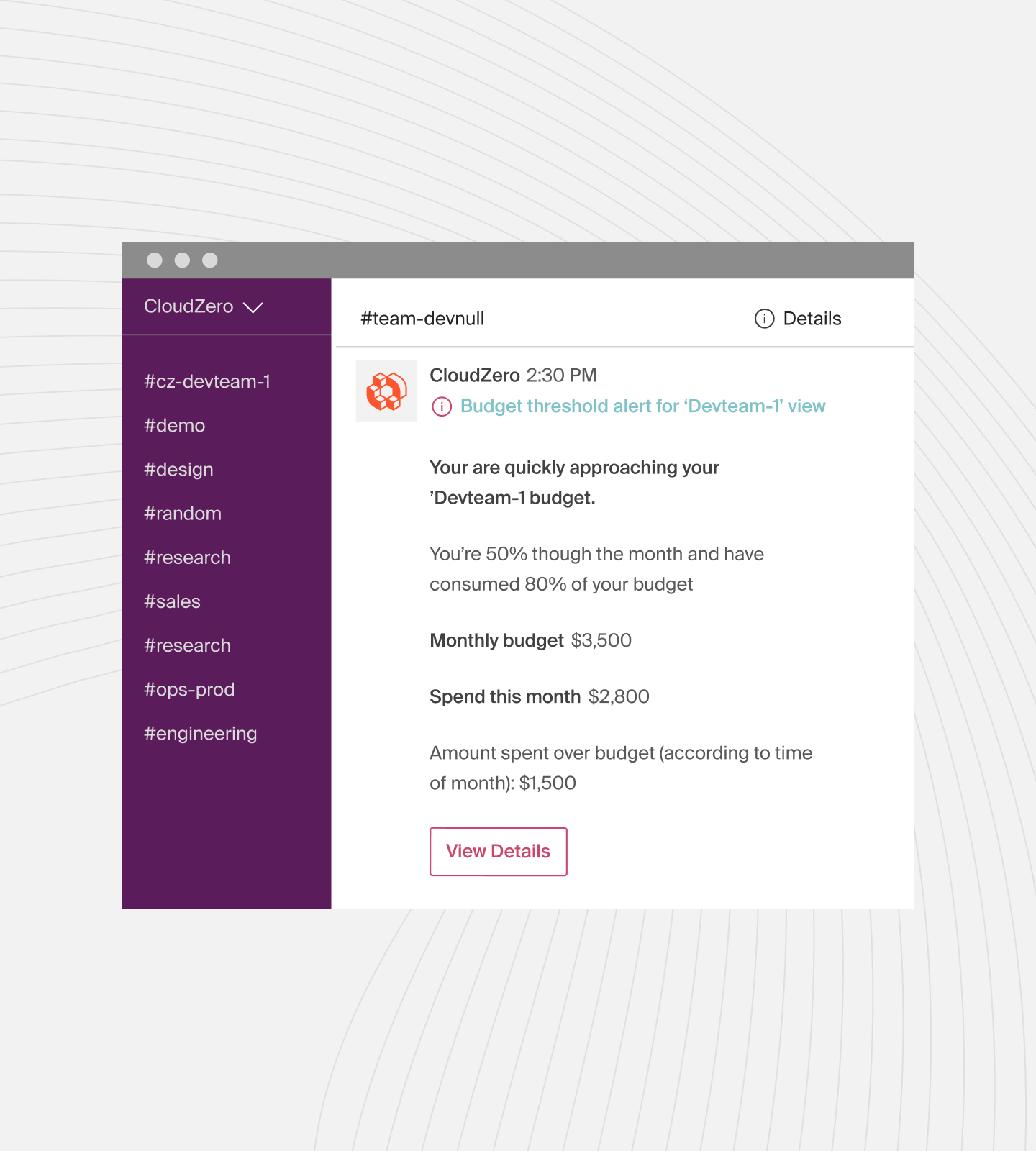
It’s nothing dramatic, but enough to warrant a look.
Engineering traces it back to a recent change, such as a:
- Longer conversation history being sent with every request, or a
- More verbose response formatting added during a feature update
Because the signal appears as usage changes (real-time), your team can adjust quickly by:
- Trimming unnecessary context
- Applying caching where appropriate
- Limiting verbose outputs to higher-value workflows
This fix happens hours or days after the deployment, not weeks later when the changes are already reflected in your invoice.
Step 6: Use cost per API call as an ongoing control
From here on, your Gemini cost per API call becomes a baseline metric you can depend on, not a one-off calculation. And that means you can use it to:
- Evaluate new AI features before full rollout
- Compare the cost efficiency of different workflows
- Forecast Gemini spend based on expected usage growth
- Support experimentation without flying blind
Most importantly, everyone, from engineering to finance to leadership, can look at the same number, grounded in the same reality, to make decisions, like this:
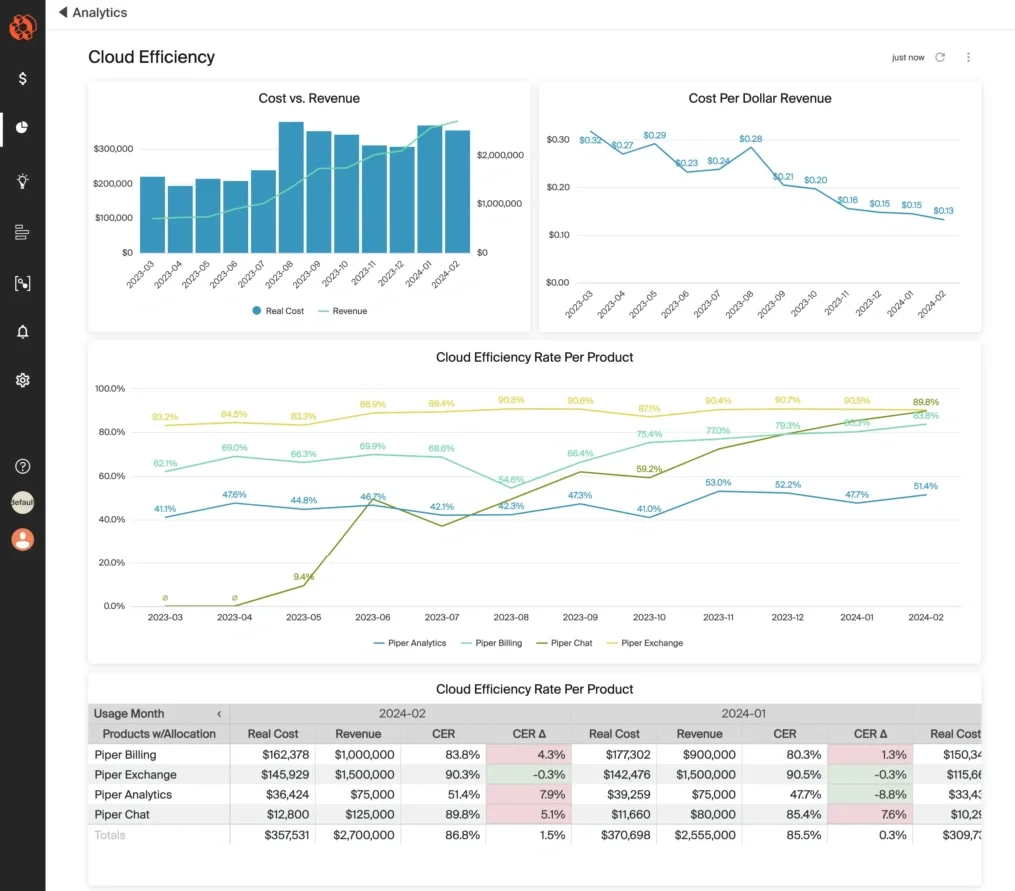
Image: CloudZero’s Cloud Efficiency Rate Dashboard
Common Mistakes SaaS Teams Make When Estimating Gemini API Costs
Most Gemini cost overruns don’t come from reckless usage. They tend to come from reasonable assumptions that stop working once AI features scale.
Here are the ones that cause the most trouble.
1. Treating all API calls as equal
Some calls are short and cheap. Others include long context windows, enriched data, or verbose outputs. Averaging these together hides the few calls that drive most of the spend.
2. Relying on token averages instead of real usage
Token averages assume prompts, context, and responses stay stable. In production, that doesn’t happen. Features mature, context grows, and outputs expand. So, using cost per API call based on actual usage is far more reliable.
3. Overlooking context growth
Context rarely shrinks. Conversation history, retrieval results, and system instructions accumulate over time, increasing your per-call cost. If you only watch total spend, you’ll miss this gradual creep until it becomes material.
4. Optimizing models before fixing usage
Switching to a cheaper model can help, but it’s rarely the biggest lever.
If your Gemini costs are driven by long context, repeated prompts, or unnecessary outputs, changing models doesn’t treat the cause. Instead, you’ll want to revise your usage patterns.
5. Keeping the cost concern separate from product decisions
When cost reviews happen after the fact, they can’t influence your design choices. Yet, engineering decisions affect costs whether teams see it or not. And without timely feedback, optimization becomes reactive instead of intentional.
6. Assuming every spike is a problem
Not all AI cost increases signal waste. Some reflect healthy adoption or reveal the high-value customers using your features, products, and services more deeply.
Without a per-call context, there’s the risk you may cut the costs of what’s bringing you value instead of improving efficiency.
Take The Next Step: Make Your Gemini API Costs Predictable And Profitable, Not Reactive
Gemini pricing isn’t inherently unpredictable. What’s unpredictable is managing it without visibility into how your product actually uses it.
By measuring the real cost of AI-driven actions inside your product, teams gain a shared language for decision-making, like this:
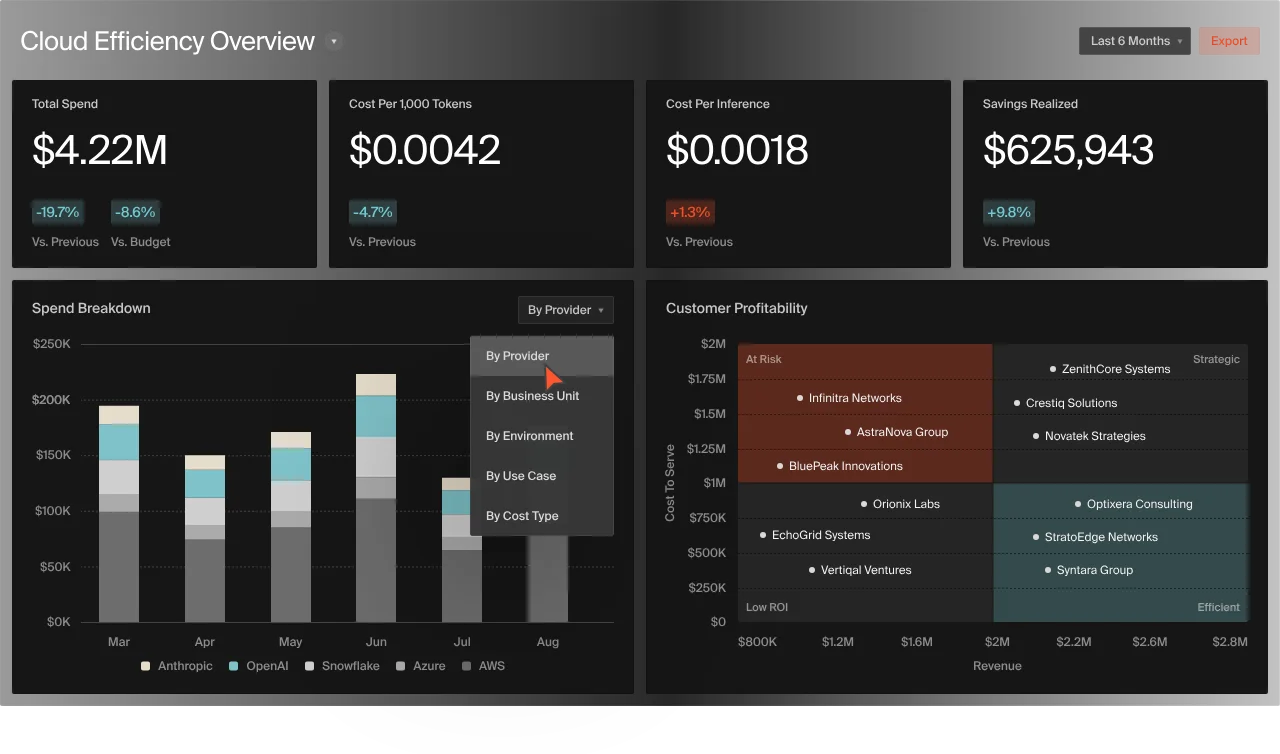
Engineers can see the impact of design choices as they build. Finance can forecast based on usage, not guesses. And leadership can support experimentation, knowing costs are tied to value.
This is how AI stops being a budget risk and starts behaving like any other scalable part of your SaaS economics.
And with CloudZero, you can operationalize that shift. You can convert Gemini usage into business-aligned unit costs, like cost per AI model, per user, per SDLC stage, per product feature, and more. You can make your GenAI cost per API call visible, measurable, and actionable — in real time, across teams.
It’s what teams at Helm.ai, Grammarly, and Coinbase trust CloudZero to do. Don’t just take our word for it.  and see how to capture and stay in control of your Gemini cost per API call with confidence.
Frequently Asked Questions about Gemini API Costs











