Amazon promotes its RDS as a scalable, high-performing alternative to traditional databases, backed by automation and reliability.
It’s popular among teams looking to offload maintenance and improve availability. But while the service is robust, costs can rise quickly depending on how it’s used.
This guide explains how Amazon RDS pricing works. In addition, we’ll discuss how to understand, optimize, and view your RDS costs.
But first…
What Is Amazon RDS?
Amazon Relational Database Service (RDS) is a fully managed AWS service for running relational databases in the cloud. It supports engines such as MySQL, PostgreSQL, Oracle, SQL Server, and Amazon Aurora.
RDS handles backups, updates, scaling, and high availability. It offers a production-ready database without requiring users to manage the underlying infrastructure.
But costs can add up fast, especially with long-running instances, high IOPS, multi-AZ configurations, and more.
Report
Finance needs to prove AI’s return: CloudZero report
260 senior finance leaders (more than half CFOs) told us why the speed of seeing AI spend, not the size of it, separates who pulls ahead on AI from who gets burned.
What Factors Influence Amazon RDS Costs?
There are ten major factors that determine how much RDS costs:
- Database engine
- Instance type
- Instance size
- Amazon region or availability zone
- Storage option
- Payment option (On-Demand vs. Reserved Instance)
- Backup choice
- Snapshot export option
- Single AZ vs. Multiple AZs
- Data transfer in/out of RDS
- Extended Support status — AWS charges additional per-vCPU fees for engine versions past community end-of-life
- RDS Proxy configuration — an optional managed database proxy that adds per-vCPU-hour charges on top of your instance cost
Getting an accurate estimate can be challenging, especially if you haven’t used Amazon RDS yet. And even when you have, it is easy to overlook some cost centers due to all the different pricing factors. So, how do you measure, analyze, and understand RDS costs?
How Does Amazon RDS Pricing Work?
Pricing for Amazon RDS varies based on several factors, including your choice of database engine, database instance, database region, and purchase type (On-Demand or Reserved Instance).
DB instances, outbound data transfers, additional storage, deployment type, and other aspects also affect Amazon RDS costs.
However, you pay only for the relational DB resources you consume over your Amazon RDS billing period, including hosting, storage, operations, and data transfer.
This is how Amazon RDS pricing works based on the major factors:
1. Amazon RDS Free Tier
You can use AWS db.t2.micro, db.t3.micro, and db.t4g.micro instances for up to 750 free hours to run MySQL, PostgreSQL, and MariaDB databases in the Single-Availability Zone each month if you wish to test RDS’s fit for your needs.
If you run more than one instance, Amazon RDS billing will automatically aggregate your usage across instance classes.
Alternatively, you can use 750 free hours each month of Single-AZ db.t2.micro Instance when running Oracle Bring Your Own License (BYOL) or SQL Server (using the SQL Server Express Edition).
The Amazon RDS free tier also lets you run the Oracle BYOL db.t3.micro Single-AZ Instance. But if you run both a db.t3.micro Single-AZ and a db.t2.micro Single-AZ Instance on Oracle BYOL, RDS will aggregate usage across instance classes.
In addition, you will receive 20 GB of General Purpose (SSD) database storage and 20 GB of storage for DB Snapshots (user-initiated) and automated database backups.
How do the paid tiers work on Amazon RDS?
2. Amazon RDS pricing by database engine
Amazon RDS supports seven relational database engines: Amazon Aurora (MySQL-compatible), Amazon Aurora (PostgreSQL-compatible), MariaDB, MySQL, PostgreSQL, Oracle, and Microsoft SQL Server. You can also deploy Amazon RDS on Outposts for on-premises workloads.
MySQL and MariaDB are the most cost-efficient starting points. PostgreSQL typically adds a modest premium — around 10% more per instance-hour depending on size — for the same underlying compute capacity. Storage, provisioned I/O, and data transfer pricing are consistent across all three open-source engines.
Oracle and Microsoft SQL Server are in a different pricing tier. When using License Included configurations (where AWS absorbs the licensing cost), both can run nearly twice the hourly rate of equivalent open-source deployments. Oracle also supports bring-your-own-license (BYOL), which reduces the hourly rate to roughly match open-source pricing if you already hold an enterprise license.
Amazon Aurora is AWS’s proprietary engine, compatible with both MySQL and PostgreSQL. It is designed for high availability at scale and includes developer tools for machine learning-driven and serverless applications. Aurora instances are typically priced around 20% higher per instance-hour than standard RDS equivalents, but offer meaningfully better throughput, automatic storage scaling, and built-in replication — a tradeoff that often makes sense for production workloads. Aurora bills storage in per GB-month increments and I/O usage per million request increments, with no prior provisioning required for either.
Aurora Serverless v2 bills per Aurora Capacity Unit (ACU) per hour rather than a fixed instance size, scaling capacity up and down automatically as your application requires. For variable or unpredictable workloads, this can be more cost-effective than committing to a provisioned instance tier. Note that features like Global Database, Snapshot Export, and Backtrack, as well as data transfers out of Aurora, attract additional charges.
3. Amazon RDS pricing by database instance
After selecting an engine, you’ll choose an RDS instance type and size with the compute (vCPU) and memory (GiB RAM) your workload needs, as well as a suitable networking capacity (Mbps).
Amazon RDS provides a range of instances, from db.t3.micro (has 2 vCPUS, 1 GiB RAM, and supports 2085 Mbps) to db.m5.24xlarge ( with 96 vCPUS, 384 GiB RAM, and does 19,000 Mbps).
We get it. Choosing the right RDS instance size for your needs can be daunting.
We recommend tracking how much data your queries use (your working set). Then, use CloudZero Advisor (a free tool for comparing cloud resources and pricing) to find and pick the right DB instance size and type. Here’s how CloudZero Advisor looks for RDS:
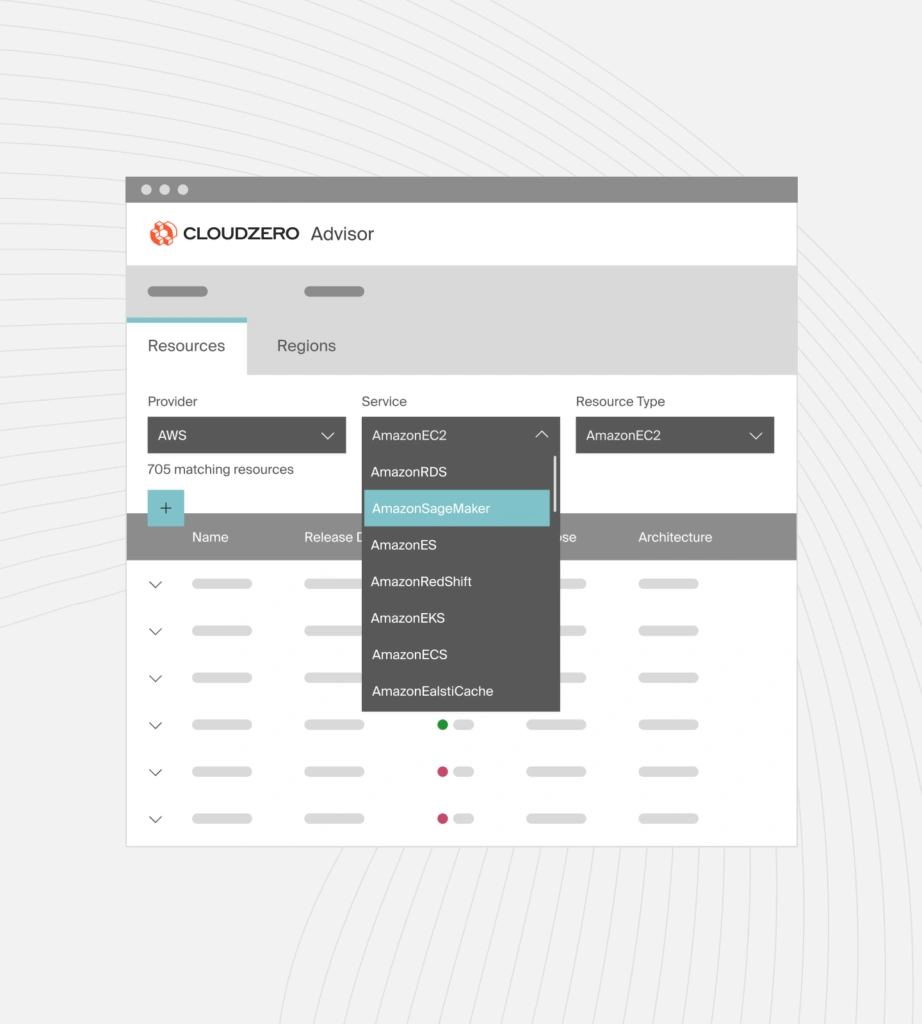
CloudZero Advisor for choosing Amazon RDS instance type, size, and pricing.
4. Amazon RDS pricing by database region
An Amazon Region hosts several Availability Zones (AZ), each with its own pricing options and failure isolation support. You always need to choose a region, an AZ, or a local zone to calculate RDS costs, regardless of your choice of DB engine, instance type, payment option, storage, etc.
You can also deploy a DB instance in multiple Availability Zones (Multi-AZ deployment). Here, RDS automatically establishes and runs secondary DB instances in another Availability Zone. The primary DB instance replicates across these secondary DB instances in various AZs. This provides data redundancy, failover support, minimizes I/O freezes, and limits latency spikes while backing up the system. Secondary DB instances also serve read traffic in Multi-AZ DB cluster deployments.
5. Amazon RDS On-Demand Instance Pricing vs. Amazon RDS Reserved Instance Pricing
In RDS, On-Demand instance pricing by the hour of DB usage is the default billing method. You don’t need to make any upfront payments or commit long-term here.
But if you use an RDS DB for less than an hour, RDS will bill you in one-second increments with a 10-minute minimum charge whenever a billable status changes, such as when you create, start, or modify the database instance class.
RDS bills these instances in one-second increments from the moment you start the instance until you stop it.
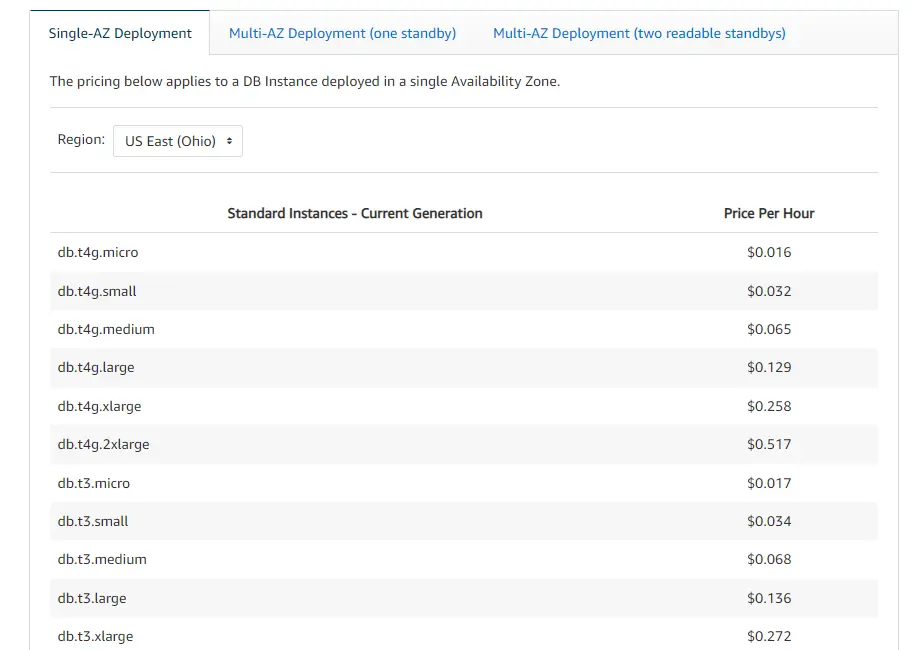
Example of Amazon RDS On-Demand instances pricing by location, instance size, and single availability zone.
By paying more, you can start, stop, or change the size of an On-Demand instance whenever you want.
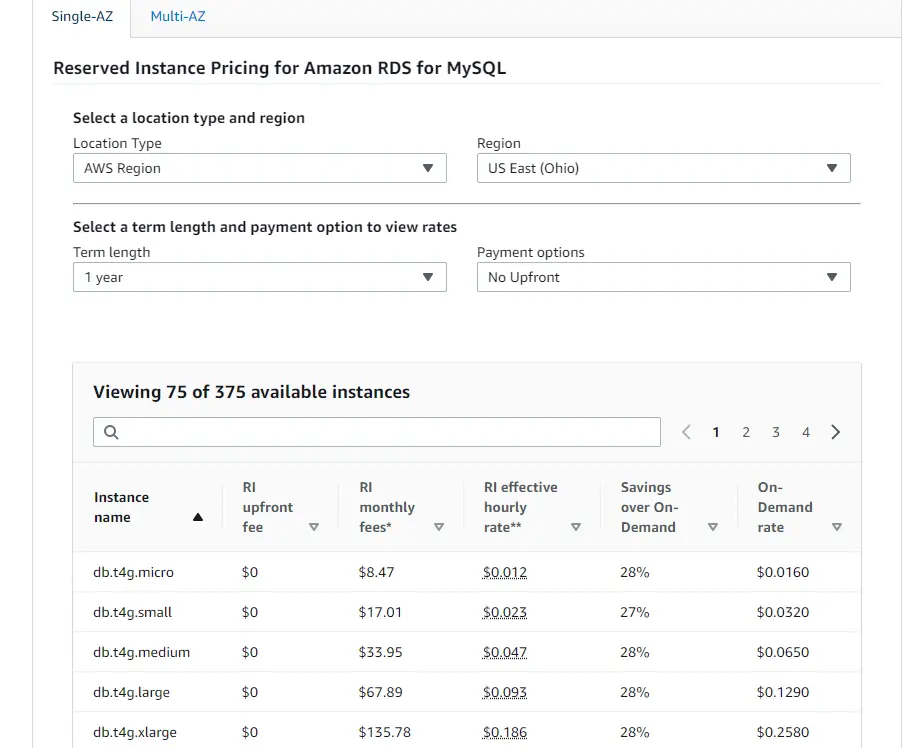
Amazon RDS Reserved Instances enable you to reserve an instance for one or three years. By committing long term, you receive a significant discount off the On-Demand rate. There are three RDS Reserved Instances payment options:
- No upfront ($0 upfront for up 29% savings off On-Demand),
- Partial upfront (pay up to 99% upfront for up to 33% savings on a one-year plan and 52% for three years), and
- All-upfront (full payment upfront for up to 34% savings in one year or 53% for three years).
Here’s a quick example of RDS Reserved Instances pricing for various DB instance sizes, for one year, with no upfront payment in US East (Ohio):
6. Amazon RDS Extended Support Pricing
Extended Support applies when you run MySQL or PostgreSQL on a major version that AWS has retired from standard support. Rather than forcing an immediate upgrade, AWS offers up to three additional years of critical security patches — for a per-vCPU-hour fee on top of your standard instance costs.
The pricing structure as of 2026:
- Years 1–2 of Extended Support: $0.100/vCPU-hour
- Year 3+: $0.200/vCPU-hour (this rate doubled on March 1, 2026)
To put that in concrete terms: a db.m5.xlarge instance (4 vCPUs) running MySQL 5.7 in us-east-1 accrues an additional $0.80/hr in Extended Support charges — roughly $584/month on top of standard instance pricing. For teams who haven’t explicitly planned for this, the charge tends to show up as a significant bill shock.
The cleanest way to avoid Extended Support costs is to upgrade to a currently supported major version before your engine version reaches end-of-standard-support. If you’re running multiple RDS instances across accounts and regions, CloudZero can surface Extended Support charges by service and account so nothing slips through.
7. Amazon RDS pricing by DB storage
There are three types of storage available with RDS, which determine how much you will pay per month.
General Purpose (SSD) storage
General Purpose SSD is priced at $0.115 per GB-month. AWS now defaults new RDS instances to gp3 storage, which delivers 3,000 IOPS and 125 MiB/s throughput at the base price — better baseline performance than the older gp2 standard at the same per-GB rate. If you’re still running gp2 volumes, migrating to gp3 is often possible without downtime and can reduce cost by eliminating the need for provisioned IOPS add-ons.
Provisioned IOPS (SSD) storage
You can provision I/O capacity to meet specific database requirements. You’ll be able to provision and scale from 1,000 IOPS to 80,000 IOPS and from 100 GiB to 64 TiB capacity. Storage costs $0.125 per GB-month. Provisioned IOPS costs $0.10 per IOPS-month.
Magnetic storage
Magnetic storage is priced at $0.10 per GB-month plus $0.10 per million I/O requests. Note: AWS no longer supports magnetic storage for new RDS instances in most regions. If you’re seeing magnetic charges on your bill, they’re almost certainly legacy resources that should be migrated to gp3 or Provisioned IOPS.
8. Additional Amazon RDS pricing factors
Amazon RDS charges additional fees for backups, Snapshot export, and data transfer.
- Automated backup storage equal to 100% of your provisioned database size is included at no charge per region. A 500 GB RDS instance gets 500 GB of automated backup storage for free. The $0.095/GB-month rate only applies when your total backup footprint — automated backups plus manual snapshots combined — exceeds that free allowance, or after terminating a DB instance.
- Manual snapshots retained beyond your automated backup window are billed at standard Amazon S3 rates ($0.023/GB-month for the first 50 TB), not at the RDS backup rate.
- Snapshot export pricing in RDS starts at $0.010 per GB of snapshot size. Note that this feature exports data in Amazon RDS or Aurora snapshots in the Parquet format to Amazon S3. On Amazon S3, this format unloads up to 2x faster and requires 6x less space than text formats.
- RDS data transfer pricing only applies outward from RDS to the internet — not inward from the internet to RDS. Pricing is tiered and starts at $0.09 per GB for the first 10 TB per month. Data transfer out to the internet is free for 100GB each month, spanning all AWS regions and AZs — excluding GovCloud and China. But that offer is global, so it will not apply separately or individually to an AWS Region.
RDS Proxy
Amazon RDS Proxy is AWS’s managed database proxy, designed to pool application connections and improve resilience for serverless or Lambda-based architectures. If you enable it, you’re charged $0.015 per vCPU-hour for provisioned instances, with a minimum of 2 vCPUs per proxy. Aurora Serverless v2 setups are charged per ACU-hour instead.
The default endpoint created with a new Proxy carries no extra charge. Adding custom endpoints triggers AWS PrivateLink fees, which are billed separately. For teams running high-connection-count applications — particularly Lambda functions hitting RDS at scale — RDS Proxy can improve stability significantly, but the per-vCPU cost compounds across multiple proxies and is easy to overlook in initial architecture estimates.
How To Understand And Control Amazon RDS Costs
To optimize RDS pricing, you must measure it granularly. This requires a solution that can break down your RDS bill into easy-to-digest, contextual, and actionable insights.
CloudZero can help. CloudZero’s cloud cost intelligence platform maps your RDS costs to the people, processes, and products that generate them.
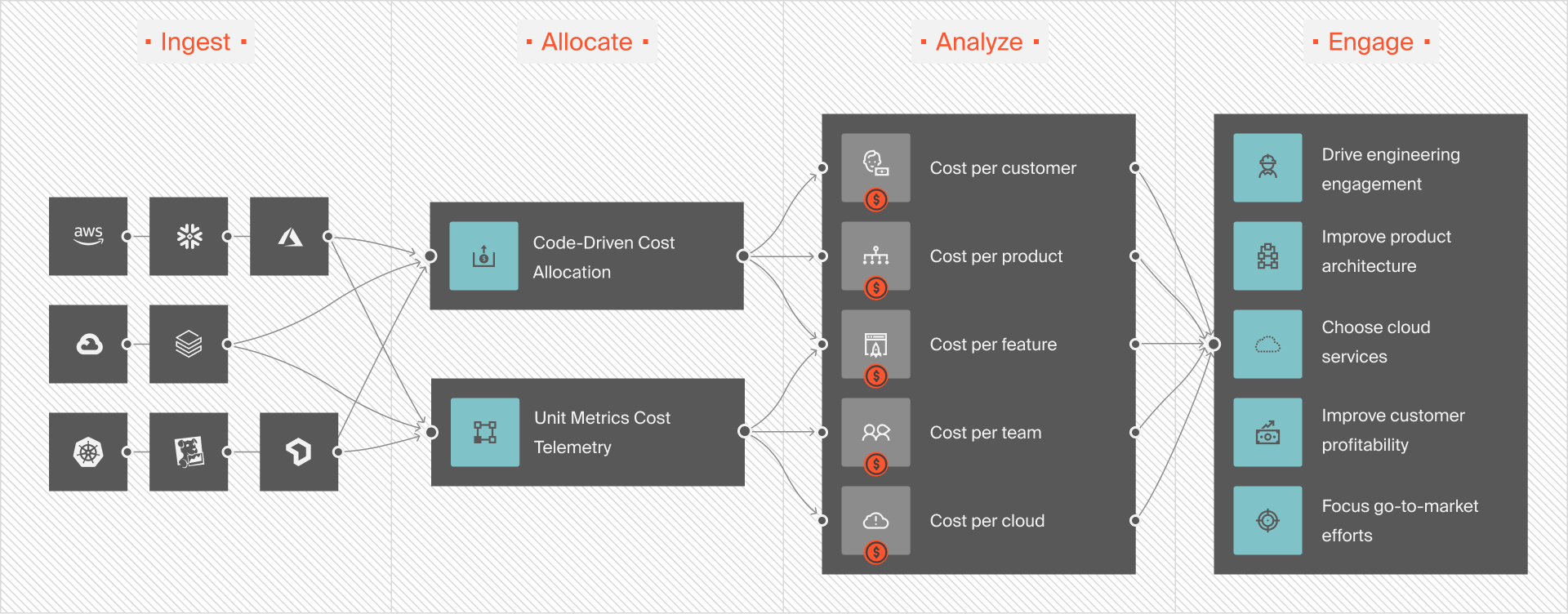
This empowers you to view Amazon RDS costs based on business dimensions that matter to you, such as cost per customer, product, software feature, team, project, environment, and more.
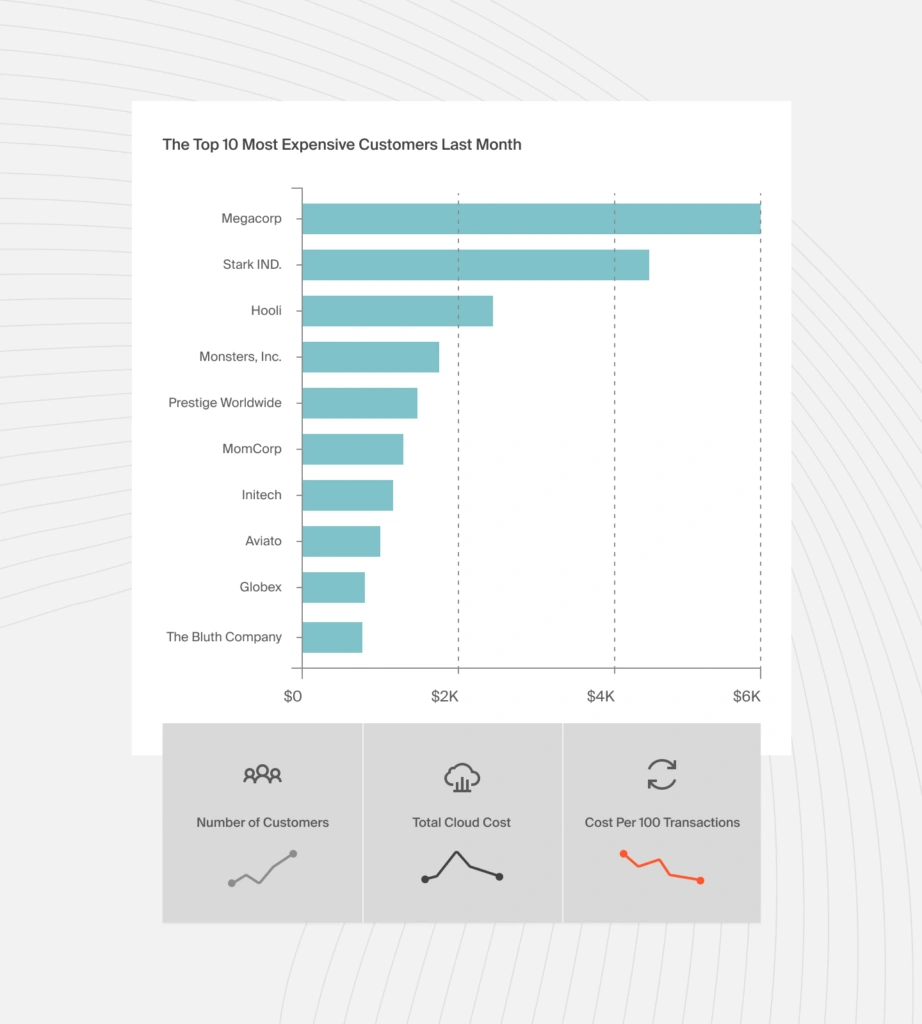
Identifying your top Amazon RDS cost drivers will help you decide what to cut to reduce costs or what to increase to improve performance or returns (ROI).
You can also use CloudZero Advisor to select the right instance types and sizes for your workload. With this right-sizing, you can save even more by eliminating over-provisioning, while maintaining optimal RDS performance by preventing under-provisioning.
It doesn’t end there. With CloudZero, you can track all your AWS and Snowflake storage costs in one place and understand what, why, and who is responsible. Ultimately, CloudZero lets you monitor, analyze, and optimize cloud costs across all major vendors.
You don’t have to take our word for it.
 to see CloudZero in action!
Software and pricing information last verified April 2026. Features, pricing, and availability may have changed. Please verify current details with vendors before making purchasing or architectural decisions.
Frequently Asked Questions about Amazon RDS Pricing