Understanding where your cloud spend goes enables you to pinpoint who, why, and what drives your cloud costs. This visibility supports informed decisions about reducing unnecessary spend or increasing investment in high-return areas.
Here, we look at how Google Cloud Storage pricing works, what types of storage are available through the Google Cloud Platform (GCP), what factors influence Google Cloud Storage costs, and how to optimize your bill.
Check out our other pricing guides:
What Does Google Cloud Storage Do?
Google Cloud Storage is a RESTful online storage service for business-grade data storage and management on the Google Cloud Platform. It handles photos, videos, files, and archive data, along with operations like ingestion, processing, retrieval, modification, and deletion. Each operation has separate fees.
Unlike Google Drive, the simple, consumer-targeted online storage service, GCP designed Cloud Storage for business cloud storage needs. These needs include data ingestion, processing data throughout its lifecycle, retrieval, modification, and deletion, as well as related operations.
Each operation has different fees, which complicates GCP storage cost calculations. This guide breaks down each cost component.
Report
Finance needs to prove AI’s return: CloudZero report
260 senior finance leaders (more than half CFOs) told us why the speed of seeing AI spend, not the size of it, separates who pulls ahead on AI from who gets burned.
Google Cloud Storage Pricing Explained
Google Cloud Storage tracks your storage and bandwidth usage daily, but bills you monthly. You’re charged per gigabyte (GB) per month, with real-time usage visibility available in the Google Cloud Console under Billing.
Google Cloud Storage pricing is usage-based. More specifically, you pay for data stored at rest.
At-rest data means:
- The data physically resides on disk
- The data is not in transit across the network
- The data is not temporarily cached elsewhere
Your total storage cost depends on volume (how much data you store) and duration (how long it remains stored).
However, the final bill varies based on additional pricing components.
The main Google Cloud Storage cost components
Four main cost components drive Google Cloud Storage pricing:
- Storage class: Google Cloud offers four tiers (Standard, Nearline, Coldline, Archive) with pricing that varies by location type (Regional, Dual-region, Multi-region). Larger volumes and longer retention increase total cost.
- Data processing fees: Operation charges (API requests), data retrieval fees, and inter-region replication costs.
- Networking fees: Data egress charges when data leaves Google Cloud or moves between regions. Costs depend on request volume, object size, and transfer destination.
- Retrieval and early deletion charges: Nearline, Coldline, and Archive storage incur retrieval fees ($0.01-$0.05 per GB) and early deletion charges when data is removed before minimum storage duration ends (30, 90, or 365 days respectively).
These components together determine your actual Google Cloud Storage bill. Next, we’ll break each one down in detail so you can clearly see what drives your costs — and where optimization is possible.
GCP Storage Billing: How Google Cloud Platform Storage Pricing Works
GCP calculates your Cloud Storage bill based primarily on the storage class you choose. Here’s what that looks like, plus the relation to other Cloud Storage pricing components.
1. Google Cloud Storage classes
A storage class is object metadata. It affects pricing and availability. Objects inherit the bucket’s default storage class unless you set one explicitly.
All storage classes share:
- 99.999999999% (11 nines) annual durability
- Low latency (no offline retrieval)
- No minimum object size
- Unlimited storage
Important billing detail: storage is billed by the object’s storage class, not the bucket’s default class. Storage charges are prorated to the sub-second.
What Are the three GCP Storage location types?
- Region: Stores data in a single geographic region with redundancy across availability zones within that region. Lowest cost option.
- Dual-region: Stores data in two specific regions within a broader geographic area (e.g., us-east1 and us-west1). Billing applies to both regions. Higher availability than single-region.
- Multi-region: Stores data across multiple regions automatically for maximum geographic redundancy and access speed. Highest cost due to greater availability.
The four Google Cloud Storage classes
Standard storage
Best for: hot data, production apps, websites, streaming, and analytics.
No minimum storage duration. No retrieval fees.
Pricing varies by location type.
Nearline storage
Best for: data accessed about once a month or less (backups, long-tail content, archives).
30-day minimum storage duration. Retrieval fees apply.
Coldline storage
Best for: data accessed about once a quarter or less (DR, compliance archives).
90-day minimum storage duration. Retrieval fees apply.
Archive storage
Best for: data accessed less than once a year (long-term archive + DR).
365-day minimum storage duration. Retrieval fees apply.
|
Location |
Standard storage (per GB per Month) |
Nearline storage (per GB per Month) |
Coldline storage (per GB per Month) |
Archive storage (per GB per Month) |
|
Iowa (us-central1) |
$0.022 |
$0.011 |
$0.0044 |
$0.0012 |
|
South Carolina (us-east1) |
$0.022 |
$0.011 |
$0.0044 |
$0.0012 |
|
Northern Virginia (us-east4) |
$0.0253 |
$0.0143 |
$0.0066 |
$0.0025 |
|
Columbus (us-east5) |
$0.022 |
$0.011 |
$0.0044 |
$0.0012 |
|
Oregon (us-west1) |
$0.022 |
$0.011 |
$0.0044 |
$0.0012 |
|
Los Angeles (us-west2) |
$0.0253 |
$0.0176 |
$0.0077 |
$0.0025 |
|
Salt Lake City (us-west3) |
$0.0253 |
$0.0176 |
$0.0077 |
$0.0025 |
|
Las Vegas (us-west4) |
$0.0253 |
$0.0143 |
$0.0066 |
$0.0025 |
|
Dallas (us-south1) |
$0.022 |
$0.011 |
$0.0044 |
$0.0012 |
|
Iowa and South Carolina (nam4) |
$0.044 |
$0.022 |
$0.0088 |
$0.0025 |
2026 pricing changes to be aware of
Google adjusted multi-region pricing in 2026. Nearline multi-region storage increased from $0.010/GB to $0.015/GB per month, while Archive multi-region storage in US and EU regions decreased from $0.004/GB to $0.0024/GB per month. If you set lifecycle policies before 2026, it is worth revisiting them to confirm the tier transitions still make economic sense under the updated rates.
Extra storage items that add to the monthly “GB stored”
Besides the object’s raw data, Google counts:
- Custom metadata (each character stored counts as bytes)
- XML multipart uploaded parts until completed or aborted
- Bucket tags: each tag attached to a bucket is billed $0.005 per month
2. Costs for data processing in GCP
Google groups “data processing” costs into:
- Operation (request) charges
- Retrieval fees
- Inter-region replication
- Autoclass charges
Operation charges (requests)
Operations fall into Free, Class A, and Class B. Pricing depends on what the operation applies to:
- Listing buckets in a project: Class A Standard rate always applies
- Bucket-level operations: priced by the bucket’s default storage class
- Tag operations: priced by the tagged bucket’s default storage class
- Object operations: priced by the object’s storage class
- Changing storage class: billed as a Class A operation for the destination class
Retrieval fees
Retrieval fees apply when you read/copy/move/rewrite object data stored in:
- Nearline: $0.01 per GiB
- Coldline: $0.02 per GiB
- Archive: $0.05 per GiB
Retrieval fees do not apply when the object is in a bucket with Autoclass enabled.
Early deletion charges
Early deletion applies when data is deleted or rewritten before the minimum duration ends. Key exceptions:
- Does not apply when Object Lifecycle Management changes the storage class
- Does not apply when the object is in an Autoclass bucket
Inter-region replication
Inter-region replication is charged per GiB for data written to dual-region and multi-region buckets. Default replication is $0.02 per GiB in North America and Europe, and higher in some other geos.
Autoclass charges
Autoclass adds:
- Management fee: $0.0025 per 1,000 objects stored for 30 days
- Plus a one-time enablement charge under certain conditions
3. Cost of networking in Cloud Storage
Google Cloud Storage does not charge for data ingress. Uploading or writing data into a Cloud Storage bucket is always free.
Network charges apply only to data egress — when data is read from a bucket or transferred
out of Google Cloud.
Google Cloud Storage egress falls into three billing categories:
Egress within Google Cloud
This includes data sent from Cloud Storage to:
- Other Cloud Storage buckets
- Google Cloud services such as BigQuery or Compute Engine
Pricing depends on the source and destination bucket locations. Reads within the same multi-region are free, which is a meaningful cost advantage for globally distributed apps.
General network egress
This applies when data leaves Google Cloud entirely, such as:
- Downloads to the public internet
- Transfers between continents
These charges apply when traffic is not covered by internal Google Cloud routing, specialty services, or Always Free limits.
Specialty network services
Specialty egress pricing applies when data uses Google-managed network services, including:
These services use dedicated network paths, providing higher reliability and performance than general internet egress.
Understanding which egress category your traffic falls into is critical because network transfer is often one of the largest hidden drivers of Google Cloud Storage costs.
What a real Google Cloud Storage bill looks like
Pricing tables are useful, but a worked example makes the costs tangible. Consider a team storing 1 TB of application data in Standard storage (regional, US) that generates 1 million GET requests and 100 GB of internet egress per month:
- Storage: 1,000 GB × $0.020/GB = $20.00
- GET requests (Class B): 1,000,000 / 10,000 × $0.004 = $0.40
- Network egress: 100 GB × $0.12/GB = $12.00
- Total: approximately $32.40/month
Now consider what happens when access patterns shift. If that same 1 TB moves to Archive storage and the team retrieves 50 GB once a year, the monthly picture changes dramatically: $1.20 in storage, $2.50 in retrieval fees during the retrieval month, and minimal egress. Object Lifecycle Management policies can automate that transition based on how recently objects were accessed, which is where most optimization gains come from.
How To Reduce Your Google Cloud Storage Costs
Beyond using the Google Cloud Console’s built-in billing reports, several strategies can materially lower your GCP storage spend.
Use Object Lifecycle Management. Lifecycle rules automatically transition objects between storage classes based on age or access recency. A common pattern: Standard for the first 30 days, Nearline after 30, Coldline after 90, Archive after 365. This prevents stale data from accumulating in expensive tiers — and the transitions themselves are exempt from early deletion charges.
Right-size your location type. Multi-region storage delivers higher availability but costs roughly 30% more than regional storage. If your workloads are concentrated in a single geography, regional buckets provide the same durability at a lower price point.
Keep compute and storage in the same region. Cross-region egress fees add up quickly. Running your analysis workloads (BigQuery, Compute Engine, GKE) in the same region as your storage buckets eliminates most network transfer costs entirely.
Consolidate small files. Google Cloud Storage charges a 128 KB minimum billable size for Nearline, Coldline, and Archive tiers. Storing millions of small log files in cold tiers inflates the bill disproportionately. Batching small files into compressed archives before transitioning them reduces both storage and request costs.
For a broader look at controlling cloud spend across all GCP services, see our guide to GCP cost optimization.
How To View, Understand, And Optimize Your Google Cloud Storage Costs The Easier Way
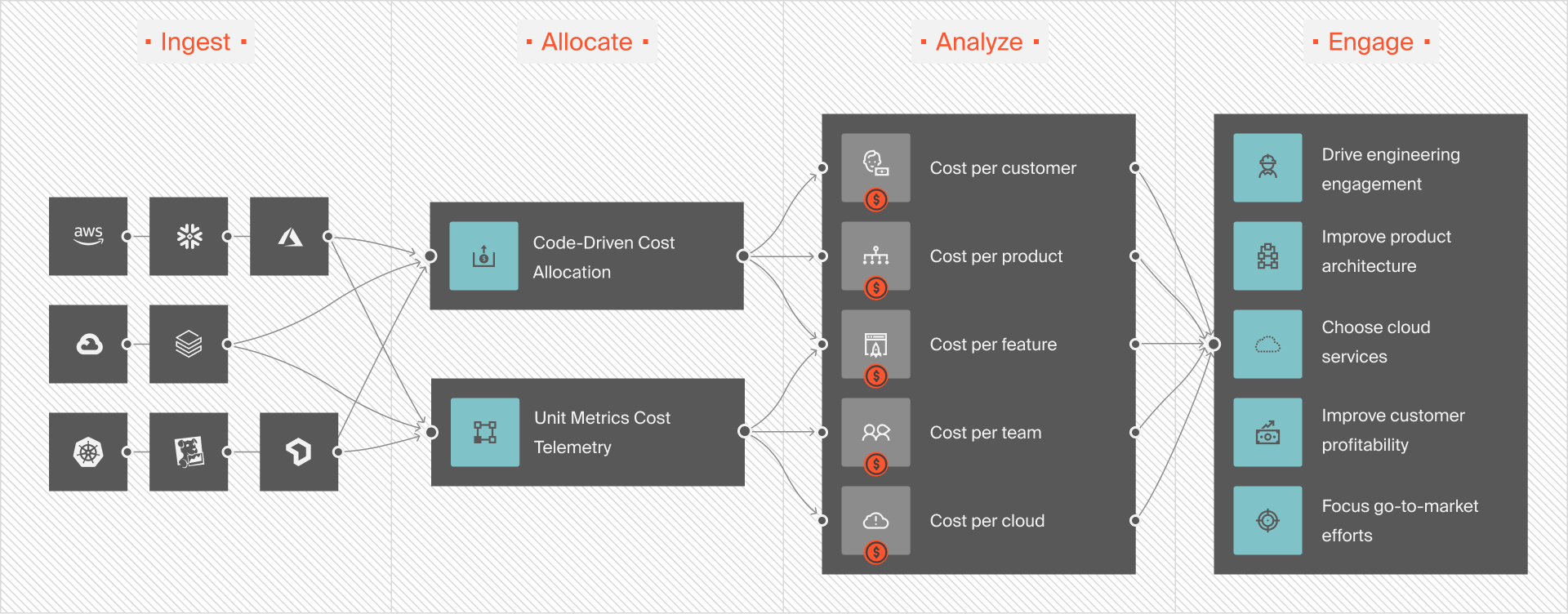
Understanding Google Cloud Storage costs doesn’t require complex analysis. CloudZero provides fast, interactive, and accurate cost visibility using the dimensions you care about. CloudZero uses a code-driven approach to collect, analyze, and share your cloud costs, using the dimensions you care about.
Rather than simply showing your overall or average storage consumption for a month, CloudZero shows you specifics, such as the people, products, or processes driving your storage bill.
That includes the cost per individual customer, per project, per product, per team, per engineering environment, and more. Per hour, per container, per deployment — you get the picture.
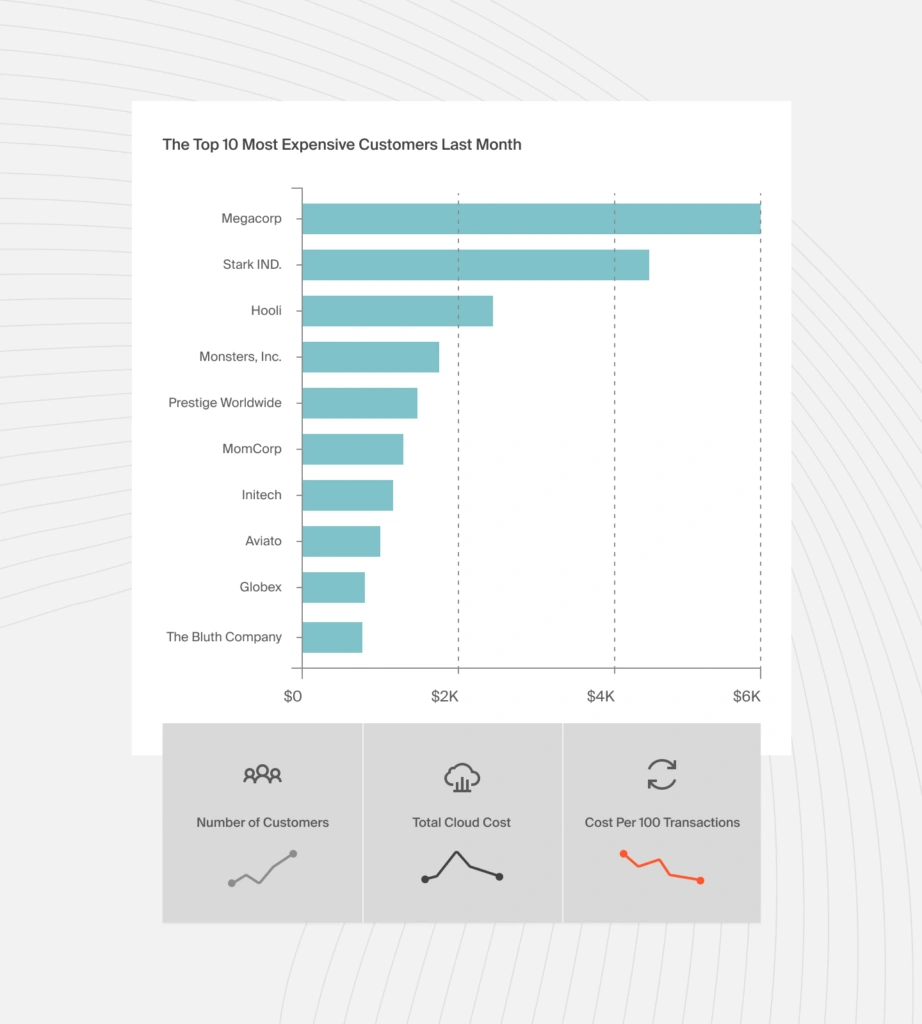
This includes organizations with incomplete cost allocation tags or multi-tenant environments. You’ll still see how much you spend per customer so that you can charge them profitably on an individual basis.
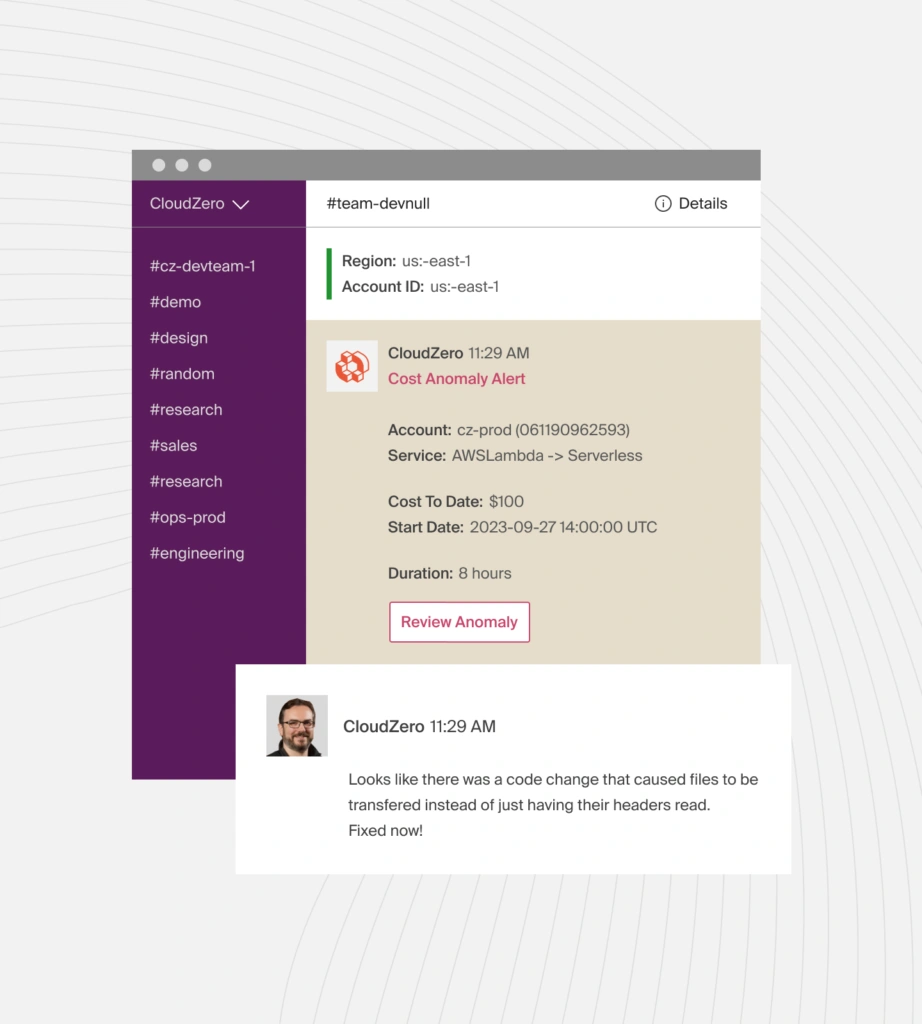
As part of our real-time cost anomaly detection, we’ll also send you noise-free alerts whenever we detect abnormal cost trends—no more late calls from your boss asking why the bill spiked last month.
CloudZero is also multi-cloud (GCP, AWS, Azure), covers various services, such as Kubernetes, Databricks, and Snowflake, and includes advanced yet easy-to-use budgeting, forecasting, and cost allocation tools all in one place.
See how CloudZero works in your environment. Take a product tour or  to discover the power of CloudZero.
GCP Storage Pricing FAQs
What factors affect Google Cloud Storage pricing?
Google Cloud Storage pricing depends on storage class, location, GB stored per month, data retrieval, request operations, early deletion fees, and network egress charges.
What are the four Google Cloud Storage classes?
The four Google Cloud Storage classes are Standard, Nearline, Coldline, and Archive. Each class is priced based on access frequency and minimum storage duration.
How much does Google Cloud Storage cost per GB?
Pricing starts at (regional, US, as of 2026):
- Standard: from $0.020 per GB/month
- Nearline: from $0.010 per GB/month
- Coldline: from $0.004 per GB/month
- Archive: from $0.0012 per GB/month
Prices vary by location type and region. Multi-region storage is more expensive than regional storage.
Does Google Cloud Storage charge for data ingress?
No. Google Cloud does not charge for data ingress into Cloud Storage buckets. You only pay for storage, access, and data egress.
Are there retrieval fees in Google Cloud Storage?
Yes. Retrieval fees apply to Nearline ($0.01/GB), Coldline ($0.02/GB), and Archive ($0.05/GB) storage. Standard storage has no retrieval charges.
What are early deletion charges in Google Cloud Storage?
Early deletion charges apply when data is removed or rewritten before the minimum storage duration ends, except when Autoclass or lifecycle policies handle the transition.
Does Google Cloud Storage charge for API requests?
Yes. Google Cloud charges for storage operations based on request type: Free, Class A, or Class B. Pricing depends on the object’s storage class and location.
How does region vs dual-region vs multi-region pricing differ?
Regional storage stores data in one location. Dual-region stores data in two regions within a continent. Multi-region stores data across multiple regions and incurs higher costs due to greater availability and redundancy.
Is Google Cloud Storage cheaper than Amazon S3?
It depends. For standard hot storage, Google Cloud Storage ($0.020/GB regional) slightly undercuts AWS S3 ($0.023/GB). However, total costs vary based on storage class, retrieval frequency, egress volume, and location. Workload patterns matter more than headline prices.
Can I automatically move data between GCP storage classes?
Yes. Google Cloud supports Object Lifecycle Management and Autoclass, which automatically move objects between storage tiers based on access patterns.
How can I see what’s driving my Google Cloud Storage costs?
Native GCP billing shows usage totals, but tools like CloudZero show storage costs by customer, product, team, environment, and workload for deeper cost analysis.