
Virtual machines often represent the largest line item in a cloud bill. And for Google Cloud users, the Google Compute Engine (GCE) accounts for a large share of overall spend.
GCE offers rich flexibility: you can choose specific machine types, scale up or down instantly, and match compute to load. But understanding how the pricing works is critical before you can unlock full value.
On the surface, GCE looks simple. You pay for vCPU, memory, storage, and network. In reality, your final bill depends on machine families, sustained-use discounts, committed-use contracts, GPUs, premium OS licensing, and region-specific factors — which makes costs more complex than they appear.
This guide explains how Google Compute Engine (GCE) pricing works and offers practical tips to optimize costs.
What Does Google Compute Engine Do?
Google Compute Engine is Google’s main IaaS platform for running virtual machines in the cloud. It enables you to create Linux or Windows servers on demand, choose the resources you need, and scale them as your workloads change.
GCE is used for everything from web servers and APIs to data processing, CI/CD runners, enterprise applications, and lift-and-shift migrations. And because it behaves like a traditional server, without hardware management or maintenance, it’s one of the simplest ways for teams to run flexible, reliable computing in the cloud.
You can start with a single VM or run large distributed systems across multiple regions.
Key features of Google Cloud Compute Engine
GCE offers:
- On-demand virtual machines. Launch Linux or Windows VMs whenever you need them. Choose from predefined machine types or customize CPU and memory to match your workload.
- Custom machine types. If predefined instances don’t fit, you can build your own vCPU-to-memory ratio so you only pay for the resources you actually need.
- Global infrastructure. Run workloads across Google Cloud regions and zones for reliability, performance, and redundancy.
- Per-second billing. GCE charges by the second (with a minimum of one minute), not by the hour. This helps reduce waste for short-running or variable workloads.
- GPU and TPU support. You can attach NVIDIA GPUs or Google TPUs for ML training, inference, scientific workloads, and rendering.
- Persistent disk storage. Attach fast, durable storage volumes that survive VM restarts and support snapshots for backups.
- Spot VMs for lower costs. Use short-lived VMs at a steep discount (60–91% off on-demand pricing) for batch jobs, data processing, or fault-tolerant applications.
Report
Finance needs to prove AI’s return: CloudZero report
260 senior finance leaders (more than half CFOs) told us why the speed of seeing AI spend, not the size of it, separates who pulls ahead on AI from who gets burned.
How Google Compute Engine Pricing Works (Explained)
Google Compute Engine uses a pay-as-you-go model. Instead of buying hardware upfront, you pay only for the vCPUs, RAM, storage, and network capacity your VMs consume within the billing cycle.
This shifts costs from capital expenditure (CapEx) to operating expenditure (OpEx).
Here is what Google Compute Engine pricing includes:
VM instance pricing
vCPU and RAM usage bill standard Google Compute Engine VMs. For example, a general-purpose E2 machine in us-central1 currently costs $0.134/hr for an e2-standard-4 (4 vCPU, 16 GB RAM), which works out to roughly $97.84/month at full utilization.
Spot VM instance pricing
Spot VMs follow the same usage-based billing as regular instances. You pay only for the compute time used in each billing cycle.
Memory and disk sizes use standard JEDEC gigabytes (GB) and IEC gibibytes (GiB), where 1 GiB equals 1,024 MB and 1 TiB equals 1,024 GB.
Because Spot VMs can be interrupted at any time, they’re priced 60–91% lower than on-demand VMs, depending on machine type, region, and current demand. Spot pricing is variable and can adjust up to once per day, but the discount floor is always at least 60%. See detailed Spot VM pricing here.
Networking pricing
Standard internet egress starts at $0.12/GB for the first 1 TB in most US regions. Note that as of May 2026, Google doubled CDN Interconnect and peering egress rates across North America, Europe, and Asia — a significant change for workloads relying on CDN or direct peering arrangements. Standard internet egress rates were not affected.
Sole-tenant node pricing
Sole-tenant nodes provide dedicated physical servers. You pay for the full vCPU and memory capacity of the node, plus a tenancy premium defined per node type. See pricing here.
GPU pricing
Adding GPUs increases your VM cost. For example, pricing for models such as the NVIDIA T4, L4, and A100 varies by type and region. GPU-attached VMs can also use Spot pricing for significant savings on training and batch inference jobs.
Disk and image pricing
Persistent disks are billed by size and type: balanced disks cost about $0.08/GB-month, SSDs about $0.17/GB-month in many regions. Snapshots and custom images add extra cost.
Confidential VM pricing
Confidential VMs run encrypted workloads by default. Pricing aligns with comparable machine types, with a small premium for the added security. See pricing here.
VM manager pricing
VM Manager includes free capabilities (such as patch reporting) and paid add-ons depending on the feature set. Some functionality is bundled with compute, while others are priced separately.
TPU pricing
Tensor Processing Units (TPUs) are billed hourly in addition to VM cost. For example, a TPU v4 starts around $3.22/hr in some regions. These accelerate ML workloads but come at a premium price. See more on TPU pricing here.
Understanding GCE Machine Families and Their Pricing
Choosing the right machine family is one of the most impactful pricing decisions you can make with Compute Engine. Each family is optimized for a different workload profile, and pricing varies accordingly.
General-purpose (E2, N2, N2D, C3, C3D): The most common choice for web servers, small databases, dev/test environments, and general applications. E2 machines offer the lowest cost per vCPU for balanced workloads. N2 and N2D machines support sustained use discounts, while E2 machines do not.
Compute-optimized (C2, C2D, H3): Built for compute-heavy workloads such as batch processing, media transcoding, gaming servers, and HPC. Higher per-vCPU price but better single-thread performance.
Memory-optimized (M1, M2, M3): Designed for large in-memory databases like SAP HANA and analytics workloads that need high memory-to-vCPU ratios. These carry a premium price but offer up to 70% CUD savings on 3-year commitments.
Accelerator-optimized (A2, A3, G2): Purpose-built for GPU workloads including ML training, inference, and rendering. The GPU cost often exceeds the VM base cost, making workload scheduling and Spot usage critical for cost control.
This distinction matters because your machine family choice determines which discounts apply. For example, if you pick an E2 instance expecting automatic sustained use discounts, you won’t receive them — SUDs only apply to N1, N2, N2D, C2, M1, and M2 series. Misunderstanding this can lead to cost projections that overestimate savings by 20–30%.
How Google Compute Engine’s Billing Model Works
Virtual machines on Google Cloud operate under multiple billing models. These include:
On-demand (pay-as-you-go)
You pay the published rate for each VM, storage unit, or GPU you use, with no long-term contract. The rate depends on machine family, region, OS licensing, and size. Because there’s no commitment, it’s typically the most expensive option, though it offers complete flexibility for fluctuating workloads.
Sustained use discounts (SUDs)
When an eligible Google Compute Engine VM runs for a large portion of the month, Google automatically applies a price reduction for that resource. There’s no contract. Discounts kick in after 25% usage in a billing cycle and increase incrementally: you pay full price for the first 25%, then receive progressively deeper discounts on each additional quarter of the month.
The net effective savings at full-month usage are approximately 30% off on-demand for applicable machine types. SUDs apply only to N1, N2, N2D, C2, M1, and M2 series — E2, C3, and newer families do not qualify.
Committed use discounts (CUDs)
If you know your usage ahead of time, you can commit to resources or spend levels for one or three years. A 1-year commitment on general-purpose machines typically saves around 37%, while a 3-year commitment can reach 55%. Memory-optimized machines see even deeper savings, up to 70% on 3-year terms.
But note that you pay for the commitment even if you scale down.
Spot and Preemptible VMs (Low-Cost Google Compute Engine Options)
For workloads that can tolerate interruption (batch jobs, testing), Google offers steep discounts via Spot (and legacy Preemptible) instances. These are reclaimed at short notice. Use them to save costs, but avoid relying on them for always-on services.
Why does this matter to your bill?
Choosing the right billing model is just as important as choosing the right VM size. A correctly sized VM billed on-demand could cost twice as much as the same machine under a well-matched CUD, or it could benefit from the full 30% SUD discount.
Rightsizing plays a big role in controlling Google Compute Engine pricing. The 2024 Stacklet Cloud Cost & Usage Optimization Survey found that 78% of organizations estimate 21–50% of their cloud spend is wasted, driven by factors like outdated instance types, incorrect resource sizing, and retention mismanagement.
CloudZero Advisor helps teams avoid this by comparing machine types and estimated costs up front, so you can choose the most efficient configuration before deploying. Google also offers a Pricing Calculator for estimating costs across services, though it lacks the cross-cloud context and business-level allocation that tools like CloudZero provide.
Practical Tips To Save On GCE Costs
These steps can help you lower your Google Cloud Compute Engine spend:
- Delete idle or under-utilised instances. Regular audits reveal VMs with very low CPU/RAM usage that still run 24/7. Stopping or deleting these immediately reduces waste without architectural changes.
- Schedule non-production workloads. Turn off dev/test/staging VMs outside business hours. For example, stopping nightly test environments can reduce compute costs by up to 80%.
- Leverage spot instances for fault-tolerant workloads. GCE’s spot VMs offer discounts in exchange for the risk of termination. Use them for batch jobs, CI/CD, or workloads that can restart.
- Rightsize machine types regularly. Choose the smallest VM size that meets your workload’s demand. Over-provisioning is one of the largest drivers of cloud waste.
- Use custom machine types to match resources to need. Instead of choosing large standard types, configure vCPUs and memory exactly for your workload. This avoids paying for unused capacity.
- Match your machine family to the workload. Running a memory-heavy analytics job on a general-purpose E2 instance wastes spend on vCPUs you don’t need. Choosing the right family (compute-optimized, memory-optimized, etc.) aligns costs with actual resource consumption.
- Optimize storage and networking. Match disk type to performance needs (e.g., balanced vs. SSD) and minimise egress traffic, especially cross-region traffic.
- Review VM accelerator usage (GPUs/TPUs). High-end GPUs and TPUs drive major cost jumps. Ensure they are only attached when needed and consider preemptible options where possible.
- Start with real-time cost visibility. Use Google Cloud’s cost management tools to organise resources, set budgets and alerts, and get recommendations for optimisation.
But native tools don’t always align engineering, security, and finance around actionable instance-level cost decisions. That’s why teams often turn to specialised platforms such as CloudZero for deeper insights, decision readiness, and complete visibility.
How To Understand, Control, And Reduce GCE Costs With CloudZero
We’ve seen how Google Compute Engine offers flexibility with multiple VM families, custom machines, GPUs, disks, network paths, and more. But this flexibility often leads to spiraling costs. Bills grow when workloads scale, when VM choices drift, or when teams deploy without clear cost signals.
CloudZero helps teams take back control by turning raw Google Cloud and Google Compute Engine usage into clear cost data.
With CloudZero, you can:
- Map Compute Engine costs to the parts of your platform that engineering cares about: microservices, workloads, features, teams, and environments. No more digging through billing exports.
- Detect anomalies such as sudden VM growth, disk expansion, or unusual traffic paths. Alerts go straight to engineering channels so teams can act before spend escalates.
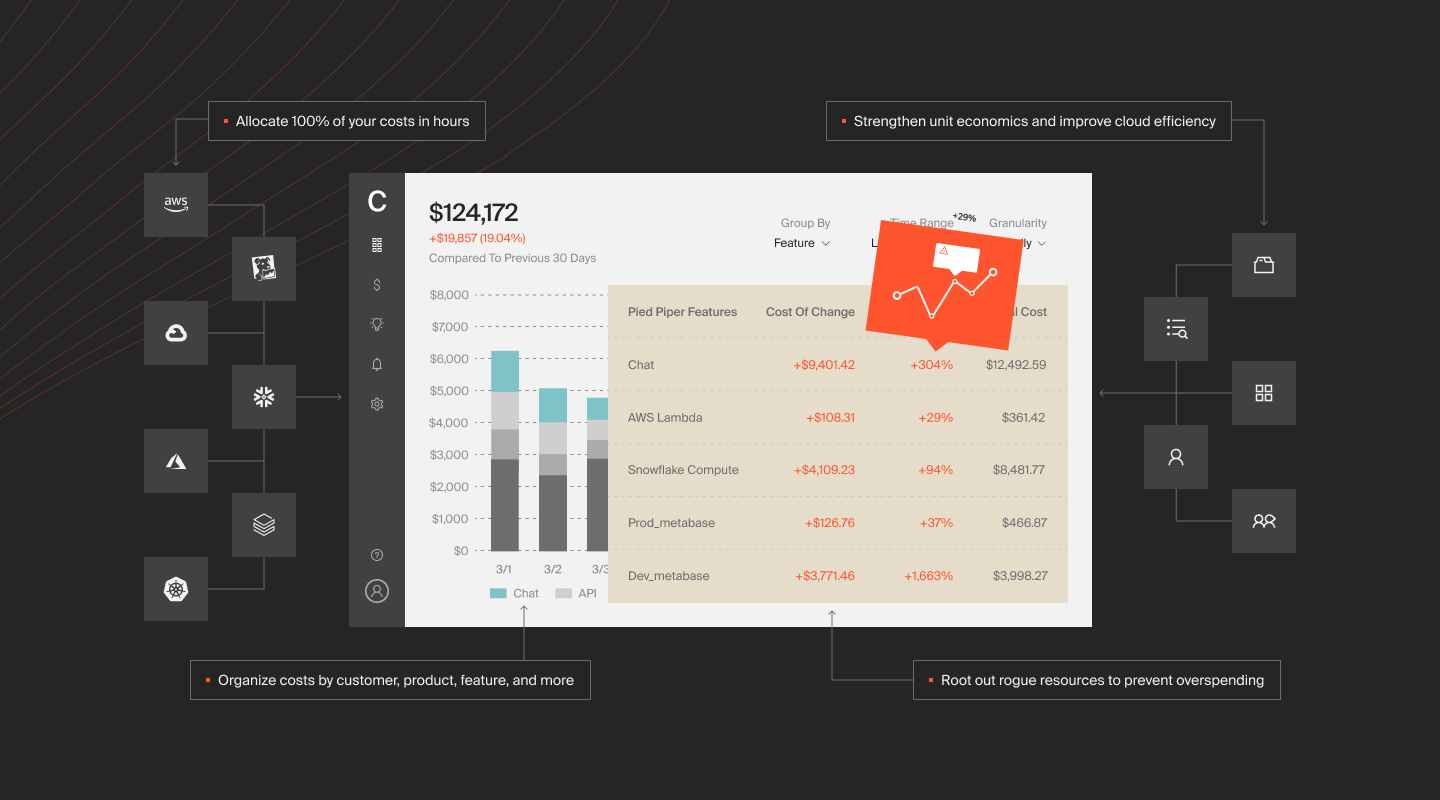
- If you run across multiple clouds or use several data platforms, CloudZero brings everything into a single view. You can analyse GCE alongside AWS, Azure, Snowflake, Datadog, New Relic, and other sources, like this:
- Break down GKE costs by namespaces, workloads, controllers, and engineering owners. Cluster spend is no longer a single opaque line item; you see exactly what drives node size, autoscaling, and GPU usage.
Ambitious brands such as Skyscanner, Duolingo, and Toyota use CloudZero to save millions of dollars in cloud costs.  .
.
Frequently Asked Questions about GCP VM Pricing











