Quick Answer
Google Cloud cost optimization means reducing your GCP bill without sacrificing performance. The highest-impact strategies are rightsizing VM instances (30–50% compute savings), using committed use discounts (up to 70% off on-demand), running fault-tolerant workloads on Spot VMs (60–91% off), and automating Cloud Storage lifecycle policies (up to 83% savings). Layer these together and most organizations cut GCP spend by 30% or more within the first year.
Google Cloud cost optimization is the practice of reducing your GCP bill while maintaining the performance and reliability your workloads demand. It combines pricing strategies like committed use discounts (CUDs), rightsizing of underutilized resources, and building of cost allocation through labels and billing exports.
Organizations that treat GCP cost management as an ongoing discipline, not a one-time cleanup, can reduce cloud spend by 30% or more within the first year. The FinOps Foundation identifies continuous optimization as a core capability for organizations managing cloud costs at scale.
This guide covers multiple GCP cost optimization strategies, explains Google’s native cost management tools and their limits, compares GCP pricing to AWS and Azure, and shows how to build lasting visibility into where your money goes — and, more importantly, if the spend is worth it. Consider it a comprehensive reference for Google Cloud cost optimization best practices that engineering and finance teams can implement together.
Why Is Cloud Cost Optimization Important For GCP?
If you have ever opened a GCP billing dashboard and thought “we cannot possibly be spending this much on a staging environment,” you are not alone.
Google Cloud cost management problems grow for predictable reasons. Knowing where they start is the first step toward building a cost optimization practice that sticks, and toward not getting paged by your CFO on a Monday morning.
- Overprovisioned compute is the biggest offender. Teams spin up VM instances sized for peak load, then never revisit them. Google’s own Active Assist recommender regularly flags instances running at 10–15% CPU utilization. That means you could be paying five to 10 times more than necessary for what amounts to an expensive space heater.
- Storage accumulates silently. Persistent disks, Cloud Storage buckets, and BigQuery datasets grow without natural pressure to clean up. Standard Cloud Storage costs $0.023 per GB per month. That sounds cheap until you have 50 TB of logs nobody has read since 2023, costing $1,150 per month to do absolutely nothing.
- Untagged resources create blind spots. Without consistent labels across projects and resources, finance teams cannot attribute costs to teams, products, or features. This makes it impossible to answer the fundamental question: did this spend produce value? Or did someone forget to tear down a load test from three sprints ago?
- Discount programs go unused. GCP offers committed use discounts of up to 55% for most machine types and up to 70% for memory-optimized types on eligible resources, per Google Cloud documentation. Many organizations leave these discounts on the table because they lack confidence in their baseline usage forecasts.
Those problems compound. But GCP’s discount mechanisms are among the most generous in cloud computing, if you know how to layer them properly.
playbook
The AI Cost Optimization Playbook
Traditional cloud cost management is broken. Here’s why — and how to make the switch to cloud cost intelligence.
How To Optimize GCP Costs: 12 Proven Strategies
Here are practical tips to reduce Google Cloud spend:
1. Rightsize VM instances
Rightsizing is the highest-impact GCP cost optimization move for most environments. It means matching your instance type and size to your actual workload, not the workload you imagined during capacity planning six months ago.
Start with Google’s VM rightsizing recommendations in Active Assist. These analyze historical CPU and memory utilization and recommend smaller machine types when usage is consistently low.
Practical moves that make an immediate difference:
- Downsize instances running below 40% average CPU utilization
- Switch from general-purpose (N2) to cost-optimized (E2) machine types for workloads that are not performance-sensitive
- Use custom machine types to match exact vCPU and memory needs instead of rounding up to the next predefined size. This is a GCP-specific advantage that AWS and Azure do not offer.
- Run rightsizing reviews quarterly. Workloads change, and last quarter’s right size is this quarter’s waste.
Rightsizing alone can save 30–50% on compute costs. Google’s Well-Architected Framework identifies rightsizing as a foundational optimization step.
This is the foundation. Everything else in this guide builds on it, because there is no point committing to discounted pricing on resources you should not be running in the first place.
Among all GCP cost optimization best practices, rightsizing delivers the fastest payback with the least risk.
2. Use committed use discounts (CUDs) for baseline workloads
Once you know your real baseline (see step 1), CUDs are the next lever to pull. You agree to use a specific amount of vCPUs and memory (resource-based CUDs) or a dollar amount per hour (spend-based Flex CUDs) for one or three years. In return, Google discounts those resources.
|
CUD type |
Commitment |
Discount range |
Flexibility |
|
Resource-based (1-year) |
Specific vCPUs + memory in a region |
Up to ~37% off |
Applies across machine types within the same family (e.g., N2) |
|
Resource-based (3-year) |
Specific vCPUs + memory in a region |
Up to ~55% off (can reach ~70% for memory-optimized shapes) |
Same family flexibility only |
|
Spend-based Flex (1-year) |
Dollar spend per hour |
Up to ~28% off |
Fully flexible across services, regions, and machine families |
|
Spend-based Flex (3-year) |
Dollar spend per hour |
Up to ~46% off |
Fully flexible across services, regions, and machine families |
Best practice: commit only to your baseline, the minimum resource level you are confident you will sustain for the full term. Let sustained use discounts (SUDs) and Spot VMs handle the variable portion. CUDs cannot be canceled once purchased, so overcommitting creates waste that is worse than paying on-demand. (If you are coming from AWS and searching for GCP reserved instances, CUDs are Google’s equivalent — though the mechanics differ. GCP CUDs do not require upfront payment, and Flex CUDs transfer across machine families.)
As of January 2026, Google migrated legacy spend-based CUDs from a credit-based billing model to a direct discount model. Discounts now appear directly on your bill instead of as credit offsets, making FinOps reporting cleaner and easier to explain to finance teams who were understandably confused by the old approach.
3. Let sustained use discounts work automatically
While CUDs cover your committed baseline, sustained use discounts (SUDs) handle everything above it, automatically. SUDs are discounts GCP applies when VMs run for more than 25% of the billing month. You do not need to sign up, commit, or even know they exist — Google calculates and applies them to eligible machine types including N1, N2, N2D, C2, M1, and M2 series.
SUDs do not stack with CUDs. If a CUD covers a resource, the CUD takes priority. SUDs only apply to usage beyond the committed amount. This is why the optimal strategy layers CUDs for your predictable baseline and lets SUDs automatically discount the rest. It is one of Google Cloud’s genuine advantages over AWS and Azure, which offer no automatic discount equivalent.
4. Use Spot VMs for fault-tolerant workloads
For workloads that can tolerate interruptions, Spot VMs are the most aggressive discount in the entire GCP pricing model. They use excess Compute Engine capacity at 60–91% off on-demand pricing, per Google Cloud documentation. The tradeoff: Google can reclaim them at any time with 30 seconds’ notice.
Spot VMs are ideal for batch processing, CI/CD pipelines, data analysis, machine learning training, and any workload that can checkpoint progress and resume after interruption. They are not suitable for production-serving workloads that need continuous uptime. (If your SRE team’s eye just twitched at the idea of Spot in prod, that is the correct reaction.)
Pair Spot VMs with managed instance groups (MIGs) for automatic replacement when instances are preempted, and use shutdown scripts to save state before termination.
5. Implement lifecycle policies for Cloud Storage
Storage optimization is less dramatic than compute savings, but it compounds fast. GCP offers several cloud storage classes with dramatically different pricing:
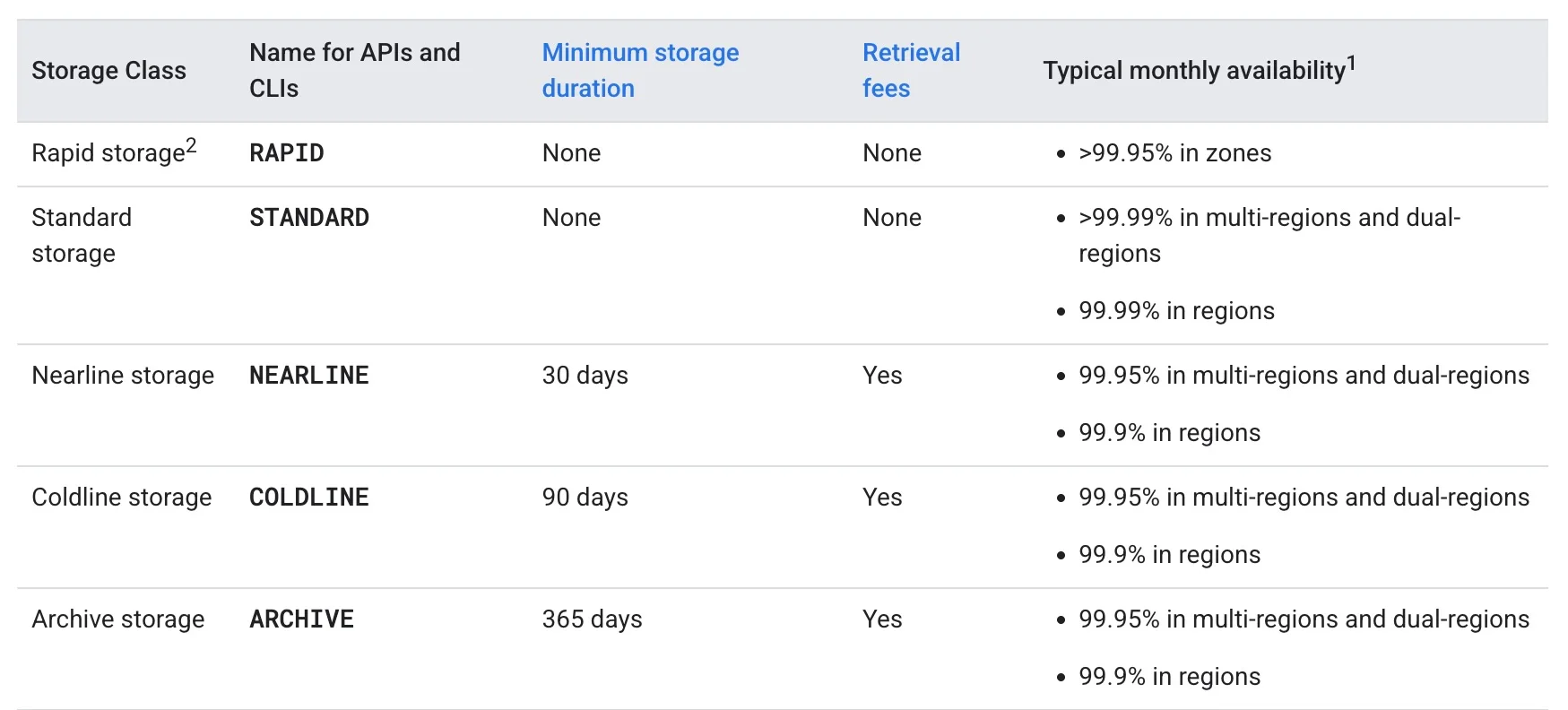
Use Object Lifecycle Management rules to automate transitions based on object age or access patterns. Move logs older than 30 days to Nearline. Move backups older than 90 days to Coldline. Move compliance archives to Archive. Set it once and stop paying premium rates for data nobody is touching.
With storage costs addressed, the next question is making sure you can actually see where the rest of your money is going.
6. Label everything, then enforce it
Labels are GCP’s mechanism for cost allocation. Without them, your billing data is a flat list of charges with no business context. You can see that Compute Engine cost $47,000 last month.
You cannot see that $31,000 of it came from the recommendation engine, $9,000 from staging environments, and $7,000 from a load test nobody cleaned up.
Apply labels for team, environment, product, and feature at minimum. Use organization policies to enforce labels on resource creation, preventing untagged resources from entering your environment in the first place.
This is where GCP cost management shifts from a billing exercise to a strategic capability.
Without labels, you can see that spend went up. With labels, you can see why, and decide if it was worth it.
7. Export billing data to BigQuery for custom analysis
The GCP console’s billing reports provide a high-level view, but for granular GCP cost optimization, you need your billing data in a place where you can actually query it.
Exporting to BigQuery gives you access to line-item detail across every project, service, SKU, and label, essentially building a GCP cost explorer tailored to your organization. This is the backbone of any serious GCP billing and cost management practice.
With billing data in BigQuery, you can build custom queries to identify cost anomalies, track unit costs over time and create dashboards that connect cloud spend to business outcomes. If you are practicing FinOps at scale, this is a non-negotiable step.
This raw data also powers the budgets and alerts that form your early warning system.
8. Set budgets and alerts before you need them
GCP’s Cloud Billing budgets let you set spending thresholds per project or billing account and receive alerts at 50%, 90%, and 100% of the budget. For automated responses, connect budget alerts to Cloud Run Functions to disable billing or shut down non-essential resources when thresholds are breached.
By the time you notice a runaway BigQuery job or a misconfigured autoscaler in your monthly bill, the damage is done. The engineering team that discovers a $14,000 weekend because someone ran SELECT * on an unpartitioned table never makes that mistake twice, but once is enough.
9. Optimize BigQuery costs with on-demand vs capacity pricing
BigQuery can be one of the most expensive GCP services if left unchecked, and it is the service most likely to generate those “who approved this?” Slack messages.
Two pricing models exist:
- On-demand pricing charges $6.25 per TiB of data processed, with the first 1 TiB per month free. Good for unpredictable, low-volume query workloads.
- Capacity pricing (BigQuery editions) charges for dedicated query processing slots measured in slot-hours. Better for teams running consistent, high-volume analytics.
Quick wins for BigQuery cost reduction: use partitioned and clustered tables to reduce data scanned, avoid SELECT *, set custom cost controls to cap bytes processed per user or project, and review query patterns to identify expensive recurring jobs. Partitioning alone can reduce bytes scanned per query by 50–90% depending on query patterns, per Google’s BigQuery documentation.
Beyond BigQuery, the same discipline applies to the compute layer of your container workloads.
Related read: What Is BigQuery? A Guide To How It Works And Costs
10. Rightsize GKE clusters and enable autoscaling
Google Kubernetes Engine (GKE) costs are driven by the underlying Compute Engine nodes. Over-provisioned node pools — the default behavior when teams prioritize availability over efficiency — create persistent waste.
Enable cluster autoscaler and vertical pod autoscaler to match node count and pod resource requests to actual demand. These are GCP autoscaling cost management strategies that work automatically once configured.
Use GKE cost allocation to see per-namespace and per-workload cost breakdowns, making it possible to attribute Kubernetes spend to specific teams and services. Without this, your Kubernetes cluster is a black box that finance teams learn to dread.
For non-production GKE workloads, use Spot VMs as node pool instances to apply the same deep discounts covered in strategy 4. For a full breakdown of GKE optimization tactics, see our GKE cost optimization guide.
11. Eliminate idle and orphaned resources
Every GCP environment accumulates waste. Unattached persistent disks. Idle load balancers. Unused static IP addresses. Stopped VM instances still holding reserved resources.
Development projects that served their purpose two quarters ago and have been collecting dust, and charges ever since.
Run regular cleanup audits using Active Assist recommendations. Pay particular attention to:
- Unattached persistent disks (you pay for provisioned capacity even when no VM is using them)
- Idle Cloud SQL instances running 24/7 for development databases used only during business hours
- Unused external IP addresses, which GCP charges for when not attached to a running instance
- Forgotten snapshots and images that outlived their usefulness months ago
With idle resources eliminated and compute optimized, the last piece is the cost that shows up where you least expect it: networking.
12. Review networking and egress costs
Data egress, (transferring data out of GCP), is often an overlooked cost driver. GCP charges $0.12 per GB for the first 1 TB of internet egress from most regions, with lower tiered rates at higher volumes.
Reduce egress costs by keeping data processing within the same region as your storage, using Cloud CDN for frequently accessed content, and reviewing cross-region replication patterns that may be generating transfer fees you did not budget for.
What Are The Best GCP Cost Optimization Tools?
Google provides several built-in GCP cost optimization tools, and knowing their strengths and limits is essential for choosing the right approach. (For a full breakdown of native and third-party options, see our GCP cost optimization tools guide.)
|
Tool |
What it does |
Limitation |
|
Cloud Billing reports |
Visualize spend by project, service, SKU |
No unit cost attribution, no per-feature breakdown |
|
Billing export to BigQuery |
Line-item billing data for custom queries |
Needs SQL expertise; raw data, not insights |
|
Active Assist / Recommender |
Rightsizing, idle resource, and CUD recommendations |
GCP-only, no multi-cloud view |
|
GCP pricing calculator |
Estimate costs before provisioning |
Static estimates, not actual spend tracking |
|
Budgets and alerts |
Threshold-based spending notifications |
Reactive, alerts after spend occurs |
|
Cost Table (FinOps hub) |
FinOps-oriented cost dashboard |
Limited customization for business dimensions |
These tools cover basic visibility and recommendations. They do not solve the harder problems: attributing cost to business dimensions like cost per customer, feature, team, product, AI and more. They also do not work across clouds, a growing gap for organizations running workloads on GCP alongside AWS or Azure.
For organizations asking which GCP cost management software is best, the answer depends on what you need beyond native tooling. Native tools are strong for basic GCP cost reporting.
But if you need the best cloud cost management for GCP at the business level, with unit cost attribution, multi-cloud visibility, and cost-to-value mapping, you need a dedicated platform.
How Does GCP Pricing Compare To AWS And Azure?
Teams evaluating GCP cost optimization often want to know how Google’s pricing stacks up.
GCP vs AWS pricing is one of the most common comparisons, and the answer depends on your workload profile. Here is a side-by-side comparison of the pricing mechanisms that matter most for cost management:
|
Dimension |
GCP |
AWS |
Azure |
|
Commitment model |
CUDs (resource-based + spend-based Flex) |
Savings Plans + Reserved Instances |
Reservations + Savings Plans |
|
Automatic discounts |
Sustained Use Discounts (SUDs) for eligible Compute Engine VMs |
None (no automatic usage-based discounts) |
None (no automatic usage-based discounts) |
|
Spot/preemptible pricing |
Spot VMs: typically 60–91% off |
Spot Instances: up to ~90% off |
Spot VMs: up to ~90% off |
|
Upfront payment required? |
No (commitments billed monthly) | Optional (all upfront/partial/ no upfront) |
Optional (similar flexibility) |
|
Custom machine types |
Yes (custom vCPU + memory) |
Limited (some flexibility, but mostly predefined) |
Limited (constrained customization) |
|
Free tier |
$300 credit + always-free tier |
12-month free tier + always-free |
$200 credit + always-free |
GCP’s unique advantages are custom machine types (avoid paying for resources you do not need) and automatic SUDs (discounts without any commitment or action). When comparing GCP vs AWS pricing directly, Google wins on flexibility and automatic discounts, while AWS wins on ecosystem breadth.
GCP’s challenge is a smaller ecosystem of third-party cloud cost management tools relative to AWS, which has been the default cloud longer and has more tooling built around it.
For a broader look at managing costs across providers, see our guide to multi-cloud cost optimization.
How Do You Optimize Google Cloud GPU Costs For AI Workloads?
AI infrastructure costs on GCP deserve special attention because they behave differently from traditional compute. Google Cloud GPU cost optimization for AI workloads centers on three principles.
First, GPU instances are expensive. An a2-highgpu-1g instance with a single A100 40GB GPU in us-central1 costs approximately $3.67 per hour on-demand. That is over $2,640 per month if running continuously. CUDs and Spot VMs apply to GPU workloads, but the commitment math changes at these price points — overcommitting on GPU CUDs is a much more expensive mistake.
Second, training and inference workloads have different profiles. Training is bursty and fault-tolerant (a good Spot VM candidate). Inference tends to be steady and latency-sensitive (a better CUD candidate). Match the discount mechanism to the workload type.
Third, most AI cost is actually embedded in compute and storage, not in a separate “AI” line item on your bill. CloudZero’s FinOps in the AI Era report found that 78% of organizations lump AI costs into their general cloud costs — and only 20% can forecast AI spend within ±10% accuracy. The gap isn’t perception: AI costs show up as Compute Engine, Cloud Storage, and networking charges, not a tidy AI category.
The gap exists because AI costs show up as Compute Engine, Cloud Storage, and networking charges, not as a tidy AI category. Without attribution at the workload level, you are flying blind.
As CloudZero CTO Erik Peterson has put it: “Stop asking what AI costs. Ask if it’s worth it.”
How To Track GCP Cost Optimization Over Time
Optimization is not a project with an end date. Cloud environments change constantly — new services get deployed, teams scale up, pricing models evolve. The organizations that sustain savings are the ones that build cost visibility into their operating rhythm.
Track these metrics monthly:
- Effective savings rate: actual discount achieved vs. on-demand, accounting for CUD utilization, SUD coverage, and Spot usage
- Unit cost trends: metrics that connect spend to output, such as cost per deployment or cost per active user, tracked over time
- Waste ratio: percentage of spend on idle, unattached, or overprovisioned resources
- CUD utilization rate: percentage of committed resources actually consumed (below 80% signals overcommitment)
Review these metrics in weekly or monthly FinOps reviews with engineering and finance stakeholders. Proposed revision: As Gartner analysts Marco Meinardi and Traverse Clayton wrote in How to Manage and Optimize Costs of Public Cloud IaaS and PaaS, organizations should “stop considering cloud costs as such and start considering them as investments” — then correlate them to business KPIs. The goal is not just to reduce cost. It is to ensure that every dollar of cloud spend is producing measurable business value. Or, put differently: was it worth it?
How CloudZero Helps Manage GCP costs
Now, here is the thing. The biggest challenge in cloud cost management is not finding savings. It is knowing if the spend you keep is producing value. Most Google Cloud cost management approaches stop at the dashboard — totals by service and project, with no connection to the business outcomes those services support.
CloudZero integrates directly with Google Cloud via BigQuery billing export, GKE Cost Allocation, and GCP Recommender data, connecting every line item to business dimensions that native tools miss — cost per customer, product, team, feature, deployment, etc. — without needing tags on every resource. This shifts the conversation from “how do we cut the bill?” to “are we spending efficiently relative to what we are building?”
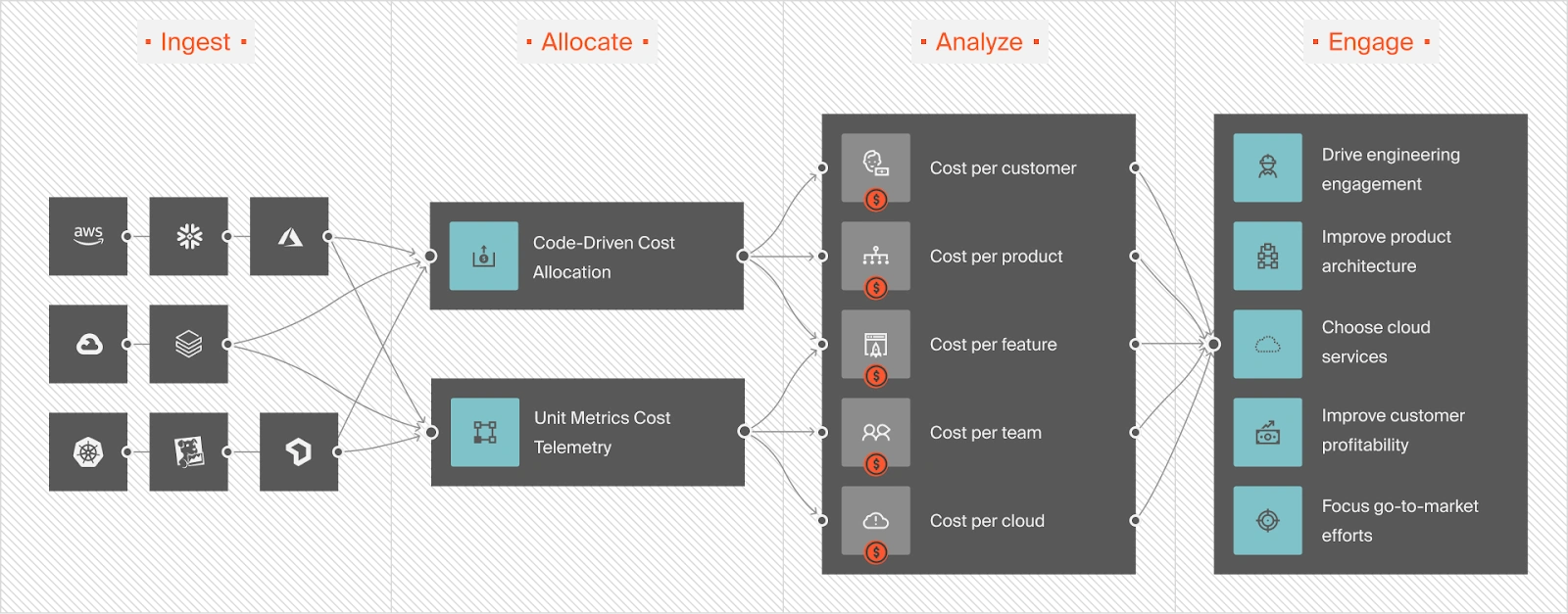
For organizations scaling AI workloads on GCP, CloudZero is also the first cloud cost platform to integrate directly with Anthropic and OpenAI, pulling API usage and cost data into the same view as your cloud infrastructure spend. That means you can track cost per inference, cost per AI feature, and cost per model across providers, not just the compute line items on your GCP bill.
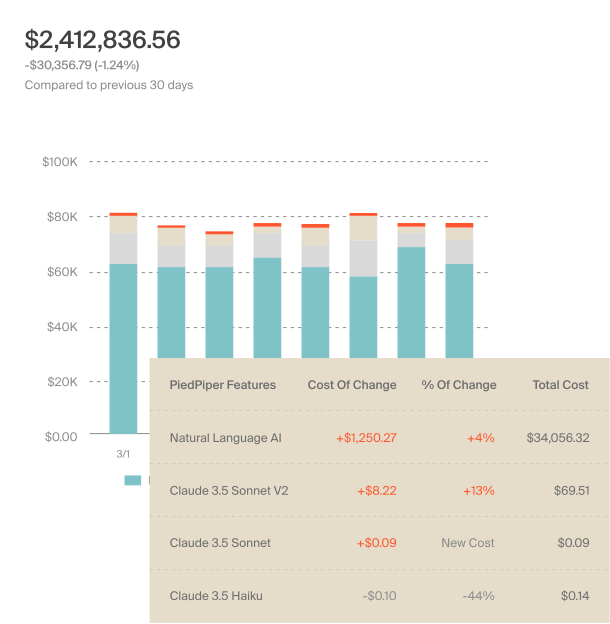
CloudZero also uses actual usage patterns to forecast AI and cloud spend with precision, giving finance teams models grounded in real engineering behavior instead of estimates.
For teams running GCP alongside AWS, Azure, Snowflake, Datadog, or other cloud services, CloudZero provides a single view of total cost of ownership.
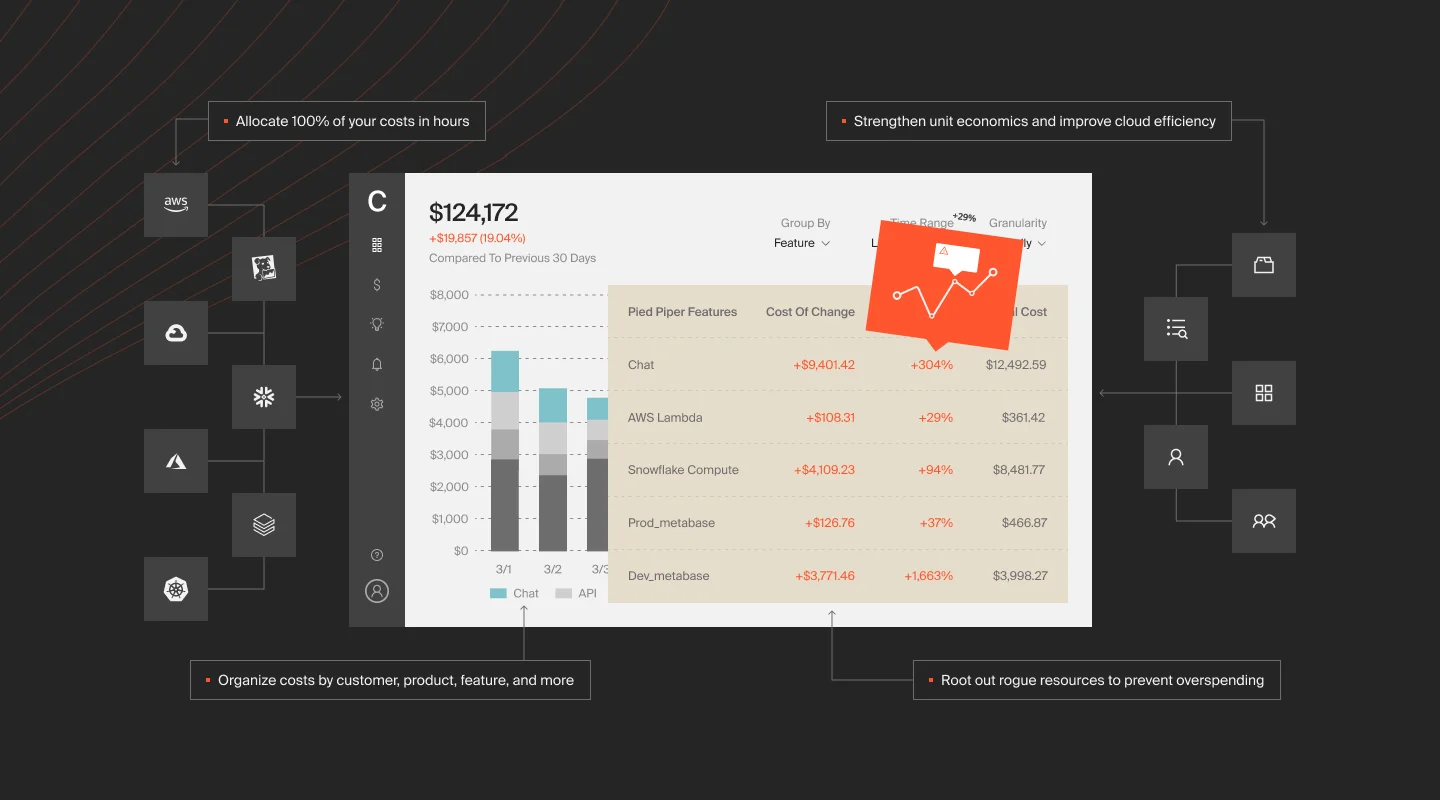
Real-time anomaly detection also alerts engineers who own the affected infrastructure the moment spend deviates from expected patterns, before it compounds into next month’s surprise.
Ambitious global organizations such as Toyota, Duolingo, Skyscanner, and Coinbase trust CloudZero to manage their cloud costs. CloudZero recently helped Upstart save $20 million and PicPay save $18.6 million.  to see how, or start with a free cloud cost assessment to find out what you could save on GCP.
Google Cloud Cost Optimization FAQs