
Kubernetes (K8s) adoption has exploded over the past few years. But it hasn’t been easy to monitor, manage, and optimize K8s costs.
To provide greater cost visibility into Kubernetes clusters and environments, Kubecost launched in 2019 and was acquired by IBM in 2024, while OpenCost debuted in 2022.
OpenCost has several founding contributors. But Kubecost developed the cost allocation engine that the OpenCost implementation uses. Both tools have remarkably similar features for managing Kubernetes costs.
But OpenCost and Kubecost differ in crucial respects, as we’ll discover in this guide.
First, a little background.
What Does Kubecost Do?
Kubecost is a tool for monitoring and optimizing Kubernetes costs. Kubecost collects, visualizes, and reports real-time cost data across Kubernetes clusters and beyond. In addition, the platform runs continuously, so you can view your K8s cost metrics as they change and optimize them as necessary.
Kubecost started as an open-source project for small engineering teams and remains available as open-source software today. It still maintains a freemium plan and tightly integrates with cloud-native, open-source tools, including Kubernetes, Prometheus, and Grafana.
Kubecost features include the following:
- Cost allocation. Kubecost can allocate costs based on any Kubernetes concept, such as a service, deployment, namespace label, cluster, pod, team, environment, product, or custom label. You can also view your costs across multiple clusters in one place, using a single API endpoint.
- Real-time Kubernetes cost monitoring. Combine and view your in-cluster costs (CPU, RAM, network, storage, etc.) with out-of-cluster costs (AWS, Azure, and Google Cloud infrastructure and services) in a single place.
- Customized K8s cost optimization recommendations. Get cluster-level insights customized to your environment and usage patterns to prevent overprovisioning (waste) or under-provisioning (performance degradation).
- Customizable alerts and governance. Receive real-time alerts via email or Slack about anomalous spend patterns, budget overruns, and inefficient Kubernetes tenants.
So, how does OpenCost compare?
Research Report
FinOps In The AI Era: A Critical Recalibration
What 475 executives told us about AI and cloud efficiency.
What Does OpenCost Do?
OpenCost is an open-source cost monitoring and optimization platform for Kubernetes.
OpenCost measures and allocates in-cluster and some external Kubernetes costs in real-time. It is currently at the Cloud Native Computing Foundation sandbox project maturity level. It is part of a growing ecosystem of Kubernetes cost optimization tools.
OpenCost continuously collects, analyzes, and reports your cost insights, just like Kubecost. So you can identify any cost anomalies or trends early enough to avoid cost overruns.
Kubecost, Red Hat, AWS, Adobe, SUSE, Armory, Google Cloud, Pixie, Mindcurv, D2iQ, and New Relic are all founding contributors to the OpenCost project.
OpenCost features include:
- Fully open-source. The free forever platform is vendor-neutral and seamlessly integrates with open-source tooling. You can use OpenCost to measure and allocate container and infrastructure costs using the major cloud providers’ billing APIs.
- Real-time K8s cost allocation. Collect, analyze, and report on cost insights for Kubernetes concepts at the container level.
- Continuous Kubernetes cost monitoring and optimization. Get on-going cost allocation capabilities for in-cluster resources, including CPU, RAM, load balancers, storage, persistent volumes, and more.
- On-prem Kubernetes support. Measure and allocate on-premises Kubernetes costs using custom pricing sheets.
- Expert support. Kubernetes specialists from providers such as AWS, Google Cloud, SUSE, and Kubecost provide knowledgeable support.
OpenCost and Kubecost are quick to install and easy to get started with. So, what makes each platform unique?
What Are The Differences Between OpenCost And Kubecost?
Kubecost and OpenCost have more similarities than differences. But the differences make all the difference.
Here is a quick overview:
| Category | Kubecost | OpenCost |
| Type | Commercial product (IBM) | Open-source project (CNCF sandbox) |
| License | Mixed (OSS + paid tiers) | Apache 2.0 |
| Governance | Vendor-led | Community-led |
| Out-of-cluster costs | Yes | Limited |
| Recommendations | Yes | No |
| Enterprise features | Yes | Minimal |
| Best for | Production FinOps teams | OSS / baseline allocation |
1. Kubecost vs. OpenCost: Product vs. project
OpenCost is a vendor-neutral, Apache 2.0–licensed project under the Cloud Native Computing Foundation that relies on Prometheus for metrics collection.
It provides:
- A Kubernetes cost allocation specification
- A reference implementation of that specification
OpenCost supports:
- Amazon EKS
- Azure Kubernetes Service (AKS)
- Google Kubernetes Engine (GKE)
- On-prem Kubernetes (via custom pricing sheets)
Kubecost began as an open-source project and is now owned by IBM.
Kubecost runs on:
- Kubernetes clusters
- On-prem and air-gapped environments
- Amazon EKS
- Azure AKS
- Google GKE
Kubecost builds on cost allocation and adds:
- Enterprise controls
- Managed SaaS (Kubecost Cloud)
- Optimization recommendations
- Extended out-of-cluster visibility
Related Read: Scaling Kubernetes On A Budget: AKS Vs. EKS Cost-Savings
2. Kubecost vs. OpenCost: pricing
OpenCost is completely open source and free to use under the Apache 2.0 license. You do not pay for licensing, no matter how large your Kubernetes deployment is.
You may incur indirect costs for infrastructure that supports OpenCost, such as:
- A managed metrics store (e.g., Prometheus)
- Storage and compute for cost metric retention
These depend on your cluster size and provider.
Kubecost pricing is tiered and depends on how you deploy it and what features you need.
Kubecost’s free edition provides cost allocation and monitoring at no cost, with basic metric retention and multi-cluster support.
Kubecost pricing starts at $449/month for business usage, with enterprise options available upon request.
Note: You can try any Kubecost plan for 30 days free to see if it meets your K8s cost monitoring, allocation, and optimization needs.
3. Kubecost vs. OpenCost: Kubernetes cost monitoring and reporting
OpenCost calculates Kubernetes pod costs based on CPU, memory, GPU, and storage usage and exports metrics to Prometheus for analysis. It also provides CLI access through the kubectl-cost plugin for quick allocation checks.
OpenCost does not provide:
- Built-in cost savings recommendations
- Native budget enforcement
- Advanced anomaly detection
- Full out-of-cluster cost aggregation
Kubecost includes Kubernetes cost allocation and extends it with Kubernetes cost monitoring, optimization, and governance features.
Kubecost provides K8s cost allocation and optimization features, including anomaly detection, budget alerts, and savings recommendations.
Kubecost can also estimate costs using pricing models or connect to cloud billing sources for more precise allocation.
It supports environments such as Amazon EKS (including Fargate), Azure AKS, on-premises clusters, and GKE.
4. Kubecost vs. OpenCost: Governance
OpenCost is governed as a CNCF Incubating project with a community-driven specification for Kubernetes cost measurement and allocation.
Kubecost adds enterprise governance features such as budget alerts, RBAC security, and automated cost policy workflows on top of Kubernetes cost allocation.
Best Kubernetes Cost Optimization Platform: CloudZero Vs. Kubecost Vs. OpenCost
OpenCost and Kubecost are helpful for monitoring, allocating, and optimizing Kubernetes costs at a granular level. Both monitor Kubernetes costs in K8s environments, but neither goes beyond that.
For costs outside of Kubernetes, or to consolidate costs of containerized and non-containerized resources in one place, you’ll likely need another service, adding complexity and cost.
Alternatively, you can use a Kubernetes cost-optimization platform that handles both.
CloudZero provides granular Kubernetes cost analysis across major cloud providers, including single-cloud, multi-cloud, and hybrid environments — down to the individual customer level (unit economics).
With CloudZero’s Kubernetes Cost Analysis, you can:
- Measure and allocate Kubernetes costs across Kubernetes, AWS, Google Cloud, and Azure. No tagging required.
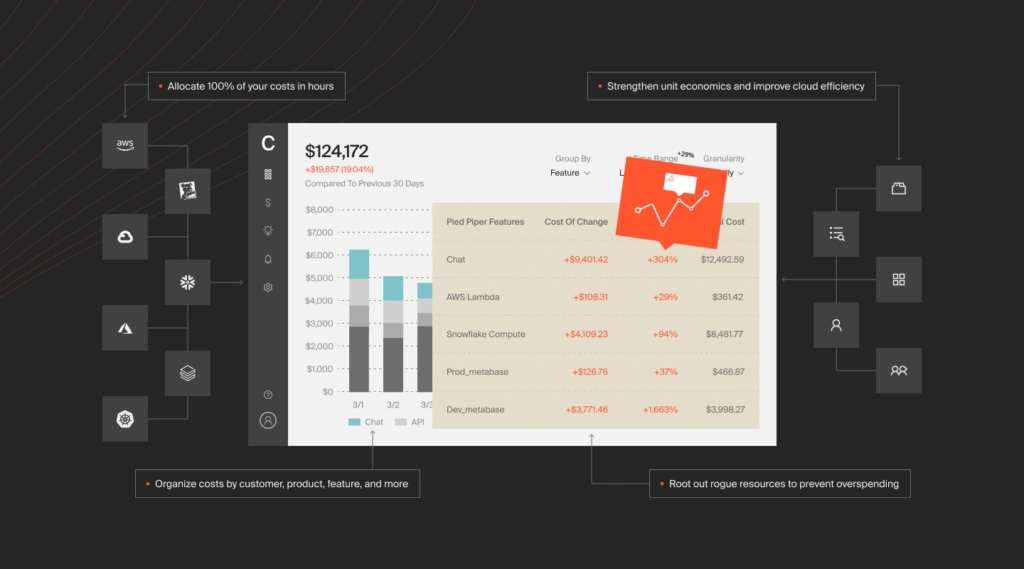
- Collect, analyze, and act on granular Kubernetes cost insights across any Kubernetes concept — namespace, label, service, environment, cluster, pod, deployment, and more.
- Accurately allocate in-cluster and out-of-cluster cost data seamlessly — even if you have messy cost allocation tags.
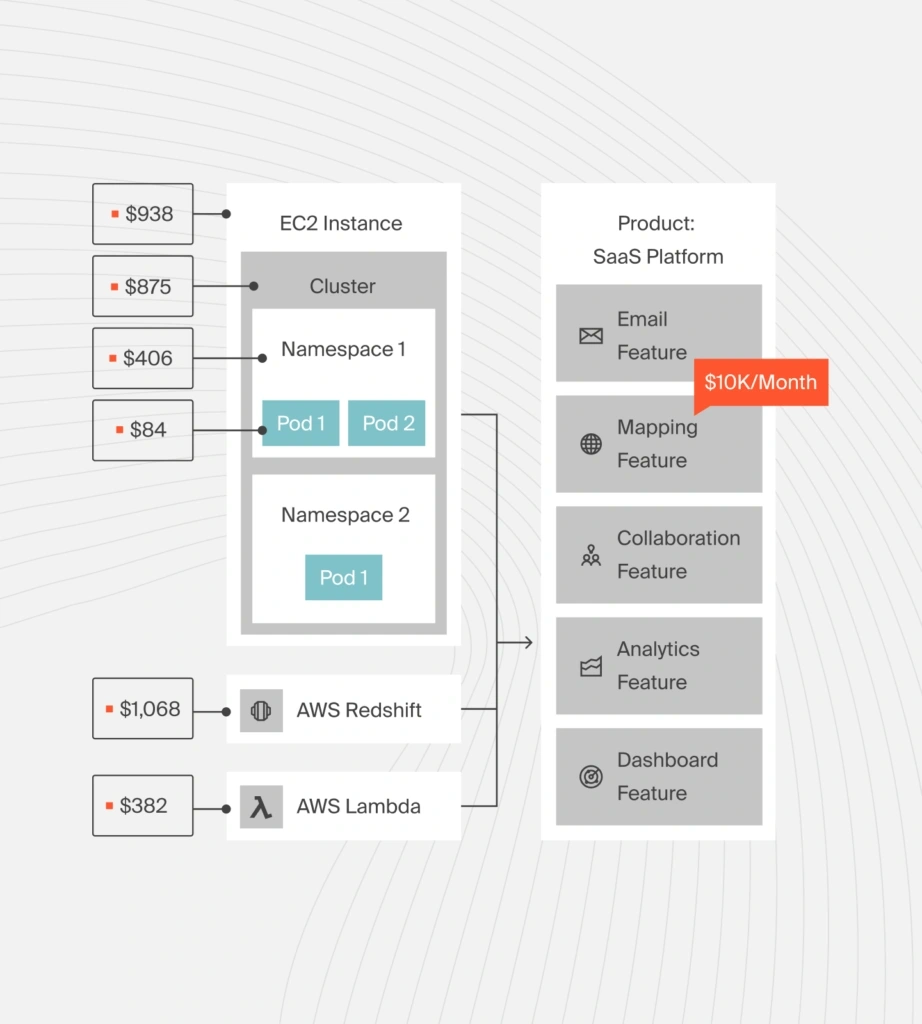
- Measure your cost of goods sold (COGS) across containerized infrastructure.
- Get an accurate picture of your cloud costs by combining containerized and non-containerized resources. Compare K8s costs with those of AWS, GCP, Azure, and platforms such as Snowflake, Databricks, MongoDB, and New Relic.
- Leverage real-time and historical Kubernetes cost data to derive cost insights in the context of your business — down to the pod level, by the hour.
- Go beyond mere visibility by seeing your Kubernetes costs in business dimensions, including cost per individual customer, software feature, product, project, team, environment, and more.
- Share contextual Kubernetes cost insights by role: Finance, engineering, or FinOps.
- Take advantage of real-time cost anomaly detection and smart alerts straight to your Slack, email, or incident response tool and prevent cost overruns.
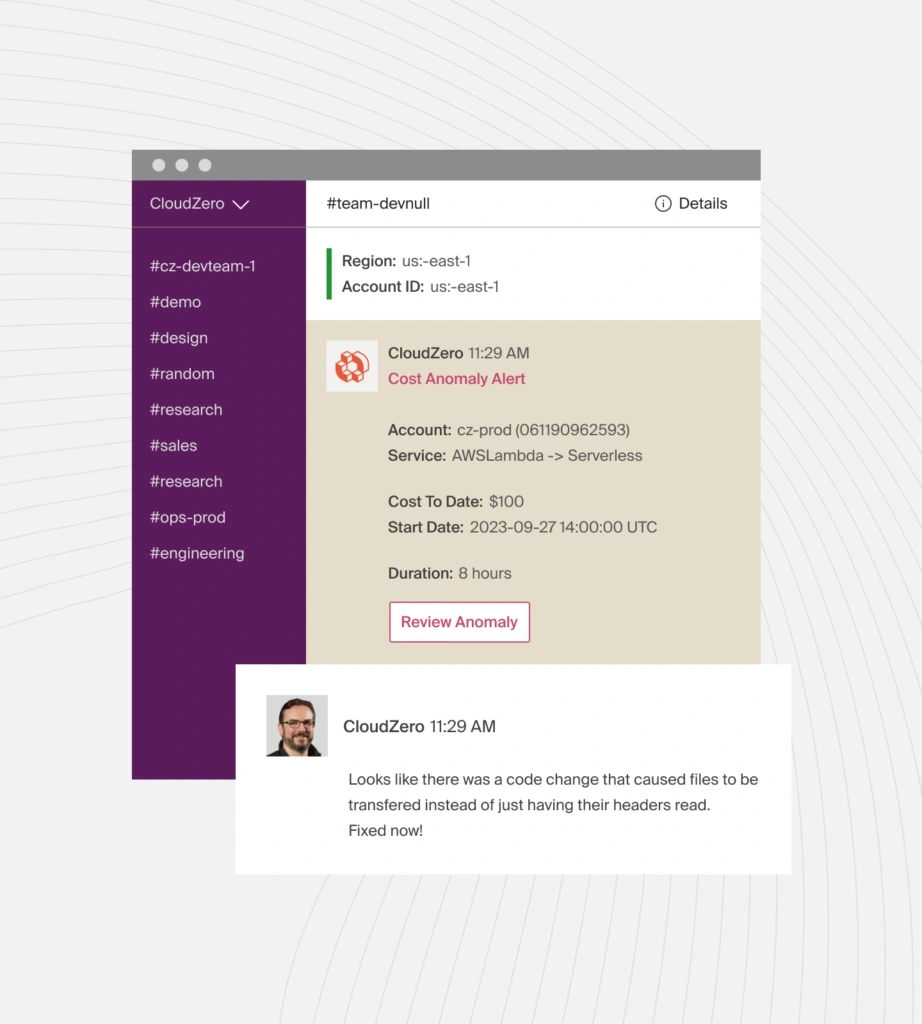
- Get budgeting, cost allocation, and forecasting tools in one place to organize and optimize your Kubernetes spend.
- Identify unallocated resources so you can remove or optimize them.
- Get customized recommendations on the best instance to use, based on factors such as pricing, instance type, size, resource, service, and more, with CloudZero Advisor.
But don’t just take our word for it. Schedule a demo today or take a product tour to see the power of CloudZero for yourself!
Kubecost Vs. OpenCost FAQs
What is IBM Kubecost?
IBM Kubecost refers to Kubecost following IBM’s acquisition of the company in 2024. It remains a Kubernetes cost monitoring and optimization platform, now part of IBM’s broader cloud cost and FinOps portfolio.
What is the difference between OpenCost vs. Kubecost?
OpenCost is a CNCF-governed open-source project that supports cost allocation for Kubernetes. Kubecost is a commercial product that builds on cost allocation with optimization, governance, and enterprise features.
How does Kubecost pricing for AWS work?
Kubecost offers a free edition and paid tiers. On AWS, deployments may be self-hosted or purchased through AWS Marketplace. Pricing scales by node count or enterprise features, with custom quotes for advanced plans.
Is OpenCost free?
Yes. OpenCost is fully open-source under the Apache 2.0 license. There are no license fees. However, you pay for the infrastructure required to run it, including Prometheus, storage, and compute resources.
How to calculate Kubernetes cost?
Kubernetes cost is calculated by allocating infrastructure costs (CPU, memory, GPU, storage, and network) to pods and workloads based on resource usage and cloud billing pricing data.
Both OpenCost and Kubecost follow this allocation model.
What is the Kubecost Helm chart?
The Kubecost Helm chart is the official Kubernetes deployment package for installing Kubecost in a cluster. It configures cost allocation, Prometheus integration, and optional cloud billing connections.
What is the OpenCost Helm chart?
The OpenCost Helm chart is the recommended installation method for deploying OpenCost in a Kubernetes cluster. It installs the OpenCost API and integrates with Prometheus to collect and expose cost metrics.
What metrics does OpenCost metrics include?
OpenCost metrics include:
- Cost per pod
- Cost per namespace
- CPU allocation cost
- Memory allocation cost
- Storage allocation cost
- Idle cost
These metrics are exported to Prometheus.
Does OpenCost work with OpenCost Grafana?
Yes. OpenCost exports metrics to Prometheus, which can then be visualized in Grafana dashboards for Kubernetes cost reporting.
Does OpenCost AWS, OpenShift, or other Kubernetes environments work?
OpenCost supports Kubernetes clusters running on AWS (EKS), Azure (AKS), Google Cloud (GKE), OpenShift, and on-prem environments, provided pricing data can be sourced from billing APIs or custom pricing sheets.
What are Kubecost alternatives?
Kubecost alternatives include FinOps platforms include FinOps platforms with Kubernetes allocation, such as CloudZero, AWS Cost Explorer, Datadog, Harness.io, etc.
What are OpenCost alternatives?
OpenCost alternatives include Kubecost, Yotascale, CAST AI, Infracost, and other Kubernetes platforms.
Is there an OpenCost demo or an OpenCost UI?
OpenCost provides a basic web UI and API for cost inspection. It is an allocation engine rather than a full SaaS dashboard platform.
What is OpenCost Kubernetes used for?
OpenCost Kubernetes is used for allocating infrastructure costs to Kubernetes objects such as pods, namespaces, and services.


FinOps In The AI Era: A Critical Recalibration
What 475 executives told us about AI and cloud efficiency.