If your SaaS product handles 1 million chatbot interactions per month, Amazon Lex alone could cost between $4,000 and $7,500.
That range assumes current Amazon Lex V2 pricing of about $0.00075 per text request and $0.004 per speech request.
Multiply the requests by the rate, and you’re done. Or are you?
Conversational AI services rarely behave that neatly in production — and that includes AWS Lex.
Amazon Lex is AWS’s conversational AI service for building chatbots. It powers text and voice interfaces across web apps, mobile apps, contact centers, and enterprise systems, using the same speech recognition and natural language understanding (NLU) technology behind Alexa.
Lex is the natural choice for teams already operating inside the AWS ecosystem.
At its core, Amazon Lex processes each AWS chatbot interaction through a consistent pipeline: it receives input (voice or text), applies automatic speech recognition if the input is spoken, runs natural language understanding to classify the user’s intent, and routes to the appropriate response or fulfillment action. Each layer of that pipeline can invoke additional AWS services — which is where real-world costs begin to diverge from the rates on the pricing page.
The rates and totals above are only the visible layer of Amazon Lex pricing. We haven’t factored in Lambda, logging, storage, and downstream AI service costs yet.
In the next few minutes, we’ll unpack how pricing for Amazon Lex actually works, what truly drives its costs in production, and how to use it without eroding your profitability.
Amazon Lex Pricing in a Nutshell
With the move from Lex V1 to Amazon Lex V2, AWS simplified the pricing model to a per-request model (text requests and speech requests) following a simple usage-based model (Pay-As-You-Go).
A request means every time a user input is processed by the service, whether that input is text or speech.
On a small scale, this feels manageable, even affordable.
Once your bot becomes part of real SaaS workflows, however, where sessions include multiple turns, fallback intents, retries, and backend integrations, billable requests often grow faster than anticipated.
Next, we’ll unpack how Amazon Lex pricing actually works under the hood, and what drives your total bill.
Report
Finance needs to prove AI’s return: CloudZero report
260 senior finance leaders (more than half CFOs) told us why the speed of seeing AI spend, not the size of it, separates who pulls ahead on AI from who gets burned.
How Amazon Lex Pricing Actually Works
Amazon Lex billing isn’t based on infrastructure uptime or bot size. It’s based on interaction volume, and there’s more to it than that.
1. What counts as a billable request on Amazon Lex
Every time a user input, whether text or speech, is processed by Amazon Lex, it counts as a separate request.
For text bots, each message a user sends to the bot is billed individually.
For voice bots, you’re charged each time Lex receives and transcribes spoken input before applying natural language understanding (NLU).
That part is straightforward — but in production environments, things become more nuanced.
2. Interaction mode (Request-and-response vs streaming)
Amazon Lex supports two primary interaction modes. The one you choose directly affects how billing is calculated.
Request-and-response
This is the standard model most teams start with. In request-and-response mode, a user must explicitly send an input, such as typing a message or speaking a prompt, to receive a reply.
Each user input is counted and billed as a separate API request.
As of current pricing, Amazon Lex charges $0.004 per speech request and $0.00075 per text request in this mode.
- If your chatbot handled 10,000 text interactions in a month, your base Lex cost would be about $7.50.
- At 100,000 text interactions, that rises to roughly $75.
- And at 1 million interactions, you’re looking at about $750.
For speech, the scale moves faster. At 3,000 speech requests, your cost is about $12. At 10,000 speech interactions, you approach $40. And at 100,000 speech requests, you’re closer to $400.
There are no upfront commitments. Pricing is strictly usage-based. As interaction volume increases, your bill grows linearly.
That’s only one interaction model.
Streaming conversation model
Instead of charging per discrete user message, streaming keeps the bot in a form of “continuous listening” mode. The interaction runs as a streaming API session, where speech, pauses, silence detection, and processing time are grouped into time-based intervals.
Each streaming session is measured in 15-second intervals. That costs $0.0065 per 15 seconds of streaming speech and $0.002 per 15 seconds of streaming text.
Moreover, billing is rounded up to the nearest 15-second block. For example, a 60-second streaming speech interaction translates to:
60 ÷ 15 = 4 intervals
4 intervals × $0.0065 = $0.026 total
If the session lasts 41 seconds, it’s rounded up to 45 seconds, like this:
45 ÷ 15 = 3 intervals
The three 15-second intervals × $0.0065 = $0.0195 total
For streaming text, that same 45-second session would cost: 3 intervals × $0.002 = $0.006
What makes streaming interesting is that multiple conversational turns can occur within one streaming session.
- That means Lex may process several back-and-forth exchanges without billing each message as a standalone request.
- In certain scenarios, particularly voice bots with natural pauses and fluid dialogue, streaming can reduce your number of billable units compared to request-and-response mode.
However, it can also increase your Lex costs if sessions stay open longer than necessary.
Request-and-response pricing scales with message count. Streaming pricing scales with time. That distinction becomes important as your conversational design evolves.
3. Automated Chatbot Designer
Automated Chatbot Designer enables you to upload existing conversation transcripts, such as customer support logs or historical chat records from your real-life contact center, and have Amazon Lex analyze them automatically.
That’s training, and it is measured in training minutes (the amount of processing time it takes Lex to parse and model your transcript set).
Amazon Lex charges $0.50 per training minute.
The thing is, instead of manually defining intents and guessing how users phrase their requests, Lex reviews the transcripts to help you identify your callers’:
- Common intents
- Repeated conversation flows
- Dialog patterns
- Frequently used phrases
It then generates a baseline bot structure based on how your real users actually communicate. It can even include pre-made prompts for your users to pick, like this:
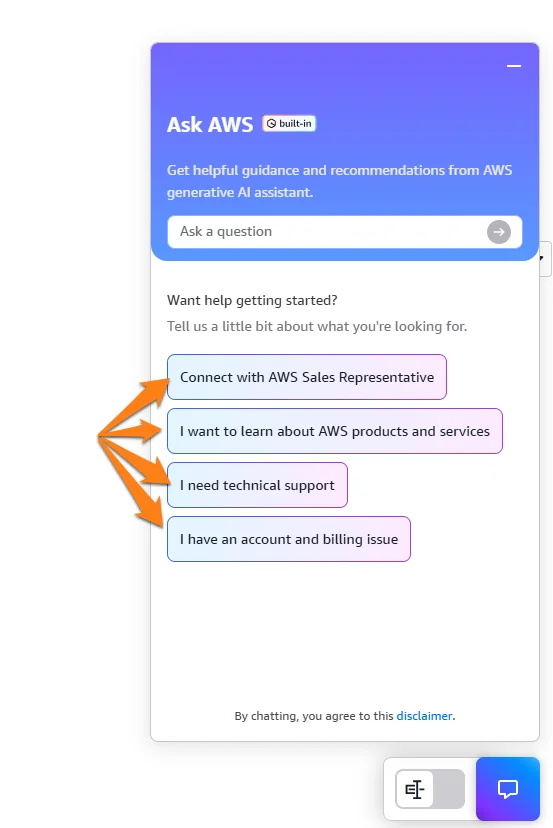
Image: AWS
Overall, Lex can help you jumpstart and accelerate your AI chatbot design and development with real data. No need to spend months on manual tweaking.
Some things to note here:
- Larger or more complex transcript sets require more training time. For example, a dataset containing roughly 180,000 lines of conversation, equivalent to several thousand support calls, may require about 300 minutes of analysis.
- At $0.50 per minute, that single run would cost approximately $150.
- More extensive datasets can easily push costs into the hundreds or even thousands of dollars, depending on volume and complexity.
Unlike text and speech requests, which scale continuously with usage, Automated Chatbot Designer costs are event-based.
You are billed only when you choose to generate or regenerate a bot design from transcripts. It’s typically a one-time or periodic optimization expense, not a recurring per-interaction cost.
4. How the AWS Free Tier and Credits work for Amazon Lex
There are two components to consider here: usage-based free limits and AWS credits. Eligible new AWS accounts receive monthly free usage for Amazon Lex at:
- 10,000 text requests per month
- 5,000 speech requests per month
These limits apply at the account level, meaning they’re shared across regions and environments within the same AWS account.
These limits apply for the first 12 months after account creation.
Once you exceed those monthly thresholds, standard pay-as-you-go pricing applies (such as $0.00075 per additional text request and $0.004 per speech request).
In addition to usage limits, AWS also provides promotional credits.
For new AWS customers signing up after July 15, 2025, AWS provides up to $200 in credits, applicable to eligible AWS services including Amazon Lex.
These credits can be applied to eligible AWS services, including Amazon Lex.
Eligible accounts also receive 2 hours of Automated Chatbot Designer usage per month during the first two months — useful if you’re starting from real conversation transcripts and want to run a full design pass before committing to ongoing training costs.
The newer Free Plan structure lasts six months, allowing usage within defined limits without charges unless you upgrade to a Paid Plan. However, even after upgrading, AWS will automatically apply any remaining promotional credits before billing your account directly.
Promotional credits expire 12 months after account creation, whether used or not.
5. Geography influences your Amazon Lex pricing
Text and speech request unit prices may differ slightly from region to region, particularly in Asia Pacific, Europe, and South America.
Teams operating globally often deploy bots across multiple AWS regions to reduce latency and comply with data sovereignty requirements.
When you do this, Lex usage may be distributed across different regions, and AWS consolidates billing at the account level, which can produce cost variations by region.
If your architecture includes geo-replicated services or multi-region deployments, even small differences in per-request pricing can create inconsistent cost behavior across environments.
To reduce AWS Lex cost surprises, we recommend that you:
- Use the AWS Pricing Calculator to estimate costs by region before deployment.
- Analyze your historical usage and costs by region in the AWS billing console.
- Factor regional pricing into your unit economics models when forecasting Amazon Lex spend.
At the time of writing, the standard rates covered earlier — $0.004 per speech request and $0.00075 per text request — apply consistently across regions.
However, AWS pricing can change at any time. So, before making architectural or financial decisions, always confirm current regional pricing on the official Amazon Lex pricing page.
6. Service integrations also influence your total bill
Lex, like many other conversational AI pipelines, calls other AWS services (which have their own pricing models):
- AWS Lambda: If you implement business logic or backend lookups in Lambda functions, each invocation is billed separately, usually based on compute duration and memory allocation. See our Guide to AWS Lambda Pricing here.
- Amazon CloudWatch: Logging, metrics, and retention of logs are billed based on storage and retrieval rates. See our CloudWatch Pricing Guide here.
- Data transfer: Cross-service or outbound network traffic may incur separate charges. See our Guide to AWS Data Transfer Charges here.
- API Gateway, DynamoDB, S3, and others: Database calls, API requests, and cloud storage add incremental costs that compound with interaction volume.
Helpful Resources:
In other words, Amazon Lex’s per-request rates only account for the bot engine itself. As soon as you start stitching your bot into your real SaaS workflows, these other services can easily overshadow Lex’s core charges.
7. User experience patterns also drive AWS Lex billing
Here’s how.
- Bots with long sessions and frequent back-and-forth interactions generate more billable requests than short, single-question bots.
- Bots that default to fallbacks or retries (say, after misunderstandings) can multiply your requests per session.
- Voice bots with continuous listening behavior may generate more speech request units than simple, short prompts.
Ultimately, when designing your workflows, bear in mind that minimizing redundant or unnecessary turns can reduce the total number of billable events without harming the user experience.
How To Optimize Amazon Lex Costs
Once you understand how Amazon Lex pricing actually works, you can optimize with precision without sacrificing performance or user experience.
If you’ve spent any time on the CloudZero blog, you already know that blunt cost-cutting rarely ends well. See the value engineering vs cost cutting guide, for example.
Here’s how high-performing teams approach Amazon Lex cost optimization instead.
1. Reduce unnecessary conversational turns
Because Lex charges per request (or per 15-second interval in streaming mode), every additional interaction matters.
Long sessions filled with clarifications, fallback intents, repeated prompts, and “I didn’t understand that” loops can multiply your bill. Instead, tighten your intent design. Improve training utterances. Reduce ambiguous prompts.
The goal isn’t fewer conversations — it’s fewer wasted turns.
Session attributes are an underused lever for reducing turn count. Lex lets you persist context across a conversation — so if a user has already provided their account number in turn two, you don’t need to prompt for it again in turn five. Caching that data in session attributes eliminates redundant exchanges. Similarly, bundling data collection — gathering multiple inputs in a single well-designed prompt rather than asking one question at a time — cuts the total turn count without sacrificing the information you need.
2. Be intentional about voice vs text
Voice interactions cost more than text.
If a workflow doesn’t truly require speech input, default to text. For example, customer support bots embedded in SaaS dashboards often deliver the same value through text, but at a fraction of the cost.
Reserve voice for use cases where it materially improves the user experience, such as hands-free environments or accessibility-driven scenarios.
3. Choose the right interaction mode
Design around usage patterns, not just feature capabilities.
For short, transactional interactions, request-and-response is often more predictable. And for natural back-and-forth voice sessions, streaming may reduce billable units, provided you manage the sessions tightly.
However, streaming sessions left open unnecessarily can increase your costs just as quickly.
4. Control Lambda and downstream service usage
In many production workloads, Lambda, logging, and data retrieval cost more than Lex itself. Here’s how to keep those supporting costs in check:
- Reduce unnecessary Lambda invocations
- Cache common responses when appropriate
- Limit excessive logging in production
- Set intentional CloudWatch retention policies
Helpful Resource: AWS Lambda Cost Optimization and Best Practices Guide CloudZero
5. Pair Lex with Amazon Connect for contact center efficiency
One of the highest-ROI configurations for production Amazon Lex deployments is pairing it with Amazon Connect. By routing incoming calls through a Lex bot before they reach a human agent, you can resolve routine queries automatically — account lookups, status checks, payment confirmations — without a single live agent interaction.
The setup uses Amazon Connect Contact Flows with a “Get customer input” block pointed at your Lex bot. You define which intent patterns trigger resolution versus escalation to a human agent. As you expand Lex’s intent coverage over time, your deflection rate increases and your cost per interaction decreases proportionally.
AWS has published case study data showing 94% cost savings on support interactions after full Lex + Connect deployment. The unit economics are straightforward: an AWS chatbot text request at $0.00075 replacing a handled agent interaction is a meaningful improvement — especially when you’re tracking cost per resolved ticket against revenue at scale.
6. Monitor fallback rates and retry patterns
Track your Lex fallback frequency because a high rate often means:
- Weak intent coverage
- Poor NLU training
- Unclear prompts
Every fallback can trigger additional billable requests, retries, or backend calls.
7. Think in unit economics, instead of only request volume
Instead of only asking:
“How many requests did we process?”
You’ll also want to answer:
- What’s our cost per conversation?
- What’s our cost per resolved ticket?
- What’s our cost per customer interaction?
- Which features generate the most conversational spend?
Raw request volume doesn’t tell you whether you’re scaling efficiently. Cost per unit of value does. CloudZero gives you that visibility — connecting AI and cloud spend to the business context that makes optimization decisions straightforward.
Resource: What in the Cloud Are SaaS Unit Economics, and Why Should I Care? CloudZero
Turn Amazon Lex Pricing Confusion into Clear, Accurate, and Profitable Cost Intelligence
At $0.00075 per text request and $0.004 per speech request, it’s tempting to assume Amazon Lex won’t materially impact your cloud bill. At small scale, that’s often true. Scale changes that.
Lex itself is rarely the problem. The real issue is the surrounding cost drivers, and without visibility into those, optimization is nearly impossible.
That’s why high-performing SaaS teams move beyond surface-level billing metrics and track conversational AI costs in business context.
With CloudZero, profitable teams at Toyota, Duolingo, Skyscanner, and PicPay break their AI and cloud spend down into precise, actionable unit costs. Think of these:
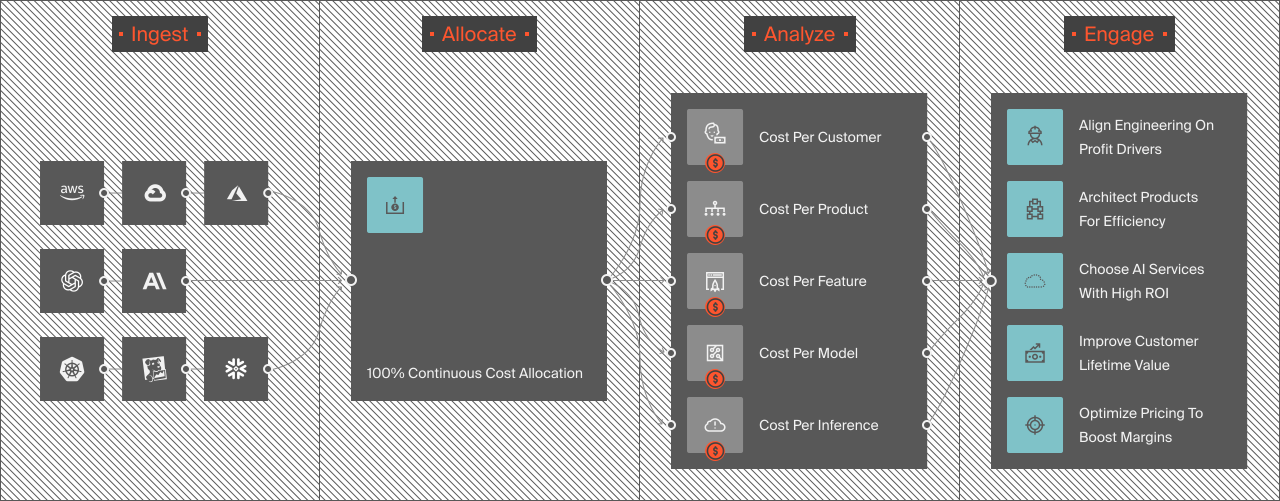
You can also view AI-specific cost insights, such as cost per AI inference, per AI service, per model, per feature, per environment, and even per SDLC stage. Like this:
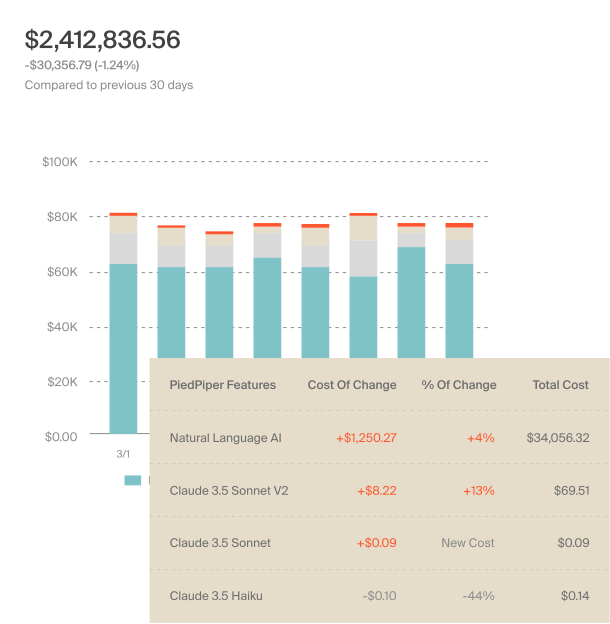
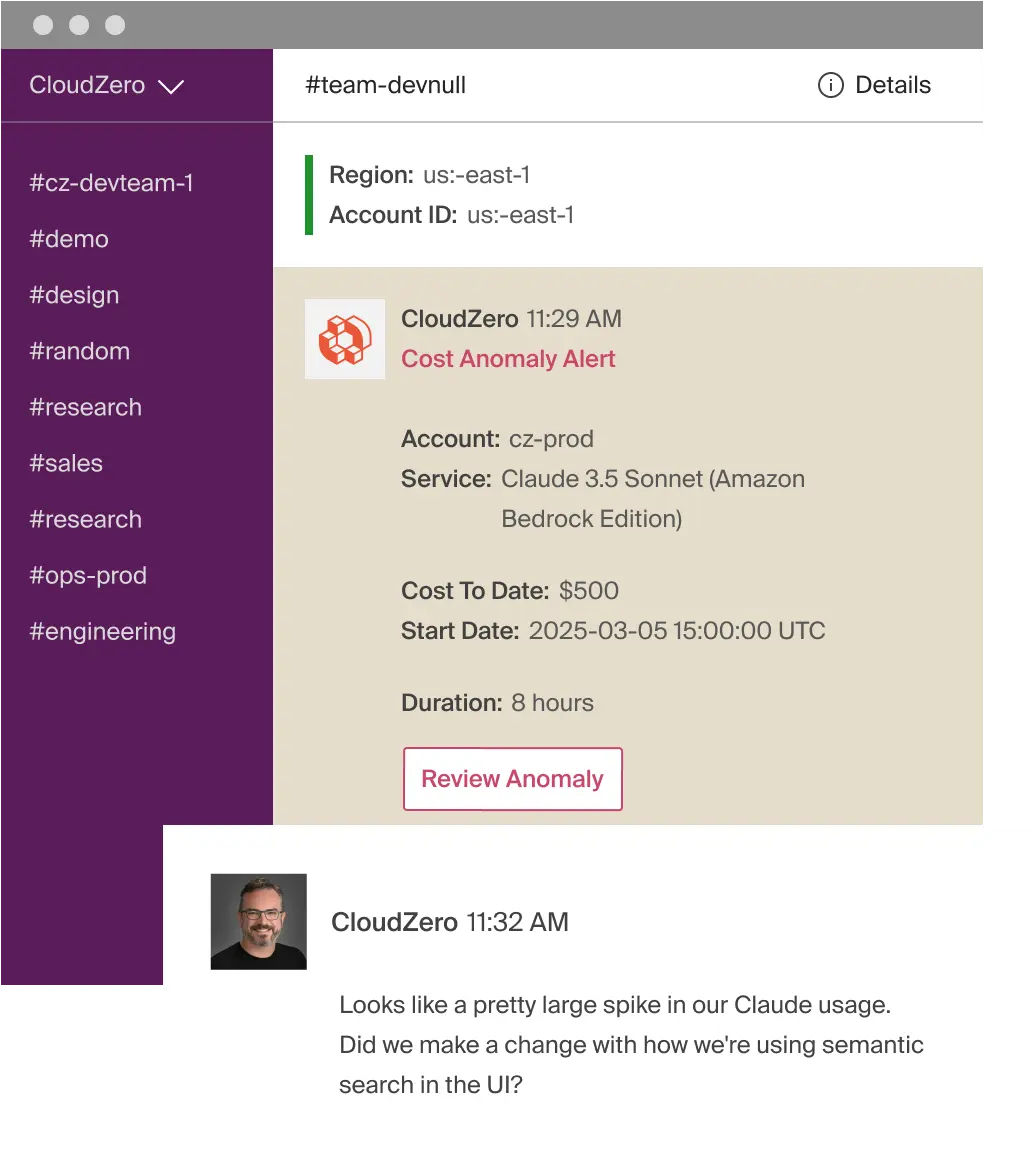
With that level of visibility, you can see how your Amazon Lex usage maps directly to engineering decisions and business outcomes. Then you can pinpoint exactly which levers to pull to optimize your costs (without sacrificing performance, velocity, or user experience). Like this:
Are you running conversational AI at scale and want to understand, control, and optimize your Amazon Lex costs in real time?  or take a product tour and see how that visibility changes the conversation.
Frequently Asked Questions about Amazon Lex Pricing











