You’re not alone if you’ve had trouble understanding Amazon DynamoDB pricing. Getting a handle on DynamoDB costs can be complex and tedious.
But with the right tools and resources, it doesn’t have to be. In this bookmarkable guide, we’ll break it down step-by-step so you can tell what drives DynamoDB costs.
That’s a big deal because you can then pinpoint where and when to reduce your DynamoDB costs with confidence — without sacrificing performance or any of the DynamoDB features you care about.
First, a quick background.
What Does DynamoDB Do?
Amazon DynamoDB is a modern Database-as-a-Service (DBaaS) offered by Amazon Web Services (AWS). DynamoDB is best known for being a fully managed, NoSQL database service.
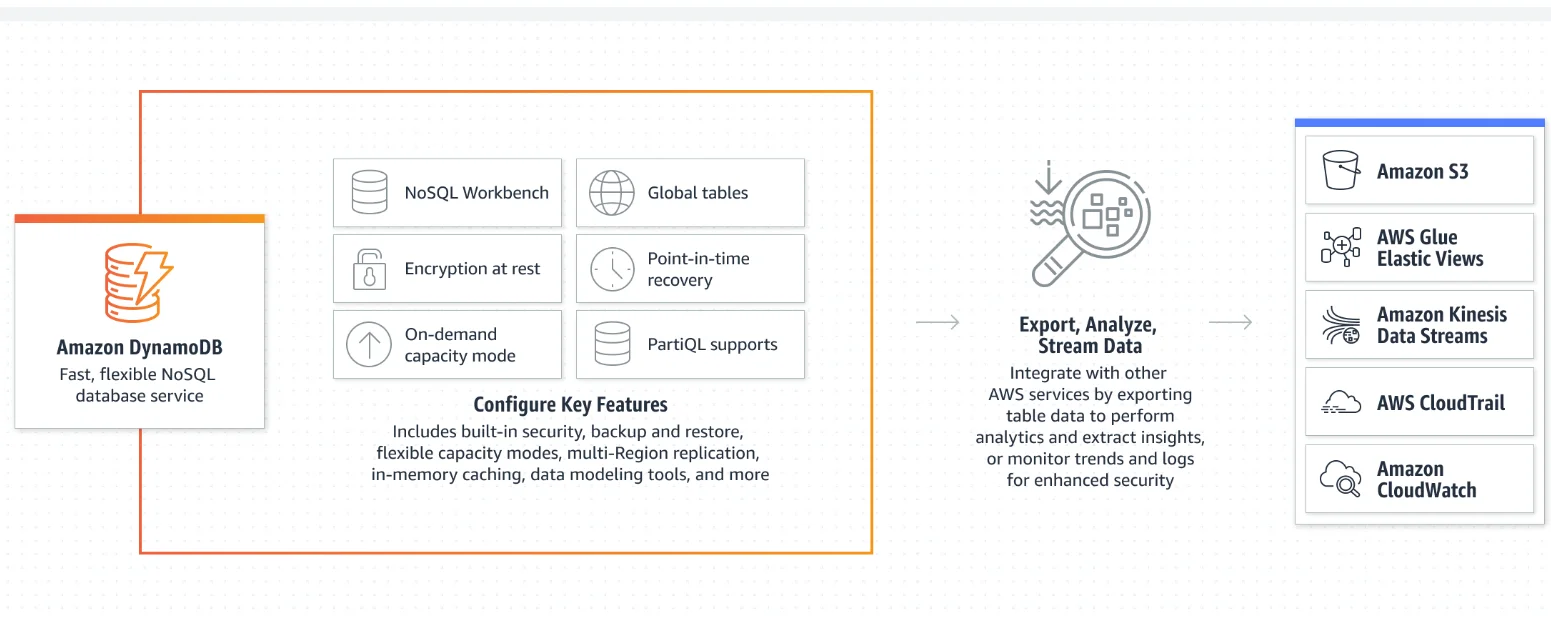
This is great because it frees your team from the time-consuming work of provisioning, scaling, and maintaining hardware while also patching software issues.
Here are some key DynamoDB features you get when you subscribe.
- NoSQL database. Traditional relational databases follow ACID (atomicity, consistency, isolation, durability) principles, and operations are based on well-defined tables. DynamoDB is a Not Only SQL (NoSQL) service; a key-value store (schemaless) that supports various data types, including scalar, set, and document types.
- Serverless. DynamoDB is a fully managed, cloud-native, and single-millisecond latency database. You don’t have to set up, scale, and maintain any hardware or patch software.
- High-performance database service. DynamoDB uses fast Solid State Disks and creates DynamoDB tables that can store and retrieve any amount of data drawn from various data sources.
- Data security. DynamoDB encrypts all data at rest. You get to choose what type of key to encrypt your table at the creation point.
- High durability. DynamoDB provides data protection by storing it across three Availability Zones in an AWS Region. You can back up and restore Amazon DynamoDB tables on demand. Point-in-time recovery (up to the last 35 days) helps safeguard your tables from unintended write or delete operations.
- High scalability. You can also ramp up or scale down your table’s throughput capacity at any time without downtime, automatically scaling to meet demand and reducing unnecessary DynamoDB spend.
- Pay-as-You-Go pricing. You pay for only what you use, which we break down below.

Research Report
FinOps In The AI Era: A Critical Recalibration
What 475 executives told us about AI and cloud efficiency.
Amazon DynamoDB Use Cases
DynamoDB is an ideal service for high-performance applications as it is fast, NoSQL, and highly available (single-digit millisecond latency). These include use cases that require fast and reliable read/write operations, such as streaming, IoT, gaming leaderboards, and high-traffic e-commerce applications.
Yet, understanding pricing for Amazon DynamoDB can help you assess how well-suited the service is to specific use cases in your business.
Amazon DynamoDB Costs Explained: How Does DynamoDB Pricing Work?
DynamoDB pricing is based on three main factors; reading (reads), writing (writes), and storing data. These are the core DynamoDB features. There are additional charges for optional features.
DynamoDB optional features include the following:
- Data transfer out
- On-demand backup
- Continuous backup
- Restore from backup
- Global tables
- DynamoDB Streams
- Data export to Amazon S3
- Data import from Amazon S3
- Change data capture for AWS Glue
- Change data capture for Amazon Kinesis Data Streams
Here’s the thing, and this is important to note.
How much you pay for DynamoDB is based on the pricing mode you choose; On-Demand Capacity vs Provisioned Capacity. On-Demand Mode allows you to scale DynamoDB tables and operations as your workload changes. This flexibility works a lot like Amazon EC2 On-Demand instances do.
That’s not all.
On the other hand, provisioned mode requires you to specify how many read/write requests per second you need in advance (but can auto-scale to meet changing needs at additional fees, of course). Think of this as you would Amazon EC2 Reservations (cheaper rates for committing to a certain usage level over a given period).
Following a major price reduction in November 2024, AWS now recommends on-demand mode as the default for most DynamoDB workloads. The 50% reduction in on-demand throughput pricing means that most provisioned capacity workloads will actually achieve a lower effective price with on-demand mode — a significant shift in how teams should evaluate their capacity strategy.
The specific DynamoDB capacity mode you choose also determines how much you pay for each pricing factor we highlighted earlier.
Amazon DynamoDB charges are based on billing units, not dollar amounts.
This means that each pricing factor has a unique billing unit. And you’ll need to remember each if you want to understand how DynamoDB pricing works. An unnecessary hassle, you say?
Not to worry. Here’s a quick table with the details you’ll want to know.
|
DynamoDB pricing factor |
Description and options |
Billing Unit |
|
Read Request |
API calls to read data from your tables Read Types: Transactional, Eventually consistent, and Strongly consistent Read operation types: Scan, Query, GetItem |
Read Request Units (RRUs) for On-Demand Mode Read Capacity Units (RCUs) for Provisioned Mode |
|
Write Request |
API calls to write data to your tables Types: Standard and Transactional |
Write Request Units (WRUs) for On-Demand Mode Write Capacity Units (WCUs) for Provisioned Mode |
|
Data storage |
Store data. Includes indexes (Local secondary index, Global secondary index, none) |
Per Gigabytes per month (GB-month) |
|
Backup and restore |
|
Per Gigabyte per month (GB-month) |
|
Global tables |
Data replication to create a multi-active, multi-region table |
Replicated write capacity units (rWCUs) or Replicated write request units (rWRUs) |
|
Change data capture for Amazon Kinesis Data Streams |
Capture item-level data modifications on a table. Then replicates them to Kinesis Data Streams |
Change data capture units |
|
Change data capture for AWS Glue |
Capture item-level data modifications on a table. Then replicates them to AWS Glue |
Change data capture units |
|
Data export to Amazon S3 |
Save or export table backups from a specific point in time to S3 storage |
Per Gigabyte (per GB) |
|
Data import from Amazon S3 |
Upload data from S3 to new DynamoDB tables |
Per Gigabyte (per GB) |
|
DynamoDB Streams |
Get a time-ordered history of item-level changes on a DynamoDB table |
Streams read request units |
|
Data transfer out |
Migrate data out to other AWS Regions |
Per Gigabyte (per GB) |
|
When you integrate with DynamoDB Accelerator (DAX) |
Reduce latency from milliseconds to microseconds |
Per node-hour consumed based on the instance type you choose |
Table: A list of DynamoDB pricing factors, what they do, and their billing units.
How Much Does DynamoDB Cost?
As we mentioned moments earlier, DynamoDB charges are based on the type of capacity mode you choose; On-Demand or Provisioned mode.
Here are the basics for calculating and understanding costs for each capacity mode available in DynamoDB.
Pricing for DynamoDB On-Demand Capacity Mode explained
DynamoDB On-Demand capacity mode prices depend on the type of request (read, write, or storage), operation (transactional, eventually consistent, strongly consistent), table class you use (Standard, Standard Infrequent Access), and AWS Region you are based in.
Following the November 2024 price reduction, on-demand mode is now the more cost-effective choice for most workloads — even those that were previously better served by provisioned capacity.
Prices for DynamoDB On-Demand reads and writes are as follows:
For writes:
- Each write costs 1 write request unit (WRU) for items up to 1KB (costs more RPUs if it is larger)
- A transactional write costs 2 WRUs
For reads:
- Each strongly consistent read costs 1 read request unit (RRU) for items up to 4KBs (larger items require additional RRUs)
- A transactional read costs 2 RRUs
- An eventually consistent read costs 0.5 RRU
Quick example: A strong read request for a 2 KB item will consume 1 RRU. A transactional read request for it would consume 2 WCUs while an eventually consistent read request for a similar-size item will cost 1 RRU.
In addition, if you choose the Standard table class in the US East (Ohio) Region, expect to pay [VERIFY: ~$0.625] per million WRUs for writes and [VERIFY: ~$0.125] per million RRUs for reads. And if you pick the Standard Infrequent Access table class, prices start at [VERIFY: ~$0.78] per million WRUs for writes and [VERIFY: ~$0.155] per million RRUs for reads.
Pricing for data storage in DynamoDB’s On-Demand capacity mode starts at $0.25 per GB-month for the Standard table class and $0.10 for the Standard Infrequent Access tale class.
Here’s a neat table that makes it easier to digest the prices.
|
DynamoDB operation |
Description and options |
Prices in the US East (Ohio) region |
|
Read Request | Standard table class Standard Infrequent Access table class |
$0.125 per million RRUs $0.155 per million RRUs |
|
Write Request |
Each API call to write data to a table Standard table class Standard Infrequent Access table class | 1 WRU up to 1KB 2 WRUs for transactional writes $0.625 per million WRUs $0.78 per million WRUs |
|
Data storage |
Standard table class Standard Infrequent Access table class |
Free for the first 25GB per month $0.25 per GB-month after that $0.10 per GB-month |
|
Backup and restore |
|
$0.10 per GB-month for warm backup storage $0.03 per GB-month for cold backup storage $0.20 per GB-month $0.15 per GB for warm backup storage $0.20 per GB for cold backup storage |
|
Global tables |
On-demand data replication to create a multi-active, multi-region table Standard table class Standard Infrequent Access table class | $0.625 per million rWRUs $0.78 per million rWRUs |
|
Change data capture for Amazon Kinesis Data Streams |
Up to a 1KB write |
$0.10 per million change data capture for Kinesis Data Streams |
|
Change data capture for AWS Glue |
Up to a 1KB write |
$0.10 per million change data capture for AWS Glue |
|
Data export to Amazon S3 |
Point-in-time recovery data from DynamoDB to S3 in Amazon Ion and DynamoDB JSON formats |
$0.10 per GB for either a full export or an incremental export to Amazon S3 |
|
Data import from Amazon S3 |
Pricing is based on uncompressed file size in Amazon S3 (DynamoDB JSON, CSV, Amazon Ion formats) |
$0.15 per GB |
|
DynamoDB Streams |
GetRecords API call (streams read request unit) returns up to 1MB of data from Streams |
$0.02 per 100,000 streams read request units after the first 2.5 million (which are free every month) |
|
Data transfer out |
Migrating data out to other AWS Regions, accounts, etc, incurs costs on both ends of the transfer |
The first 100 GB is free per month (aggregated across all services and regions) $0.10 per GB for the 10TB-month after the free tier Up to $0.05 per GB for over 150TB-month |
|
When you integrate with DynamoDB Accelerator (DAX) |
Pricing is per node-hour consumed based on the instance type you choose |
Starts at $0.04 per hour for dax.t3.small (2vCPU, 2GiB memory) up to $8.59 per hour dax.r4.16xlarge (64vCPU, 488GiB memory) |
Table: DynamoDB pricing in dollars.
DynamoDB’s costs vary slightly if you use Provisioned Capacity. Over time, however, these small differences can add up to a lot of savings (or unnecessary bill items) as your workload increases. Consider the following.
Pricing for DynamoDB Provisioned Capacity Mode explained
Here, you specify how many writes and reads your application requires per second. However, actual billing is based on an hourly rate.
Pricing for Provisioned Capacity mode in DynamoDB is calculated based on:
For reads:
- Each strongly consistent read request per second requires 1 Read Capacity Unit (RCU) for items up to 4KBs
- 2 eventually consistent read requests per second require 1 RCU for items up to 4KBs
- Each transactional read request per second requires 2 RCUs for items up to 4KBs
Larger items require more RCUs, which are priced in 4KB increments.
For writes:
- Each standard write request per second requires 1 WCU for items up to 1KB in size (you’ll need more WCUs for larger items)
- Each transactional write request per second requires 2 WCUs for items up to 1KB
Quick example: A standard write request for a 2 KB item will consume 2 WCUs while a transactional write request for a 5 KB item would consume 10 WCUs.
Let’s organize all of it into a table.
|
DynamoDB Operation |
Description and options |
Prices based on the US East (Ohio) Region |
|
Read Request | Standard table class Standard Infrequent Access table class Reserved capacity:
|
2 RCUs for each transactional read per second 1 RCU for 2 eventually consistent reads per second 1RCU for each strongly consistent read per second $0.00013 per RCU hourly $0.00016 per RCU hourly $150 when paid upfront, 1 year commitment and $0.0128 per hour, 1 year commitment $30 when paid upfront, 1 year commitment or $0.0025 per hour, 1 year commitment |
|
Write request |
Each API call to write data to a table Standard table class Standard Infrequent Access table class |
1 WRU up to 1KB 2 WRUs for transactional writes $0.00065 per WCU per hour $0.00081 per WCU per hour |
|
Data storage |
Standard table class Standard Infrequent Access table class |
Free for the first 25GB per month $0.25 per GB-month after that $0.10 per GB-month |
|
Backup and restore |
|
$0.10 per GB-month for warm backup storage $0.03 per GB-month for cold backup storage $0.20 per GB-month $0.15 per GB for warm backup storage $0.20 per GB for cold backup storage |
|
Global tables |
On-demand data replication to create a multi-active, multi-region table Standard table class Standard Infrequent Access table class | $0.000975 per rWCU per hour $0.00121875 per rWCU per hour |
|
Change data capture for Amazon Kinesis Data Streams |
Up to a 1KB write |
$0.10 per million change data capture for Kinesis Data Streams |
|
Change data capture for AWS Glue |
Up to a 1KB write |
$0.10 per million change data capture for AWS Glue |
|
Data export to Amazon S3 |
Point-in-time recovery data from DynamoDB to S3 in Amazon Ion and DynamoDB JSON formats |
$0.10 per GB for either a full export or an incremental export to Amazon S3 |
|
Data import from Amazon S3 |
Pricing is based on uncompressed file size in Amazon S3 (DynamoDB JSON, CSV, Amazon Ion formats) |
$0.15 per GB |
|
DynamoDB Streams |
GetRecords API call (streams read request unit) returns up to 1MB of data from Streams |
$0.02 per 100,000 streams read request units after the first 2.5 million (which are free every month) |
|
Data transfer out |
Migrating data out to other AWS Regions, accounts, etc, incurs costs on both ends of the transfer |
The first 100 GB is free per month (aggregated across all services and regions) $0.10 per GB for the 10TB-month after the free tier Up to $0.05 per GB for over 150TB-month |
|
When you integrate with DynamoDB Accelerator (DAX) |
Pricing is per node-hour consumed based on the instance type you choose |
Starts at $0.04 per hour for dax.t3.small (2vCPU, 2GiB memory) up to $8.59 per hour dax.r4.16xlarge (64vCPU, 488GiB memory) |
Table: DynamoDB on-demand pricing in dollars. Prices reflect the November 2024 reduction. Verify current rates.
If all these manual calculations seem a little too much, that’s because they are. But there is a way to get around them without losing the level of cost intelligence you need to make crucial DynamoDB cost tradeoffs.
The Hidden Cost Multiplier: Global Secondary Indexes (GSIs)
One factor that catches many teams off guard is the cost impact of Global Secondary Indexes. Every time you write an item to a DynamoDB table, that write is also replicated to each GSI attached to the table. If your item is 1KB and you have three GSIs, a single write operation costs 4 WCUs (or WRUs) — one for the base table plus one for each index.
GSIs also store their own copies of projected attributes, adding to your monthly storage bill. Tables with four or five GSIs can see write costs multiply significantly compared to a table with no indexes, even when the core access pattern hasn’t changed.
To keep GSI costs under control, only create indexes for access patterns that are truly critical and latency-sensitive. Use attribute projections (KEYS_ONLY or INCLUDE) rather than projecting ALL attributes when you don’t need every field in the index. And periodically audit for unused or redundant GSIs that may have been created during development but no longer serve a production workload.
How To Control And Optimize Amazon DynamoDB Costs
You may have noticed by now that calculating DynamoDB costs can get a bit confusing. With all the variables involved — different billing units, capacity modes, and index behavior — it is easy to see why.
Before reaching for a cost management tool, there are several practical levers you can pull to reduce DynamoDB spend without compromising performance.
Choose the right capacity mode. With the November 2024 price reduction, on-demand mode is now cost-effective for the majority of workloads. If your traffic is steady and highly predictable, provisioned capacity with auto-scaling can still save money, but the gap has narrowed significantly. For spiky or unpredictable workloads, on-demand is almost always the better choice.
Use eventually consistent reads where possible. Eventually consistent reads consume half the read capacity of strongly consistent reads. For workloads like analytics dashboards, caching layers, or user-facing views where slight staleness (typically under one second) is acceptable, this cuts read costs in half with no architectural changes.
Prefer queries over scans. DynamoDB charges based on data read, not data returned. A Scan operation reads the entire table and then filters the results, meaning you pay for every item scanned regardless of how many match your criteria. Designing access patterns around Query operations with precise partition and sort keys is far more efficient as tables grow.
Consider Database Savings Plans. Launched in December 2025, AWS Database Savings Plans let you commit to a $/hour amount for a 1-year term and receive discounted rates across eligible database services, including DynamoDB. On-demand throughput can receive up to 18% savings, and provisioned capacity up to 12%. For teams already committed to DynamoDB at scale, this is a new lever worth evaluating alongside reserved capacity.
The Smarter Way: Business-Context Cost Intelligence
Even with these optimizations in place, DynamoDB costs can grow in ways that are hard to trace through raw billing data alone. Understanding that your DynamoDB bill increased by 15% is useful, but knowing that the increase was driven by a specific customer segment, product feature, or engineering team is what turns cost data into decisions.
CloudZero bridges that gap.
Shutterstock, Drift, and Upstart are some of the ambitious brands already using CloudZero. Upstart reduced its cloud costs by $20 million dollars with the help CloudZero!
With CloudZero, Remitly now allocates 50% more costs without tagging. Want to get similar results or better? Here’s your risk-free chance.  to experience CloudZero for yourself.
DynamoDB Pricing FAQ
What does the DynamoDB Free Tier offer?
The DynamoDB Free Tier provides 25 GB of data storage, 25 provisioned Write Capacity Units (WCU), and 25 provisioned Read Capacity Units (RCU) each month, which can handle up to 200 million requests. For on-demand tables, you get 2.5 million read request units and 2.5 million write request units per month. The Free Tier also includes 2.5 million stream read requests from DynamoDB Streams and 1 GB of data transfer out. These allowances apply at the account level and are shared across all your DynamoDB tables.
What are the factors that affect Amazon DynamoDB pricing?
You are charged based on your read/write requests, data storage, and data transfers out, as well as optional features such as backups/restores, global tables, DynamoDB Streams, and DAX. Global Secondary Indexes also increase costs because each GSI replicates writes and stores its own data independently.
How much does DynamoDB cost per month?
Your DynamoDB spend will depend on the DynamoDB features you choose and how much you use them. You pay only for what you use. Following the November 2024 price reduction, on-demand throughput starts at approximately [VERIFY: ~$0.625] per million write request units and [VERIFY: ~$0.125] per million read request units in US East regions.
Is DynamoDB worth it?
Yes, depending on your use case. With DynamoDB, you’ll have a reliable, fully managed, NoSQL database at your disposal. The November 2024 price reduction made it more competitive than ever for both new and existing workloads, and its predictable per-request pricing model makes it straightforward to estimate costs before committing.
Does DynamoDB provide good or reliable long-term storage?
Amazon DynamoDB’s Standard Infrequent Access tables are designed and optimized for long-term data storage while the Standard table class is suitable for rapidly changing data. The Standard-IA class offers lower storage costs ($0.10 per GB-month vs $0.25 per GB-month) but slightly higher per-request charges, making it a good fit for data that is stored long-term but accessed infrequently.
Is DynamoDB more expensive than S3?
They serve different purposes. S3 is object storage priced primarily by GB stored and API requests — it is typically cheaper for storing large files, backups, or static assets. DynamoDB is a low-latency database priced by reads, writes, and storage — it is designed for fast key-value lookups and transactional workloads. If you need sub-millisecond data retrieval, DynamoDB is worth the premium. For bulk storage, S3 is more cost-effective.
Software and pricing information last verified April 2026. Features, pricing, and availability may have changed. Please verify current details with AWS before making decisions.


FinOps In The AI Era: A Critical Recalibration
What 475 executives told us about AI and cloud efficiency.