
Machine learning pipelines are getting heavier by the day. From model training to large-scale inference and data preprocessing, compute demands are scaling faster than teams can manage.
Kubernetes clusters groan under unpredictable job spikes. Static infrastructure wastes money when workloads slow down.
The result? Organizations are perpetually chasing flexibility, automation, and cost efficiency.
AWS has quietly built a solution to establish that balance. AWS Batch for EKS brings automated batch job management to containerized environments — making it easier to run batch processing workloads without maintaining separate infrastructure.
In this article, we’ll explore how it works, why it’s gaining traction, and how to keep your AWS Batch on EKS costs under control as your workloads scale.
What Is AWS Batch?
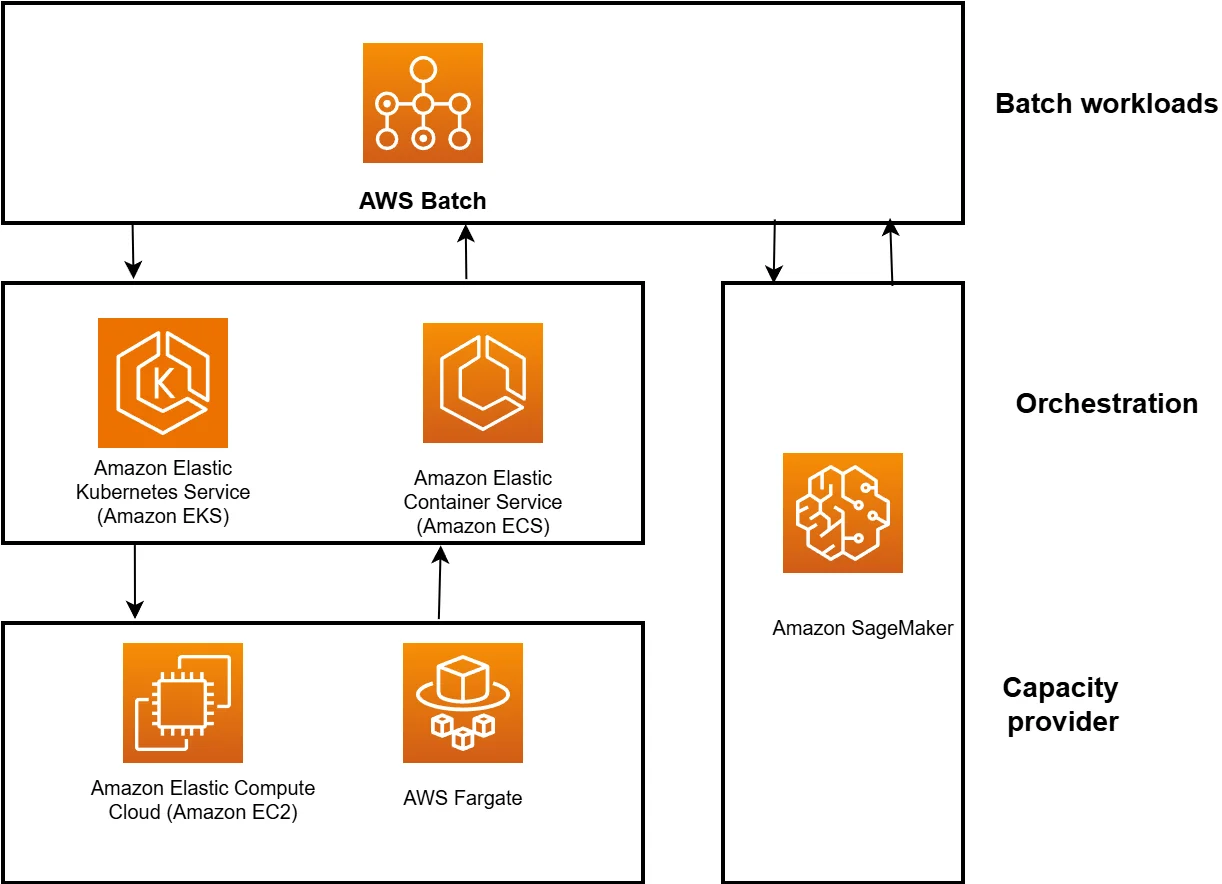
AWS Batch is Amazon’s fully managed service for running batch computing workloads at any scale. It automatically provisions the right amount and type of compute resources, queues jobs, and schedules them based on priorities and dependencies.
It’s built for teams that process large volumes of parallel tasks — from data analysis and ML model training to high-performance computing (HPC) and data pipeline orchestration. Instead of manually spinning up instances or building complex job schedulers, Batch handles orchestration so engineers can focus on code and outcomes.
Related read: EKS Pricing In 2025: Understand And Optimize Your EKS Costs
To understand how Batch handles containerized workloads so efficiently, let’s look at the platform that powers its orchestration: Amazon EKS.
Report
Finance needs to prove AI’s return: CloudZero report
260 senior finance leaders (more than half CFOs) told us why the speed of seeing AI spend, not the size of it, separates who pulls ahead on AI from who gets burned.
Amazon EKS
Amazon EKS is a fully managed Kubernetes service on AWS. It abstracts away the Kubernetes control plane so you can focus on deploying and scaling containerized applications.
EKS integrates with the rest of AWS and supports both EC2 and Fargate for flexible compute. It’s built for teams running containerized applications that need high performance and predictable scaling.
That same reliability now powers large-scale batch workloads through AWS Batch running directly on EKS.
How to run batch workloads on EKS with AWS Batch
Running workloads with AWS Batch on EKS follows a clear lifecycle, from environment to job submission, monitoring, and scaling. Each part of the workflow depends on specific AWS services working together.
You start with an existing Amazon EKS cluster, configured with the right IAM roles, subnets, and permissions. This cluster serves as the execution environment for your batch jobs. You then create a compute environment in AWS Batch and select EKS orchestration. This connects Batch to your Kubernetes cluster and defines how resources like EC2 or Fargate will be used to run containers.
Next, you set up a job queue, the waiting area for your workloads. Every job submitted to AWS Batch enters this queue until compute capacity becomes available. Queues can be assigned priorities and linked to multiple compute environments for flexibility and failover.
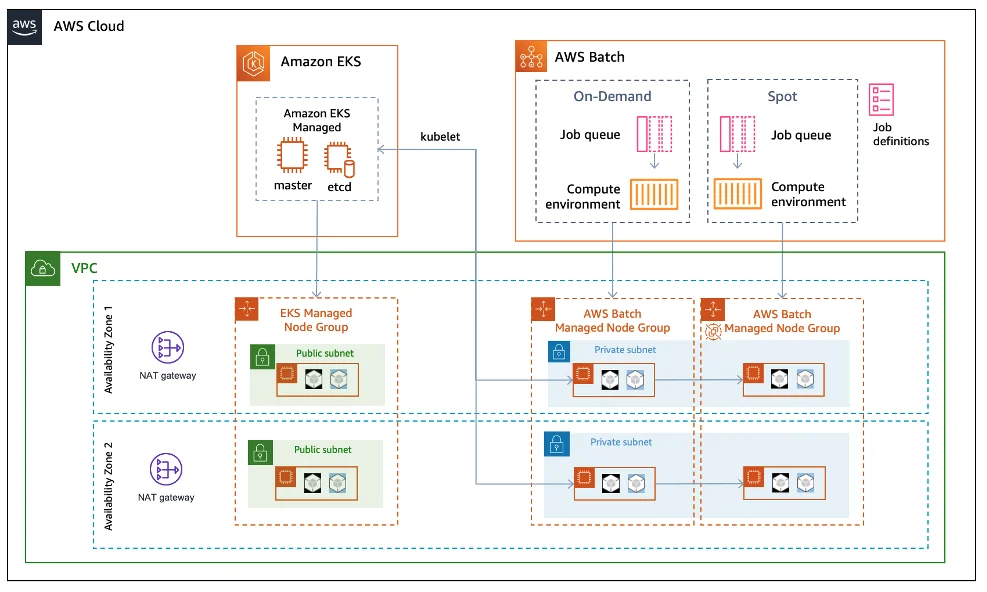
AWS Batch orchestrates jobs on an Amazon EKS cluster
Then comes the job definition, which tells AWS Batch how to run each task. It includes the container image stored in Amazon ECR, vCPU and memory settings, environment variables, IAM roles, retry strategies, and timeouts. Each job submitted references one of these definitions.
Once submitted via the AWS Management Console, AWS CLI, or SDK, Batch automatically launches pods on your EKS cluster. It creates and monitors Kubernetes jobs within your selected namespace, handles retries on failed runs, and manages dependencies between jobs.
While the workloads run, you can track progress in the AWS Batch console, CloudWatch Logs, or directly using kubectl get pods on your EKS cluster. Batch dynamically scales the compute layer by adding or removing EC2 instances or Fargate pods through Auto Scaling Groups or Karpenter, following the same patterns used in EKS cost optimization, ensuring you only pay for active resources.
When jobs complete, results can be processed, stored in Amazon S3, or trigger new workloads through EventBridge or Step Functions. Once the queue clears, Batch automatically releases unused compute to keep costs down. And there’s more than…
Why Use AWS Batch On EKS?
Cost efficiency is only one part of the story.
Running Batch on EKS lets teams manage batch, data, and long-running services within the same Kubernetes environment — an advantage covered in our deep dive on Kubernetes cost monitoring. There’s no need to maintain separate clusters for pipelines and applications. Everything runs under one orchestration layer, using the same IAM, VPC, and monitoring tools you already rely on.
It also brings advanced job control: queues, dependencies, retries, and array jobs, all built in.
Teams can run complex workflows without writing custom automation or scaling scripts.
And since EKS supports EC2, Fargate, Spot, and GPU nodes, you can run any workload type with flexibility and control.
AWS Batch on EC2
AWS Batch on EC2 runs jobs directly on virtual machines that Batch manages for you. It handles provisioning, scaling, and cleanup automatically.
This is best for workloads that aren’t containerized, like HPC, rendering, or simulations that rely on custom AMIs or specific software libraries.
You get complete control over instance types and networking, while Batch handles scheduling and scaling. It’s simple, reliable, and ideal for teams that want powerful compute without managing Kubernetes.
Limitations Of AWS Batch
Large workloads can be slow to debug, and configuring custom environments takes time. Job scheduling can also become a bottleneck when workloads scale unexpectedly.
But the biggest issue is the lack of cost visibility. AWS Batch may be free, but the compute and storage it triggers can grow expensive fast because:
- Compute usage (EC2, Fargate, or EKS nodes) runs for the duration your jobs use them. If you’ve set a minimum capacity, you pay even when idle.
- Storage and data transfers (between S3, ECR, EBS, etc.) add up, even if they are indirectly related to the job runtime.
- Shared compute environments (especially on EKS) make it harder to tie a cost to the job, dataset, or team that drove it — a challenge we explore in detail in our guide to EKS add-ons and cost impacts.
How To Keep Costs Associated With AWS Batch Under Control With CloudZero
CloudZero gives teams the visibility AWS lacks. It connects Batch, EKS, and EC2 costs to the specific workloads that generated them.
CloudZero lets you see cost per job or pipeline, so instead of broad EC2 totals, you know exactly what each workload costs. It also helps map spend to teams or features, making it easier for engineering and finance to stay aligned — the same discipline behind Kubernetes cost optimization.
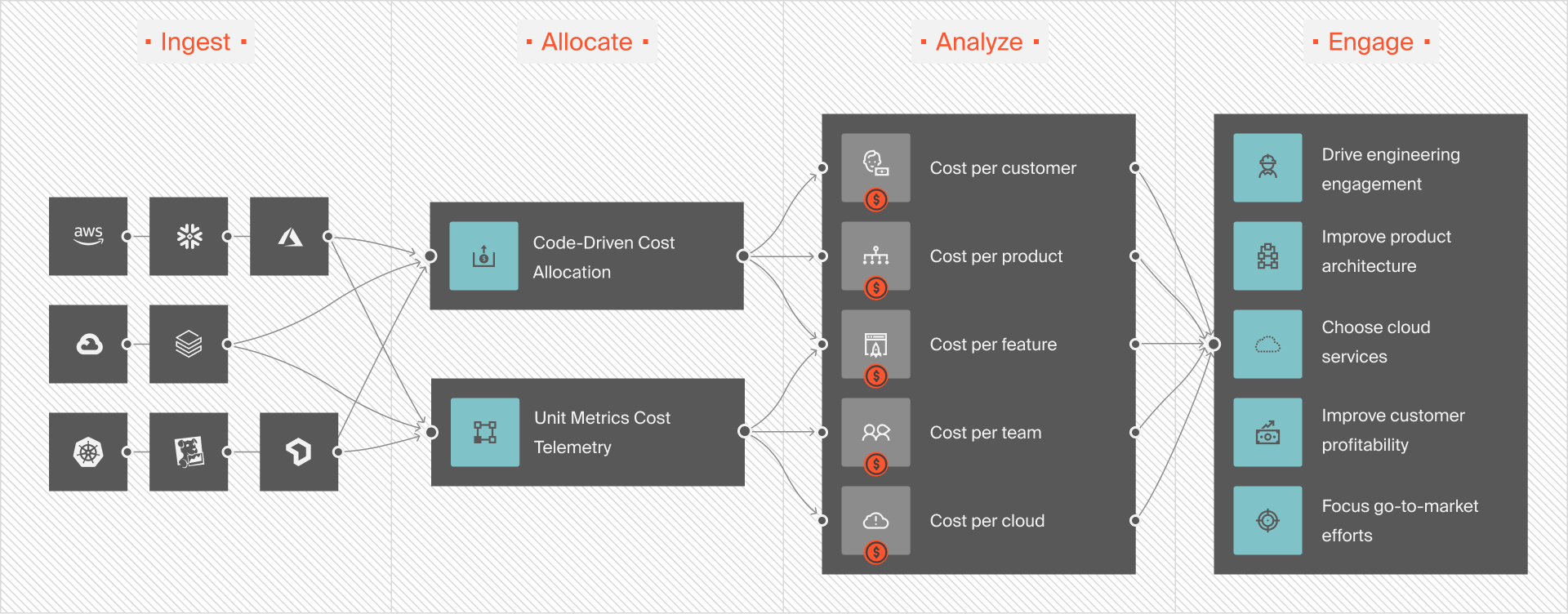
You can benchmark efficiency by tracking how much it costs to process each dataset or train each model, and set alerts for anomalies so teams can react before month-end surprises.
CloudZero helps teams like Drift, Hiya, SmartBear, and Applause save millions of dollars in AWS costs. If you’re ready to see the same results,  to discover how CloudZero can bring clarity and control to cloud costs.
Frequently Asked Questions about AWS Batch on EKS











