If you’ve ever tried to make sense of your AWS bill, you know how fast things get messy. Different accounts, hundreds of services, random tags, and suddenly, no one can say for sure who’s spending what or why the total looks so high.
It’s not that teams don’t care about costs — it’s that AWS billing data isn’t always easy to interpret.
Finance wants accountability. Engineering wants visibility. And somewhere between the two, ownership disappears.
That’s kind of what AWS Cost Categories tries to fix — giving teams a structured way to bring order to the chaos.
This guide covers what AWS Cost Categories are, how they work, how they compare to tagging, their pros and cons, and how CloudZero can help you take them further.
What Are AWS Cost Categories?
AWS offers a suite of cost management tools. Among them is AWS Cost Categories, a feature that automatically organizes your cloud costs into predefined business groupings according to predefined rules.
The process begins when you define a category, for example, team, product, or environment. Each category represents a lens through which you want to view your AWS costs. You then decide which values belong in that category, such as engineering, marketing, production, or development. This forms the base of how you’ll group your costs moving forward.
Once you’ve defined your structure, you create categorization rules that tell AWS how to assign costs to each value. These rules can reference multiple dimensions, such as account, tag, service, region, or charge type, allowing you to map costs however your business operates.
For instance, you might set a rule that says: “If the linked account equals prod-account and the tag Environment=Production, group that cost under the ‘Production’ category.” This rule-based logic lets AWS automatically sort every cost line item into the correct bucket, regardless of its source.
If your organization has shared or overhead costs, such as networking, shared infrastructure, or support charges, Cost Categories can also handle them using split-charge rules. These rules let you allocate a single charge across multiple category values using one of three methods: proportional allocation (distributing costs based on each value’s relative spend), fixed percentages (you define the exact split), or even split (divided equally across all target values). This ensures that no costs remain unassigned and that finance teams receive a fair, traceable distribution of shared expenses across business units. Learn more about shared costs here.
After your rules are set, you choose the effective date —the point at which your Cost Category applies. Even if you create or edit a category mid-month, AWS applies it retroactively to the start of that billing period. Once active, the categorization engine processes your data daily. It adds a new column to your Cost Explorer and Cost and Usage Report (CUR) labeled with your chosen Cost Category name. That field can now be used to filter, group, or break down spend consistently across dashboards, budgets, and reports.
See more: AWS Budgets Vs. AWS Cost Explorer: The Ultimate Comparison Guide
Key Concepts: Dimensions, Rules, and Quotas
Understanding a few core concepts helps you get more from AWS Cost Categories.
Dimensions are the building blocks of every categorization rule. AWS supports five primary dimensions: Account (which AWS account generated the cost), Service (such as EC2, S3, or Lambda), Charge Type (covering taxes, credits, fees, and savings plan charges), Tag Key (filtering by any user-defined cost allocation tag), and Cost Category (referencing other categories you’ve already created, which enables multi-level hierarchies).
When building rules, you’ll work with two rule types. Regular rules let you manually define conditions using the dimensions above and operators like “Is,” “Is not,” “Contains,” “Starts with,” and “Ends with.” Inherited rules are more dynamic — they automatically categorize costs based on existing dimension values from other cost categories, which is particularly useful when your organizational structure has nested layers like teams within departments within cost centers.
AWS also imposes specific quotas worth noting: each management account can create up to 50 cost categories, each category supports up to 500 rules when using the JSON editor (or 100 via the console Rule Builder), and each category allows up to 10 split charge rules. These limits are generous for most organizations, but teams managing highly granular use cases across large multi-account environments should plan their category structure accordingly.
Report
Finance needs to prove AI’s return: CloudZero report
260 senior finance leaders (more than half CFOs) told us why the speed of seeing AI spend, not the size of it, separates who pulls ahead on AI from who gets burned.
AWS Cost Categories Vs. AWS Cost Allocation Tags: When To Use Each
The main difference between tagging and Cost Categories lies in granularity and scope. Tags describe individual resources — they tell AWS what something is. Cost Categories operate at a higher level — they tell AWS how groups of costs should roll up across accounts, services, or environments.
Tags are ideal when you need precision and automation. They let engineering teams track cost at the resource level. For example, identifying the cost of a specific EC2 instance, Lambda function, or S3 bucket. Because tags are applied directly to resources, they update in near real time and can integrate with automation tools.
But tagging isn’t always perfect. Inconsistent naming conventions, missing tags on legacy resources, and services that don’t support tagging at all can create persistent gaps in your cost visibility. Here’s a complete guide to overcoming tagging challenges and accelerating cloud cost allocation.
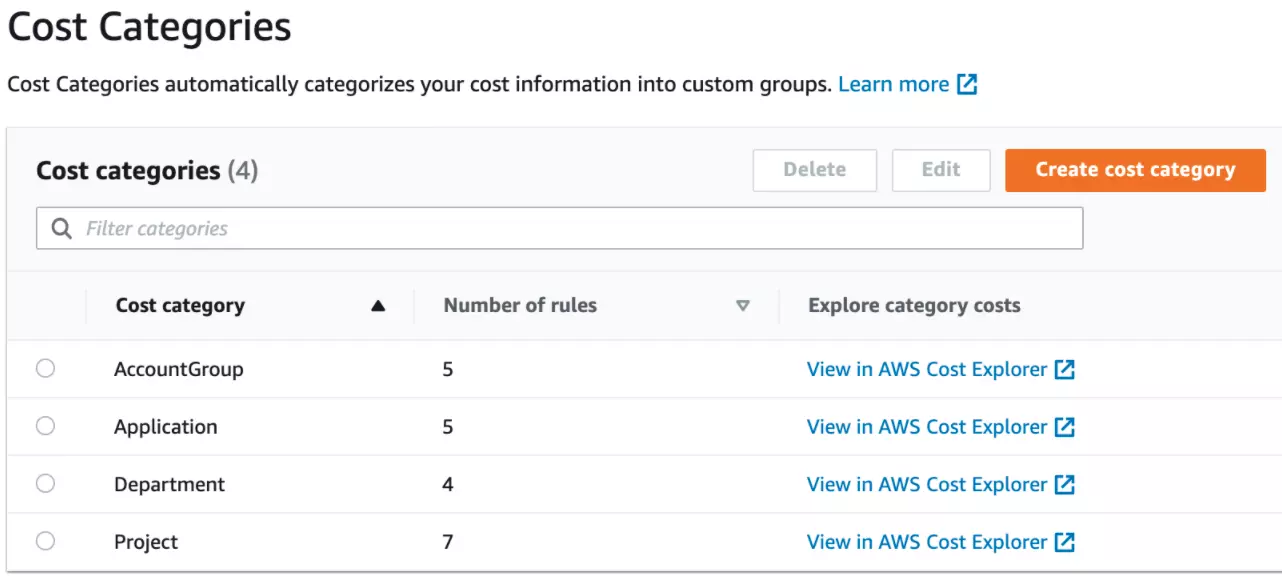
Cost Categories, meanwhile, are best for financial reporting and cross-team accountability. You can, for example, roll up several tagged accounts or projects into a single “Product” or “Business Unit” category for executive dashboards and budget tracking. You can also create multi-level hierarchies by using one Cost Category as a dimension inside another — grouping teams into departments, and departments into cost centers — to mirror your actual organizational structure.
Where they work best is together. Tags supply the raw, detailed metadata that identifies ownership and purpose. Cost Categories use those tags (and other dimensions) to produce clear, high-level views of spend. Organizations that pair strong tagging discipline with well-structured Cost Categories tend to achieve the most complete cost visibility.
AWS Cost Categories Pros, Cons, And Limitations
The pros: AWS Cost Categories bring structure to messy billing data. They give finance and engineering a shared, organized view of costs. They also make it easier to allocate shared costs fairly across departments or projects through split-charge rules, which support proportional, fixed, and even-split allocation methods.
They also integrate with Cost Explorer, Budgets, and the Cost and Usage Report, ensuring consistency across AWS cost tools. For a broader optimization approach, see our guide to cloud cost optimization. Once set up, they simplify reporting, improve ownership, and reduce time spent reconciling accounts or guessing who drove a spike in spend.
The cons: Cost Categories require clean, consistent input data. Inconsistent or missing tags, overlapping rules, or multi-account complexity can easily lead to “uncategorized” costs. Maintaining accurate mappings takes ongoing effort, especially as teams or environments change.
They also refresh only once every 24 hours, limiting real-time visibility. And while they provide strong financial rollups, they don’t surface engineering-level details — such as cost per customer, cost per feature, or cost per workload — that teams need for day-to-day optimization.
There are also practical limits to consider. Each management account supports up to 50 cost categories, each with a maximum of 500 rules (via JSON editor) or 100 rules (via the console Rule Builder), and up to 10 split charge rules per category. While these quotas are sufficient for most setups, organizations with highly complex or granular cost structures across large multi-account environments may find them constraining.
CloudZero can help you.
Frequently Asked Questions about AWS Cost Categories
How CloudZero Enhances AWS Cost Categories
CloudZero takes that same concept that Cost Categories follow and turns it into an automated, and far more intelligent cost model. Instead of static categories that refresh once a day, CloudZero continuously ingests spend data across all your AWS accounts and services, automatically applying business context without depending solely on tags.
CloudZero’s platform builds hierarchical mappings that go far beyond what AWS supports. You can view costs not only by account or tag but by product, feature, customer, deployment, or environment. It automatically detects untagged or misallocated resources and assigns them correctly, ensuring every dollar is tracked to an owner.
Where AWS Cost Categories organize costs into fixed, rule-based buckets, CloudZero lets you explore costs dynamically across any combination of dimensions — without having to predefine every rule. This flexibility is particularly valuable for engineering teams that need to investigate a cost spike, trace spend back to a specific deployment, or understand the true margin on a customer or product line.
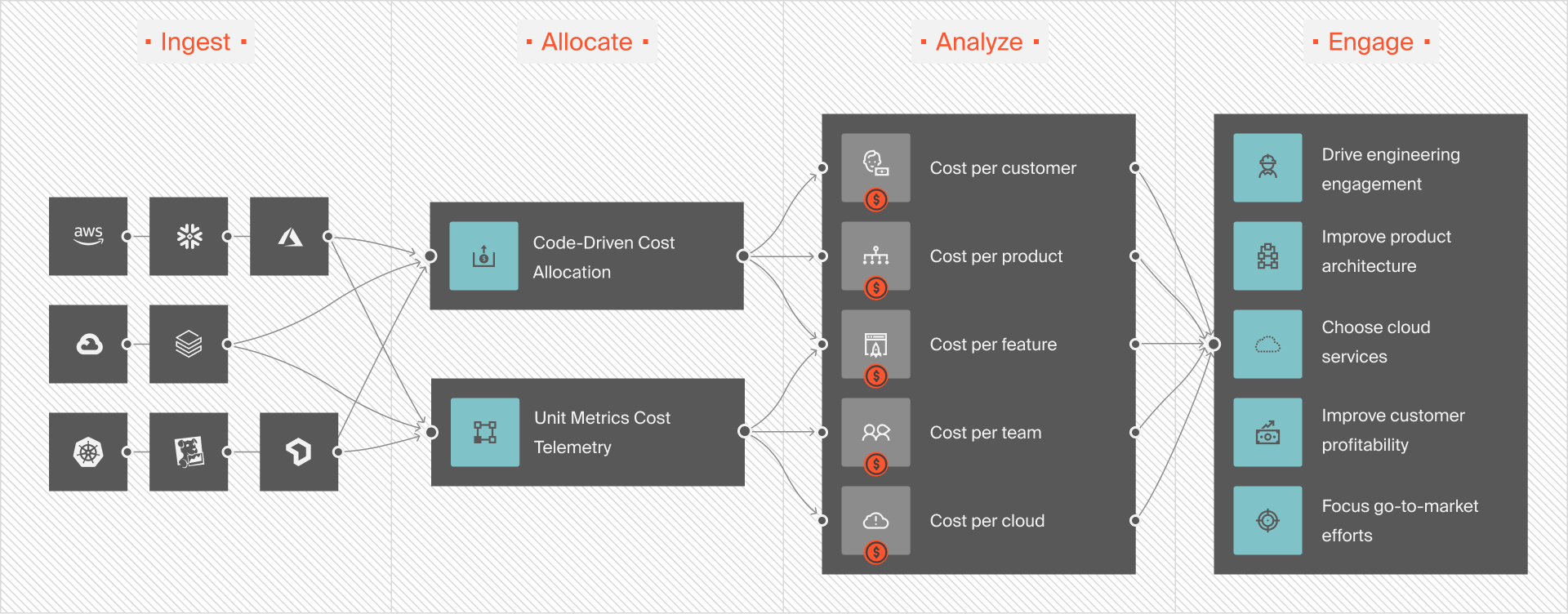
Finance teams get clean, executive-ready views aligned with budgets and departments, while engineering gains real-time visibility into what’s driving spend inside each system.
In short, AWS Cost Categories organize your bill — but CloudZero turns it into cost intelligence.  to see how.