AWS Direct Connect pricing looks simple until you’re staring at an unexpected bill. Understanding how AWS Direct Connect costs work, such as port hours, data transfer, and the charges that don’t appear on the AWS pricing page, is the first step to managing them. The model has no setup charges and no minimums, but it has enough moving parts that costs can compound quickly if you’re not watching closely.
This guide breaks down every component of AWS Direct Connect pricing, including the hidden costs that don’t appear on your bill. By the end, you’ll know exactly what drives your spend and where to look when it’s higher than expected.
What Is AWS Direct Connect?
AWS Direct Connect (DX) is a dedicated private network connection between your on-premises infrastructure and AWS.
Instead of routing traffic over the public internet, Direct Connect provides a consistent, low-latency path directly into AWS, which is important for latency-sensitive workloads, high-volume data transfers, and hybrid architectures that continuously move traffic.
It’s worth understanding where Direct Connect fits in the broader AWS networking picture before digging into cost.
Services such as AWS Transit Gateway, Amazon VPC, and Site-to-Site VPN all interact with Direct Connect in common architectures, and each adds its own cost layer.
Think of it like this: Direct Connect is the dedicated physical pipe into AWS; how traffic moves once it’s inside is a separate question with its own billing implications, and we’ll cover those too.
With that context in place, here’s how the pricing actually works.
Report
Finance needs to prove AI’s return: CloudZero report
260 senior finance leaders (more than half CFOs) told us why the speed of seeing AI spend, not the size of it, separates who pulls ahead on AI from who gets burned.
How AWS Direct Connect Pricing Works
AWS Direct Connect pricing has three core components when connecting to AWS Regions or Local Zones: port hours, data transfer out, and (if applicable) SiteLink.
If you use SiteLink to route traffic between Direct Connect locations, that adds two more. Each component can be modest on its own, and significant in combination.
1. Port hours
Port hours are the foundation of your Direct Connect bill. You’re charged for every hour a port is provisioned, whether or not data is flowing through it. Think of it like a leased line: you pay for the connection, not just the usage.
Pricing depends on whether you have a dedicated or hosted connection.
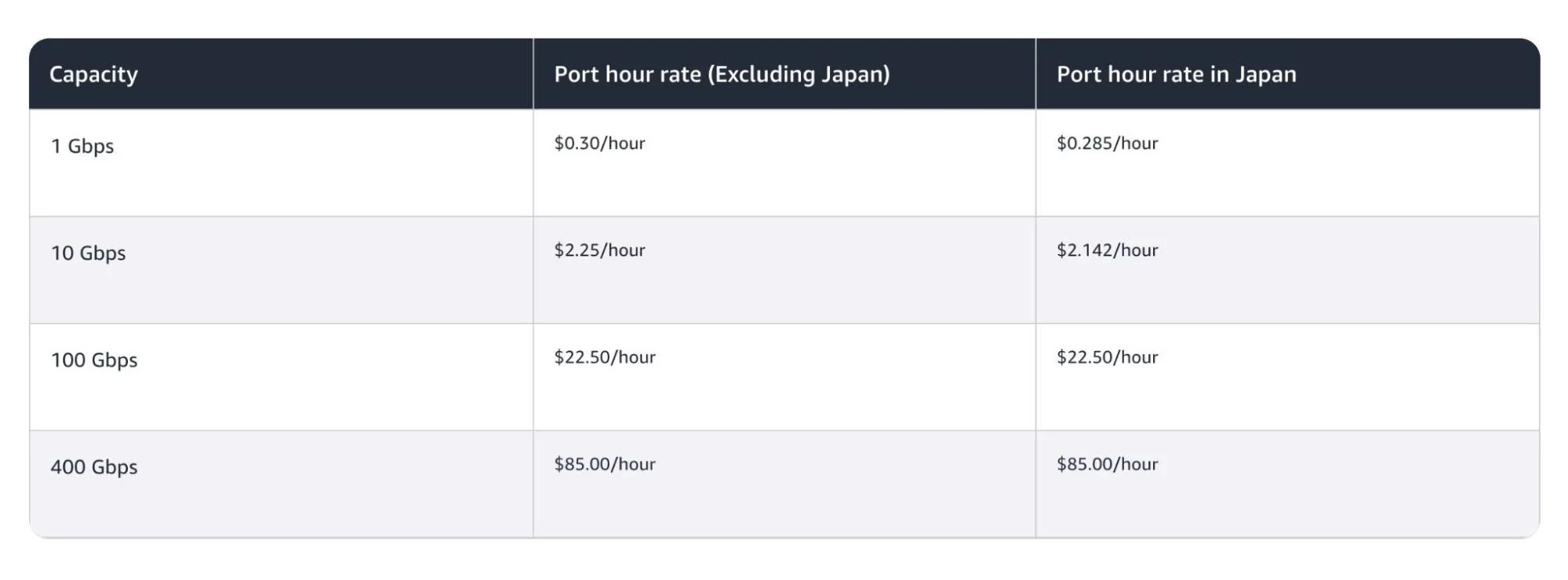
- Dedicated connections are physical ports that connect your network to AWS hardware at a Direct Connect location. Port hour rates are globally consistent, except Japan:
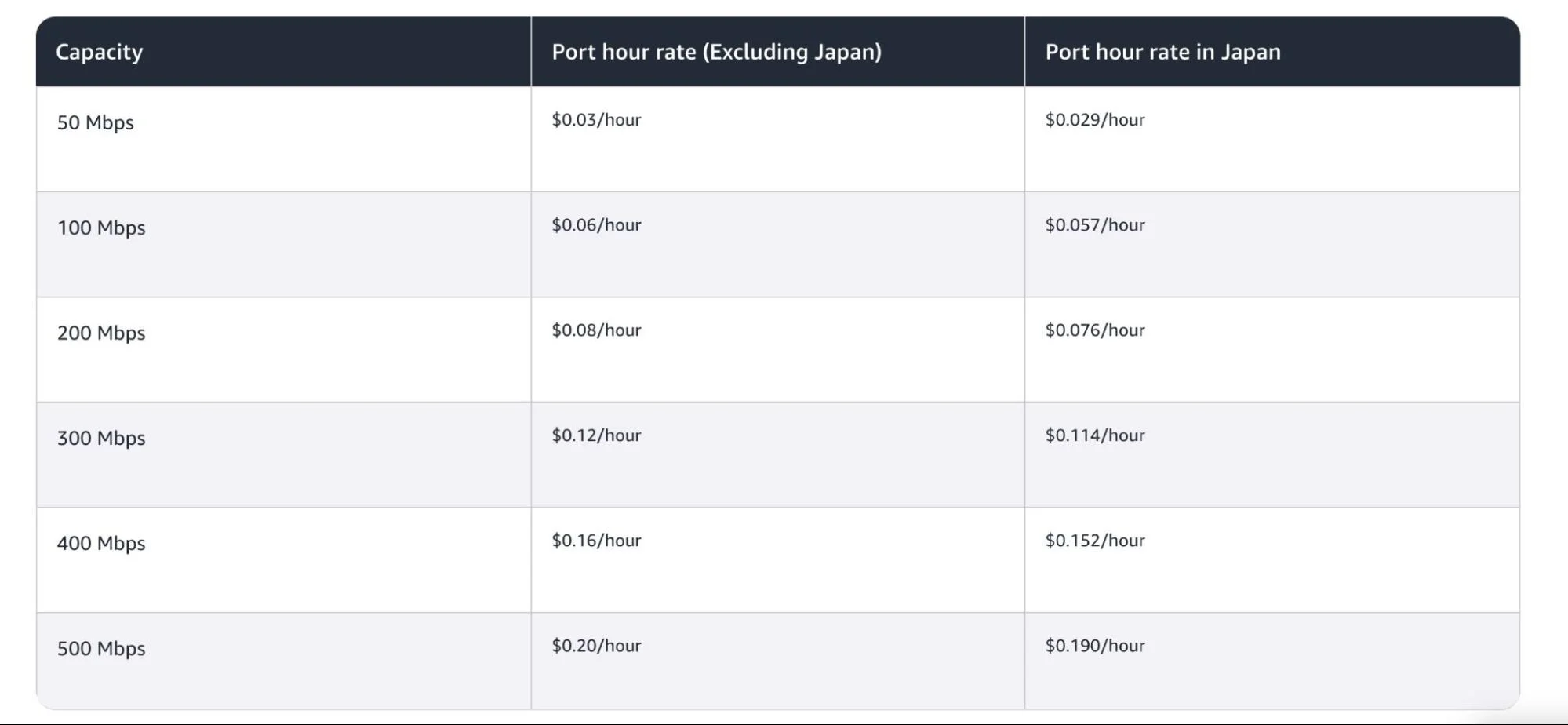
- Hosted connections are provisioned through an AWS Direct Connect Delivery Partner. You’re sharing their physical infrastructure, which brings the entry price down as low as $0.03/hour for a 50 Mbps connection and gives you finer-grained bandwidth options (50 Mbps up to 25 Gbps from select AWS Direct Connect Partners):
One important detail for resiliency planning: AWS recommends deploying connections across multiple Direct Connect locations. That’s sound architecture, but it means you’re paying port hours at each location, including the redundant path during normal operations when it’s sitting idle.
2. Data transfer out (DTO)
Once you’ve accounted for port hours, the next major cost driver is data transfer. DTO is charged per GB for traffic leaving AWS through your Direct Connect location.
Data transfer into AWS is always free.
DTO rates vary based on two factors: the AWS Region or Local Zone where the data originates, and the geographic region of your Direct Connect location.
When both are in the same pricing region, rates are lower. When they cross regions, a surcharge applies.
A few reference points:
- US East → US Direct Connect location: $0.02/GB
- Europe → Europe Direct Connect location: $0.02/GB
- Asia Pacific (Tokyo) → US Direct Connect location: $0.0491/GB
- South America → US location: $0.15/GB
For teams with significant outbound traffic, DTO is where Direct Connect starts to look attractive compared to internet egress, which runs $0.09/GB for most US Regions under standard EC2 pricing (for the first 10 TB/month).
At scale, that differential adds up fast, and it’s one reason AWS cost reduction strategies often start with networking.
Related Reads:
3. SiteLink
With port hours and DTO accounted for, there’s a third cost component for organizations connecting multiple locations.
SiteLink enables traffic to flow directly between Direct Connect points of presence, useful for connecting multiple data centers or branch offices through AWS’s global backbone rather than the public internet. It’s off by default and adds cost when enabled.
SiteLink pricing has two components:
- SiteLink hours: $0.50/hour per virtual interface (VIF) with SiteLink enabled, charged even when no data is flowing
- SiteLink data transfer: per-GB rates that vary by source and destination (e.g., US to Europe is $0.0282/GB; US to South America is $0.15/GB)
Dedicated Vs. Hosted Connections: Which Is The Best Choice?
Now that you understand how the three cost components work, the natural question is which connection type to choose.
The right answer depends on throughput needs, flexibility needs, and if you want to manage physical connectivity yourself or work through a partner.
- Dedicated connections are best when you need guaranteed high bandwidth (1 Gbps or higher), want full control over the physical layer, or have workloads with consistent, predictable traffic patterns. Large enterprises moving hundreds of terabytes monthly are the prototypical use case.
- Hosted connections are better suited for organizations seeking lower entry costs, greater bandwidth flexibility, or who prefer not to deal directly with colocation arrangements. The trade-off is a dependence on a partner for provisioning and support.
One cost detail to consider: Hosted 1 Gbps ports ($0.33/hr) cost slightly more than dedicated 1 Gbps ports ($0.30/hr). If you consistently use the full capacity, a dedicated connection may be more cost-efficient.
Hidden AWS Direct Connect Costs
Even after calculating port hours, data transfer out (DTO), and connection type, several costs do not appear on the AWS pricing page. These are common in real Direct Connect deployments.
Cross-connect and colocation fees
Dedicated connections require a physical cross-connect in a Direct Connect location (usually a colocation facility). The facility, not AWS, bills this separately.
Partner fees
Hosted connections are provisioned through AWS Direct Connect Delivery Partners, who set their own pricing. These costs are separate from AWS port and DTO charges.
Transit Gateway costs
If traffic routes through AWS Transit Gateway, you also pay $0.02 per GB processed. At large volumes, this becomes a big networking cost.
Additional VPC networking charges
Services such as NAT Gateways, VPC peering, and interface endpoints incur per-hour and per-GB charges.
In reality, your total Direct Connect cost includes AWS charges plus these additional networking layers.
Here’s a real-world cost example
Here’s what a medium-complexity Direct Connect deployment looks like.
Say you’ve deployed a highly resilient architecture: one hosted 2 Gbps port at each of two Direct Connect locations, both connected to the US East (Ohio) Region. You’re transferring 1 TB of data out per month.
|
Component |
Monthly cost |
|
Port hours (2 locations × 1 port × $0.66/hr × 730 hrs) |
$963.60 |
|
DTO (1,024 GB × $0.02/GB) |
$20.48 |
|
Total (AWS charges only) |
$984.08 |
Once cross-connect and partner fees are included, the realistic monthly total is often $1,100–$1,300.
At a larger scale, for example, four 10-Gbps ports and 400 TB of monthly transfer, AWS charges alone can exceed $14,700/month (according to AWS Pricing Calculator).
Now layer in Transit Gateway processing charges on that same traffic volume at $0.02/GB, and the number climbs further still.
These figures assume you can see exactly where every dollar is going. In reality, that’s rarely the case.
AWS Direct Connect Pricing FAQs
Why Direct Connect Costs Are Hard To Manage And How CloudZero Helps
Understanding the AWS Direct Connect pricing model is step one. The harder challenge is managing and attributing those costs once your deployment is live especially when a single port serves multiple workloads, teams, and VPCs simultaneously.
Direct Connect is a shared infrastructure. A single port or gateway typically serves multiple workloads, VPCs, and teams simultaneously.
AWS billing data shows you the total port hour and DTO charges, but not which workload drove them, which team owns the traffic, or whether the spend is justified relative to the value being delivered. This is the same visibility gap that makes cloud cost allocation difficult across shared infrastructure of any kind.
This is the main challenge of AWS cost allocation for networking services, and it’s one that most teams solve too late.
CloudZero is built to solve exactly this problem.
Here’s how:
Shared cost allocation across business dimensions
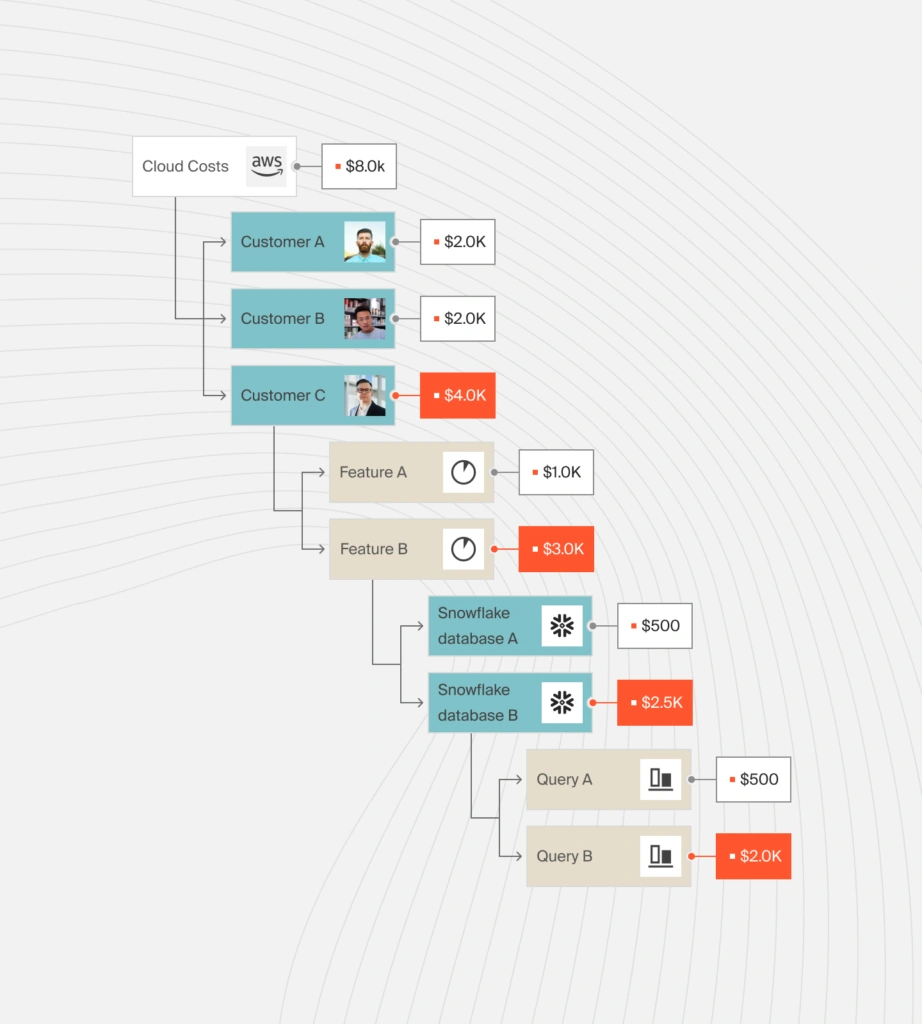
CloudZero’s Allocation Dimensions let you split shared infrastructure costs, including networking spend like Direct Connect port hours and DTO, across teams, products, customers, or any other business dimension that matters.
Instead of a lump-sum networking line item, you get cost per team, product, customer, etc., calculated automatically, without relying on perfect tagging.
Proportional allocation without manual math
Using CloudZero’s Allocate by Rules method, you can distribute shared Direct Connect costs proportionally based on each team or product’s existing share of total cloud spend.
As that spending changes over time, the allocation adjusts automatically, no spreadsheets, no manual recalculation.
Anomaly detection down to the hour
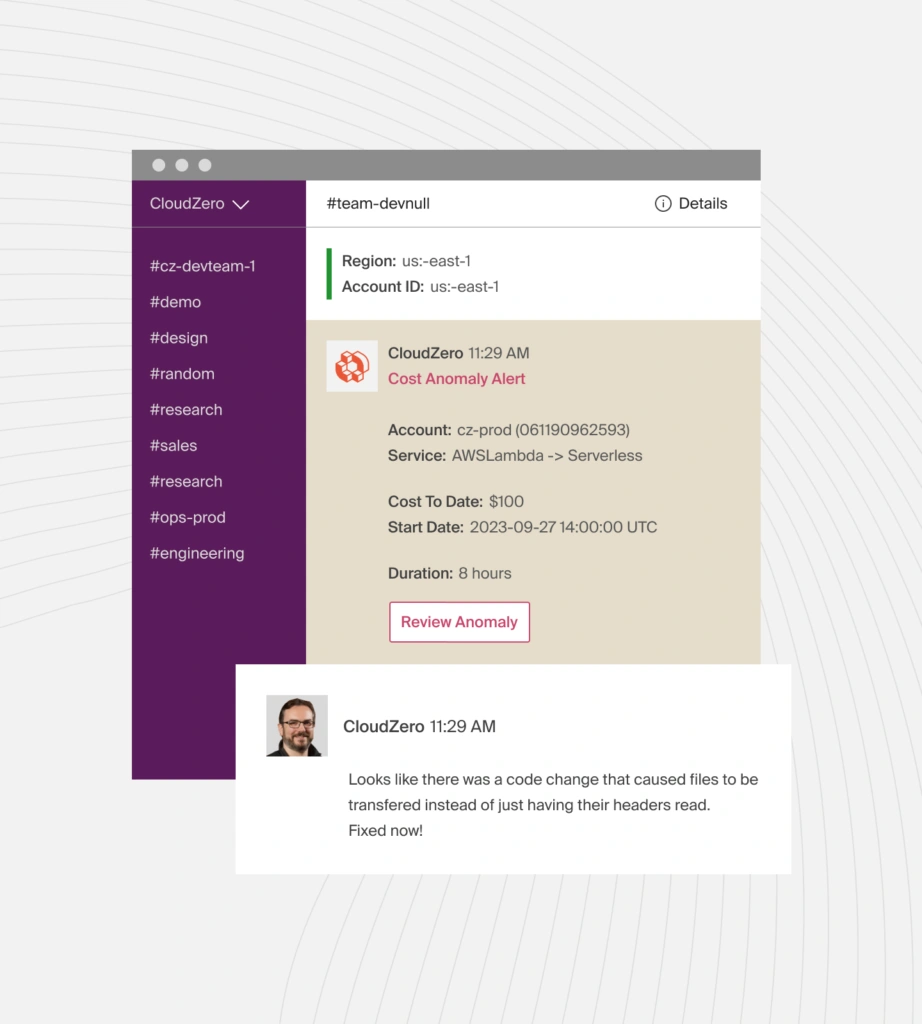
CloudZero’s anomaly detection flags abnormal spend events at hourly granularity and routes alerts directly to the teams responsible via Slack, email, or both.
For networking costs that spike unexpectedly due to a misconfigured route, a forgotten test, or a sudden traffic surge, early detection is the difference between a manageable investigation and a surprise at month-end.
Unit economics for networking spend
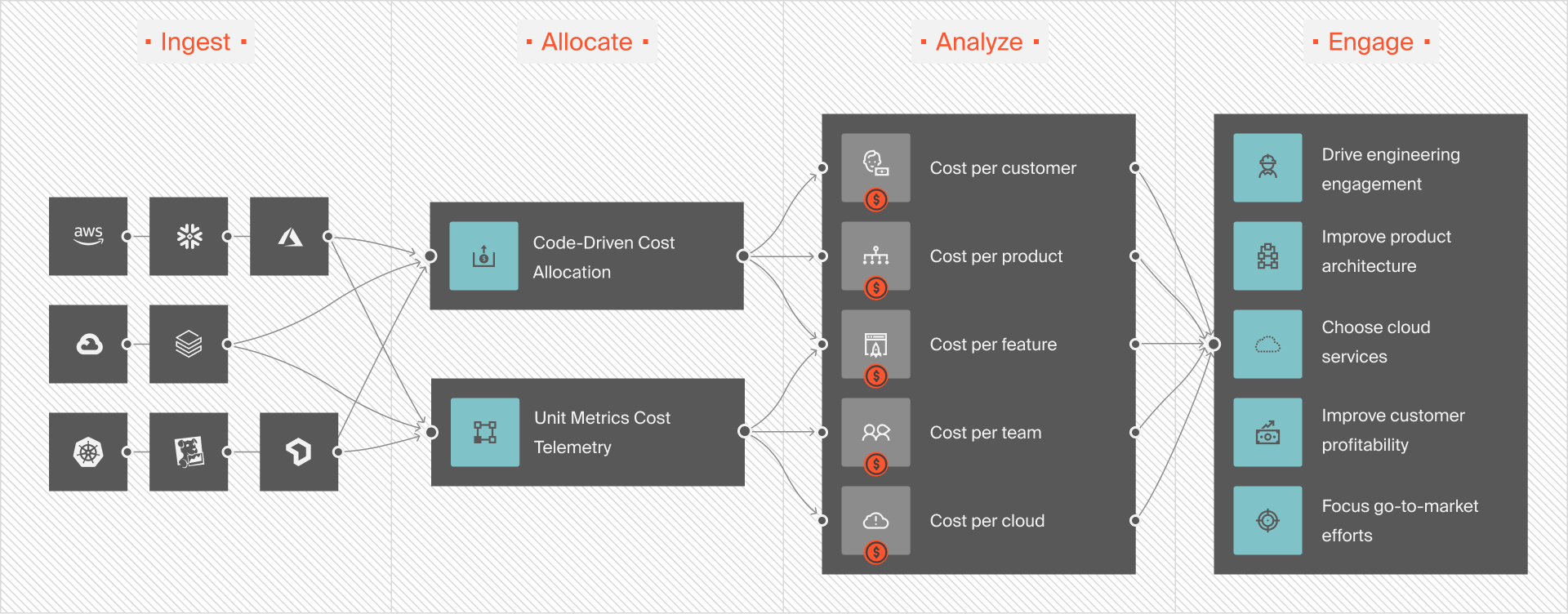
CloudZero’s Unit Cost Analytics lets you tie Direct Connect costs to real business metrics, cost per customer, per transaction, and per feature. That reframes the question from “how much did Direct Connect cost this month?” to “was that spend worth what it delivered?” — which is where the real optimization conversation starts.
CloudZero customers have turned that visibility into real savings. Upstart reduced cloud costs by $20M through complete engineering visibility and accountability. Symphony Talent cut AWS costs by 48% through engineering-led optimizations. Diaceutics reduced their total AWS bill by 41% and exceeded their S3 savings target by 70%.
Take a product tour or  to see how CloudZero can do the same for your AWS infrastructure.











