Quick Answer
The Perplexity API pricing looks competitive at first, until the per-request fees quietly double your bill. Search any developer forum and you'll find threads calling the costs "ridiculous" and asking whether the Perplexity API pricing model is misleading. The frustration is real, and mostly rooted in one thing: the per-request fee layer is real, but it's not hidden — it's documented and predictable once you understand the structure. This guide breaks it down completely.
The Perplexity API pricing looks competitive at first, until the per-request fees quietly double your bill. Search any developer forum and you’ll find threads calling the costs “ridiculous” and asking whether the Perplexity API pricing model is misleading. The frustration is real, and it’s mostly rooted in one thing: the pricing structure is more complex than it appears on the surface.
This guide is the antidote to that confusion. Whether you’re evaluating Perplexity AI API pricing for a new integration or auditing an existing one, we break down every Perplexity AI API cost component, compare Perplexity Sonar API pricing against OpenAI and Google Gemini, walk through real cost calculations, and cover the optimization strategies that separate a well-managed integration from a monthly billing surprise.
How Much Does The Perplexity API Cost Per Query?
The short answer: somewhere between half a cent and a dollar-plus, depending on what you ask for. The long answer is why this article exists.
Perplexity API cost, and the broader Perplexity API pricing cost question, is determined by three variables working in parallel:
- The model you select — Sonar tiers ranging from lightweight retrieval to multi-step deep research
- Token volume — input tokens (your prompt) plus output tokens (the response), priced per million
- Request type — certain search-enabled or deep research queries include an additional per-request fee
That third variable is what catches people off guard. Most LLM APIs charge per token and call it a day.
Perplexity charges per token and per request — and the per-request fee varies based on search depth. It’s like ordering a pizza and discovering the delivery fee changes based on how many toppings you picked.
Here’s what a single query actually costs in practice:
|
Scenario |
Model |
Search usage |
Tokens (in/out) |
Estimated cost |
|
Quick fact check |
Sonar |
Minimal |
~300 / 100 |
~$0.01 |
|
Research summary |
Sonar Pro |
Moderate |
~500 / 400 |
~$0.01–$0.03 |
|
Deep analysis |
Sonar Pro |
Heavy |
~800 / 1,000 |
~$0.03–$0.08 |
|
Deep research report |
Sonar Deep Research |
Extensive |
Varies widely |
~$0.30–$1.50+ |
Estimates are based on Perplexity’s published pricing as of April 2026. Actual costs vary based on response length and number of autonomous searches.
At low volume, these numbers feel harmless. At 50,000 queries per day — modest scale for any production application — routing all traffic through Sonar Pro at high context instead of Sonar at low context costs $1,500/day versus $300/day. That’s $36,000 per month in avoidable spend driven entirely by model and context selection, not usage volume. The kind of “rounding error” that makes a FinOps team’s eye twitch.
CloudZero’s FinOps in the AI Era report found that 40% of companies now spend at least $10 million annually on AI, yet most can’t attribute that spend to specific products or features. API costs like Perplexity’s are a perfect example of where the money disappears when visibility is absent.
Now that you have the big picture, let’s break down exactly where the complexity hides.
Report
Finance needs to prove AI’s return: CloudZero report
260 senior finance leaders (more than half CFOs) told us why the speed of seeing AI spend, not the size of it, separates who pulls ahead on AI from who gets burned.
How Does Perplexity’s Per-Request Pricing Work?
This section exists because the Perplexity API pricing structure makes it look simple on the surface, and it isn’t. Understanding the two-layer cost structure is the difference between a predictable API budget and an “urgent meeting with finance” situation.
Layer 1: Token pricing (the part everyone understands)
Like most LLM APIs, Perplexity charges per million tokens for inputs and outputs. One token is roughly four characters of English text. Your prompt, system instructions, and any conversation history count as input tokens. The model’s generated response counts as output tokens.
Token pricing is fixed per model and doesn’t change based on search depth. Understanding Perplexity API pricing per token is the easy part, it’s the same math as any LLM API. The harder part comes next.
Layer 2: Per-request fees (the part that surprises people)
On top of Perplexity API pricing tokens, Sonar, Sonar Pro, and Sonar Reasoning Pro charge a Perplexity API pricing per request fee based on search context size, how much web content the model retrieves before generating a response.
|
Pattern |
What happens |
Cost impact |
|
Minimal retrieval |
Few or no external searches |
Lowest cost |
|
Moderate research |
Some web searches + synthesis |
Moderate cost |
|
Deep research |
Multiple searches + iterative reasoning |
Highest cost |
The formula every developer needs:
Total cost per query = token costs (input + output) + any request-level charges
Let’s make that concrete.
A typical query with 600 input tokens and 400 output tokens:
- Input cost ≈ (600 / 1M × input price)
- Output cost ≈ (400 / 1M × output price)
- Additional cost depends on how many search or reasoning operations the model performs
At scale, this is where AI cost management becomes critical and AI cost optimization becomes required.
Even small per-request overhead can dominate total spend. At 20,000 queries per day, request-level charges can outweigh token costs entirely, without any change in token efficiency.
That’s the trap. When part of your per-query cost isn’t obvious from the invoice, it becomes a visibility problem. And visibility problems, left unattended, turn into margin problems.
With the billing mechanics clear, let’s look at what you’re actually buying across each model tier.
How Do Perplexity Sonar Models Compare On Price?
Perplexity’s Sonar API pricing spans several model tiers. Understanding Perplexity API pricing Sonar model-by-model is essential, choosing the wrong one is the fastest way to overspend, or to under-deliver and still overspend.
|
Model |
Cost pattern |
Context |
Best for |
|
Sonar |
Lowest token cost |
~100K+ |
High-volume retrieval |
|
Sonar Pro |
Higher token + compute cost |
Larger |
Complex reasoning |
|
Reasoning models |
Higher cost due to deeper compute |
Large |
Structured analysis |
|
Deep research |
Highest cost (multi-step search |
Varies |
Exhaustive research |
Understanding Sonar Pro API pricing matters because that gap isn’t a typo — it reflects the compute difference between a lightweight retrieval model and a 70B+ parameter reasoning model. Routing “what time does the store close?” through Sonar Pro is paying for a PhD when you needed a phone call. But routing “analyze recent SEC filings for semiconductor export controls” through base Sonar is asking a librarian to do a lawyer’s job. Model selection isn’t just a cost decision, it’s a quality decision with cost implications.
Sonar Deep Research API pricing: a category of its own
Perplexity deep research API pricing, and specifically Perplexity sonar-deep-research API pricing 2026, behaves differently from standard models. This is where most billing surprises happen in Perplexity AI API pricing 2026.
Beyond base token pricing (~$2 input / $8 output per 1M tokens), Deep Research can introduce additional cost layers:
- Citation tokens (~$2 per 1M) for referenced sources
- Reasoning tokens (~$3 per 1M) for internal processing
- Autonomous search queries (~$5 per 1,000)
You don’t directly control how many searches run. The model decides. A single query can trigger dozens of searches, which makes costs less predictable.
A typical Deep Research query can look like this:
- Input: negligible
- Output: ~$0.05–$0.10
- Citations: ~$0.04
- Reasoning: ~$0.20+
- Searches: ~$0.05–$0.10
Total: ~$0.30 to $1.30+ per query, depending on context depth.
Reasoning tokens are usually the biggest driver. You’re not just paying for output, you’re paying for the model to think, search, and synthesize.
That’s why Deep Research feels different from standard Sonar.
How Has Perplexity API Pricing Changed Since 2025?
If you’ve been tracking Perplexity API pricing 2025 costs and wondering what shifted, the 2026 structure introduced several changes worth understanding before you update your forecasts.
The core Perplexity AI API pricing model, token costs plus request fees, remains the same. But the details have evolved in ways that affect real budgets.
What changed:
Citation tokens dropped for Sonar and Sonar Pro. In 2025, citation costs applied across all models. In 2026, they apply only to Deep Research. This quietly lowers per-response costs for the two most popular models — the kind of price cut that doesn’t make headlines but shows up in monthly invoices.
Sonar Pro Search launched. The new Pro Search mode adds an agentic multi-step reasoning capability with request fees running $14–$22 per 1,000 queries — steeper than standard Sonar Pro but capable of multi-search workflows that previously required custom orchestration.
The Agentic Research API debuted. Developers can now access OpenAI, Anthropic, Google, and xAI models through Perplexity at direct provider rates, plus $0.005 per web search. The 2025 lineup was Sonar-only; 2026 opens a full model marketplace.
Pro API credits in question. The $5/month API credit for Pro subscribers appears to have been discontinued — verify directly with Perplexity before building any budget around it.
What stayed the same:
Core token rates for Sonar ($1/$1) and Sonar Pro ($3/$15) carried into 2026 unchanged. Sonar Reasoning Pro held at $2/$8. The pay-as-you-go model remains — prepaid credits, no subscription required, no rollover.
Bottom line for budget holders: If you’re updating from Perplexity Sonar API pricing 2026 estimates based on last year’s numbers, you’re likely overestimating Sonar and Sonar Pro costs (citation tokens dropped) but potentially underestimating if your team has adopted Pro Search or Deep Research. The Perplexity Sonar Pro API pricing 2026 base rates haven’t changed, but the expanded model lineup means more levers to pull, and more ways to accidentally pull the expensive ones.
Now, the question everyone actually wants answered: is all of this cheaper or more expensive than just using OpenAI?
How Does Perplexity API Pricing Compare To OpenAI And Google Gemini?
This is the comparison table every engineering lead and procurement team asks for. The honest answer: it depends entirely on whether you need web-grounded responses.
|
Capability |
Perplexity Sonar |
OpenAI GPT-4o |
Google Gemini 2.0 Flash |
|
Input (per 1M tokens) |
~$1 |
$2.50 |
Token-based (varies by usage) |
|
Output (per 1M tokens) |
~$1 |
$10.00 |
Token-based (varies by usage) |
|
Search included |
Yes (native) |
No (requires separate tool) |
Yes (built-in, model-dependent) |
|
Additional search cost |
Yes (per request) |
Yes (via tools, not fixed pricing) |
Not separately priced |
|
Context window |
~127K |
128K |
Up to 1M |
|
Citations in output |
Yes (native) |
Not native |
Supported (model-dependent) |
|
Free tier |
No standard free tier |
Limited credits |
Free tier available |
Where Perplexity wins: Bundled web search. Perplexity includes search and citations in the model, while OpenAI requires separate tools and doesn’t publish per-search pricing. For search-heavy use cases, this often means lower cost per response.
Where Perplexity loses: No-search workloads. For tasks like summarization or code, Perplexity adds request overhead, while standard LLMs charge only for tokens, making them cheaper.
The real question; it’s not the cheapest API, it’s cost per useful answer. That’s an AI unit economics problem.
Related read: How much does AI cost in 2026?
With the pricing landscape mapped, let’s talk about the enterprise picture.
What Does Perplexity Enterprise Pricing Include?
Perplexity enterprise pricing spans two organizational tiers, plus the newer Max tier for individual power users:
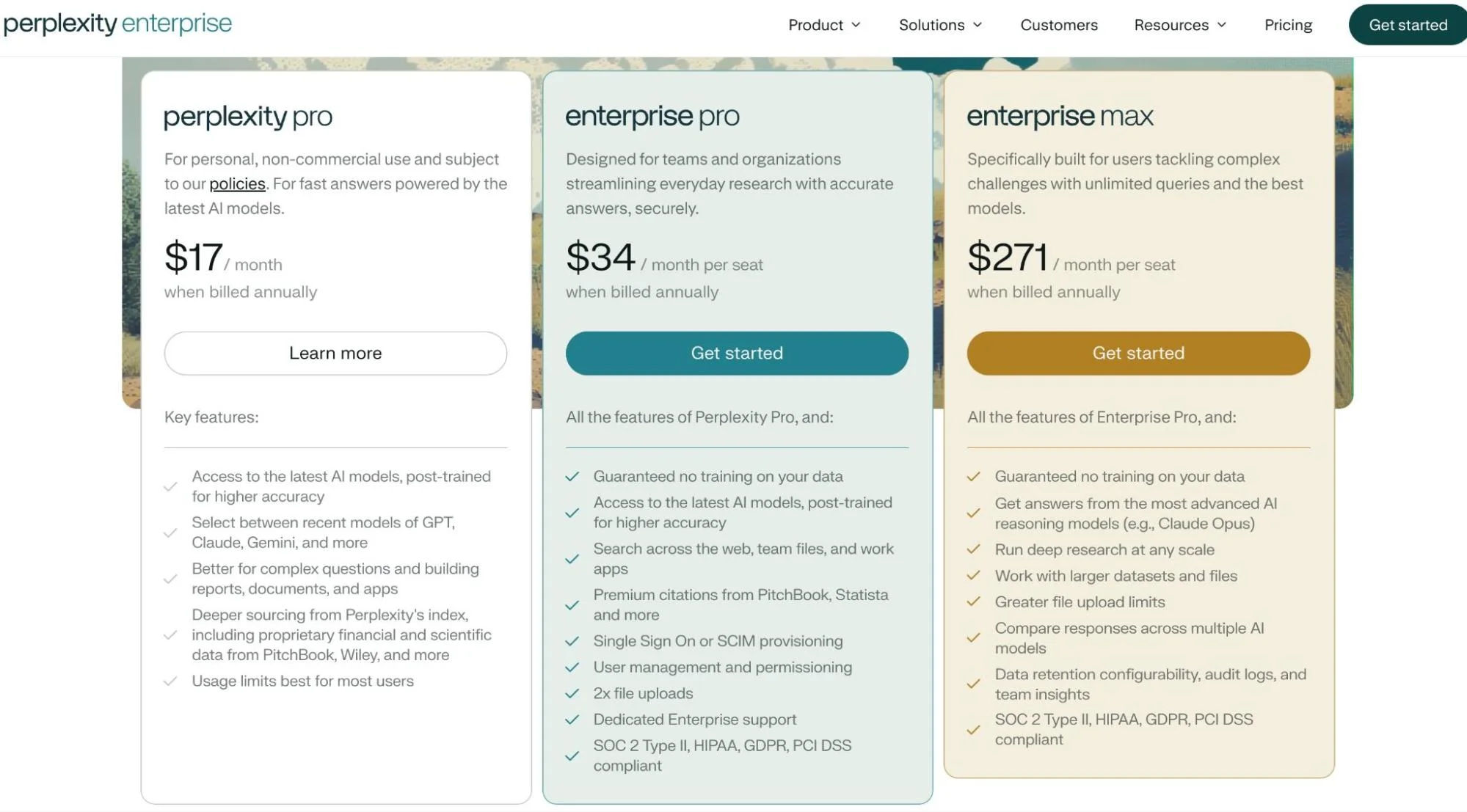
Enterprise subscriptions and API access are separate cost centers. Organizations using Perplexity for internal research (chat) and customer-facing applications (API) will see two distinct charges.
Perplexity API pricing is generally independent of subscription tier. Whether you’re on Free, Pro, or Enterprise plans, API usage is billed separately based on tokens and requests, not your chat subscription.
API keys also share the same pricing model. You can segment usage by project or environment, but pricing does not vary by key.
Knowing what you’re paying is step one. Making sure you’re not overpaying is where it gets interesting.
Is There A Free Tier For Perplexity API?
No. There is no permanent Perplexity API pricing free tier.
Free plan users get zero API credits. Generating a working API key requires a payment method and a credit purchase. Full stop. Perplexity’s API has all the warmth of a toll booth, pay before you pass.
Perplexity Pro subscribers ($20/month) have historically received $5/month in API credits, modest but functional for light testing. However, multiple reports indicate this credit was quietly removed in early 2026 without notifying subscribers. Developers who had built Raycast extensions, terminal workflows, and client integrations on top of that credit reported 401 errors with no warning. Some third-party guides still cite the $5 credit, so verify directly with Perplexity before relying on it.
The broader lesson matters more than the $5: when a provider can change your cost structure without warning, real-time cost monitoring is infrastructure, not a nice-to-have.
For comparison, OpenAI offers new API accounts a small credit balance, and Google’s Gemini API provides a free tier with rate limits. If testing before committing matters to your evaluation process, that’s a meaningful difference in the Perplexity pro API pricing calculus.
Given all of this complexity, let’s look at what teams actually do to keep costs under control.
7 Ways To Optimize Your Perplexity API Costs
The gap between a well-optimized Perplexity integration and a “set it and forget it” deployment can be 5–10x in monthly spend. These are the patterns that FinOps teams managing AI at scale apply every day.
1. Default every query to low search context
The single highest-leverage optimization. Low context cuts per-request fees by more than half compared to High, and for most factual lookups, the quality difference is negligible. Set Low as your default. Escalate only when response quality demonstrably improves at a higher tier.
2. Build a model router
Not every query deserves Sonar Pro. “What’s the weather in Tokyo?” doesn’t need a 200K context window. Build a lightweight classifier that routes queries by complexity: simple lookups to Sonar, moderate questions to Sonar Reasoning Pro, and only genuinely complex research to Sonar Pro or Deep Research. This follows the same tiered pricing logic that SaaS companies use for their own products.
3. Cache with freshness-aware TTLs
Perplexity responses include citations and timestamps. Use them. A “What is FinOps?” definition can cache for days. A stock price needs a 15-minute TTL. Caching alone can reduce call volume by 20–40% in applications with any query repetition. The engineering effort is minimal. The savings aren’t.
4. Set budget alerts and rate limits
Perplexity’s dashboard tracks usage by model and key, and understanding your Perplexity AI API key pricing exposure per key is the first step. Set alerts at 50%, 75%, and 90% of monthly budget. Implement rate limiting in your application layer. A runaway loop can burn through a quarter’s budget in a weekend. As one developer in the Perplexity subreddit advised: use API Groups to set strict spending limits for different environments. A staging bug shouldn’t drain production.
5. Track cost per query, not just total spend
Total spend tells you how much. Cost per query tells you whether it’s worth it. If Perplexity calls cost $0.02 each and generate responses that drive $2 in product value, that’s a 100x return. If those same calls generate responses users ignore, that’s waste with good syntax.
CloudZero breaks AI spend down by model, feature, customer, and team, connecting inference costs directly to business outcomes. One customer managing 50+ LLMs uncovered $1M+ in savings by identifying which model-feature combinations generated cost without proportional value.
6. Watch for silent pricing changes
AI API pricing is not static. Terms change, credits disappear, and new billing components appear without announcement, as the disputed Pro API credit removal illustrates. Monitor your effective cost per query weekly, not monthly. Build your architecture so you can swap providers without a rewrite. The organizations that treat AI spend as a living metric, the way they’d treat cloud cost anomalies, are the ones that don’t get surprised.
7. Connect cost to value (the only optimization that actually scales)
Every other tip on this list reduces cost. This one increases the return on cost that remains. The organizations that manage AI spend best aren’t optimizing for the lowest possible bill, they’re optimizing for the highest ratio of business value to dollars spent. That means tracking not just Perplexity API pricing details but what those API calls actually produce: conversions, time saved, decisions improved, features shipped.
CloudZero’s FinOps in the AI Era research found that formal cloud cost programs now exist at 72% of organizations, yet the mean Cloud Efficiency Rate dropped from 80% to 65%. The programs are scaling. The efficiency isn’t. That’s because most teams stop at visibility and never connect cost to outcome. The gap isn’t a Perplexity problem, it’s the AI cost visibility gap playing out across every provider, every model, every team shipping AI features without granular cost attribution.
What Next?
AI API costs are growing faster than AI revenue at most organizations, and the organizations that get ahead aren’t just watching the bill. They’re connecting every API call to a business outcome. CloudZero gives engineering and finance teams real-time visibility into AI spend across major AI and cloud providers, broken down by feature, customer, and team. No tagging required.
 to see how it works or get a free cloud cost assessment to see where your AI costs currently stand.
Frequently Asked Questions About Perplexity API pricing











