
Whether you’re a data-driven, data-informed, or data-backed organization, your data remains your most crucial business intelligence resource. All the data you collect for later analysis needs to be stored in a secure location as well.
Cloud-based data warehouses offer superior performance, flexibility, and cost benefits.
Redshift and Snowflake are two of the big names in this space, and they provide similar services — but with some subtle differences that may make one or the other a better choice for your business. In this Snowflake vs Redshift comparison, we break down six key differences across pricing, architecture, performance, management, security, and enterprise cost control — so you can make an informed decision.
This guide will cover in detail the ins and outs of Snowflake and Amazon Redshift, highlighting their differences and when you’d want to use each.
What Is Amazon Redshift?
Amazon Redshift is a cloud-based data warehouse platform within Amazon Web Services (AWS). Redshift enables you to query and combine structured and semi-structured data across your data warehouse, operational database, and data lake using SQL.
Amazon Redshift empowers you to access, query, and derive actionable insights from data ranging from a few hundred gigabytes to petabytes. It is fast, fully managed, and highly efficient, depending on how you optimize your workload.

Research Report
FinOps In The AI Era: A Critical Recalibration
What 475 executives told us about AI and cloud efficiency.
Amazon RedShift Benefits: What Are The Best Amazon RedShift Features?
Here are reasons to use Amazon RedShift right now:
- Redshift’s data warehouses are fully managed. Amazon Redshift handles system configuration, architectural-level security, maintenance, and backups on your behalf, reducing your administrative tasks.
- Its modern architecture connects seamlessly with modern data analytics and various business intelligence tools.
- Supports other AWS services natively. For example, you can easily save the results of your queries back to your S3 data lake using open formats.
- Redshift’s modular node design is optimized for big data and machine learning. It is built to support massive amounts of data and continuously ingest, store, analyze, and deliver insights at a level impossible with traditional data warehouse platforms.
- It is a fast data warehousing solution. Redshift’s Massive Parallel Processing (MPP) approach delivers a multi-layered architecture that enables you to process multiple queries simultaneously, speeding up decision-making.
- Redshift uses a columnar data storage approach for dividing clusters into slices, enabling more precise, efficient, and rapid data analysis.
- Additionally, Redshift databases run on AWS cloud infrastructure, including S3 for data backups.
- It also provides capabilities such as zone maps, data compression, and fault tolerance to enhance reliability.
- Amazon Redshift scales up or down to your requirements virtually instantly. That means it’ll meet your increased or decreased data warehousing needs as your business needs change.
- You pay for what you use (pay-as-you-go model)
Related: Redshift also supports AI workloads through integration with Amazon SageMaker via Redshift ML, and can serve as a structured knowledge base for generative AI and machine learning applications within the AWS ecosystem.
Amazon Redshift pros
- Cost-effective for stable workloads. Reserved instance pricing can significantly reduce costs for predictable workloads.
- Integration with AWS services. Seamless integration with other AWS services like AWS Data Pipeline, AWS Lambda, and more.
- Customizability. Offers more control over compute resources and configurations.
- Performance. Advanced query optimization and columnar storage enable fast querying of large datasets.
- Security. Redshift offers strong security and is well integrated with AWS IAM for granular access control.
Amazon Redshift cons
- Complexity in management. More manual tuning and maintenance are required.
- Scaling can cause downtime. Scaling operations are not instantaneous and can result in temporary downtime.
- Limited multi-cloud and On-premise support. Largely tied to AWS, with less flexibility for multi-cloud or hybrid environments.
- Data transfer costs. As with Snowflake, transferring data outside AWS may incur additional costs.
That’s Redshift in a snapshot. So, how does Snowflake compare to real?
What Is Snowflake?
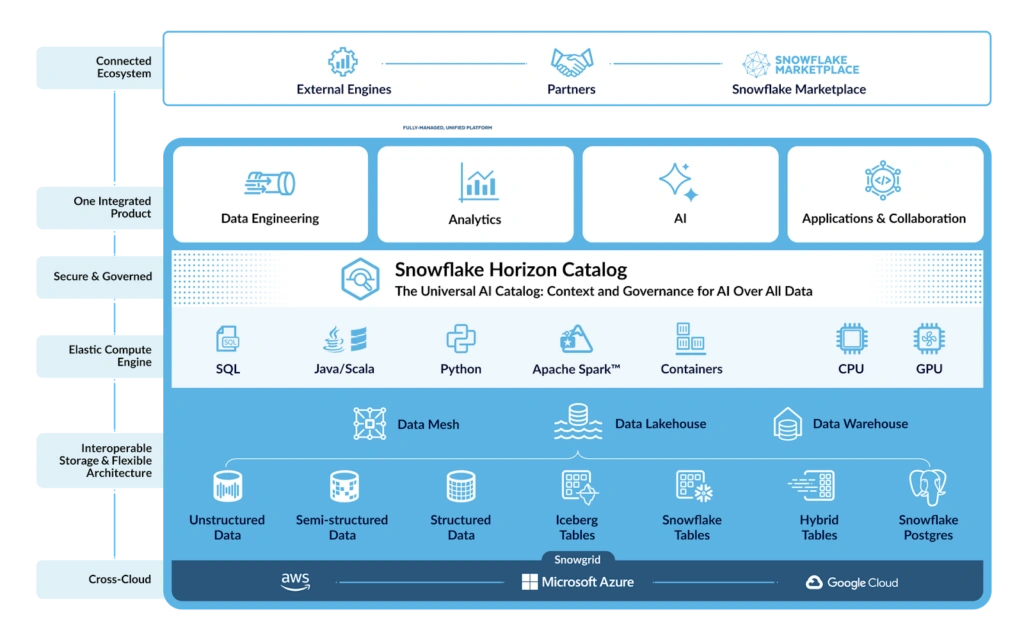
Like Redshift, Snowflake is a cloud-based data warehouse that provides flexible, scalable storage.
Snowflake uses virtual compute instances for compute and persistent data storage. You cannot run Snowflake on private cloud infrastructures (hosted or on-premises). Rather, it runs entirely on public cloud infrastructure (excluding optional command line clients, drivers, and connectors).
Snowflake provides its data warehousing tools through a Software-as-a-Service (SaaS) model.
Snowflake Benefits: What Are The Best Snowflake Features?
The following are reasons to use Snowflake right now:
- Snowflake is SaaS. So there is no hardware or software to install, configure, manage, or update. The service handles all that on your behalf.
- Its architecture separates compute and storage components. This ensures fast data handling and persistent storage performance, reducing wasted time to decision-making.
- That architecture also delivers the data management benefits of a shared-disk configuration, but with the scale-out and performance advantages of a shared-nothing architecture.
- Snowflake is an enterprise analytics database that built a unique SQL query engine to speed up, ease, and simplify data processing, analytics, and storage compared to traditional approaches such as Hadoop.
- You can seamlessly integrate and use Snowflake with AWS, Azure, GCP, and more cloud providers, analytics tools, and business intelligence solutions.
- In addition, it can access and use some AWS services. Snowflake can ingest data from Amazon S3 storage. You can then store your data in S3 buckets (AWS) and run the queries in Snowflake.
- The Snowflake data cloud compresses data, distributes it using its columnar architecture, and manages all aspects of data storage in its virtual warehouses. The virtual warehouses are independent, meaning each one’s performance does not affect another’s performance.
- You pay separately for compute and storage. It also includes tier-based pricing, providing flexibility. Each tier offers varying features, including security.
- Supports concurrency scaling, which, coupled with security and modern data warehousing technologies, is available in all editions.
- Robust support for JSON-based functions. Snowflake stores and queries JSON natively using the VARIANT data type with built-in functions, making semi-structured data a first-class citizen rather than an afterthought.
Snowflake pros
- Fully managed SaaS
- Independent scaling of compute and storage
- Multi-cloud support
- Strong concurrency handling
- Native semi-structured data support
- Minimal infrastructure management
Snowflake cons
- Compute time-based pricing can become expensive
- Data transfer between regions or clouds may increase costs
- Less infrastructure customization compared to self-managed systems
- Requires learning Snowflake-specific SQL extensions
Useful resources:
At A Glance: Snowflake Vs. Amazon Redshift
Choosing between Snowflake and Amazon Redshift for data warehousing? Here’s a quick comparison:
|
Feature |
Snowflake |
Amazon Redshift |
|
Storage Format |
Columnar, compressed, micro-partitioned |
Columnar, partitioned, uncompressed |
|
Architecture |
Fully decoupled compute and storage; each virtual warehouse operates independently |
Coupled compute and storage by default; RA3 nodes offer partial decoupling via managed storage |
|
Data Security |
Always-on encryption |
Flexible, customizable encryption |
|
Pricing Model |
Separate compute and storage; tiered pricing |
Bundled compute & storage; cheaper with Reserved Instances |
|
Data Customization |
Limited |
Advanced features like Machine Learning |
|
Semi-Structured Data |
Native VARIANT type for JSON, Avro, Parquet, XML |
SUPER data type for JSON and semi-structured data |
|
Management |
Fully managed, automates tasks |
More hands-on, requires maintenance |
|
Cloud Providers |
Multi-cloud across AWS, GCP, and Azure in multiple regions |
AWS only, on-premises via AWS Outposts |
|
Auto-Scaling |
Adds capacity almost instantly, up to 10 warehouses |
15–60 minutes to add/remove cluster, supports up to 10 clusters |
|
Delivery Method |
SaaS |
PaaS |
|
Isolated Tenancy Support |
Available with “VPS” tier |
Available in your VPC |
|
Integrations |
Over 100 integrations, cloud-agnostic |
Deep AWS integration, partner tools, and services |
|
Compute Control |
Set warehouse size from XS through 6XL; fixed compute types |
Set cluster size; customizable compute types |
1. Pricing structure
Snowflake pricing is time-based.
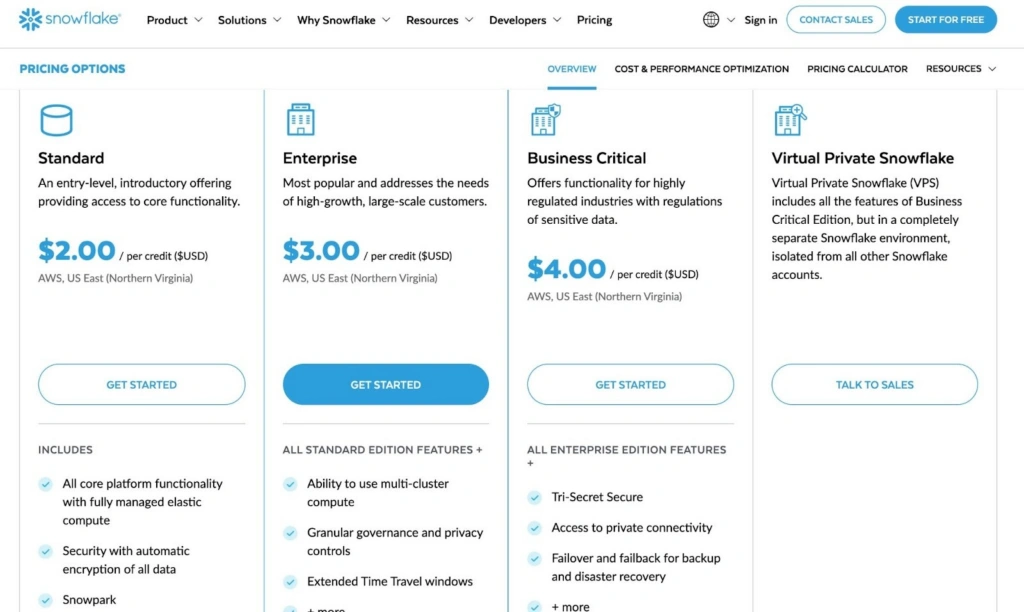
Snowflake pricing tiers and cost structure for AWS in US East Region
You pay for the amount of time a warehouse runs. If a query runs for two minutes, you are charged for those two minutes based on the compute size selected.
Amazon Redshift pricing depends on deployment type: provisioned (on-demand or reserved instances) and Redshift Serverless (pay per usage via RPUs).
With provisioned clusters, you choose node types and commit to capacity. Reserved Instances reduce costs for predictable, long-term workloads.
Redshift clusters can be paused. However, pausing or resizing can take up to 15 minutes.
Snowflake warehouses suspend and resume in seconds.
Key difference: Redshift favors predictable, long-running deployments. Snowflake favors rapid suspend-and-resume workloads.
2. Pricing flexibility
Snowflake warehouses range from XS to 6XL. You choose the warehouse size per session. You only pay while it runs.
Smaller warehouses cost less but execute queries more slowly. Larger warehouses execute faster but cost more.
Snowflake allows you to scale compute independently from storage. You can increase capacity instantly for heavy workloads.
At CloudZero, we use Snowflake for our data warehouse because of its pricing flexibility. We were onboarding a new customer with unusually large amounts of data; as a result, many of our large queries were timing out.
Within seconds, we scaled the warehouse that powers our front-end application to four times its original capacity.
Over the next few days, we absorbed the costs before implementing optimization strategies that reduced them. Therefore, Snowflake’s flexibility enabled us to respond to customer requests very quickly.
Redshift pricing varies by node type, region, and storage configuration. Examples include Dense Compute and Dense Storage nodes.
Dense Compute nodes cost less and work best for smaller datasets. Dense Storage nodes cost more but support larger data volumes. But you cannot combine different node types within a cluster.
Key difference: Snowflake offers per-workload flexibility. Redshift flexibility depends on node selection and AWS region.
3. Performance and scalability
In Redshift, cost remains steady once capacity is provisioned. However, performance can decline under heavy concurrent load. Scaling a Redshift cluster may take 15 to 60 minutes.
Snowflake separates compute from storage. Multiple virtual warehouses can access the same data.
You can ingest workloads into one warehouse, run dashboard workloads on another and scale each independently
Scaling in Snowflake takes seconds.
Key difference: Redshift scales clusters. Snowflake scales workloads.
4. Data warehouse management
Snowflake operates as a fully managed service. There is no infrastructure to manage. Data compression and encryption are automatic. The platform handles maintenance tasks.
Redshift is managed but requires more configuration. You manage node types, resizing, and tuning decisions.
Key difference: Snowflake reduces operational overhead. Redshift offers more infrastructure-level control.
5. Data cloud security
Both Snowflake and Redshift support encryption at rest and in transit, as well as multi-factor authentication
Snowflake security features vary by edition. Advanced compliance features require higher tiers.
Redshift integrates directly with AWS IAM. Security policies align with AWS-native identity controls.
Key difference: Snowflake security depends on the edition. Redshift security integrates deeply with AWS IAM.
6. Enterprise analytics costs
If Snowflake warehouses run continuously, costs increase. However, you do not pay for suspended compute.
Snowflake can be cost-efficient for intermittent workloads. Costs increase with heavy, constant usage.
Redshift is often more cost-effective for steady workloads. Reserved pricing lowers long-term costs.
Key difference: Snowflake optimizes for usage-based elasticity. Redshift optimizes for predictable, stable deployments.
Redshift Vs. Snowflake: Which Platform Should You Use?
Redshift Vs. Snowflake: Which Platform Should You Use?
Choosing between Snowflake and Redshift depends on your workload patterns, cloud strategy, and team capacity. Here is how to think through the decision:
Choose Snowflake if:
- Your workloads are intermittent or unpredictable — you need compute for a short burst and then nothing for hours. Snowflake’s per-second billing and instant suspend/resume keep costs proportional to actual usage.
- You operate in a multi-cloud environment or plan to. Snowflake runs on AWS, Azure, and GCP, so you avoid vendor lock-in.
- Your team prefers a hands-off approach to infrastructure. Snowflake automates vacuuming, compression, and tuning, so engineers focus on queries rather than cluster maintenance.
- You need strong concurrency. Multiple virtual warehouses can serve different teams or workloads on the same data simultaneously without resource contention.
Choose Redshift if:
- Your organization is already embedded in the AWS ecosystem. Redshift integrates natively with S3, Glue, Lambda, Kinesis, Lake Formation, and IAM, making it a natural extension of existing pipelines.
- Your workloads are steady and predictable. Reserved Instance pricing can cut costs significantly for always-on clusters running consistent query volumes.
- You need deep infrastructure control. Redshift lets you choose node types, configure distribution and sort keys, and tune performance at the hardware level.
- You process large-scale structured data for enterprise reporting and BI. Redshift’s MPP architecture handles petabyte-scale datasets efficiently when the workload is well-characterized.
Now, how do you manage your Amazon Redshift or Snowflake costs to optimize them?
How To Manage Your Data Warehouse Costs
Cloud data transfer, storage, and analytics costs can add up quickly. That’s why it’s crucial to keep these costs in check, whether you use Amazon Redshift or Snowflake. In either case, you want to maximize the value of your money.
But picture this. Data-heavy organizations often keep half a petabyte (PB) of unused data. Others store over three-quarters of a petabyte of data they’ll rarely use again, incurring unnecessary storage costs.
Yet optimizing Redshift or Snowflake costs may be challenging if you do not know exactly what costs you can reduce without negatively affecting your workload.
What Other Alternatives Are Available?
While Snowflake and Amazon Redshift offer strong data warehousing capabilities, several popular alternatives are worth considering.
Google BigQuery
Google BigQuery is Google Cloud’s fully managed, serverless data warehouse. It uses a pay-per-query pricing model for on-demand usage, which can be cost-effective for sporadic analytical workloads. BigQuery separates compute and storage, supports standard SQL, and integrates natively with Google Cloud services like Looker, Dataflow, and Vertex AI. For organizations already invested in the Google Cloud ecosystem, BigQuery offers a comparable alternative to both Snowflake and Redshift.
Databricks
Unlike Amazon Redshift, Databricks excels in data engineering and data science workflows. It utilizes Apache Spark for ultra-fast in-memory processes.
It separates compute and storage, allowing high scalability across multiple cloud platforms (AWS, GCP, and Azure). It is ideal for organizations looking for flexibility and advanced analytics capabilities beyond traditional data warehousing.
Useful resources:
Amazon Athena
Amazon Athena is a serverless query service that makes it easy to analyze data directly in Amazon S3 using standard SQL.
Unlike Snowflake and Redshift, Athena does not require data warehousing setup or management. It offers a simple, pay-per-query model that can be more cost-effective for querying data stored in S3 without requiring complex data transformations or migrations.
MongoDB
MongoDB is a NoSQL database known for its flexibility in handling various data types and powerful query capabilities. It distinguishes itself from Snowflake and Redshift by offering document-oriented storage, real-time analytics, and the ability to run anywhere — cloud, on-premises, or hybrid environments.
MongoDB provides a robust alternative for projects requiring high-performance data storage and retrieval for JSON-like, unstructured, or semi-structured data.
So, how do you get that visibility?
Software and pricing information last verified May 2026. Features, pricing, and availability may have changed. Please verify current details with vendors before making decisions.
CloudZero’s Cost Intelligence For Snowflake And AWS Can Help
With CloudZero, you can continuously ingest, normalize, and deliver granular, actionable cost insights from AWS and Snowflake.
CloudZero, a Snowflake Partner Network member, accurately maps Snowflake or Redshift costs to the people, processes, and products that produce them. Thus, you can understand your cloud data costs in the context of your business, not just as columns and rows in a billing email.
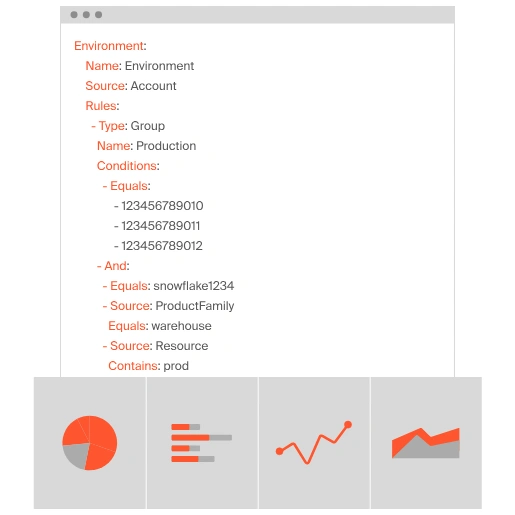
With CloudZero, you can view Snowflake or AWS data costs per customer, team, environment, software feature, and more. This level of granularity empowers you to understand exactly what drives your cloud spend so you can optimize costs.
Schedule a demo today to see CloudZero in action now.
Snowflake Vs. Redshift FAQs


FinOps In The AI Era: A Critical Recalibration
What 475 executives told us about AI and cloud efficiency.