Amazon Aurora offers up to five times the throughput of standard MySQL and three times that of PostgreSQL. Its architecture combines the database engine with a cloud-native, SSD-based storage system built for high I/O operations to achieve this.
That said, AWS Aurora pricing can be a real headscratcher for customers, with concerns about the cost structure, pricing components, and ways to cut expenses.
In this post, we’ll demystify Aurora pricing and share tips to help you trim costs without sacrificing performance.
What Does Aurora Actually Cost?
Before diving into the details, here are ballpark monthly costs for common Aurora setups in us-east-1 to anchor your expectations:
- Dev/test (single db.t3.medium, 20 GB storage, Aurora Standard): ~$50–70/month
- Small production (db.r6g.large writer + 1 reader, 100 GB, moderate I/O): ~$400–600/month
- Production with replicas (db.r6g.xlarge writer + 2 readers, 500 GB, heavy OLTP): ~$900–1,400+/month
These ranges vary heavily based on your I/O patterns, which is the variable most teams underestimate. Aurora is also not included in the AWS RDS Free Tier (which covers only standard RDS MySQL, MariaDB, PostgreSQL, and SQL Server Express).
Report
Finance needs to prove AI’s return: CloudZero report
260 senior finance leaders (more than half CFOs) told us why the speed of seeing AI spend, not the size of it, separates who pulls ahead on AI from who gets burned.
What Is Amazon Aurora?
Amazon Aurora is an Amazon Web Services (AWS) relational database service. It offers higher performance and availability than standard Amazon RDS without significant changes to existing applications. It is also compatible with MySQL and PostgreSQL.
Aurora features a distributed, fault-tolerant storage system that automatically scales up to 128 TiB and supports up to 15 low-latency read replicas. This ensures robust data availability and recovery options.
Aurora’s architecture separates compute from storage at the infrastructure level. Your cluster has DB instances (compute heads that execute queries) and a shared cluster volume (where all data lives). Instances hold no persistent data themselves, and the storage layer replicates data across three Availability Zones using six copies automatically. Despite six copies existing, you pay for only one logical copy per region — a detail that matters when estimating your Aurora bill.
How Aurora Differs From Amazon RDS
We’ve shared an in-depth comparison of Amazon RDS vs. Amazon Aurora here. Below is a sneak peek at the key differences between the two AWS database solutions.
Amazon Aurora offers several advantages over standard RDS, including:
- Performance: Aurora delivers significantly higher throughput than traditional RDS, making it suitable for applications with demanding workloads.
- Scalability: It automatically adjusts resources based on demand, which is particularly beneficial for fluctuating workloads.
- High availability: With a 99.999% uptime SLA, Aurora provides superior durability through multi-AZ replication, continuously backing up your data without impacting performance.
- Aurora Serverless option allows on-demand resource allocation minus the hassle of configuring physical servers. You also pay only for the capacity you use. This flexibility is particularly beneficial for applications with unpredictable workloads. Aurora Serverless has its own pricing model, which we’ll cover later in this post.
- Automated backups and point-in-time recovery: Aurora provides robust automated backups and allows users to restore their database to any point within the retention period, improving data durability and recovery options compared to standard RDS.
These added advantages come at a cost, making Aurora pricier than Amazon RDS pricing — at least at first glance. So, here’s how Aurora calculates your bill so you can identify what’s driving the charges and address them before overspending.
How Does AWS Aurora Pricing Work?
Aurora pricing is based on several cost factors, primarily your Aurora cluster configuration, database instance types, storage options, and I/O, as well as any optional features you decide to use.
The key pricing factors for Aurora are:
- Aurora cluster configuration
- Database instance type
- Storage options
- Input/Output requests
- Backup storage costs
- Data transfer fees
- Backtrack costs
- Additional features
To keep this guide concise, here’s the TL;DR to help you pinpoint what you’re paying for and where to optimize Aurora costs.
1. Pricing by Amazon Aurora cluster configuration
Aurora offers two configurations, and choosing between them is the single highest-impact cost decision you’ll make for an Aurora cluster:
- Aurora Standard: Suitable for applications with typical data access patterns and low to moderate I/O usage. In this configuration, you pay for database instances, storage, and I/O on a per-request basis.
- Aurora I/O-Optimized: Designed for I/O-intensive applications, this option eliminates I/O charges, allowing you to pay only for database instances and storage. It’s beneficial if your I/O costs exceed 25% of your total Aurora spend.
The 25% rule: Check AWS Cost Explorer, filter by Amazon RDS, and group by Usage Type. Look for RDS:StorageIOUsage as a share of your total Aurora charges. If it sits above 25%, switching to I/O-Optimized can reduce your total Aurora cost by up to 40%. Below that threshold, Standard’s lower storage rate ($0.10 vs. $0.225/GB-month) makes it the better deal.
Here’s a worked example showing the impact. For a 1,000 GB database with heavy I/O (roughly 350 read pages/sec and 100 write pages/sec over 30 days):
| Configuration | Storage Cost | I/O Cost | Total |
|---|---|---|---|
| Aurora Standard | ~$129 | ~$233 | ~$362 |
| Aurora I/O-Optimized | ~$290 | $0 | ~$290 |
In this scenario, I/O-Optimized delivers roughly 20% savings on storage and I/O costs alone. Switching between configurations is a cluster-level change that requires no data migration.
2. Aurora pricing by database instance types
Charges are based on the type and number of database instances in your cluster.
- On-Demand instances: Users pay hourly for database instances based on actual usage, with charges calculated per second after a minimum of 10 minutes. This model allows flexibility without long-term commitments.
- Reserved instances: For predictable workloads, Reserved Instances offer significant savings — up to 66% over On-Demand pricing — by committing to a one or three-year term. This option provides flexibility across instance sizes within the same family.
One thing worth noting on instance families: Graviton-based instances (db.r7g, db.r6g, db.t4g) deliver better price-performance than their Intel equivalents at comparable or lower hourly rates. If you’re running Intel-based instances (like db.r6i) and haven’t evaluated Graviton, that’s a straightforward opportunity to reduce compute costs.
Note: Aurora typically costs more than standard Amazon RDS due to its superior performance.
3. Aurora pricing by storage and I/O operations
Aurora storage costs are based on the cluster configuration you choose (Standard or I/O Optimized) and the amount of storage you provision for your database (in gibibytes (GiB) per month).
- With Aurora Standard, you’re billed for the storage your database uses and the I/O operations it performs, with costs varying based on your workload and database engine.
- Aurora I/O-Optimized configuration does not charge separately for I/O operations, which can save you money for I/O-heavy workloads.
For specific figures, the storage rate for Aurora Standard starts at $0.10 per GB-month, while I/O-Optimized storage runs $0.225 per GB-month. The I/O rate for Aurora Standard is $0.20 per million requests.
If you adjust your storage capacity during the month, your bill is prorated accordingly.
4. Backup storage
Backup storage pricing starts at $0.021 per GB-month. Aurora provides automated backup storage for free up to 100% of your provisioned cluster size — you’re only charged for backup storage that exceeds that threshold, plus any manual snapshots you’ve taken. Increasing your backup retention period or creating additional snapshots will raise your backup storage consumption.
5. Data transfer charges
Moving data from the internet into Amazon RDS is free. But data transfer to the internet starts at $0.09 per GB for the first 10 TB. Moving more than 150 TB per month drops the rate to $0.05 per GB.
Consider this:
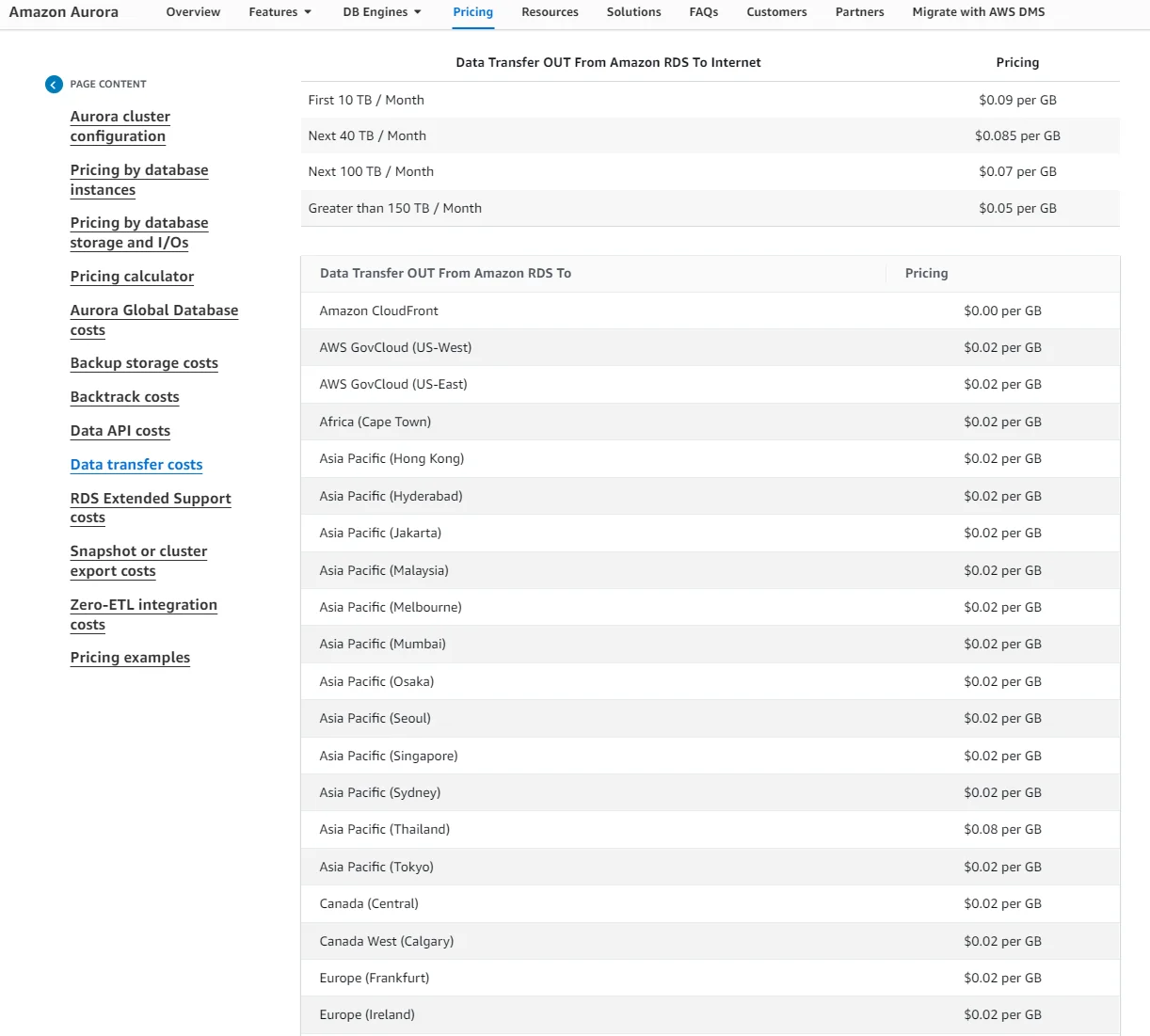
Image: Aurora data transfer fees
Here are a few other things to keep in mind:
- AWS Free Tier offers 100 GB of free data transfer to the internet monthly. This is not exclusive to your Aurora usage but applies across all your AWS services and Regions (except Beijing and Ningxia, China, and GovCloud (US)).
- Data transfers between Aurora and Amazon EC2 instances within the same Availability Zone are free.
- Transfers between Availability Zones for DB cluster replication are also free.
- If an Amazon EC2 instance and an Aurora DB instance are in different Availability Zones within the same Region, standard EC2 Regional Data Transfer charges will apply. At high query volumes, this cross-AZ transfer cost can add up quietly — placing your application and Aurora writer in the same AZ eliminates it.
6. Aurora Serverless v2 Pricing
Aurora Serverless v2 is an autoscaling instance type within a standard Aurora cluster. It scales by the second based on actual load, which makes it cost-effective for variable workloads and dev/test environments.
Serverless v2 bills on Aurora Capacity Units (ACUs), where one ACU corresponds to approximately 2 GB of memory along with corresponding CPU and networking resources. The cost for Aurora Serverless v2 is $0.12 per ACU-hour on Aurora Standard, or $0.156 per ACU-hour on Aurora I/O-Optimized.
For dev/test environments, setting the minimum ACU to 0 enables automatic pause. When the cluster has no active connections, compute charges drop to zero while storage costs continue, potentially reducing a development database to just a few dollars per month.
One important trade-off: Serverless v2 has no Reserved Instance equivalent. For sustained high-utilization workloads (running at near-peak capacity more than 60–70% of the time), provisioned instances with a 1-year Reserved Instance often work out cheaper. The hybrid pattern that works well in practice is a provisioned writer (stable baseline, RI-eligible) combined with Serverless v2 readers (flexible read scaling).
7. Additional Features
Activating optional features introduces extra costs. The features do add value, but you’ll want to evaluate whether you need them. Here are two examples:
- Aurora Global Database allows a single Aurora database to span multiple AWS Regions for low-latency reads and disaster recovery, with costs starting at $0.20 per million replicated write I/Os. Note: replicated write I/O charges still apply even on I/O-Optimized clusters.
- Backtrack (Aurora MySQL only) enables you to rewind a database cluster to a specific point in time, supporting quick recovery from mistakes. The cost is based on change records stored for your configured backtrack window.
8. Additional Features
Activating optional features introduces extra costs. The features do add value, but you’ll want to evaluate whether you need them. Here are three examples:
- Aurora Global Database allows a single Aurora database to span multiple AWS Regions for low-latency reads and disaster recovery, with costs starting at $0.20 per million replicated write I/Os.
- Backtrack enables you to rewind a database cluster to a specific point in time, supporting quick recovery from mistakes. The cost is based on change records and priced per hour at $0.012 per million change records.
- For Aurora Serverless, users are charged based on Aurora Capacity Units (ACUs), where one ACU corresponds to approximately 2 GB of memory. The cost for Aurora Serverless v2 is $0.12 per ACU-hour, which is double that of v1 at $0.06 per ACU-hour.
Now that we’ve covered AWS Aurora pricing, let’s talk about optimizing your Aurora costs.
Hidden Costs That Surprise Aurora Teams
Beyond the pricing components above, a few charges consistently catch teams off guard:
I/O bills that exceed compute costs. For OLTP workloads with frequent small transactions, I/O is often the largest single line item on the bill. At $0.20 per million I/Os, a busy production database generating 1 billion I/Os per month accumulates $200 in I/O charges alone, on top of compute. Check your I/O percentage in Cost Explorer (the 25% rule above) and switch to I/O-Optimized if warranted.
Orphaned snapshots from deleted clusters. When you delete an Aurora cluster, manual snapshots are not automatically deleted. They continue billing at standard backup storage rates indefinitely. This is particularly common in dev/test environments where clusters spin up and down frequently. Audit with aws rds describe-db-cluster-snapshots --snapshot-type manual and look for snapshots whose cluster identifiers no longer match active clusters.
RDS Extended Support fees. Running an end-of-life Aurora engine version (such as Aurora PostgreSQL 12, which reached community EOL in February 2025) triggers Extended Support charges of $0.10 per vCPU-hour in years 1–2, escalating to $0.20 per vCPU-hour in year 3. On a db.r6g.2xlarge (8 vCPUs), that adds roughly $584/month in Extended Support fees alone, on top of normal instance costs. Plan major version upgrades before EOL dates.
Tips For Estimating And Optimizing Your Aurora Costs
To estimate, control, and optimize Amazon Aurora costs, consider these immediately actionable strategies:
1. Right-size your DB instances
Choose the appropriate instance size based on your workload requirements. Start with smaller instances and monitor performance using tools like Amazon CloudWatch to avoid overprovisioning, which can increase unnecessary costs. AWS Compute Optimizer can analyze your CloudWatch metrics and flag over-provisioned, under-provisioned, or idle instances with specific recommendations.
2. Use RIs where applicable
For predictable workloads, consider Reserved Instances (RIs). Committing to a one or three-year term can save you up to 66% off the On-Demand rate. RIs are size-flexible within the same instance family and region.
If your infrastructure is likely to change (different instance families, regions, or engines), Database Savings Plans offer up to 35% savings with a 1-year commitment. They apply automatically across Aurora, RDS, DynamoDB, ElastiCache, and other database services, giving you more flexibility than RIs at a slightly lower discount.
3. Take advantage of Aurora Auto Scaling
Activate Aurora Auto Scaling to adjust your read replica capacity based on actual demand. This feature ensures you only pay for needed compute, preventing over-provisioning charges during low-traffic periods.
4. Monitor your I/O operations
Track your I/O usage since Aurora charges for read and write operations on Standard clusters. Use Amazon CloudWatch metrics (VolumeReadIOPs and VolumeWriteIOPs) to analyze I/O patterns. Apply the 25% rule: if I/O exceeds 25% of your total Aurora spend, switch to I/O-Optimized to eliminate those charges entirely.
5. Optimize backup storage costs
Regularly review your backup retention policies. Aurora automatically backs up data, but unnecessary manual snapshots (especially from deleted clusters) can quietly accumulate storage costs. Define a clear data retention policy that aligns with your business needs, and automate snapshot cleanup as part of any cluster deletion workflow.
6. Use data compression
This will reduce your storage requirements, significantly lowering your storage costs while maintaining performance.
7. Conduct regular cost reviews
Schedule a routine to review your Amazon Aurora costs. If you run a small operation, you can use AWS Cost Explorer and AWS Budgets. Analyze spending patterns, identify cost spikes, and adjust your strategies for ongoing cost optimization.
But when you need deeper insights, like Cost per Customer, Cost per Request, or Cost per Feature, to uncover who, why, and what’s driving your AWS spend (including Aurora costs), pick a powerful cloud cost optimization platform like CloudZero.
With CloudZero, you’ll get:
- A unified view: Consolidate cost data from your cloud provider (AWS, Azure, GCP) and platforms like MongoDB, Snowflake, and New Relic in one centralized dashboard.
- Engineering-Led Optimization: Access detailed, DBA-friendly metrics, such as cost per request, customer, team, and feature, handing you the insights to control spending before it escalates.
- Real-time cost anomaly detection: Get timely, actionable alerts (with context) delivered straight to your inbox so that you can proactively address unexpected issues.
- Custom budgets and tracking: Set tailored budgets, monitor spending, and protect your margins with precision tracking.
- Expert FinOps support: Your very own Certified FinOps Practitioner awaits you. These folks have helped CloudZero customers save enough in three months to cover their annual subscription — just ask Skyscanner.
CloudZero’s unique approach has earned the trust of brands like Skyscanner, Shutterstock, and Remitly. In fact, Skyscanner saved enough in three months to cover their annual subscription. It’s your turn to take control.  to see CloudZero in action.
Pricing information last verified May 2026. Features, pricing, and availability may have changed. Please verify current details with AWS before making decisions.











