Amazon Elastic Block Storage (EBS) is an efficient and durable block storage service. It is especially great for rapidly changing data on Amazon Web Services (AWS). Besides, Amazon EBS GP volumes promise a balance between performance and cost savings.
In this guide, we compare gp2 vs gp3 volumes in detail — including the significant September 2025 performance upgrades to gp3 — so you can decide which EBS volume type makes sense for your workloads and your budget.
What Are GP Volumes In AWS?
GP, or General Purpose volumes, are one type of Elastic Block Storage (EBS) volumes. EBS offers Solid State Drive (SSD), Hard Disk Drive (HDD), and Previous generation volume types. GP volumes are SSD-backed Amazon EBS volumes.
SSD-based volumes include both General Purpose and Provisioned IOPS volumes. Meanwhile, HDD-based options include Throughput Optimized HDDs and Cold HDDs.
There’s also the Magnetic volume type, a previous-generation volume type.
Each category offers more choices. The goal is often to provide various suitable options for different use cases and budgets.
General Purpose SSD volumes provide two EBS volume types; gp2 and gp3. And what do these gp volumes do?
Here’s the breakdown …
Report
Finance needs to prove AI’s return: CloudZero report
260 senior finance leaders (more than half CFOs) told us why the speed of seeing AI spend, not the size of it, separates who pulls ahead on AI from who gets burned.
What Are AWS GP Volumes Used For?
AWS designed Amazon EBS gp volumes to balance IOPS performance and cost savings. Meanwhile, Provisioned IOPS volumes offer the highest performance possible of any SSD-backed EBS volume.
Yet, gp volumes are ideal for many transactional workloads that have a small I/O size and frequent read/write operations.
This makes gp volumes suitable for transactional use cases. These include virtual desktops, interactive gaming apps, development environments (including testing), boot volumes, and single-instance databases.
If your workload requires more than 80,000 IOPS, you should consider Provisioned IOPS volumes (io1 and io2 Block Express).
If you don’t need all that horsepower, gp volumes will serve you just fine. So, the next question would be; should you choose gp2 or gp3 EBS volumes for your needs?
Consider the following.
Amazon EBS GP2 Vs. GP3 Volumes: Choosing The Best EBS Volume Type (Chart)
Here’s a quick overview of the differences between gp2 and gp3 volumes as offered by AWS.
|
Amazon EBS gp2 volumes |
Amazon EBS gp3 volumes | |
|
EBS volume type |
SSD-backed block storage |
SSD-backed block storage |
|
Volume size |
1 GiB to 16 TiB | 1 GiB to 64 TiB |
|
Maximum throughput per volume |
250 MiB/s | 2,000 MiB/s |
|
Baseline throughput |
128 MiB/s |
125 MiB/s |
|
Maximum IOPS per volume |
16,000 (16 KiB I/O) | 80,000 (16 KiB I/O) |
|
Baseline IOPS | 100 IOPS minimum; scales at 3 IOPS/GiB up to 16,000 IOPS | 3,000 IOPS (flat, regardless of volume size) |
|
Maximum IOPS per instance |
260,000 IOPS |
260,000 IOPS |
|
Maximum throughput per instance |
12,500 MiB/s |
7,500 MiB/s |
|
Latency |
Single-digit millisecond |
Single-digit millisecond |
|
Durability |
99.8%-99.9% |
99.8%-99.9% |
|
Supports |
Boot volume, low-intensity transactional workload | Boot volume, medium-to-high intensity transactional workload |
|
Does not support |
NVMe reservations; EBS multi-attach |
NVMe reservations; EBS multi-attach |
|
Pricing | $0.10 per GiB-month | $0.08 per GiB-month (+ optional IOPS/throughput provisioning) |
Table: Gp2 vs GP3 comparison table
Software and pricing information last verified April 2026. Features, pricing, and availability may have changed. Please verify current details with AWS before making decisions.
The September 2025 update made the performance gap between gp2 and gp3 significantly wider. GP3 volumes now support 5X the maximum IOPS (80,000 vs. 16,000), 8X the maximum throughput (2,000 vs. 250 MiB/s), and 4X the maximum volume size (64 TiB vs. 16 TiB) compared to gp2. For most workloads, gp3 is now the clear default choice.
Here’s a deeper look at the performance and pricing differences to help you decide.
Amazon EBS gp2 vs gp3 volumes: Performance
We’ll go over the two types of performance attributes (IOPS and throughout) as well as durability and other assurances.
IOPS performance
A gp2 volume scales linearly with volume size from 100 IOPS to 16,000 IOPS.
Consider this:
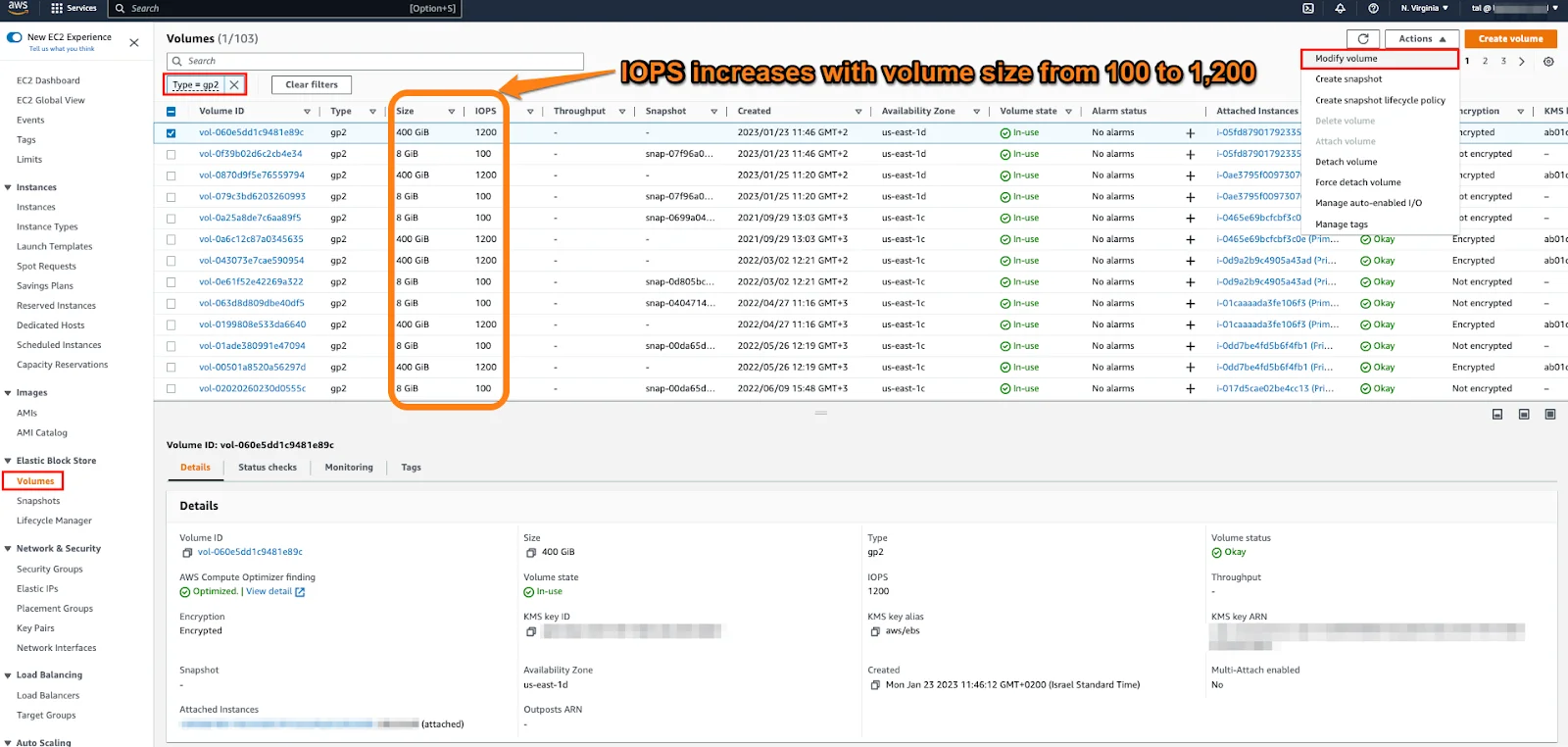
A unique feature here is that GP2 volumes can burst performance when needed. This works on the same principle as burst mode for Amazon EC2 T2 instances.
Gp3 volumes do not support this “burst mode”. Then again, we are about to see if gp3 volumes need to burst at all.
Burst mode improves gp2 volume performance during high demand. The system is based on a credit system. You accumulate credits when your gp2 volumes perform at or under baseline performance. That baseline performance varies by volume size.
When volumes that are smaller than 1 TiB need to perform above baseline I/O performance, the accumulated credits boost performance up to 3,000 IOPS. gp2 volumes provision 100 IOPS as baseline performance by default for volumes that are up to 33.33 GiB.
For volumes that are between 33.33 GiB and 5,334 GiB, Amazon EBS provisions them with a minimum of 3 IOPS and a maximum of 16,000 IOPS. Anything above 5,334 GiB runs with 16,000 IOPS.
When performance drops to the baseline (or lower) I/O rate, the volume earns I/O credits, up to 5.4 million units. These are enough to ramp up IOPS performance above 3,000 IOPS for about 30 minutes.
This “burst mode” can run longer. How long exactly depends on the amount of I/O credits your workload consumes per second.
The credits are earned back at a rate of 3 I/O credits per gigabyte of volume size per second.
Remember, this happens when your volumes run at or below baseline performance for each volume size. So, volumes that are smaller than 33.33 GiB can refill their I/O credit balance in about 15 hours (54,000 seconds).
GP3 volumes lack burst capabilities but offer sustained maximum IOPS performance. Expect baseline performance at 3,000 IOPS regardless of volume size. You can provision up to 80,000 IOPS for workloads that need more — a dramatic improvement over the previous 16,000 IOPS ceiling. This means gp3 volumes deliver higher IOPS performance without requiring more block storage capacity. And we’ll see how this impacts costs in a few moments.
Throughput performance
Likewise, gp3 volumes can sustain a 125 MiB/s baseline throughput at any volume size for no additional cost. You can provision up to 2,000 MiB/s for an additional fee — double the previous maximum of 1,000 MiB/s. This makes gp3 a viable option for throughput-heavy workloads like big data analytics and media processing that previously required io2 volumes.
Again, throughput performance for gp2 volumes increases or decreases with volume size. The baseline to expect here is 128 MiB/s while maximum throughput is capped at 250 MiB/s. But that’s not everything.
Another note to make is that the 128 MiB/s rate applies to volumes that are up to 170 GiB. If you need to run at the maximum possible throughput of 250 MiB/s, your volume will need to be at least 334 GiB.
However, if your volumes are between 170 GiB and 334 GiB, they can burst throughput performance up to 250 MiB/s.
Amazon EBS gp2 vs gp 3 volumes: Pricing
The newer EBS gp3 volumes are 20% cheaper than gp2 volumes. Again, this is consistent with pricing for the latest generation Amazon EC2 instances.
Better still, GP3 volumes allow you to decouple volume size, throughput, and IOPS. And yes, no downtime is required to make these changes.
Now, remember how we said performance scales with volume size for GP2 volumes?
Well, after 1 TiB, adding more storage doesn’t equal improved performance. Instead, it can lead to overprovisioning. Said another way; an unnecessary cost. Waste.
There are no such issues with gp3 volumes as you can modify the IOPS-to-volume size ratio. gp3 volumes provision performance based on workload requirements, not volume size. No overprovisioning = less waste = cost savings.
Oh, there’s one more thing.
We mentioned that gp3 volumes are cheaper than gp2 options right off the bat. Here’s how that works.
Pricing for gp3 and gp2 volumes is per GiB-month until capacity is released. The cost is $0.08 per GiB-month at 3,000 IOPS and 125 MiB/s for gp3 volumes compared to $0.10 per GiB-month for gp2 volumes.
If you need higher throughput or IOPS, gp3 volumes can be a suitable option. You can go up to 80,000 IOPS from the standard 3,000 IOPS at an additional cost of $0.005 per provisioned IOPS-month (above the 3,000 baseline).
For throughput, you can pay an extra fee of $0.04 per provisioned MiB/s-month to exceed the standard 125 MiB/s throughput, up to 2,000 MiB/s.
To put that in real numbers: a 100 GB gp2 volume costs $10/month, while the same capacity on gp3 costs $8/month with better baseline performance (3,000 IOPS vs. the 300 IOPS you’d get from a 100 GB gp2 volume). That’s a 20% savings before you even factor in the performance uplift.
The savings compound for larger deployments. If you’re running 500 GB gp2 volumes and overprovisioning storage just to hit 1,500 baseline IOPS, switching to gp3 gives you 3,000 IOPS at a lower storage cost — and you can often downsize the volume since performance is no longer tied to capacity. Organizations running hundreds of EBS volumes across multiple accounts can see savings well beyond the base 20% once overprovisioning is eliminated.
Here’s a quick side-by-side comparison of General Purpose SSD gp volumes in one place.
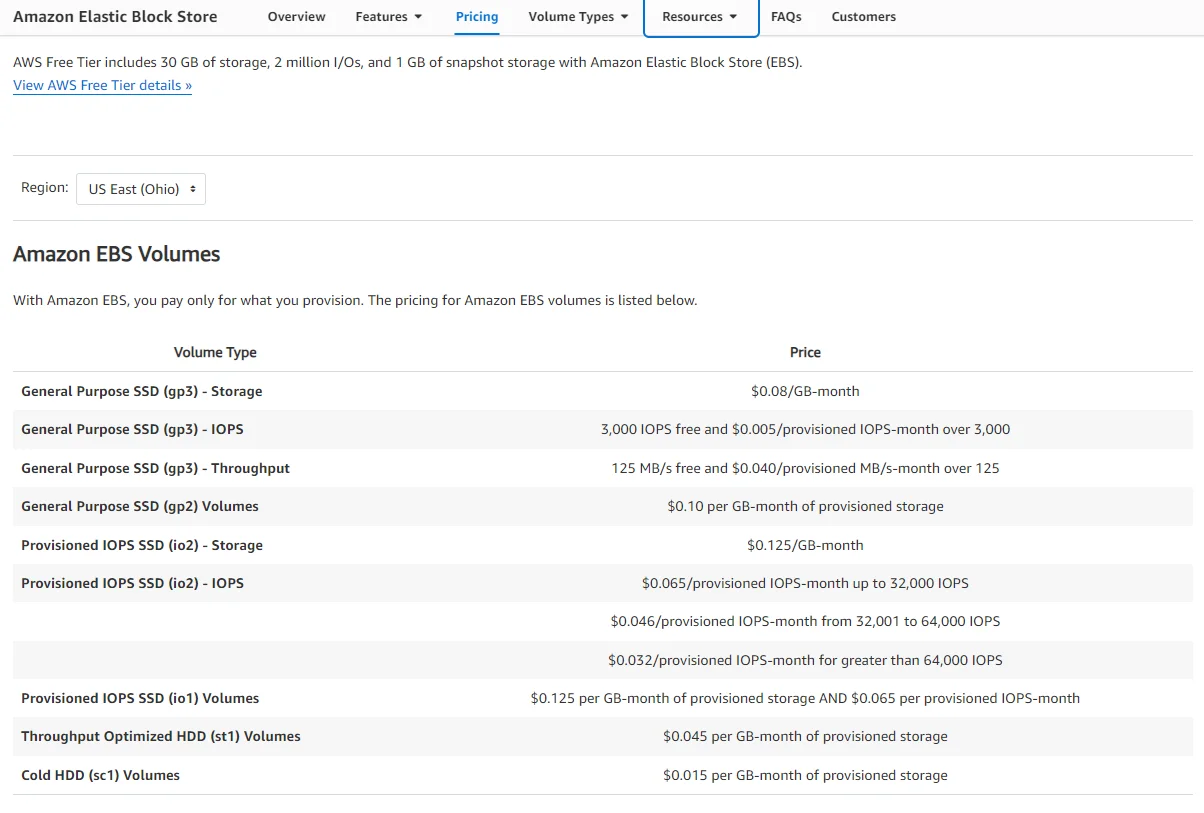
Amazon EBS pricing
In conclusion, you can save up to 20% on block storage costs by switching from gp2 to gp3 volumes.
Yet, for workloads with low-intensity transactions, such as single-instance databases and dev environments, gp2 volumes may still be a suitable option.
Medium-intensity transactional workloads can use gp3 volumes to sustain higher performance. Think about interactive applications, performant Hadoop clusters, and virtual desktops here.
That said, using gp3 volumes doesn’t automatically cut unnecessary spending.
You still need to constantly check your performance (IOPS and throughput) against the provisioned block storage amount to determine the most cost-efficient ratio to adjust.
Besides, you must choose just the right EBS-optimized Amazon EC2 instances for the greatest performance. And how do you know at what point to just use Provisioned SSDs instead of GP volumes altogether?
There’s a way to get around this monitoring mayhem.
How To Migrate From GP2 to GP3 Volumes
Migrating from gp2 to gp3 is straightforward and requires no downtime. AWS modifies volumes in place, so your applications continue running without interruption.
Using the AWS CLI, run the modify-volume command:
aws ec2 modify-volume –volume-type gp3 –volume-id vol-xxxxxxxxxxxxx
From the Amazon EC2 console: navigate to Volumes under Elastic Block Store, select the volume ID you want to migrate, choose Modify volume, enter gp3 as the volume type along with your desired IOPS and throughput settings, then confirm.
A few things to keep in mind when migrating. AWS automatically provisions gp3 IOPS to match or exceed your gp2 volume’s baseline — a 500 GB gp2 volume with 1,500 baseline IOPS converts to a gp3 volume with 3,000 IOPS, actually more than you had before. After modification, the volume enters an “optimizing” state. Performance is available immediately, but you cannot make another modification until optimization completes (typically a few hours depending on volume size). You can also modify IOPS and throughput independently after the initial migration to fine-tune performance for your workload.
For teams managing hundreds of volumes across multiple accounts, the migration can be automated using AWS Systems Manager, Terraform, or cost optimization tools like CloudZero to identify which volumes would benefit most from conversion.
What’s An Efficient Way To Track Amazon EBS Volumes For The Greatest Cost Savings?
CloudZero can help you track your Amazon EBS volume costs in real-time. You get an easy-to-digest cost report.
CloudZero maps your EBS costs broken down by product, process, and people. By contrast, most cost tools present total and average costs in one big data dump.
But with CloudZero you get to see who, what, and how your Amazon EBS volume costs are changing. You’ll know exactly which attributes to tweak to reduce costs without compromising on performance or customer experience.
Here’s an example. You can get details such as the exact EBS volume’s Volume ID and Sub-account. Then you can use these to decide if switching to a different EBS volume type is worth your time and effort.
Also, CloudZero compares your EBS costs with other AWS services in one place, such as EBS vs S3 storage costs. No endless tags or separate dashboards are required here.
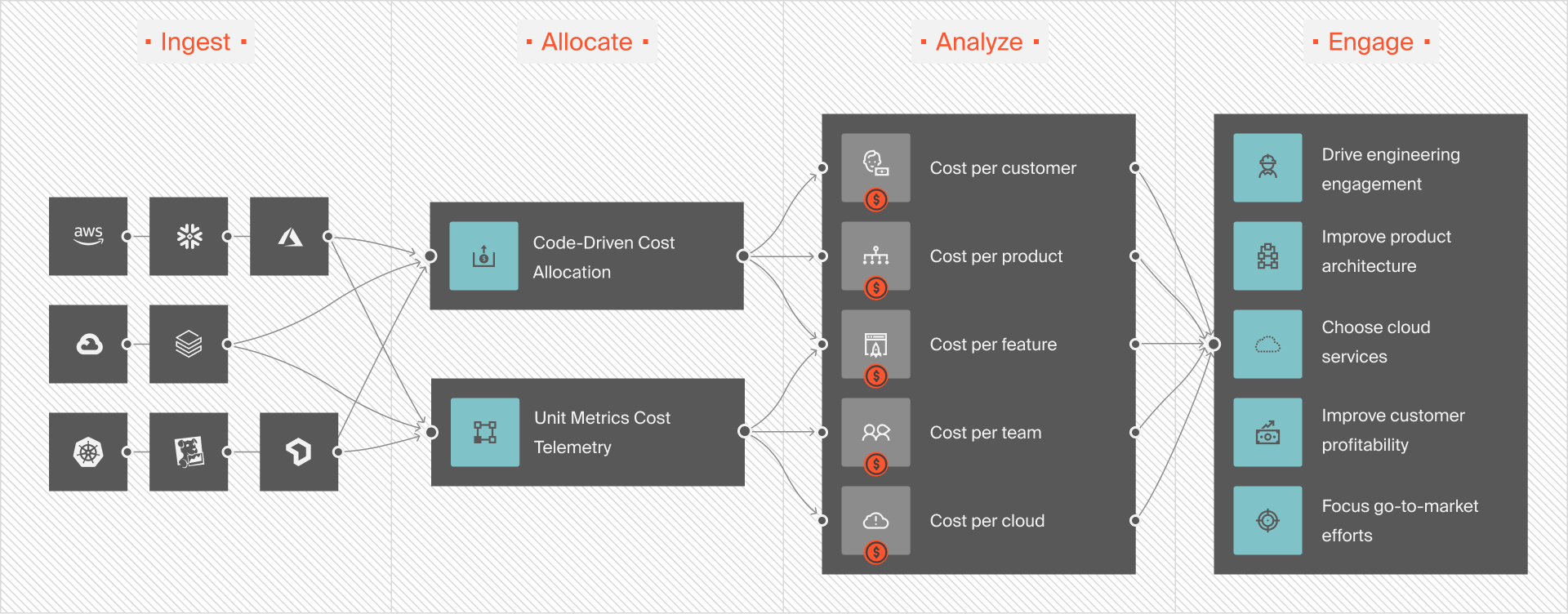
CloudZero is the first cloud cost optimization platform to provide accurate, hourly, and immediately actionable cost intelligence. These include granular insights such as cost per customer, cost per environment, and cost per I/O request.
And unexpected cloud costs won’t catch you off guard, either. CloudZero sends you timely and contextual cost anomaly alerts. This means you can take swift corrective action to avoid overspending and keep your AWS storage costs in pocket.
Yet, talking about CloudZero is nothing like experiencing it for yourself. Ambitious brands like Shutterstock and Upstart already use CloudZero to manage and optimize their cloud costs. Want to take CloudZero for a spin risk-free?  to experience CloudZero for yourself.
Frequently Asked Questions about GP2 vs. GP3











