According to CloudZero’s Cloud Economics Pulse, databases are often among the largest and most persistent cloud cost categories.
Database costs are notoriously difficult to predict and control. Unlike stateless infrastructure that scales predictably with traffic, databases run continuously and expand behind the scenes, causing costs to rise even when usage appears stable.
Because databases run continuously and expand behind the scenes, costs can rise even when usage appears stable. That makes visibility, attribution, and optimization more difficult.
What Are The Key Components Of Database Cost Management?
Seven factors drive total database costs:
1. Compute and provisioned capacity
Managed databases charge for allocated compute while instances run. Overprovisioning for peak demand often leads to paying for idle capacity.
2. Storage growth and data retention
Database storage scale as data accumulates. Retained tables, indexes, logs, and historical data all contribute to rising storage costs.
3. Replication and high availability
Read replicas, multi-AZ deployments, and cross-region replication multiply both compute and storage costs.
4. Backups, snapshots, and recovery
Automated backups, manual snapshots, and long retention periods increase storage usage and add hidden costs over time.
5. I/O, throughput, and performance tiers
Higher IOPS, throughput limits, and performance tiers increase pricing even when query volume remains steady.
6. Idle environments and sprawl
Development, staging, and test databases often run continuously, creating unnecessary spend outside production.
7. Licensing and engine-specific pricing
Commercial database engines and advanced features can introduce additional licensing or premium charges.
Understanding cost drivers is the first step. The next step is applying optimization strategies to control database spend.
2026 State of AI Spend Report
Why Finance Caps What It Can’t See
Learn how finance leaders are managing AI spend, and how they’re approaching FY2027
15+ Database Cost Optimization Strategies
With these practical strategies, you can reduce database storage costs and improve efficiency:
1. Use Reserved Capacity and Savings Plans
Cloud providers offer discount programs for committed usage. By committing to a one- or three-year term for database capacity, organizations can secure huge discounts compared to on-demand pricing. Committed plans reduce variability in cloud database price and reward predictable workloads.
2. Compress data where possible
Modern database engines often support data compression, which can cut storage needs, especially for large tables or analytic datasets.
3. Autoscaling
Autoscaling ensures databases consume only the resources they need. For managed services like Amazon Aurora Serverless or Azure SQL elastic pools, autoscaling reduces spend during low-usage periods while still meeting peak demand. Best for workloads with predictable traffic patterns and clear usage valleys.
4. Allocate and tag costs
Use granular tagging for database resources so teams can see which product, team, or environment is driving spend. Proper cost allocation is foundational to effective database cost management and supports accountability.
5. Monitor and alert on cost anomalies
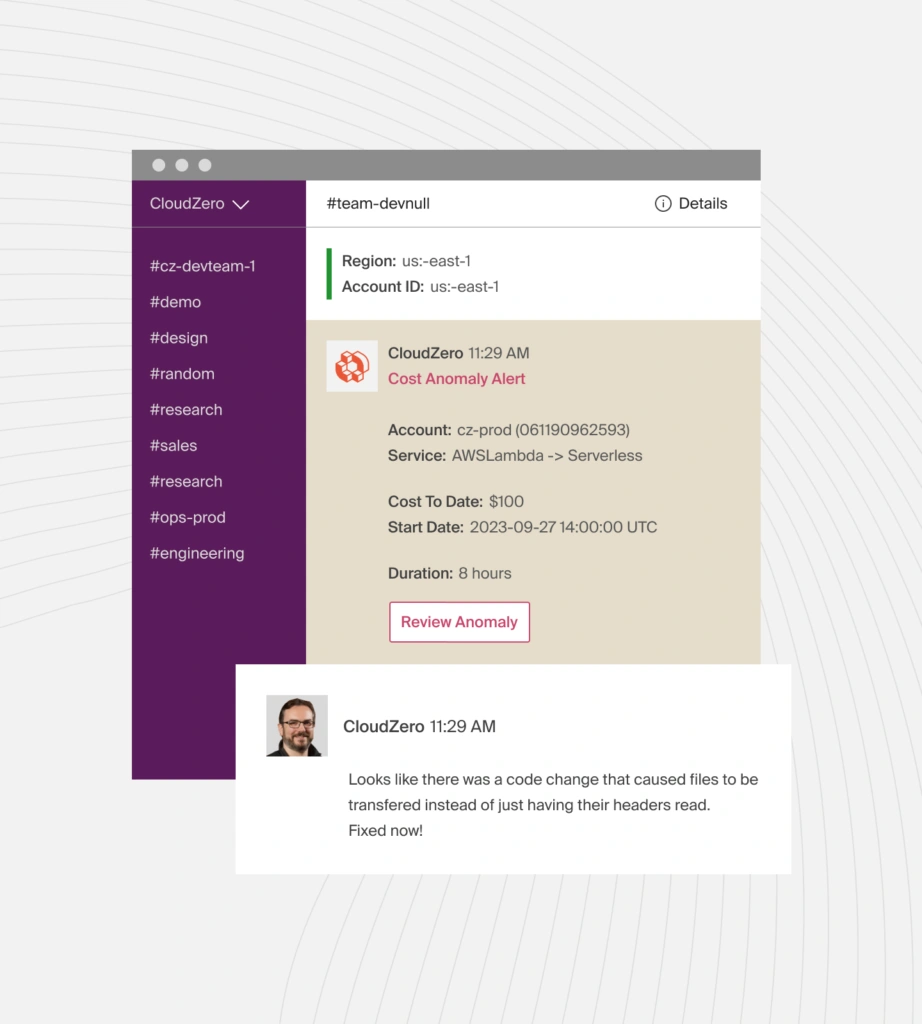
Set up automated alerts to catch unexpected database cost spikes. CloudZero’s anomaly detection flags sudden increases caused by runaway queries or misconfigured replica scaling, even when application traffic remains stable. Teams can trace spikes to specific services or features and address issues before costs compound. One scenario might be when a single inefficient query running in a loop increases database I/O costs by 300-500% within hours.
6. Rightsize instances
Overprovisioned database instances directly inflate costs. Regularly analyze CPU, memory, and I/O metrics and downsize instances that consistently run well below capacity.
7. Clean up database storage regularly
Database storage growth often goes unnoticed until bills spike. Four cleanup actions: (a) implement automated retention policies for logs and backups, (b) archive historical data to cheaper object storage, (c) remove unused indexes that consume storage and slow writes, and (d) compact tables and vacuum databases to reclaim space.
8. Turn off non-production instances
Development, staging, and testing databases often run full-time by default. Schedule automated start/stop so these non-production environments only run when needed.
9. Consider serverless database options
Serverless databases (like Amazon Aurora Serverless, Azure SQL Database serverless tier) bill based on actual usage rather than continuous provisioned capacity. Best for workloads with unpredictable or intermittent demand — for example, development environments, infrequently accessed applications, or services with variable traffic patterns. Not suitable for steady, high-volume production workloads.
10. Leverage caching to reduce load
Use memory-based caching layers, such as Redis or Memcached, in front of databases so that frequent reads don’t hit the primary database. This reduces database compute and I/O demand, lowering both database costs and query latency.
11. Review and optimize query performance
Inefficient queries can generate excessive compute and I/O charges. Query optimization directly lowers workload cost across SQL and NoSQL databases.
12. Use efficient indexing strategies
Indexes speed up query performance but increase storage and write costs. Only create indexes that are essential for your most common queries.
13. Archive cold data
Not all data has to live in the primary database. Move infrequently accessed data to cheaper storage tiers (like object storage) with pointers remaining in the database.
14. Evaluate alternative database engines
Some workloads are cheaper on a different engine. For example, moving a read-heavy feature from a large relational database to Azure Cosmos DB can reduce database costs. For flexible schema and horizontal scaling, MongoDB Atlas may also be more cost-effective than an oversized relational instance.
See also: MongoDB Cost Optimization Techniques To Reduce Waste
15. Optimize database configuration
Configuration settings such as backup retention, log verbosity, and replication frequency affect costs. Shortening backup retention windows where appropriate and tuning replication strategies can reduce long-term storage and I/O fees without sacrificing performance.
16. Adopt spot or preemptible instances for supporting services
While critical database workloads need stable compute, supporting services such as analytics nodes can run on spot or preemptible instances to reduce infrastructure costs.
17. Review licensing and feature tiers
Commercial editions of some databases include premium features at a cost. Review whether you need enterprise features or if a lower-tier or open-source alternative can suffice.
18. Leverage built-in provider tools
Native tools such as AWS Cost Explorer, Azure Advisor, and Google Cloud Recommender can help identify underutilized database resources and basic cost-saving opportunities.
But these tools are limited and offer little context on how database costs relate to environments or business impact.
How CloudZero Helps With Database Cost Management
MongoDB, Microsoft SQL Server, Amazon DynamoDB, Oracle Database, Amazon RDS, and Amazon Aurora power applications across SaaS, finance, ecommerce, and AI workloads. These databases share a common challenge: cost visibility. Cloud providers itemize charges by layer (compute, storage, networking), making it difficult to understand why costs change or which teams and workloads drove them.
Cloud providers itemize charges by layer (compute, storage, networking), making it hard to see why costs change and who drove them.
CloudZero can help.
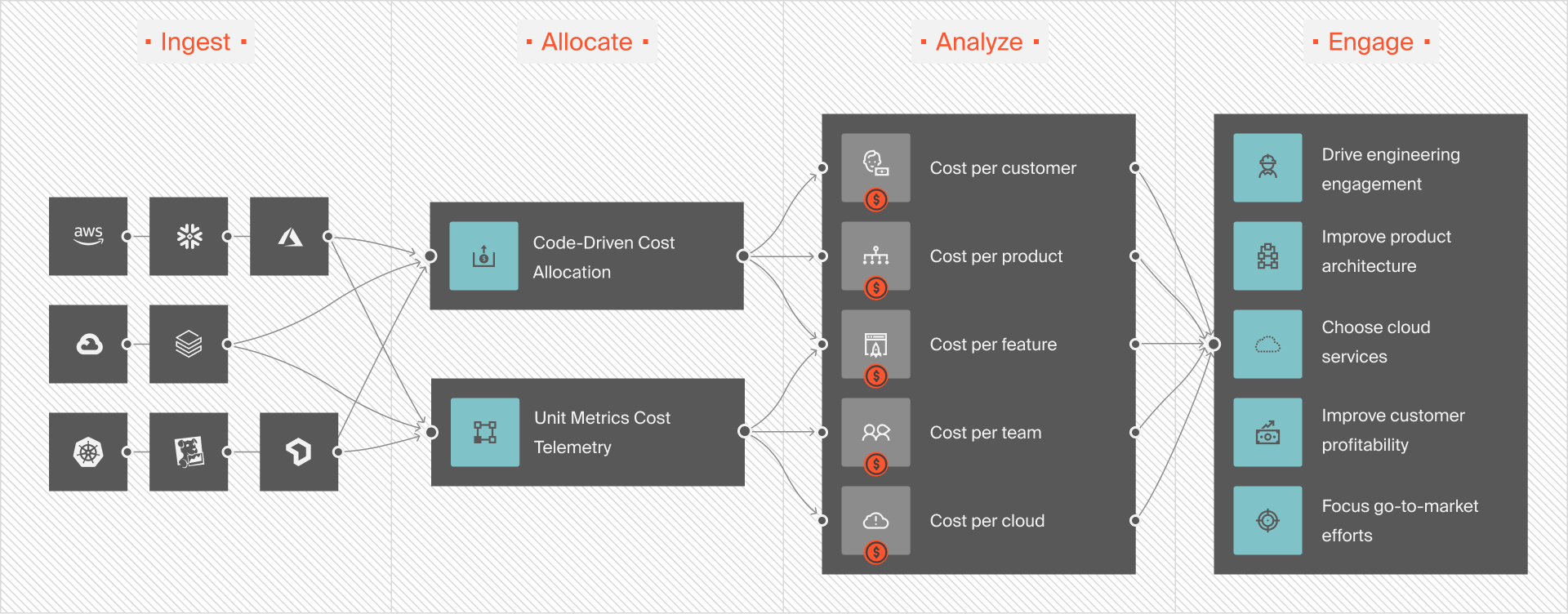
CloudZero connects database charges (instance hours, storage, backups, replicas, data transfer) to the workloads and services that caused them. Users don’t just see cost increases; they see the drivers behind them.
CloudZero calculates metrics such as cost per customer, request, transaction, or feature. If database spend rises while usage stays flat, the efficiency problem becomes obvious.
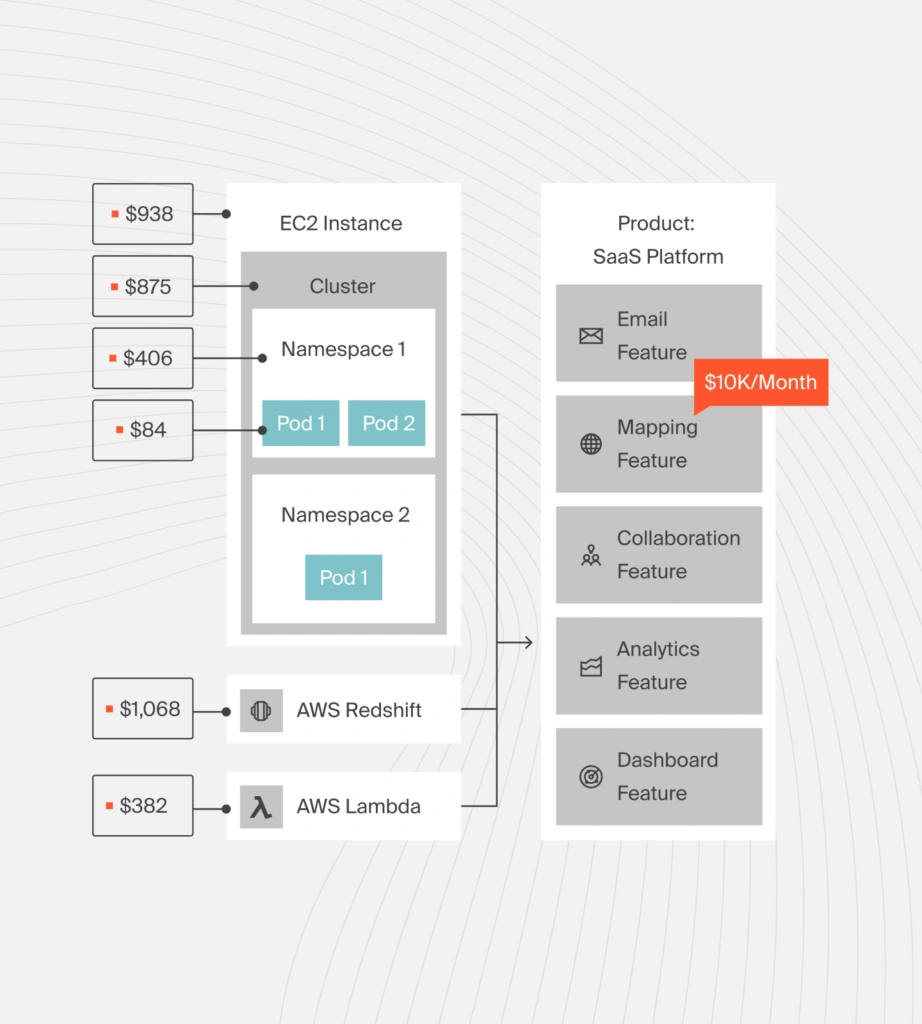
For databases serving Kubernetes-based applications, CloudZero links pod and service activity to downstream database costs. This shows how application behavior translates into database load and spend.
CloudZero also provides:
- CloudZero Explorer: Filter database charges by dimensions like service, account, team, environment, or custom business units
- Core + Custom Dimensions: Organize costs beyond tags using your own mapping logic, critical when database resources are shared or inconsistently tagged
- Rules-based shared cost splitting: Allocate shared database costs across multiple applications or teams using custom rules so each consumer sees their proportional share
- Telemetry-based allocation: Stream usage telemetry into CloudZero and allocate database costs based on actual consumption patterns, not estimates
- Hourly cost granularity: Flag abnormal database spend at hourly intervals so teams can act on cost issues immediately, not days later
- Budget tracking: Monitor spend against planned limits and notify teams when database costs exceed thresholds
- Engineering correlation: Send CI/CD deploy events and correlate deployment patterns with cost changes
- Optimization recommendations: Receive specific recommendations for database infrastructure like RDS instance rightsizing
- Multi-source cost ingestion: Ingest database costs from MongoDB Atlas, self-managed databases, and other sources beyond AWS/Azure/GCP
 to see CloudZero in action.
Frequently Asked Questions about Database Cost Management











