
Quick Answer
Cloud rightsizing is the practice of analyzing cloud resource utilization such as CPU, memory, storage and GPU, and adjusting instance types and sizes to match actual workload demand. Organizations that rightsize effectively reduce compute waste by 25% to 40%. It requires no code changes or long-term commitments, making it the highest-impact first move in cloud cost optimization.
50% FinOps practitioners name workload optimization and waste reduction as their top priority. Yet, most cloud environments remain overprovisioned — a gap between ambition and execution where budgets go to die.
This guide covers how to identify that waste, build a repeatable rightsizing practice, and automate the process across AWS, Azure, GCP, and Kubernetes, with real numbers, practical frameworks, and the business context most guides skip entirely.
What Is Cloud Rightsizing?
Rightsizing — also written as right sizing or right-sizing — means analyzing how cloud resources perform under real workloads and adjusting instance types, sizes, storage tiers, and database configurations to match actual demand.
The scope is broad. Cloud resource optimization through rightsizing covers every adjustable parameter: vCPU count, memory allocation, storage type and IOPS, network bandwidth, and GPU configuration. It applies to EC2 instances, Azure VMs, GCP Compute Engine, RDS databases, Kubernetes pods, and serverless function memory settings.
The goal is precision, not cuts. Sometimes rightsizing in cloud computing means scaling down from an instance nobody needs. Sometimes it means scaling up to clear a bottleneck that’s costing more in latency than it saves in compute. The FinOps Foundation classifies rightsizing under “Usage Optimization” — one of the capabilities within the “Optimize Usage & Cost” domain, alongside rate optimization, workload placement, and licensing.
What makes it the first move for most teams: zero code changes, zero long-term contracts, zero architectural redesign. You’re adjusting configuration dials, not rebuilding the engine.
Report
Finance needs to prove AI’s return: CloudZero report
260 senior finance leaders (more than half CFOs) told us why the speed of seeing AI spend, not the size of it, separates who pulls ahead on AI from who gets burned.
What Is The Difference Between Rightsizing And Downsizing?
Downsizing cuts. Rightsizing aligns.
The distinction matters more than most teams realize.
Consider a database running on a general-purpose m7i.xlarge (4 vCPUs, 16 GiB) with low CPU usage (~25%) but high memory usage (~90%). Downsizing to an m7i.large halves the memory to 8 GiB and starves the workload.
Rightsizing instead means switching to a memory-optimized instance like r7i.large (2 vCPUs, 16 GiB). You keep the required memory, maintain performance, and reduce cost by ~30–35%. Better fit, lower bill.
The reverse also applies. An inference workload running on a c5.2xlarge (~$0.34/hour) may look efficient but can bottleneck performance. Moving to a g5.xlarge (~$1.00/hour) introduces GPU acceleration and can deliver 10x+ higher throughput, depending on the model.
The cost per prediction drops significantly. That’s not overspending — it’s rightsizing for performance efficiency.
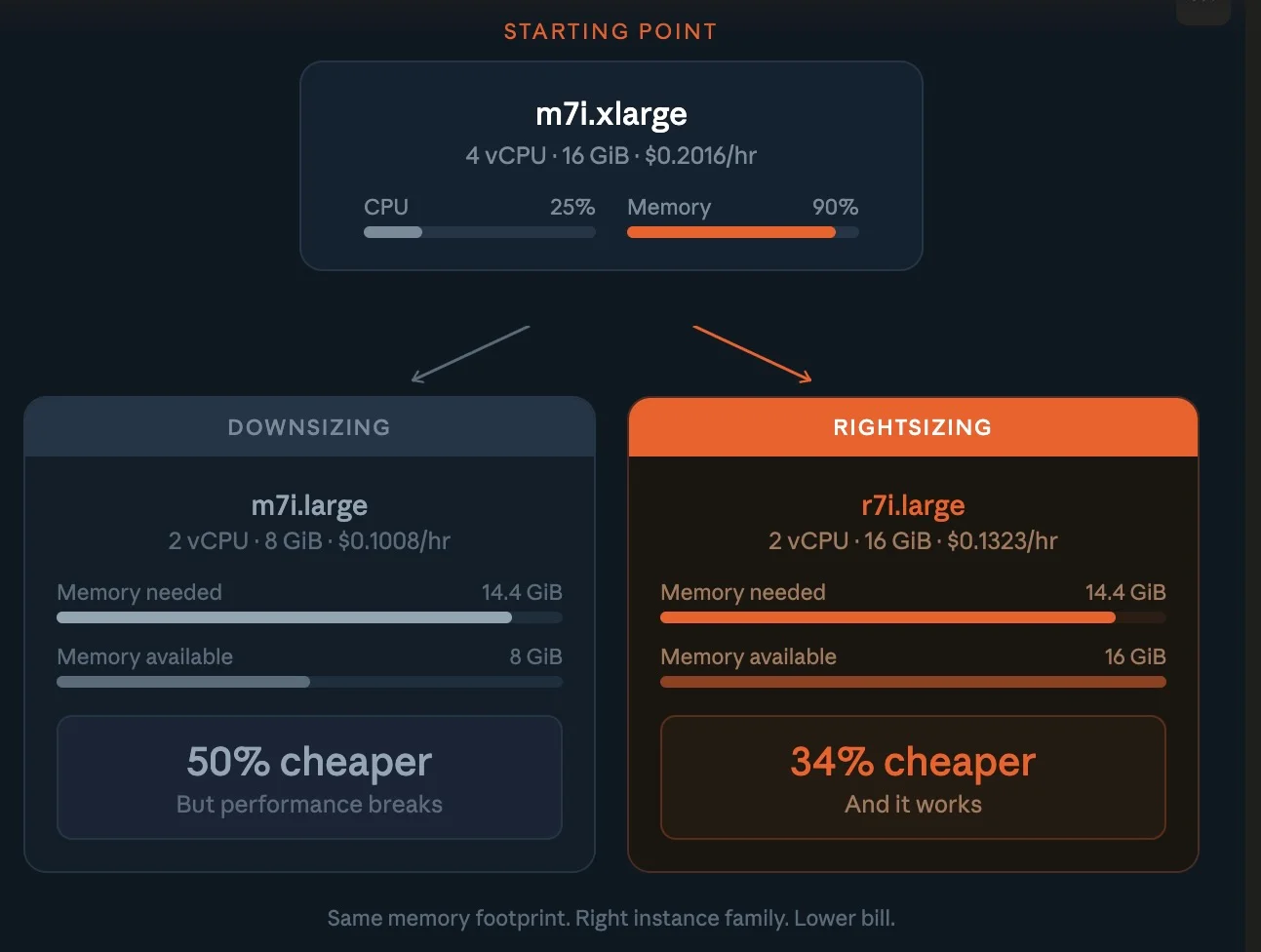
This is why at CloudZero we frame cost decisions around a single question: “Was it worth it?” Rightsizing vs downsizing isn’t about spending less. It’s about spending right.
Why Does Cloud Waste Happen?
Nobody provisions resources with the intention of burning money.
Cloud waste is a side effect of how decisions get made, and how rarely anyone revisits them.
Here’s the average lifecycle: an engineer selects an instance type based on a rough estimate, a teammate’s Terraform template, or a vendor quickstart guide. The workload runs. Nobody circles back. Six months later, that c5.4xlarge hums along at 8% CPU because the traffic spike everyone braced for never showed up.
Multiply that across hundreds of services and you’ve got a cloud bill that’s 25% to 40% larger than it needs to be. Nobody planned it. Nobody noticed it. It just happened.
Overprovisioned instances are the largest single source, compute sized for peak demand that never materializes. Idle resources are the sneakiest: stopped instances still attached to storage, load balancers pointing at nothing, unattached EBS volumes at $0.08/GB per month.
Zombie infrastructure — resources orphaned after a project ends or a team reorgs — persists indefinitely because nobody owns it. And wrong pricing models mean paying on-demand rates for steady-state workloads that should run on savings plans with up to 35% discounts.
The thread connecting all four: lack of visibility. Teams can see the total bill. They can’t trace who is spending what on which workload — and without that granularity, every optimization is a guess. More on solving that below.
How Do You Identify Overprovisioned Resources?
Gut instinct is how you got into this mess. Data is how you get out.
Step 1: Collect utilization metrics
Pull CPU, memory, network, and disk I/O data for every compute instance over at least 14 days. Thirty days captures monthly billing cycles and end-of-month reporting spikes.
AWS CloudWatch, Azure Monitor, and Google Cloud Monitoring provide these natively.
Here’s what to watch:
|
Metric |
Overprovisioning signal |
Action |
|
CPU utilization |
Consistently below 20% |
Downsize or switch instance family |
|
Memory utilization |
Below 30% average |
Move to smaller or memory-optimized instance |
|
Network throughput |
Below 10% of capacity |
Consider network-optimized smaller instance |
|
Disk IOPS |
Below 20% of provisioned |
Switch to gp3 or lower IOPS tier |
|
GPU utilization |
Below 40% average |
Move to CPU instance or smaller GPU |
Step 2: Check every dimension, not just CPU
Your cloud monitoring tools show 30% CPU across the fleet. Looks like easy savings, until you discover those same instances run at 85% memory. A workload at low CPU and high memory isn’t wasteful. It’s working exactly as designed.
Always assess CPU and memory and network and storage before touching anything.
Optimizing one dimension while blind to the others is how rightsizing breaks production, and how FinOps teams lose engineering trust.
Step 3: Connect resources to business outcomes
AWS Compute Optimizer and Azure Advisor tell you what’s underutilized. They don’t tell you whether it matters.
That m5.4xlarge at 12% CPU? If it’s serving a latency-sensitive API that drives $500K in monthly transactions, downsizing it saves $200/month and risks millions in revenue.
The resource-level view is incomplete without business context, and that’s the gap most native tools leave open. We’ll cover how CloudZero fills it in a few.
What Are The Best Practices For Cloud Rightsizing?
Getting the order right saves as much as the rightsizing itself.
Rightsize before buying commitments
This sequence maximizes savings:
- Rightsize to match actual utilization
- Buy reserved instances or savings plans for the rightsized workloads
- Apply spot instances for fault-tolerant, interruptible jobs
Reversing steps one and two is one of the most expensive mistakes in cloud financial management. A three-year reserved instance on an oversized workload doesn’t save money, it just discounts the waste. You’re locking in a bulk rate on groceries you’ll never eat.
Start where the risk is lowest
Non-production environments are the low-hanging fruit everyone walks past. Production workloads are typically overprovisioned by 30% to 50%. Dev and staging? Often 70% or more, because engineers clone production configs and never scale them back.
The blast radius of getting it wrong in dev is close to zero. Start there, prove the process, then move to production with confidence.
Match the family, not just the size
AWS offers over 750 instance types across more than 30 families. Picking a smaller instance in the wrong family is like buying a smaller truck when you need a sedan, you’re still paying for capabilities you don’t use.
|
Workload type |
Best AWS family |
Why it fits |
|
General web applications |
M7i, M7g |
Balanced CPU, memory, and networking |
|
Caching, in-memory databases |
R7i, R7g |
High memory per vCPU |
|
Batch processing, CPU-based ML, HPC |
C7i, C7g |
High compute performance |
|
ML training |
P5 (or Trn1) |
GPU / AI accelerator optimized |
|
Inference, rendering |
G5 (primary), C7i (CPU inference) |
GPU acceleration or high-frequency CPU |
|
High-throughput storage, data lakes, logs |
I4i, D3 |
High IOPS and storage bandwidth |
Note: Graviton-based instances (the “g” suffix) can deliver 20% to 40% better price-performance than comparable x86 instances, according to AWS benchmarks.
For cloud-native Linux workloads such as containers, microservices, and modern application stacks, migrating to ARM can reduce compute costs.
However, compatibility depends on your dependencies, runtime, and third-party tooling, which means not every workload can switch without validation.
Set utilization floors, not just ceilings
Most teams alert on high utilization but ignore low. Flip it. Target ranges by workload class: production at 40% to 70% average CPU, non-production at 20% to 50% or scale to zero outside business hours, databases at 50% to 80% to preserve burst headroom.
How Do You Rightize AWS, Azure, And GCP Resources?
Each cloud service provider offers native rightsizing tools. They’re free and worth using, but each only sees its own cloud.
For AWS rightsizing, Compute Optimizer analyzes 14 days of CloudWatch data and recommends optimal types for EC2, Lambda, EBS, and ECS on Fargate. As of re:Invent 2025, you can apply these recommendations directly and automate them on a recurring schedule with custom rules. AWS Cost Explorer also surfaces EC2 right sizing recommendations for underutilized instances.
For Azure rightsizing, Azure Advisor provides VM rightsizing recommendations based on CPU and memory patterns, integrated with Cost Management for budget-aware suggestions across app services, SQL databases, and virtual machine scale sets.
For GCP rightsizing, Google Cloud Recommender identifies idle VMs and recommends machine type adjustments based on observed utilization.
The shared limitation: isolation. If you run workloads across multiple clouds — and most enterprises do — a workload that looks efficient in AWS might have a redundant twin in GCP that nobody’s tracking. Cross-cloud visibility isn’t optional anymore. It’s table stakes.
How Do You Rightsize Kubernetes Workloads?
Kubernetes rightsizing is its own discipline.
CPU and memory requests set at deployment time frequently bear no resemblance to actual runtime consumption. Over-set requests mean over-provisioned nodes, wasted cluster capacity, and bills disconnected from reality.
The Cast AI 2025 Kubernetes Cost Benchmark puts average cluster CPU utilization at 10%. In plain terms: 90 cents of every dollar spent on Kubernetes compute buys idle capacity. That’s not a rounding error, it’s a structural gap.
Pod-level rightsizing adjusts CPU and memory requests to match observed usage. Vertical Pod Autoscaler (VPA) automates this by recommending values based on historical consumption.
The catch: VPA restarts pods to apply changes, making it better suited to stateless workloads.
For stateful services, treat VPA outputs as recommendations and apply them during planned maintenance windows.
Node-level rightsizing means selecting the right instance types for your node pools. A pool running general-purpose instances for memory-intensive pods wastes CPU at the node level even when pod requests are accurate. Match node families to the dominant workload profile in each pool — compute-optimized for batch processing, memory-optimized for caching, GPU-equipped for inference.
The key shift? Connecting container costs to the teams and services that generate them. That’s where generic monitoring falls short, and where purpose-built cost intelligence like CloudZero makes the difference.
How Do You Automate Cloud Rightsizing?
Manual rightsizing is a weekend project that expires in 90 days. Cloud spend automation is what makes savings stick.
- Scheduling is the simplest win. Dev and staging environments running 24/7 but used only during business hours cost three times what they should. AWS Instance Scheduler and equivalent tools automate start/stop cycles. Savings: 65% or more on non-production compute, zero performance impact. It’s the cost optimization equivalent of turning off the lights when you leave the room.
- Auto-scaling adjusts capacity in real time. Target tracking maintains a utilization target (e.g., 50% CPU) and scales instance count automatically. Predictive scaling uses ML to anticipate demand before it arrives. Together, they keep allocation tight without human intervention.
- Infrastructure as Code guardrails prevent overprovisioning at the source. Embed default instance sizes in Terraform templates. Use policy-as-code tools like OPA or Sentinel to block oversized instances without approval. Tag every resource with team and project metadata for cost allocation.
- Continuous cost intelligence closes the feedback loop. The State of FinOps 2026 captured the shift: “Dashboards are table stakes of yesterday, reactive. You have to move to proactive, real-time, automation.” When an engineer can see that their service’s cost per API call jumped 40% after a deployment, they don’t need a quarterly review to take action. The signal is built into the workflow.
Cloud Rightsizing Vs Other Cost Optimization Strategies
No single lever covers everything. The highest-performing teams layer multiple strategies, in the right order.
|
Strategy |
Best for |
Savings range |
Commitment |
Effort |
|
Rightsizing |
Overprovisioned instances |
20%–40% |
None |
Medium |
|
Reserved Instances / Savings Plans |
Steady-state workloads |
30%–70% |
1–3 years |
Low |
|
Spot instances |
Fault-tolerant batch jobs |
60%–90% |
None (interruptible) |
Medium |
|
Auto-scaling |
Variable demand |
10%–40% |
None |
Medium–high |
|
Scheduling (start/stop) |
Non-production environments |
40%–65% |
None |
Low |
|
Architecture refactoring |
Inefficient application design |
Varies |
None |
High |
Each strategy targets a different cost driver. Skipping anyone leaves money exposed. The sequence that maximizes total savings: rightsize first, commit second, spot and schedule third.
What Are Common Cloud Rightsizing Mistakes?
The most common cloud rightsizing culprits are:
- Optimizing CPU and ignoring memory. Most provider tools overweight CPU in their recommendations. A workload at 20% CPU and 92% memory doesn’t need a smaller instance, it needs a memory-optimized family like R7i.
- Skipping performance baselines. If you don’t know what “normal” latency and error rates look like before a change, you can’t tell if the change broke anything after.
- Treating it as a quarterly cleanup. Workload patterns shift with every deployment, traffic change, and feature launch. Without continuous monitoring, last quarter’s rightsizing becomes this quarter’s overprovisioning.
- Ignoring business context. Cutting a “wasteful” instance that turns out to be your payment gateway during Black Friday is the kind of optimization that generates résumé-updating events. Every rightsizing decision should connect to business impact, not just utilization percentages.
- Rightsizing in isolation. Adjusting compute without reviewing storage pricing, networking, and data transfer misses the full picture. An instance downsize that increases cross-region data transfer can net out to zero savings — or worse.
- Celebrating dashboard projections. Estimated savings aren’t realized savings. Track your Effective Savings Rate, the actual discount achieved as a percentage of eligible spend, to measure what hits the invoice, not what a tool predicted.
How CloudZero Makes Rightsizing Actually Work
Most cloud cost management tools can tell you that an instance is underutilized. CloudZero tells you why it matters.
The platform maps every dollar of cloud spend to business dimensions — cost per customer, cost per feature, cost per deployment, cost per API call across AWS, Azure, GCP, and Kubernetes.
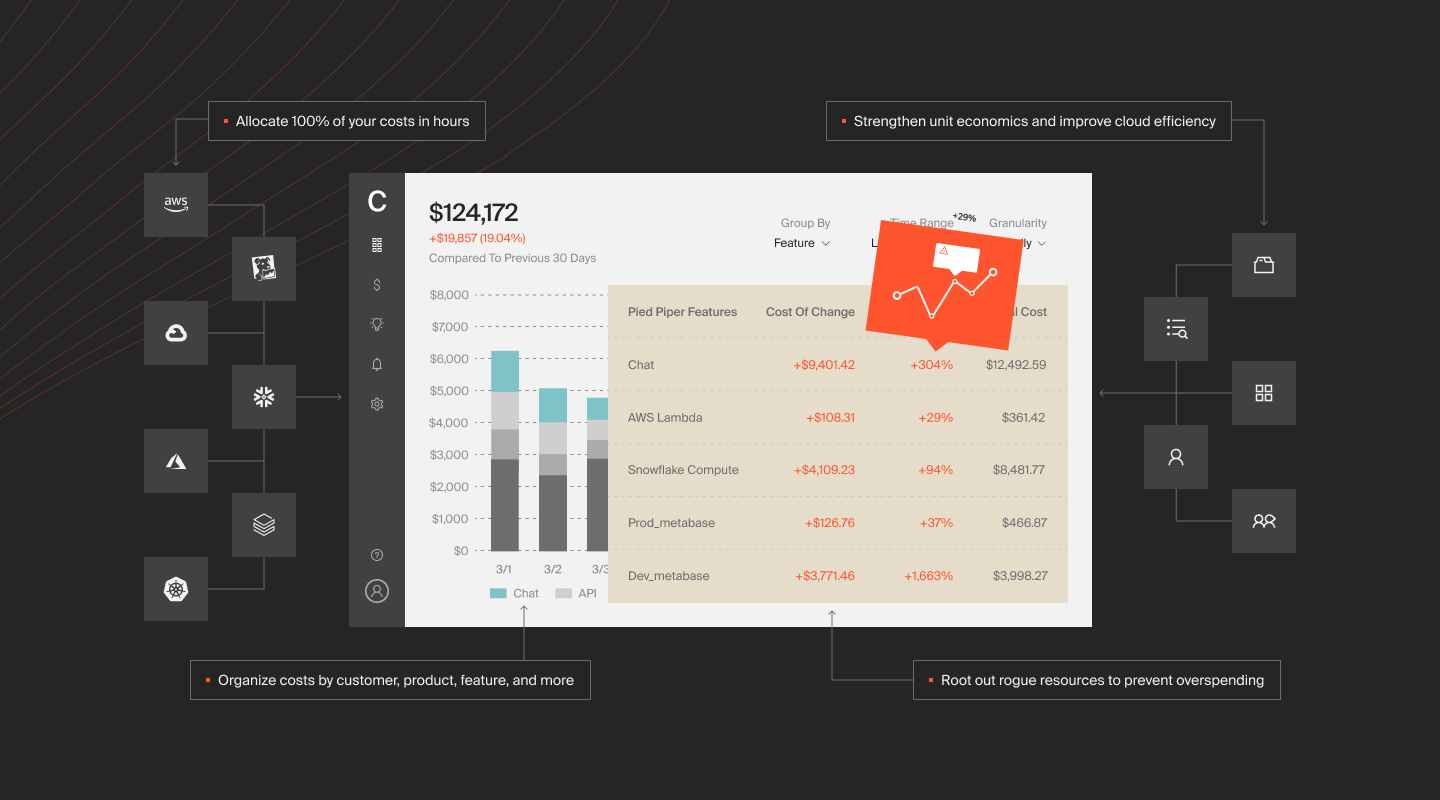
No tagging required. CloudZero’s CostFormation engine uses a code-based allocation model (think Infrastructure as Code, but for cost) to attribute 100% of spend regardless of tag quality.
That changes what rightsizing looks like in practice. Instead of a spreadsheet of underutilized instances ranked by CPU percentage, you get a view of which services and products are driving cost, and whether the cost aligns with the value they deliver. An instance running at 15% CPU for a service generating $2M in annual revenue isn’t waste. It’s insurance. An instance running at 60% CPU for a feature nobody uses is the real problem, and you’d never catch it from utilization data alone.
CloudZero also closes the feedback loop. Real-time anomaly detection flags cost changes the moment they happen. Engineers see cost per unit metrics alongside their deployment pipelines. Finance gets forecasts grounded in actual usage, not budgets built on hope.
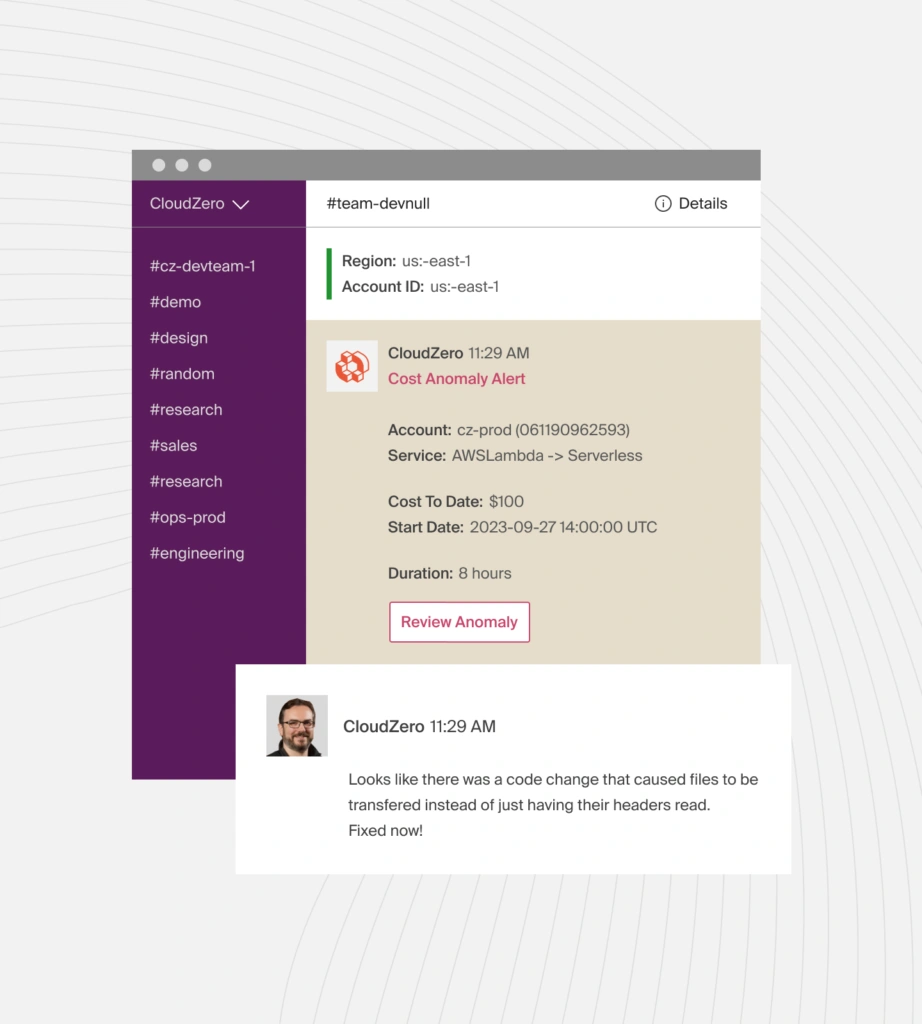
The result: rightsizing moves from a periodic cleanup to a continuous practice embedded in how teams build and operate, a cost-aware engineering culture that compounds over time.
That’s the difference between reducing cloud costs once and building a system that keeps them reduced.
Rightsizing is the fastest path to cutting cloud waste. But lasting savings require continuous visibility into what you’re spending, who’s driving the cost, and whether it delivers value.  to see how CloudZero works.
Frequently Asked Questions About Cloud Rightsizing