AWS EC2, Azure Virtual Machines, and Google Compute Engine (GCE) appear similar on paper but produce different bills due to how each provider prices capacity, discounts, idle time, and commitment terms. The same VM configuration can cost 20-40% more or less depending on which cloud you choose and how your workload runs.
On paper, all three offer similar virtual machines. In reality, they price capacity, discounts, and idle time very differently. That’s why teams often see VM costs rise even when traffic stays flat.
This guide doesn’t benchmark performance or list features. Instead, it breaks down how EC2, Azure VMs, and GCE price compute, what pricing calculators leave out, and why the “cheapest” option depends on how your workloads actually run.
Why Cloud VM Pricing Is Hard To Compare
Cloud providers price virtual machines based on three factors: reserved capacity (VM size and type), runtime duration (billed per second or hour), and usage predictability (discount eligibility). Actual CPU or memory utilization doesn’t affect pricing — a VM at 10% utilization costs the same as one at 100% utilization.
AWS, Azure, and Google Cloud make different assumptions in those areas. Those assumptions determine when discounts apply, how idle time is billed, and why VMs behave differently on real invoices.
Understanding those mechanics is the only way to make meaningful cost comparisons between EC2, Azure VMs, and GCE.
Research Report
FinOps In The AI Era: A Critical Recalibration
What 475 executives told us about AI and cloud efficiency.
How AWS EC2 Pricing Works
AWS EC2 pricing is based on provisioned capacity and runtime, billed per second (Linux) or per hour (Windows). An idle EC2 instance costs the same as a fully utilized one — billing doesn’t track actual CPU or memory load.
AWS offers several ways to get discounts, including Reserved Instances, Savings Plans, and Spot Instances. Each option lowers pricing through commitment, flexibility across more instance types, or interruption-aware workloads.
Without these options, On-Demand EC2 pricing increases directly with uptime. The longer an instance runs, the higher the cost, regardless of actual usage.
Here is a complete breakdown of Amazon EC2 Pricing.
How Google Compute Engine Pricing Works
Google Compute Engine pricing applies sustained-use discounts automatically based on runtime duration — VMs running more than 25% of the month receive incremental discounts up to 30% for continuous usage. No advance commitment required.
GCE supports custom machine types, letting you specify exact vCPU and memory ratios (e.g., 4 vCPUs with 10 GB RAM) rather than choosing fixed instance sizes. This reduces overprovisioning for workloads with non-standard resource requirements. Discounts apply automatically without Reserved Instance planning.
How Azure Virtual Machine Pricing Works
Microsoft Azure Virtual Machine pricing is influenced by enterprise licensing and existing Microsoft agreements. Like other clouds, Azure VMs are billed by size and runtime, but total cost often changes based on license reuse.
Azure Hybrid Benefit lets eligible Windows Server and SQL Server licenses apply to Azure VMs. For Windows-based workloads, this can lower costs enough to make Azure cheaper than EC2 or GCE.
Without existing Microsoft licenses, that advantage often fades. Azure still offers Reserved Instances and Spot VMs, but savings are strongest in environments already built around Microsoft software and contracts.
EC2 Vs. Azure VMs Vs. Google Compute Engine: Which Is Cheaper?
No cloud provider is universally cheapest. AWS, Azure, and Google Cloud all have unique pricing models with no single winner, and actual costs vary by workload and usage pattern.
When AWS EC2 is cheaper
For traditional compute workloads, AWS EC2 often delivers competitive effective costs when commitment discounts are used. These options are attractive for workloads that run predictably over long periods.
For AI workloads, EC2 is often cheaper for bursty training jobs and experimentation. Flexible GPU availability and interruption-tolerant capacity help control costs when models are not running continuously. Idle GPU time remains expensive, so savings depend on tight runtime control.
When Azure VMS are cheaper
Azure VMs are usually cheaper for traditional workloads in Microsoft-licensed environments. Existing Windows Server or SQL Server licenses reduce total VM cost.
Without license reuse, Azure VM pricing aligns closely with AWS and GCP. But Azure’s advantage appears mainly when enterprise licensing applies.
For AI workloads, Azure can be cheaper when AI applications are embedded in Microsoft enterprise stacks. Azure offers a wide range of GPU configurations, which helps reduce overprovisioning for some workloads. GPU list prices are otherwise similar across all three providers.
When Google Compute Engine is cheaper
Always-on services benefit from automatic sustained-use discounts.
GCE frequently shows lower effective monthly costs for stable workloads without advance planning, an advantage for long-running VMs.
For AI workloads, GCE is often cheaper for steady inference and long-running model serving. Automatic discounts and precise machine sizing reduce idle capacity over time. For predictable AI usage, this lowers effective compute cost.
Useful resources:
10+ Proven Strategies To Reduce VM Costs Across AWS, Azure, and Google Cloud
Once you understand how EC2, Azure VMs, and Google Compute Engine pricing work, a clear pattern emerges.
Organizations overspend on compute for the same few reasons, regardless of provider.
The strategies below address those recurring cost drivers, based on how VMs are actually used in cloud computing.
1. Right-size continuously, not once
VM sizing drifts as workloads scale. Regular rightsizing based on CPU, memory, and disk pressure prevents long-term overpayment for unused capacity.
2. Eliminate idle but running instances
Stopped or unused VMs are among the largest sources of cloud waste. Cloud providers recommend identifying instances with sustained low usage and removing or scheduling them off.
3. Match instance families to workload behavior
General-purpose VMs are often misused for memory-heavy or compute-intensive workloads. Using the correct VM family lowers cost at the same performance level.
4. Review costs on an hourly or weekly basis, not monthly
VM costs change daily, not monthly. Instance launches, scaling events, GPU jobs, and region shifts all affect spend immediately.
If these changes are reviewed only at month-end, teams lose the chance to act while workloads are still running. The result? Cost is already locked in.
With CloudZero, VM cost spikes are visible at the hour they occur, not weeks later at month close.
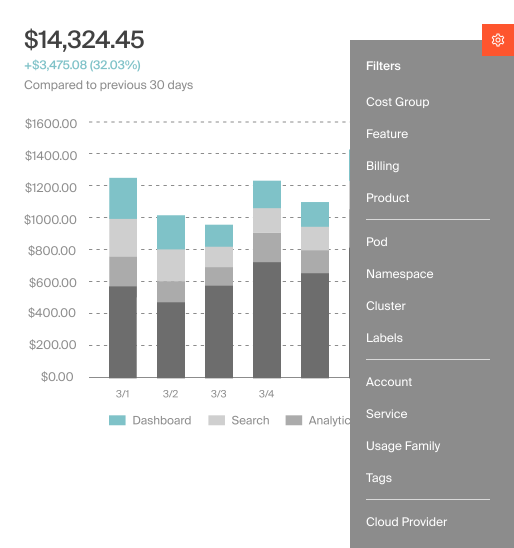
CloudZero allocates cloud costs at hour-level granularity and continuously evaluates spend patterns. When VM costs spike abnormally due to autoscaling, mis-sized instances, or long-running jobs, CloudZero flags the change as it emerges, rather than after costs are aggregated.
5. Choose regions intentionally
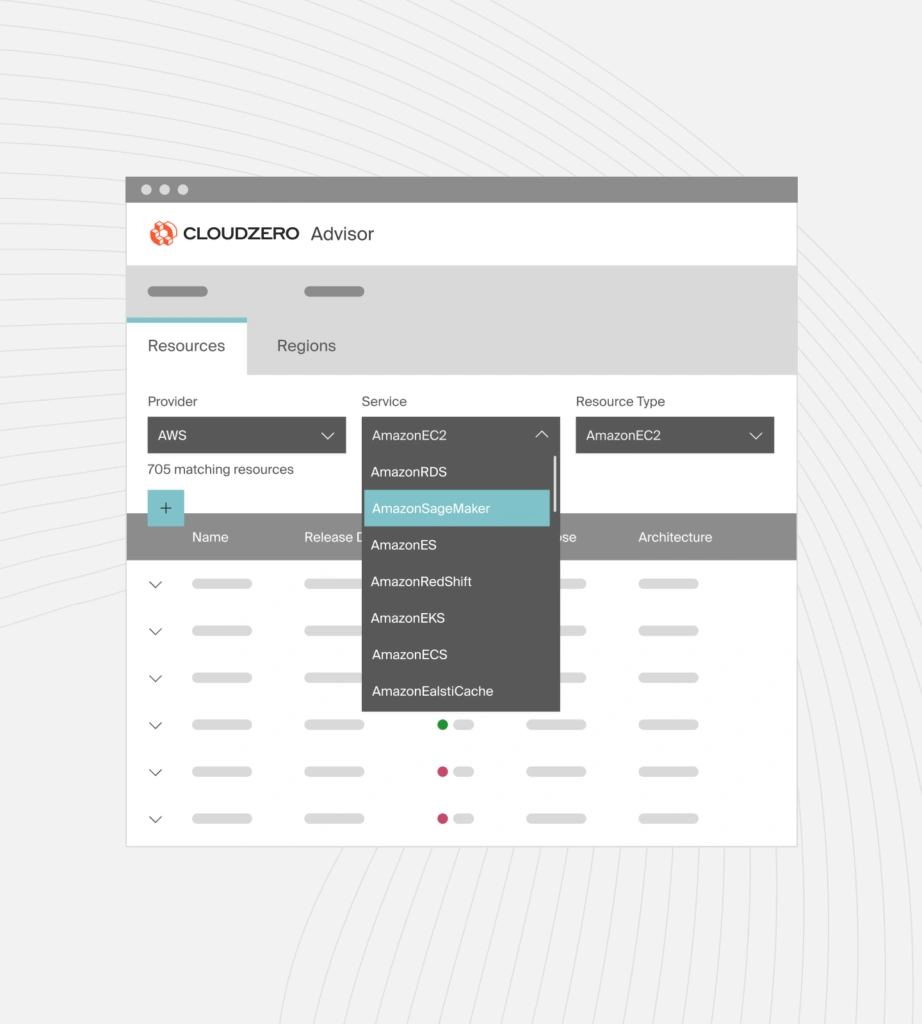
VM pricing varies by region. The same instance type can cost more or less depending on where it runs. This strategy works best for workloads that are not latency-sensitive. But most teams don’t know which regions are driving higher costs.
CloudZero Advisor lets you compare instance options by region (plus service, pricing, and other filters), so you can spot cheaper regions for the capacity you need.
6. Replace always-on VMs with autoscaling groups
Autoscaling ensures capacity tracks demand. This reduces idle runtime during off-peak hours across all providers.
7. Optimize storage attached to VMs
Oversized disks, unused snapshots, and storage tiers inflate VM costs. Providers recommend periodic storage audits tied to VM usage.
Note: Storage attached to virtual machines is billed separately from compute and uses different services across providers. Amazon EC2 relies on Elastic Block Store (Amazon EBS), Google Compute Engine uses Persistent Disk, and Azure Virtual Machines use Managed Disks.
8. Avoid default high-availability settings
High availability increases VM count and cost. Apply it selectively to workloads that need it.
Use interruption-tolerant capacity where possible Spot, low-priority, or preemptible VMs reduce costs for batch jobs, CI workloads, and some AI training tasks.
9. Schedule non-production environments
Development, staging, and testing environments rarely need 24/7 uptime. Scheduling VM shutdowns cuts costs immediately.
10. Reduce memory over-allocation
Memory is often over-provisioned “just in case.” Monitoring real memory usage and resizing accordingly lowers VM costs without impacting performance.
11. Treat GPUs as high-risk cost assets
For AI workloads, idle GPUs are the fastest way to overspend. Tight lifecycle control and runtime limits are critical to managing AI VM costs.
12. Track cost per workload, not per VM
VM-level cost views hide the real drivers of spend. A single service, batch job, or AI workload often spans multiple instances, autoscaling groups, and regions.
Native cloud tools rely heavily on tagging, which is frequently incomplete or inconsistent.
That’s why you need to…
Get Unit Cost Intelligence With CloudZero
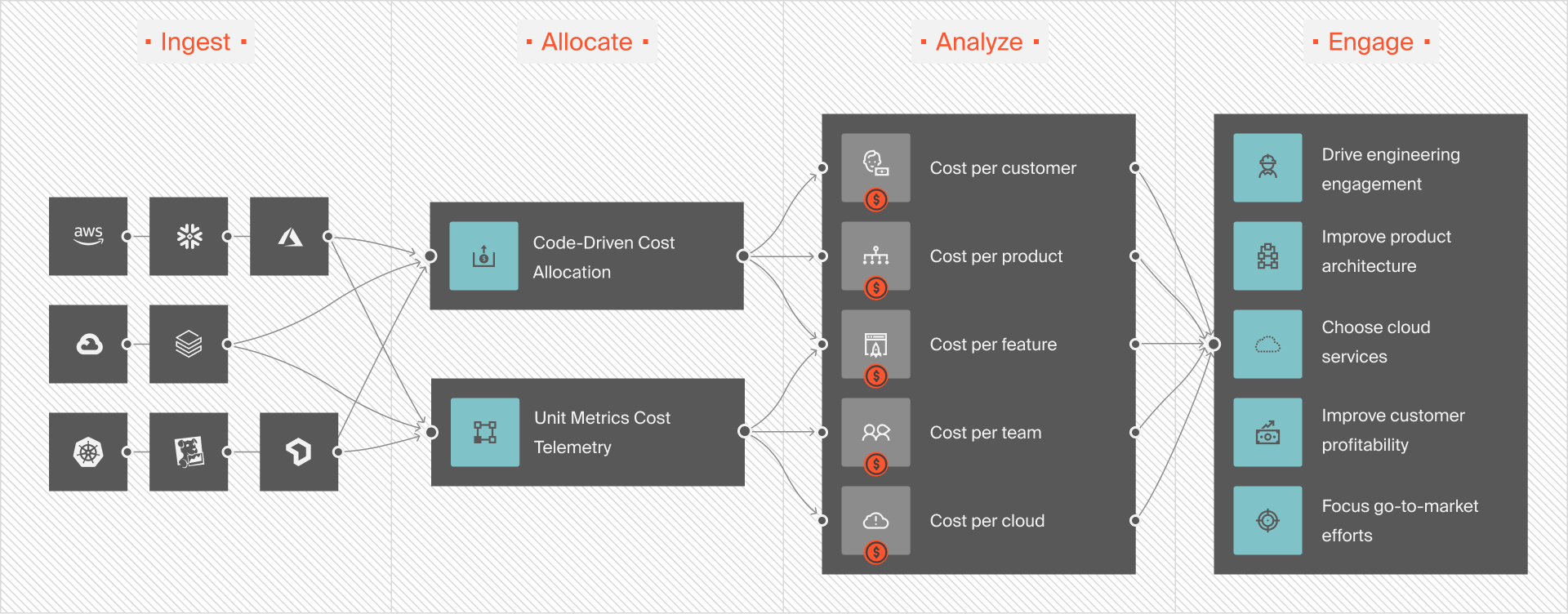
With CloudZero, VM spend is connected directly to the business outcomes it supports, not just the infrastructure it runs on. Instead of tracking costs per instance, teams see compute costs aligned to customers, services, environments, deployments, and teams across AWS, Azure, and Google Cloud.
With CloudZero, you can also:
- Allocate 100% of cloud spend (including shared and untaggable resources) using AnyCost
- Track cost per workload, service, feature, environment, or team using Dimensions
- See VM cost changes at hour-level granularity, not delayed monthly rollups
- Detect VM cost spikes automatically with anomaly detection, including sudden scaling or runaway workloads
- Compare Savings Plans, Reserved Instances, and Spot usage effectiveness in real spend data
- Forecast VM cost impact as usage, traffic, or customers grow
- Unify VM costs across AWS, Azure, and GCP into a single source of truth
- CloudZero also supports AI and GPU-backed workloads and model AI unit costs, such as cost per inference, feature, or customer.
Take a product tour or  to see how organizations such as Toyota, Duolingo, Skyscanner, Drift and more use CloudZero to save millions of dollars in cloud costs.
FAQs About Cloud VM Costs
Which is cheaper: AWS EC2, Azure VMs, or Google Compute Engine?
None is always cheaper. AWS is often cost-effective for variable workloads, GCP for steady workloads, and Microsoft Azure when existing Microsoft licenses apply.
Why do cloud VM costs increase without more traffic?
Because VM costs depend on uptime and allocated resources, instances that stay running, scale conservatively, or accumulate storage can increase costs even when traffic remains flat.
What causes the most wasted spend on virtual machines?
Idle but running VMs are the most common cause. Oversized disks, unused snapshots, and premium storage tiers attached to VMs also drive unnecessary costs.
Are cloud pricing calculators accurate?
They provide estimates, not real costs. Pricing calculators assume ideal usage, correct sizing, and full discount eligibility, which can rarely match production environments.
Why are AI and GPU VMs so expensive?
GPU instances are billed continuously and cost far more per hour than CPU VMs. Idle GPU time and long-running jobs can cause costs to escalate fast.
What does CloudZero do?
CloudZero helps organizations understand what drives cloud costs and why. It connects cloud spend to business context, such as services, features, customers, teams, and workload, so organizations can measure unit costs, identify inefficiencies, and control spend across major cloud providers, Kubernetes, AI, and SaaS platforms.
Is CloudZero a FinOps tool?
Yes. CloudZero is a FinOps tool that supports key FinOps activities, including cost allocation, cost visibility, unit cost analysis, anomaly detection, and cost governance across AWS, Azure, and Google Cloud.


FinOps In The AI Era: A Critical Recalibration
What 475 executives told us about AI and cloud efficiency.





![Amazon RDS Instance Types Explained [Classes, Sizes, Costs, and Tradeoffs]](https://www.cloudzero.com/wp-content/uploads/2026/01/rds-instances.webp)