
Quick Answer
Copilot Studio pricing offers three paths: included at no additional credit cost for internal agents used by M365 Copilot-licensed users, prepaid capacity packs at $200/month for 25,000 Copilot Credits, or pay-as-you-go at $0.01 per credit via Azure. The catch: one credit buys a scripted FAQ answer, but a single reasoning-model response costs 100 credits. The same agent can run $8 per month or $800 depending entirely on how it's built.
That headline number, $200 for 25,000 credits, sounds straightforward until you discover that credit consumption varies 100x between agent features. Add the M365 licensing layers beneath the credits, the Azure compute that agents invoke, and the Azure OpenAI tokens that custom models consume, and “how much does Copilot Studio cost” becomes the kind of question that keeps Power Platform admins awake at 2 AM with a spreadsheet and a sense of dread.
This article does the math they’re losing sleep over. Every credit rate, every plan path, real-world cost projections by agent type, the hidden licensing layers, and how to track Microsoft Copilot Studio pricing across your full Microsoft AI stack, including the spend that doesn’t show up in the Power Platform admin center.
What Is Microsoft Copilot Studio?
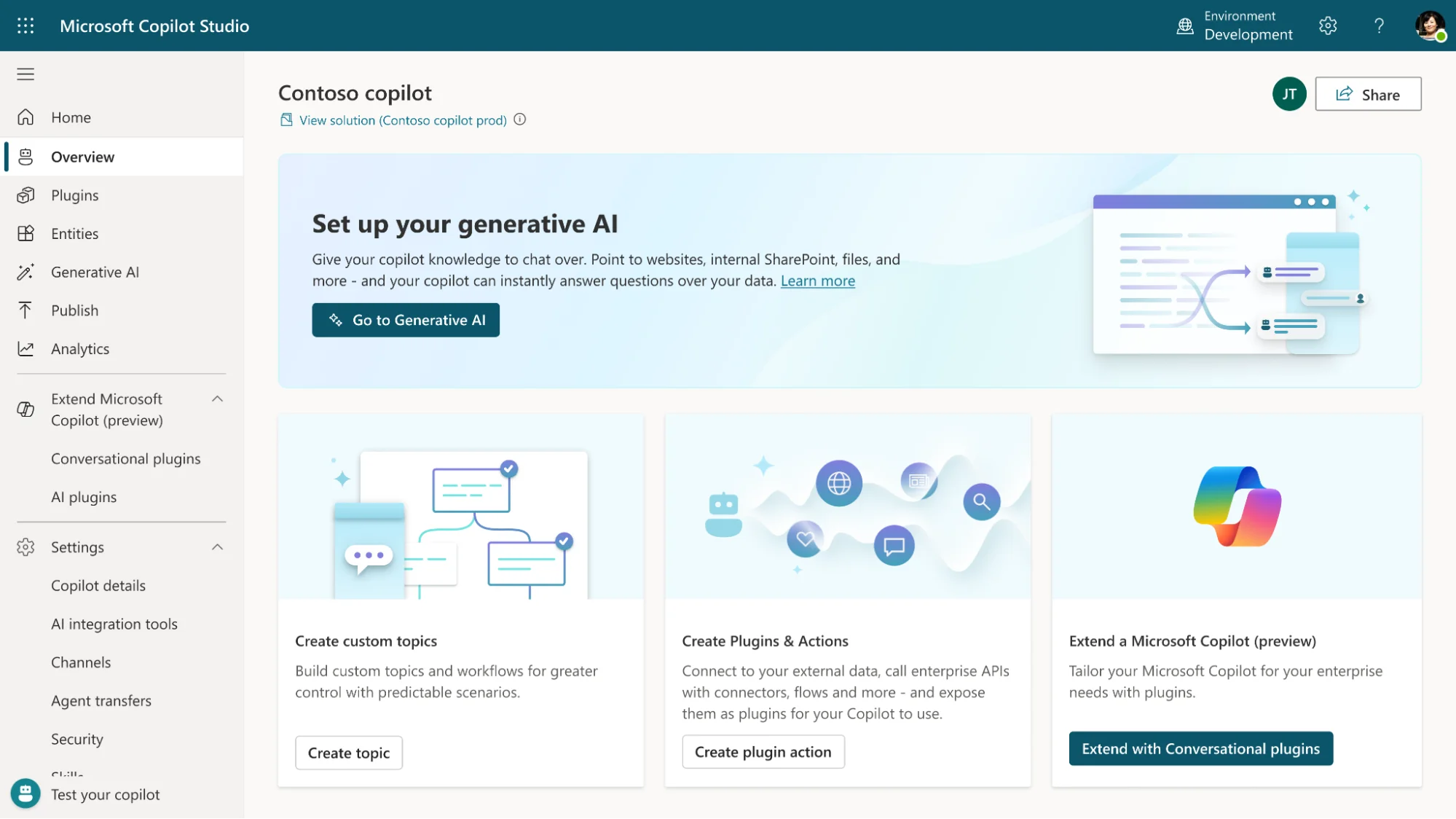
Microsoft Copilot Studio (formerly Power Virtual Agents, rebranded in late 2023, though “power virtual agents pricing” still pulls online searches) is Microsoft’s low-code platform for building and deploying AI agents.
Organizations use Copilot Studio to create agents that answer employee questions, automate approvals, process orders, and serve customers across Teams, web chat, WhatsApp, and custom apps.
The agents themselves range from scripted FAQ bots that return canned answers to autonomous systems that query your entire Microsoft Graph, trigger Power Automate workflows, and reason through multi-step problems.
That range is what makes Copilot Studio cost estimation genuinely difficult, the same platform builds agents at $0.01 per conversation and agents at $2.00+ per conversation — like asking “how much does a car cost?” when the answer spans from a used Civic to a new S-Class.
The distinction that catches most new buyers: Microsoft Copilot Studio is not Microsoft 365 Copilot. M365 Copilot is the per-user AI assistant in Word, Excel, and Outlook ($18–$30/user/month). Copilot Studio is the platform for building custom agents. They share a name, a brand, and a billing ecosystem, but the Copilot Studio license requirements, Copilot Studio license cost, and consumption model are completely different products.
If you’re comparing Copilot Studio vs Power Virtual Agents, they’re the same product under a new name, the pricing model shifted from per-message to per-credit in September 2025.
M365 Copilot licenses do include some Copilot Studio access for internal agents, a detail worth understanding before buying standalone packs. Which brings us to the three ways you actually pay.
Report
Finance needs to prove AI’s return: CloudZero report
260 senior finance leaders (more than half CFOs) told us why the speed of seeing AI spend, not the size of it, separates who pulls ahead on AI from who gets burned.
How Much Does Microsoft Copilot Studio Cost?
Microsoft Copilot Studio pricing 2026 offers several billing paths. One important note before the table: questions about Copilot Studio pricing per user are misleading. Copilot Studio is priced per credit, pooled at the tenant level, not per seat.
The cost depends on how your agents consume credits, not how many people interact with them.
|
Plan |
Pricing |
Billing |
Includes |
|
Microsoft 365 Copilot |
Business: $18/user/month (promo, normally $21, ≤300 users) Enterprise: $30/user/month |
Annual |
Includes Copilot Studio. Internal agent interactions by licensed users don’t consume Copilot Credits (classic answers, generative answers, grounding, agent actions) |
|
Microsoft Copilot Studio Capacity Packs |
$200/month |
Monthly |
Includes 25,000 credits/month |
|
Microsoft Copilot Credit Commit Units (CCCU) |
Custom |
Annual |
Buy credits upfront via Microsoft Azure, up to 20% off, auto PAYG overflow |
|
Microsoft Pay-as-you-go |
$0.01/credit |
Usage-based |
Billed through Microsoft Azure |
Included with Microsoft 365 Copilot
If your organization has M365 Copilot licenses, $18/user/month for Copilot Business (≤300 users, promotional through June 30, 2026, standard $21), or $30/user/month for Copilot Enterprise, internal agent interactions by licensed users don’t consume Copilot Credits. Classic answers, generative answers, grounding, agent actions, agent flows, all included within Teams, SharePoint, and Copilot Chat, subject to fair usage limits.
This only covers employee-facing (B2E) scenarios. You don’t need a separate Copilot Studio user license for end users, only for creators who build agents. But external-facing agents (websites, apps, WhatsApp) require standalone Copilot Studio licensing with credit consumption regardless.
The opportunity most organizations miss: if you’re already paying for M365 Copilot, build internal agents first. IT helpdesks, HR policy bots, onboarding assistants, zero additional credit cost for your licensed users. That’s not a hack. It’s how the licensing was designed. Microsoft just buried it in the docs.
Prepaid capacity packs ($200/month per 25,000 credits)
Two prepaid options for organizations needing standalone Copilot Studio licensing. Capacity packs cost $200/month for 25,000 Copilot Credits ($0.008/credit, ~25% cheaper than PAYG), pooled across every agent in the tenant. Additional packs stack. The pre-purchase plan (Copilot Credit Commit Units) is the annual alternative — buy CCCUs upfront through Azure at up to 20% off standard rates, usable across eligible Microsoft products, with automatic PAYG overflow if credits run out.
That overflow matters. With capacity packs, enforcement triggers at 125% of capacity — agents are disabled until you add credits or enable PAYG. That’s your customer-facing chatbot going dark because another department’s reasoning-heavy agent ate the shared credit pool. The pre-purchase plan avoids this by billing overages at PAYG rates automatically. For most enterprises: start with packs, enable PAYG as a safety net, and move to the pre-purchase plan once you have enough usage data to commit against. Copilot Studio enterprise pricing at scale is an availability risk as much as a budget line, AI governance needs to be in place before the first agent goes live, not after the first enforcement event.
Pay-as-you-go via Azure ($0.01 per credit)
Azure Copilot Studio pricing means no upfront commitment. $0.01 per Copilot Credit, billed monthly through Azure. Requires an active Azure subscription.
Pack math: prepaid costs $0.008/credit ($200 ÷ 25,000). PAYG is $0.01. That’s a ~25% premium for flexibility.
The smart play: packs for the base, PAYG as a safety net against the enforcement cutoff. A reasonable insurance policy against explaining to your CIO why the customer service bot went dark on a Tuesday.
Credit rates tell you what a unit costs. The rate table below tells you how fast those units burn, and that’s where the real math lives.
How Copilot Credits Are Consumed: The Rate Table
Copilot Credits are the unit of consumption across all Copilot Studio plans. The number consumed per interaction depends entirely on agent design:
|
Agent feature |
Credits |
Cost (PAYG $0.01) |
Cost (pack $0.008) |
|
Classic answer (scripted) |
1 |
$0.01 |
$0.008 |
|
Generative answer (AI) |
2 |
$0.02 |
$0.016 |
|
Agent action (tools/steps) |
5 |
$0.05 |
0.04 |
|
Tenant graph grounding |
10 |
$0.10 |
$0.08 |
|
Agent flow actions (per 100) |
13 |
$0.13 |
$0.104 |
|
AI tools — basic (per 10 resp.) |
1 |
$0.01 |
$0.008 |
|
AI tools — standard (per 10 resp.) |
15 |
$0.15 |
$0.12 |
|
AI tools — premium/reasoning (per 10 resp.) |
100 |
$1.00 |
$0.80 |
|
Content processing (per page) |
8 |
$0.08 |
$0.064 |
Features stack within a single interaction.
Microsoft’s own example: a tenant-graph-grounded agent uses 12 credits per response (10 for grounding + 2 for generative answer). Add reasoning and the same response costs 112+ credits. Copilot Studio pricing per message has no single answer. It ranges from 1 to 200+ credits depending on agent architecture.
When one credit type costs 100x another, forecasting monthly spend requires understanding agent design at a granularity that most budget conversations never reach. And that’s just the credit layer.
What Copilot Studio Actually Costs: Real-World Scenarios
The rate table shows what each credit buys. These scenarios show what the monthly bill looks like. All estimates use verified Microsoft credit rates at pack pricing ($0.008/credit). For your specific agent, use Microsoft’s Copilot Credit Estimator.
|
Agent type |
Convos/mo |
Avg credits/convo |
Credits/mo |
Est. cost/mo |
Packs needed |
|
IT helpdesk (scripted + gen) |
5,000 |
~3 |
15,000 |
~$120 |
1 |
|
HR policy agent (gen + grounding) |
3,000 |
~12 |
36,000 |
~$290 |
2 |
|
Customer service, external |
20,000 |
~8 |
160,000 |
~$1,280 |
7 |
|
Sales assist (gen + reasoning) |
2,000 |
~50 |
100,000 |
~$800 |
4 |
|
Enterprise (5+ agents) |
50,000+ |
Varies |
300,000+ |
$2,400–$5,000+ |
12–20 |
An organization running five agents across HR, IT, customer service, sales, and operations reaches an estimated $3,000–$6,000 per month in Copilot Studio credits alone (based on the credit rates above). The Microsoft Copilot Studio pricing per user framing doesn’t fit, the right question is “per agent, per conversation, per month.” And those credit costs are just the visible layer.
What Sits Beneath the Credits: The Full Microsoft Copilot Studio License Cost
If you search for Copilot Studio pricing Microsoft expecting a single number, this is why you can’t find one. The Microsoft Copilot Studio license cost is a stack, not a line item.
- M365 Copilot licenses. Using the “included” path? You’re still paying $18–$30/user/month for M365 Copilot ($18 Business promo for ≤300 users through June 2026, $30 Enterprise), plus $12.50–$57/user/month for the M365 base plan (Business Standard to E5). A 100-user enterprise on E3 + Copilot runs approximately $6,600 per month ($66/user all-in) before a single Copilot Studio credit is consumed. The credit conversation starts at $6,600. Not $200.
- Azure compute. PAYG credits run through Azure. If agents invoke Cognitive Services, Logic Apps, or Azure Functions, those costs land on the Azure subscription as separate line items. Nobody budgeted for them when they approved the Copilot Studio pack.
- Azure OpenAI Service. Custom agents using Azure OpenAI models incur per-token charges on top of Copilot Studio credits. This is the layer most organizations discover three months into deployment, when the Azure bill arrives higher than anyone projected. It’s the “we didn’t know the agent was also calling GPT-4” moment.
- SharePoint Premium. Agents processing documents through SharePoint may need SharePoint Premium licensing. Another line item that doesn’t appear in the Copilot Studio pricing conversation until someone asks why document grounding stopped working.
This multi-layer cost structure — M365 licenses + Copilot Studio credits + Azure compute + Azure OpenAI tokens — is precisely why visibility into AI costs remains the top challenge FinOps practitioners report, according to the FinOps Foundation’s State of FinOps 2026 survey of 1,192 practitioners managing over $83 billion in annual cloud spend. Allocating those costs to business units ranks second. The problem isn’t that organizations don’t know they’re spending — it’s that each layer arrives on a different invoice, in a different format, under a different cost center, making the actual cost of AI agent deployments invisible until the quarterly review.
CloudZero’s Azure integration connects directly to these cost layers. CloudZero CostFormation engine ingests Copilot Studio credit consumption, Azure subscription billing (compute, Cognitive Services, Logic Apps etc.), Azure OpenAI token charges, and M365 licensing data, then attributes all of it by team, department, agent, and customer. No tagging required. The Power Platform admin center shows you credit consumption per environment. CloudZero shows you total agent cost per business outcome, across every layer in the stack.
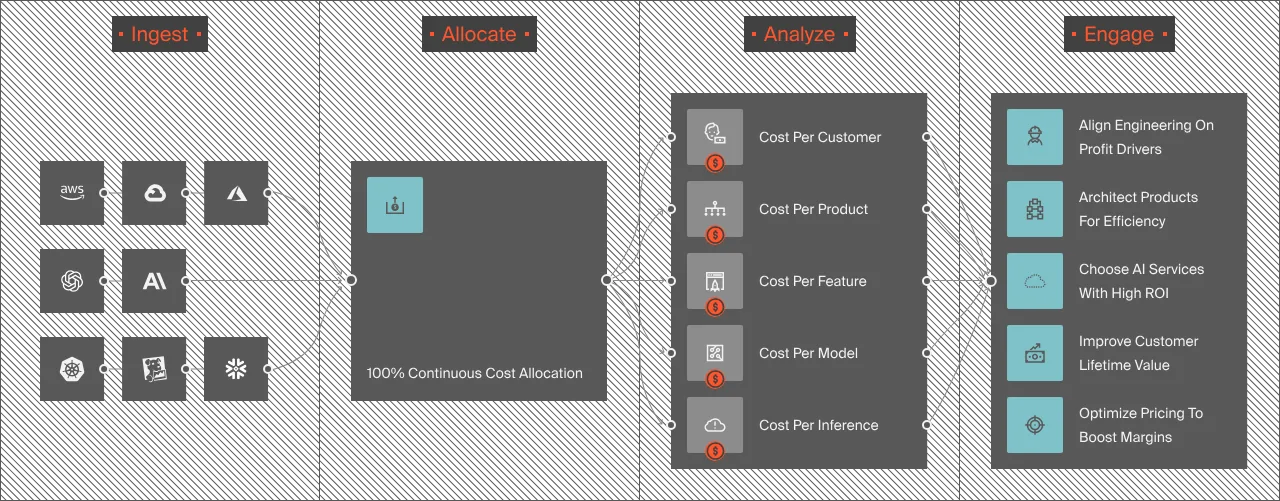
For organizations running Copilot Studio alongside Claude Code, OpenAI, or Amazon Bedrock workloads, CloudZero normalizes all AI spend into one view.
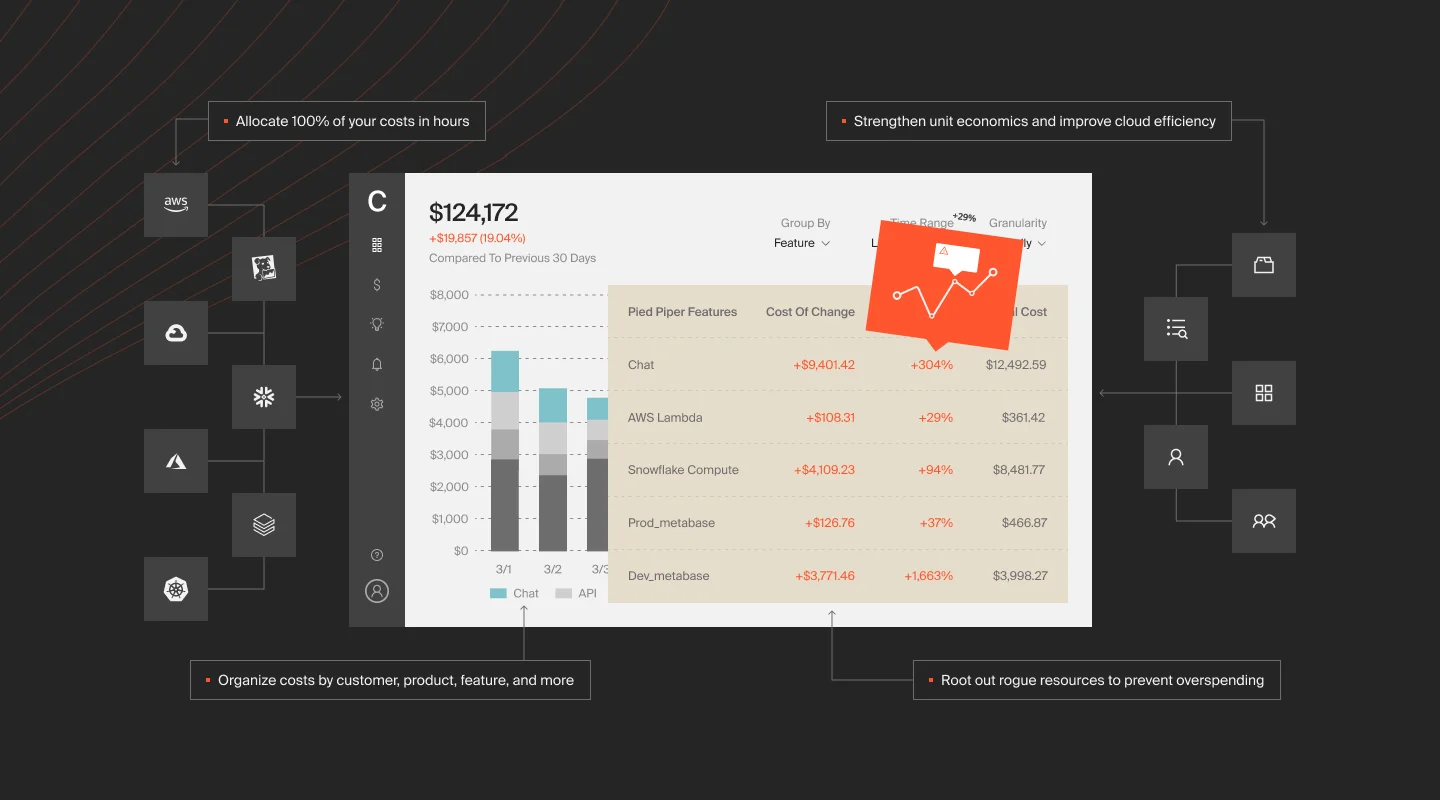
CloudZero’s anomaly detection watches the entire Azure + Copilot Studio stack in real time. When a sales team deploys a reasoning-heavy agent that spikes from 5,000 credits per week to 50,000 overnight, CloudZero alerts the owning team before the tenant hits the 125% enforcement cutoff, not after the chatbot goes dark.
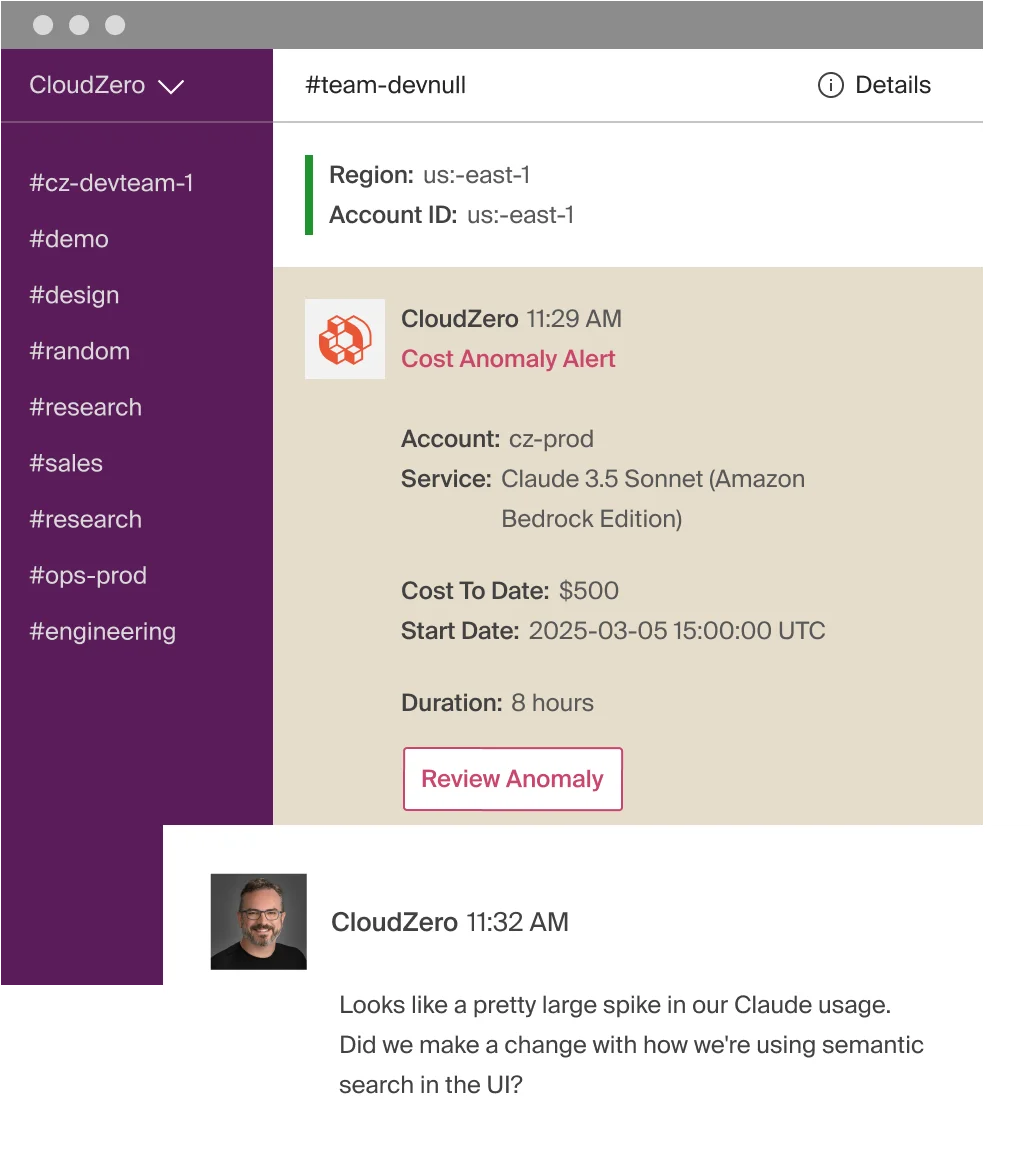
CloudZero’s Cost Anomaly Detection
That same detection covers the layers beneath the credits: a spike in Azure OpenAI token costs from a custom model triggers an alert even if Copilot Studio credits are tracking fine. Azure OpenAI costs live in Azure Cost Management, not the Power Platform admin center, so without a tool that watches both, the spike is invisible until the Azure invoice arrives.
Gartner forecasts that by 2027, 40% of enterprises using consumption-priced AI tooling will see unplanned costs exceeding twice their budget — the predictable result when credit-based billing meets agent sprawl without a control layer in between. With three to six months of agent usage data, CloudZero’s budgeting and forecasting tools turn Copilot Studio from a guess into a projection, giving finance teams the cross-layer visibility needed to project next quarter’s Copilot Studio + Azure costs before the invoice arrives.
 to see your Copilot Studio + Azure costs in one view with CloudZero.
The cost stack tells you where the money goes. The next section covers how to spend less of it.
5 Ways To Reduce Copilot Studio Costs
The credit rate table creates clear optimization paths. These five moves reduce spend while keeping agents effective.
1. Design for scripted responses first
Classic responses cost 1 credit. Generative responses cost 2. For questions with known answers such as office hours, password resets, or return policies, scripted topics are 50% cheaper and produce more predictable outputs. Not every conversation needs a language model behind it. Some just need the right paragraph from the right document, delivered without drama.
2. Reserve reasoning for tasks worth 100 credits
Premium reasoning costs 100 credits per 10 responses, 50x more than standard generative answers. Use it for multi-step financial analysis, compliance queries, and scenarios where accuracy on the first pass prevents hours of human review. Don’t use it for “what floor is the cafeteria on?” The routing logic in your agent design determines more about the monthly bill than any procurement negotiation.
3. Build internal agents on M365 Copilot inclusion first
Internal interactions by licensed users don’t consume credits. Every IT helpdesk question answered through the inclusion path is a question that doesn’t touch your credit pool. Build the free agents first. Buy packs when you need external-facing agents. In that order.
4. Buy packs for the base, PAYG for overflow
Packs at $0.008/credit are ~25% cheaper than PAYG at $0.01. Cover 80% of expected usage with packs. Enable PAYG to prevent the 125% enforcement cutoff that disables agents.
5. Set per-agent credit caps
The Power Platform admin center supports monthly consumption limits per agent. Set them. One department’s experimental reasoning agent should not be able to disable another department’s production chatbot by exhausting the shared credit pool. It’s the Copilot Studio equivalent of resource quotas in Kubernetes, obvious in hindsight, catastrophic to skip.
Frequently Asked Questions About Copilot Studio Pricing











