Kubecost and Cast AI promise real-time Kubernetes cost monitoring. Both deliver this to a good extent. For example, Kubecost provides cost data from within and outside a K8s cluster. It also shares the data in a granular format, such as cost by Kubernetes concepts like namespaces, pods, and custom labels.
Cast.ai offers several similar capabilities, including cost savings recommendations, and is currently available for AWS, Google Cloud, Azure, and on-prem Kubernetes. Despite these similarities, Cast AI and Kubecost differ in several key ways, as we will discuss below.
Table of Contents
First, a little background.
What Does Cast.ai Do?
CAST AI is a Kubernetes cost-monitoring platform. It continuously collects, analyses, and reports Kubernetes costs in real-time within your K8s environment. This way, you can track and optimize cost changes as they occur.
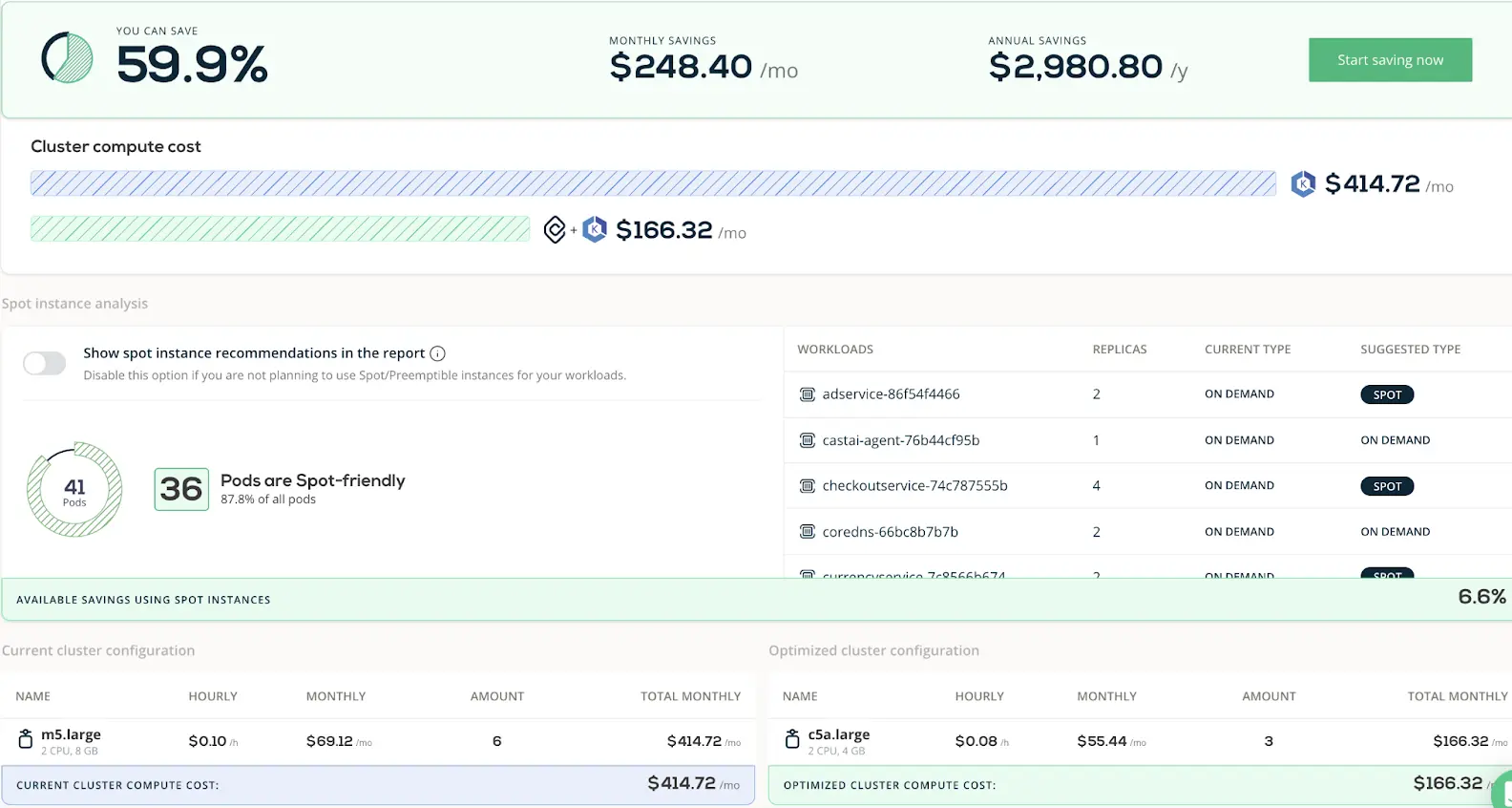
CAST AI dashboard
The CAST AI cost monitoring solution includes the following features:
- Real-time K8s cluster cost monitoring – Use universal metrics to capture and analyze the cost of your Kubernetes operations across multiple clouds (AWS, GCP, Azure, and on-prem K8s). It also includes real-time alerting so you can tell when you are hitting certain consumption thresholds.
- Granular Kubernetes cost allocation – Break down your Kubernetes costs by native Kubernetes concepts like cluster, pod, namespace, workload, and deployment. Cost allocation works per node and cluster basis. By seeing the values of your requested, allocatable, and overhead resources, you can better understand your CPU and memory provisioning costs.
- Automated cost saving recommendations – Automatically apply CAST AI’s K8s cost optimization recommendations as soon as they are available to ensure around-the-clock efficiency (Instant rebalancing).
- Real-time autoscaling for rebalancing – Automate lowering your Kubernetes costs with CAST AI-powered autoscaling, bin packing, rightsizing, and spot instance automation.
- Automatic cluster rightsizing – Automatically add or remove resources, such as nodes, to meet your use case requirements at the best price-performance ratio.
Here’s how Kubecost compares.
Research Report
FinOps In The AI Era: A Critical Recalibration
What 475 executives told us about AI and cloud efficiency.
What Does Kubecost Do?
Kubecost continuously measures and allocates both in-cluster and out-of-cluster Kubernetes costs in real-time.
The platform tracks your K8s costs data across the major cloud providers; Google Cloud (Google Kubernetes Engine), AWS (Amazon EKS), Microsoft Azure (Azure Kubernetes Service), and on-premises.
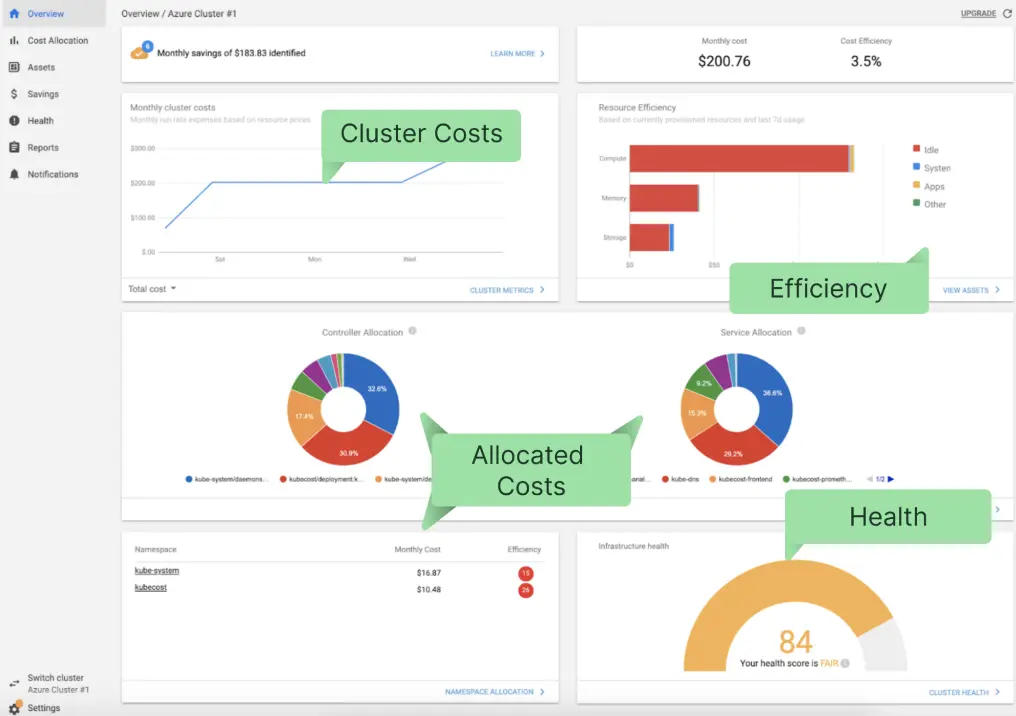
Kubecost dashboard
Kubecost features include the following:
- Cost allocation – Allocate K8s costs using Kubernetes concepts, like cluster, namespace, service, label, deployment, pod, environment, team, product, or a custom label. Use a single API endpoint to view costs across multiple clusters in one place.
- Real-time Kubernetes cost monitoring – Bring together and view your in-cluster costs (CPU, RAM, network, storage, etc) and out-of-cluster costs (infrastructure and services) within a single platform.
- K8s cost optimization recommendations – Get cluster-level insights tailored to your usage patterns and environment to prevent overprovisioning (waste) or under-provisioning (performance degradation).
- Customizable alerts and governance – Access real-time warnings via email or Slack about suspicious spend patterns, potential budget overruns, and non-efficient Kubernetes tenants.
So, what’s the best Kubernetes cost monitoring tool; Kubecost or CAST AI?
What Are The Differences Between CAST AI And Kubecost?
The following are a few areas where CAST AI and Kubecost differ in monitoring and optimizing Kubernetes costs.
1. Cost allocation and tagging
CAST AI and Kubecost allocate costs based on Kubernetes concepts such as namespace, deployment, service, and workload. You can also use either tool to organize cost data at the microservice level. This provides detailed information for processing chargebacks and showbacks.
To tag resources, Kubecost and CAST AI use the underlying cloud provider’s resource tagging mechanism. For example, if you are using Amazon Web Services, either tool will take advantage of AWS tagging to allocate out-of-cluster costs to concepts like deployment, pod, and namespace.
In either case, you can manually add custom cost allocation tags if you prefer user-defined cost allocation tags.
2. Kubernetes cost visibility
They both support real-time K8s cost visibility. With CAST AI, you can view and manage multi-cloud infrastructure costs in one place. The platform supports universal metrics that you can use across any cloud provider.
With Kubecost, you can use a single API endpoint to view (not directly manage or optimize) cost insights across multiple clusters and cloud environments.
There’s more. Kubecost supports multi-tenant cost monitoring. That means you can, for example;
- Run multiple Amazon EKS clusters in separate, dedicated AWS accounts (hard multi-tenancy)
- Run several groups of nodes in a shared Amazon EKS cluster (soft multi-tenancy)
Kubecost also enables you to connect real-time in-cluster costs (such as CPU, RAM, storage, network, etc.) and out-of-cluster spend from cloud services across AWS, Google Cloud, and Microsoft Azure.
You can, for example, collect cost data on your tagged RDS instances, Amazon S3 buckets, or BigQuery warehouses. You can expect context-aware, cluster-level reporting.
CAST AI emphasizes detailed CPU costs in the Savings estimator. This displays your potential savings from deployments on Spot Instances. As of this writing, CAST AI is yet to enroll other dimensions, such as control plane, egress, network, and storage.
3. FinOps, engineering accountability, and financial reporting
Both Kubecost and CAST AI support automatic alerts for anomalous cost trends. In addition to Slack, you can receive the alerts via email or another incident reporting tool, such as PagerDuty or ServiceNow.
CAST AI limits allocating organizational costs by cluster and pod. With Kubecost, you can go further with cost allocation concepts such as project, team, product, environment, and more.
Now, while each has a different level of engineering event correlation, neither offers a dedicated FinOps resource or a shared Slack channel to chat with resources. It may also be challenging to correlate your costs to dimensions such as cost per customer, and cost per internal software feature vs. customer-facing software (product feature).
In addition, neither CAST AI nor Kubecost combines all cloud costs in a single place, such as displaying your Kubernetes costs alongside AWS (cloud provider), Snowflake (data cloud), or New Relic (monitoring) costs. All you’ll be able to do is analyze and optimize Kubernetes costs.
Speaking of optimizing Kubernetes costs.
4. Kubernetes cost optimization and reducing waste
Kubecost provides cost-saving recommendations tailored to your Kubernetes’ environment. But it leaves you to decide if you want to implement its recommendations or not.
If you do, you have to apply them manually, unlike CAST AI, which applies its optimization recommendations automatically and around the clock.
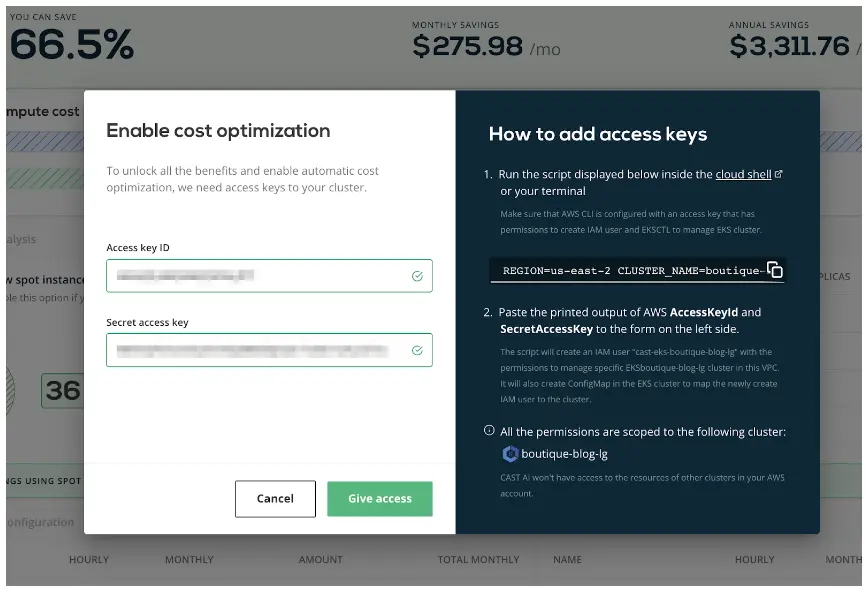
Automated Kubernetes cost optimization in CAST AI
Also, CAST AI offers several ways to optimize costs and reduce resource waste in Kubernetes environments:
- Horizontal pod autoscaling – Automatically increase or decrease your pod replica count as demand increases or decreases. It uses business metrics to calculate the number of pod instances needed. CAST AI supports node autoscaling.
- AI-driven instance selection – CAST AI selects the most cost-effective instance types to meet your performance requirements. CAST AI can also generate a mix of different instance types adapted to your performance and cost requirements.
- Automatic bin packing – Instead of distributing workloads evenly among clusters, CAST AI modifies the default pod scheduling strategy and applies automated bin packing to generate the biggest savings based on user preferences.
- Cluster scheduling – Automatically pause and resume your clusters as needed, so you don’t have to pay for resources your team isn’t using.
One more thing. CAST AI provides Spot Instance automation. This feature automatically replaces interrupted Spot Instances to prevent downtime. The service ensures high availability by continuously scanning for replacement instances and spinning them in a fraction of a second.
Kubecost does not currently offer this Spot instance orchestration. Instead, it offers Spot Readiness Checklist, a way to check if your Kubernetes workloads are spot-ready based on six parameters; Controller type, Local storage, Rolling update strategy, Replica count, Controller pod distribution budget, and Manual annotation overrides.
Best Kubernetes Cost Optimization Platform: CloudZero Vs. Cast.ai Vs. Kubecost
Here’s a table to compare the best Kubernetes cost monitoring and optimization platform.
CloudZero | Kubecost | CAST AI | |
Data Quality & Scale | |||
Cost data reflected in real-time | Yes | Yes | Yes |
Configuration changes affected immediately | Yes | Yes | Yes |
Infrastructure Support | |||
Supports multi-service (e.g. Snowflake, Databricks, New Relic, MongoDB, etc) | Fully | Limited | No |
Supports multicloud (AWS, Azure, GCP, and on-prem K8s) | Yes | Yes | Yes |
Consolidates K8s and non-Kubernetes costs | Yes | No (Kubernetes only) | No (Kubernetes only) |
Ability to Organize and Track Costs | |||
Tag-based cost allocation | Yes | Yes | Yes |
Code-driven cost allocation | Yes | No | No |
Splitting shared costs (proportionally) | Yes | Yes | No |
Splitting shared costs (telemetry driven allocation) | Yes | Yes | No |
Average cost per customer metric | Yes | Yes | No |
Cost per individual customer (driven by telemetry) | Yes | No | No |
Engineering Friendliness | |||
Slack integration | Yes | Yes | Yes |
Automatic cost anomaly detection and alerts | Yes | Yes | Yes |
Cost debugging workflow (drill down into cost) | Yes | Yes | Yes |
Engineering event correlation (e.g. GitHub) | Yes | Limited | Limited |
Services | |||
Dedicated FinOps Resource | Yes | No | No |
Shared Slack Channel to chat with resource | Yes | No | No |
Cost Optimization | |||
Horizontal pod autoscaling | Yes (via ProsperOps) | No | Yes |
Automatic instance selection | Yes (via ProsperOps) | No | Yes |
Automated Spot instance orchestration | Yes (via Xosphere) | No | Yes |
Pod and Node autoscaling | Yes (via ProsperOps) | No | Yes |
Cluster auto-scheduling | Yes (via ProsperOps) | No | Yes |
Pricing | Steady and predictable tiered pricing | Tiered, consumption based | Tiered, consumption based |
When To Use CloudZero
Use CloudZero if you want to:
- Boost cost visibility across your entire cloud infrastructure, containerized and non-containerized.
- Consolidate or compare cloud cost across multiple providers (AWS, Azure, Google Cloud, etc.) and services (Snowflake, Databricks, MongoDB, New Relic, specific AWS services, etc.).
- Get detailed insights into cloud costs across business dimensions, such as cost per customer, per product, per team, per feature, per deployment, per environment, and more.
- Investigate Kubernetes cost using any K8s native concept, such as cost per pod, cluster, namespace, service, deployment, etc.
- Accurately capture, analyze, and allocate the costs of tagged, untagged, untaggable, and multi-tenant resources within a single platform.
CloudZero also provides budgeting tools, forecasting tools, and the ability to manage public cloud discounts in one place.
 to see how it all works together — without adding a layer of complexity like other tools do.


FinOps In The AI Era: A Critical Recalibration
What 475 executives told us about AI and cloud efficiency.