SaaS products require high availability, reliability, and cost-effectiveness to maintain customer satisfaction. Your choice between On-Demand and Spot Instances affects all three factors.
On that note, you can determine how stable and high-performing your service is, depending on whether you use On-Demand or Spot Instances. Pricing, capacity, and flexibility will also vary depending on which of the two instances you choose.
In this guide, we’ll explain the key difference between On-Demand and Spot Instances, when to use each, and best practices to maximize savings.
What Are On-Demand Instances?
An Amazon EC2 On-Demand Instance is a compute capacity you can provision on demand. You can start, stop, reboot, hibernate, or terminate the instance at any time.
Key characteristics of On-Demand Instances:
- Capacity can scale up or down almost instantly
- Instances are available immediately after launch
- Billing is per second or per hour, with a 60-second minimum
- You pay only while instances are running
- No long-term commitments or contracts
- Pricing is fixed per instance type and region
- Usage is limited by vCPU-based account quotas, which can be increased
On-Demand Instances prioritize flexibility and control.
What are the pros of On-Demand Instances?
- Instant scalability: Add or remove capacity as demand changes
- Complete control: Start, stop, resize, or terminate at any time
- High flexibility: No penalties for changing usage
- Reliable capacity: Instances remain available until you stop them
- Broad workload support: Suitable for most compute use cases
What are the cons of On-Demand Instances?
- Higher cost: More expensive than Reserved or Spot options
- Overprovisioning risk: Easy to overspend without active monitoring
- Pricing complexity: Costs vary by region, instance type, and size
Useful resources:
When to use On-Demand Instances
On-Demand Instances are best for:
- Workloads that require uninterrupted compute
- Customer-facing or business-critical applications
- Short-term or unpredictable tasks, such as testing and deployments
Report
Finance needs to prove AI’s return: CloudZero report
260 senior finance leaders (more than half CFOs) told us why the speed of seeing AI spend, not the size of it, separates who pulls ahead on AI from who gets burned.
What Are Spot Instances?
An Amazon EC2 Spot Instance is a type of compute capacity offered at a steep discount when a cloud provider has excess capacity. Spot Instances are available only when capacity exists in a specific region and Availability Zone.
Key characteristics of Spot Instances:
- Prices can be up to 90% lower than On-Demand pricing
- Pricing is not fixed and varies based on available capacity
- Spot Instances run only while capacity is available
- The cloud provider can reclaim capacity with a two-minute interruption notice
Spot Instances offer major savings, but availability is not guaranteed.
What are the pros of Spot Instances?
- Cost optimization: Spot Instances are the lowest-cost compute option available
- Flexibility: You can launch and terminate Spot Instances quickly as needs change
What are the cons of Spot Instances?
- Interruption risk: Capacity can be reclaimed at short notice
- Potential service disruption: Workloads must recover or restart automatically
- Lower reliability: Not suitable for workloads that cannot tolerate interruptions
The advantages and disadvantages of Spot Instances make this instance type ideal for some use cases.
When to use Spot Instances
Spot Instances are best suited for workloads that can handle interruptions, such as:
- Batch processing
- Data analysis
- CI/CD jobs
- Optional or background tasks
Related read: 50+ CI/CD Tools to Streamline DevOps Workflows
What Are The Differences Between Spot Instances And On-Demand Instances?
On-Demand and Spot Instances differ in pricing, purchase models, use cases, and more. When weighing spot vs. on-demand AWS options, the key differences between the two instance types come down to pricing, availability, and workload fit:
|
On-Demand Instances |
Spot Instances | |
|
Purchase |
Buy directly for the capacity you need, when you need it |
Bid and wait to see if your proposed Spot price wins |
|
Launching |
Limited and unstable |
Virtually unlimited |
|
Availability |
Only possible if the Spot Instance request is active and excess capacity is available |
Immediately available after a manual request, and capacity is available |
|
Hourly pricing |
Fixed |
Changes according to capacity demand and supply |
|
Reliability |
Stable and under your control |
The vendor may take back Spot Instance capacity at short notice, causing disruptions |
|
Recommended use case |
Short-term workloads to keep costs low When you are uncertain of how much compute power is required |
Short-term workloads that can handle sudden interruptions When sure how much compute power you need for a specific use case |
A table overview of the major differences between Spot Instances vs. On-Demand Instances.
5 Major Differences Between On-Demand And Spot Instances
To help you more accurately decide which instance option to choose, here’s a deeper dive into Spot Instances versus On-Demand Instances.
1. Commitment
On-Demand Instances require no long-term commitment. You launch, run, and stop instances whenever needed and pay only for usage.
Spot Instances come with no capacity commitment from AWS. AWS can reclaim Spot capacity with a two-minute interruption notice, and availability SLAs do not cover Spot Instances.
2. Capacity availability
On-Demand Instances have priority access to capacity and are generally available as long as your account quota allows.
Spot Instances use unused AWS capacity, which fluctuates based on regional demand. Availability can increase or disappear without warning.
3. Purchasing process
On-Demand Instances launch immediately at a fixed price set by AWS for each instance type and region.
Spot Instances are requested at the current Spot price, which varies based on available capacity. There is no bidding. Instances run only while capacity remains available.
4. User-control
With On-Demand Instances, you control the full lifecycle: start, stop, reboot, hibernate, resize, or terminate at any time.
With Spot Instances, AWS controls availability. You can stop or restart EBS-backed Spot Instances, but AWS decides when capacity is reclaimed.
AWS may issue a rebalance recommendation, followed by a two-minute interruption notice, when a Spot Instance is at high risk of termination.
5. EC2 Spot Pricing vs. On-Demand Pricing
Spot Instances can cost up to 90% less than On-Demand Instances, making them the lowest-cost EC2 option. EC2 spot pricing is not fixed — it fluctuates with real-time excess capacity and varies by region and instance type.
Related read: Mastering Cloud Cost Optimization? 15+ Best Practices
These are the most significant differences between On-Demand and Spot Instances. So, when should you use each type?
Should You Use On-Demand Or Spot Instances?
By now, you’ve seen the pros and cons of Spot Instances versus On-Demand Instances. The two approaches to instance usage have different ideal use cases.
Spot Instances offer steep discounts (up to 90%) but can be interrupted with two minutes’ notice when AWS reclaims capacity. On-Demand Instances cost more but provide stable, predictable capacity under your control.
Still, you can use On-Demand Instances when you want to:
- Be able to handle unpredictable workloads, such as a code deployment you’ve never done before
- Run workloads with unknown compute power requirements, such as new applications or processes
- Run short-term workloads that cannot be interrupted until they are complete, such as testing a new release
- Launch and run operations almost immediately
Use Spot Instances when you want to:
- Operate workloads that can retain their data even after interruptions
- Run data analytics processes
- Launch and scale temporary CI/CD processes
- Run stateful applications in bursts of increased usage
Best Practices To Save Costs With Spot Instances And Prevent Interruptions
Several best practices can help you reduce the risk that Spot Instance interruptions will negatively impact your service availability.
1. Avoid using Spot Instances for business-critical workloads that are not fault-tolerant
You don’t want Spot capacity recalls to catch your workload by surprise, which could cause service outages.
Also, you can learn more about Spot Instance quotas, like how many Spot Instances you can run and how to increase your limit, on the official service provider’s pages; these details tend to change over time.
2. Use a Spot Instance orchestration tool to rebalance the affected workloads automatically.
Xosphere does this seamlessly, for example. It scans your workload requirements and compares them with Spot Instance availability at a reasonable price. As soon as the cheaper instances become available, Xosphere automatically switches your workload to them.
As soon as the spot price becomes unfavorable, the tool rebalances your workload to On-Demand Instances, ensuring that your service remains uninterrupted.
3. Use Spot Instances alongside more reliable instances
The major cloud providers offer additional discounted instance types, such as Savings Plans and Reserved Instances (RIs). In addition to committed-use discounts of up to 72%, SPs and RIs provide service-level agreements, such as 99.99% availability guarantees.
With these alternative instances, you can avoid service interruptions while reducing your operational costs.
However, SPs and RIs require you to commit to spending a certain amount per instance per hour (SPs) or a fixed resource usage level per hour (RIs) for a specified period (1 or 3 years).
4. Use Spot Instances alongside On-Demand Instances
If you don’t want long-term commitments, run:
- On-Demand Instances for baseline or customer-facing workloads
- Spot Instances for burst, overflow, or non-critical tasks
This model preserves flexibility while still capturing Spot savings.
How To Manage And Optimize Instance Costs
Maximizing the benefits of On-Demand and Spot Instances requires understanding your cloud resource consumption, cost drivers, and usage patterns.
CloudZero provides comprehensive visibility into cloud resource usage and costs:
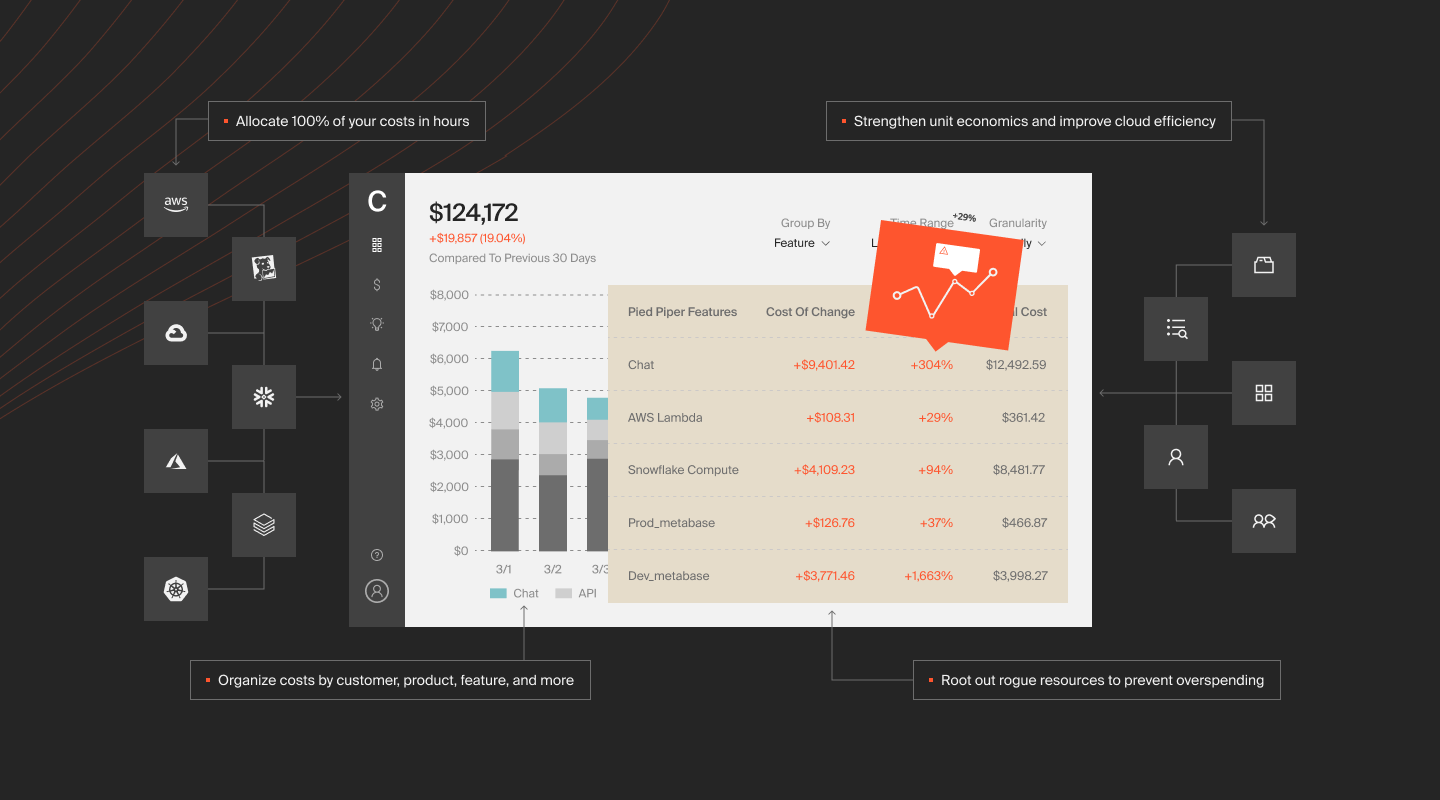
With CloudZero, you can dramatically increase your visibility into cloud resource usage and associated costs. We are talking about being able to:
- See your costs per unit, such as cost per individual customer, per software feature, per product, per project, per team, etc. Using this cost intelligence, you can calculate how much to charge for your service to protect your margins.
- View your cost of goods sold (COGS) to determine if you are running a profitable business and where you could lower costs without compromising customer experiences.
- Collect, analyze, and report on tagged, untagged, and untaggable resources — yes, no endless tagging is required.
- View the costs of specific tenants in a multi-tenant environment so you can determine how much to charge them individually based on their usage, including personalized discounts.
- Use CloudZero’s real-time anomaly detection and receive alerts when costs are trending abnormally so you can prevent overspend.
- Track your AWS, Azure, and GCP costs in one place to simplify analysis. Plus, you can analyze costs from other services, including Snowflake, Kubernetes, Datadog, and Databricks, in CloudZero.
We recently used CloudZero to find $1.7 million of annualized savings. Drift even reduced annual costs by over $2.4 million. Want to see for yourself?  to get started.
Frequently Asked Questions about On-Demand vs. Spot Instances











